Uvod
This manual provides detailed instructions for the installation, operation, and maintenance of your ExpertPower 6500W 48V - 120V Hybrid Solar Inverter. Designed for home, cabin, and off-grid solar systems, this inverter offers advanced features for efficient energy management. Please read this manual thoroughly before installation and use to ensure safe and optimal performance.
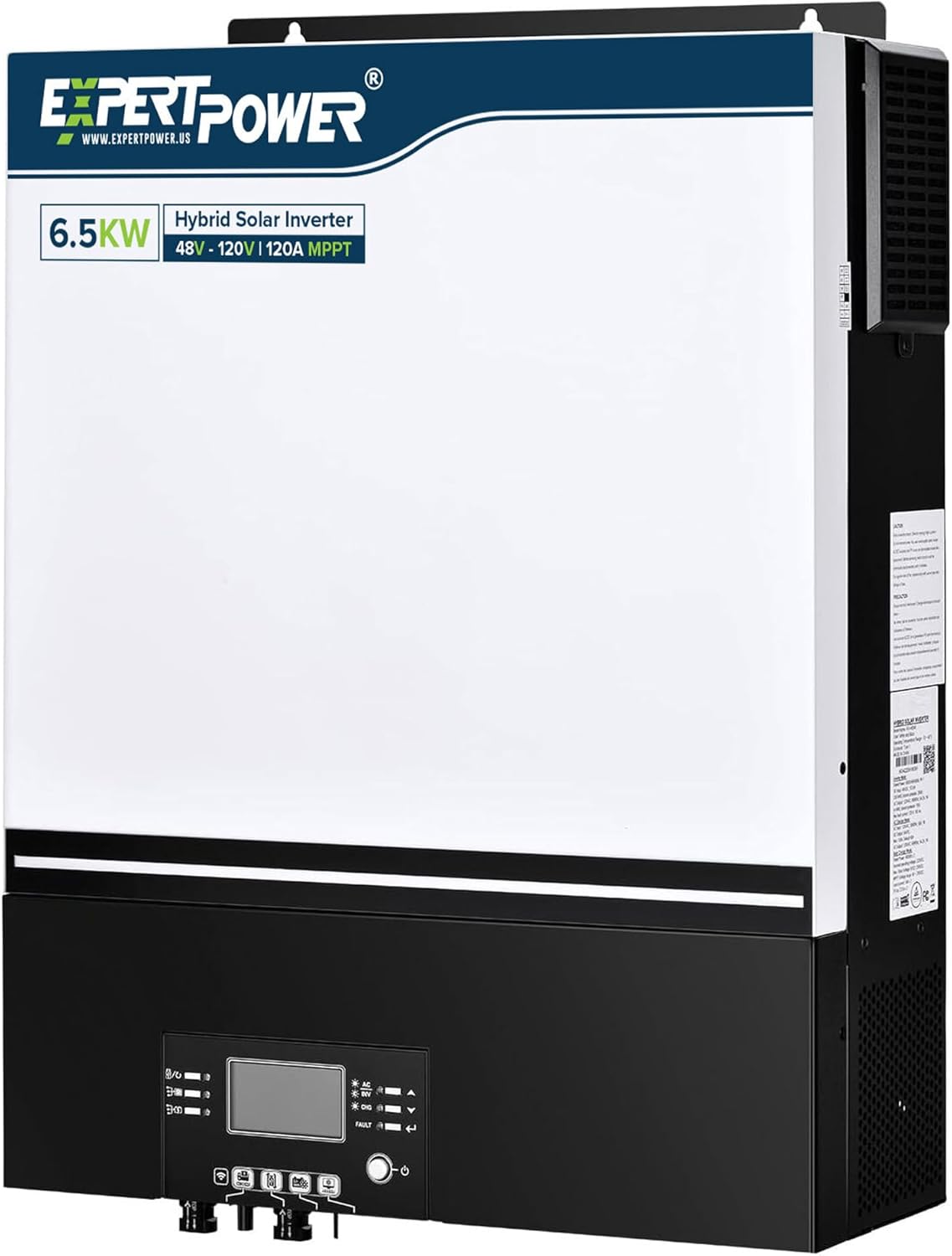
Figure 1: ExpertPower 6500W Hybrid Solar Inverter. This image shows the front view of the inverter, highlighting its compact design and integrated display.
Ključne karakteristike
- UL1741 Standard Compliance: Pure sine wave AC output of 120V, built-in MPPT solar charger with 8000W max solar input and 120A utility battery charger. Supports two 4000W PV inputs, each up to 500V open circuit voltage.
- Adaptable Power Supply: Powers loads from PV arrays or AC grid, even without a battery. Compatible with SLA, AGM, GEL, and Lithium LiFePO4 battery types.
- Split Phase Operation: Supports 120V/240V split phase (requires 2 units) for large appliances and HVAC systems. Also supports 120V single-phase (1 unit) and 208V 3-phase (3 units).
- Enhanced Parallel Functionality: Connect up to 6 units for a maximum system capacity of 39KW, allowing for scalability.
- Napredno povezivanje: Wi-Fi enabled for remote monitoring via a dedicated app (iOS/Android). Features a detachable LCD control module and multiple communication ports (RS485, CAN-BUS, RS232) for BMS integration.
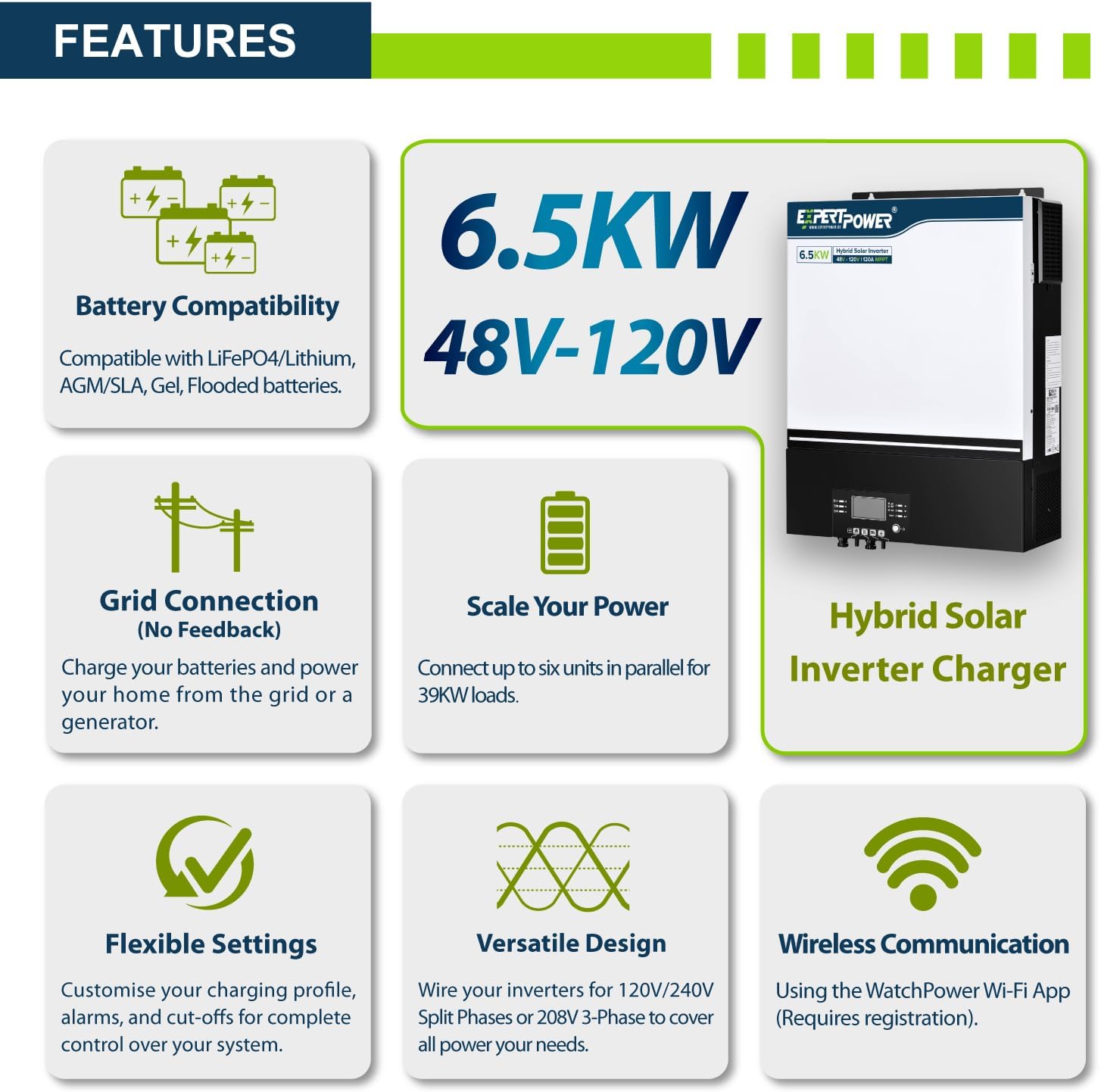
Slika 2: Gotovoview of the ExpertPower Hybrid Solar Inverter's key features, including battery compatibility, grid connection, scalability, flexible settings, versatile design, and wireless communication.
Product Overview i komponente
Familiarize yourself with the inverter's physical layout and included components.
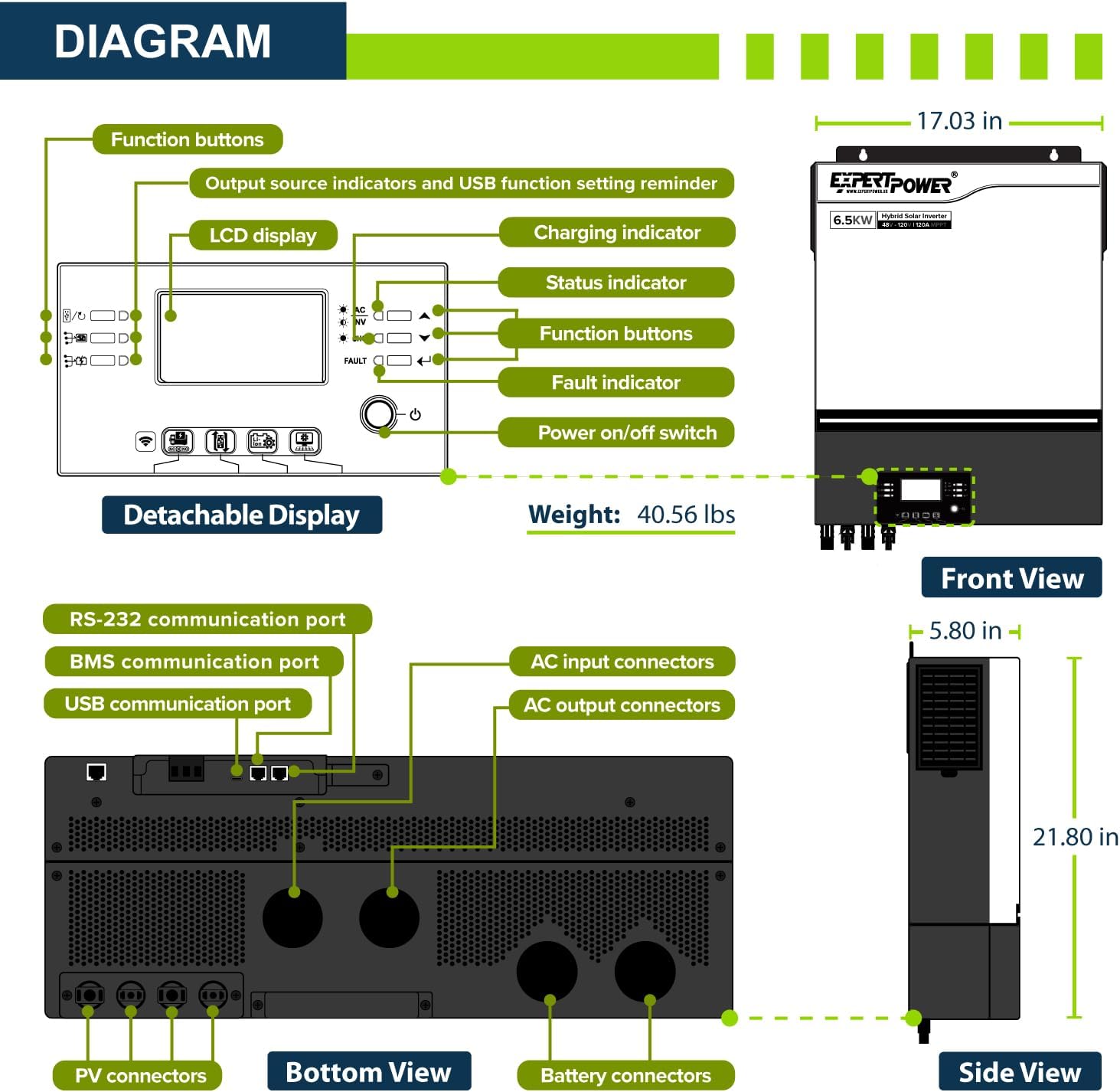
Figure 3: Detailed diagram of the inverter showing its front, side, and bottom views, along with dimensions and port locations. Key components include the LCD display, function buttons, charging indicator, status indicator, fault indicator, power on/off switch, RS-232, BMS, and USB communication ports, AC input/output connectors, PV connectors, and battery connectors.

Figure 4: Contents included in the ExpertPower 48V Inverter Charger Package. This includes the hybrid inverter unit, cable glands, cable accessories, PV connectors, a DC fuse, a user manual, and a software CD.
Postavljanje i instalacija
Proper setup is crucial for the inverter's performance and safety. Consult a qualified electrician for installation if you are unsure.
Sistemska integracija
The inverter is designed to integrate with various power sources, including grid power, generators, solar panels, and battery banks.
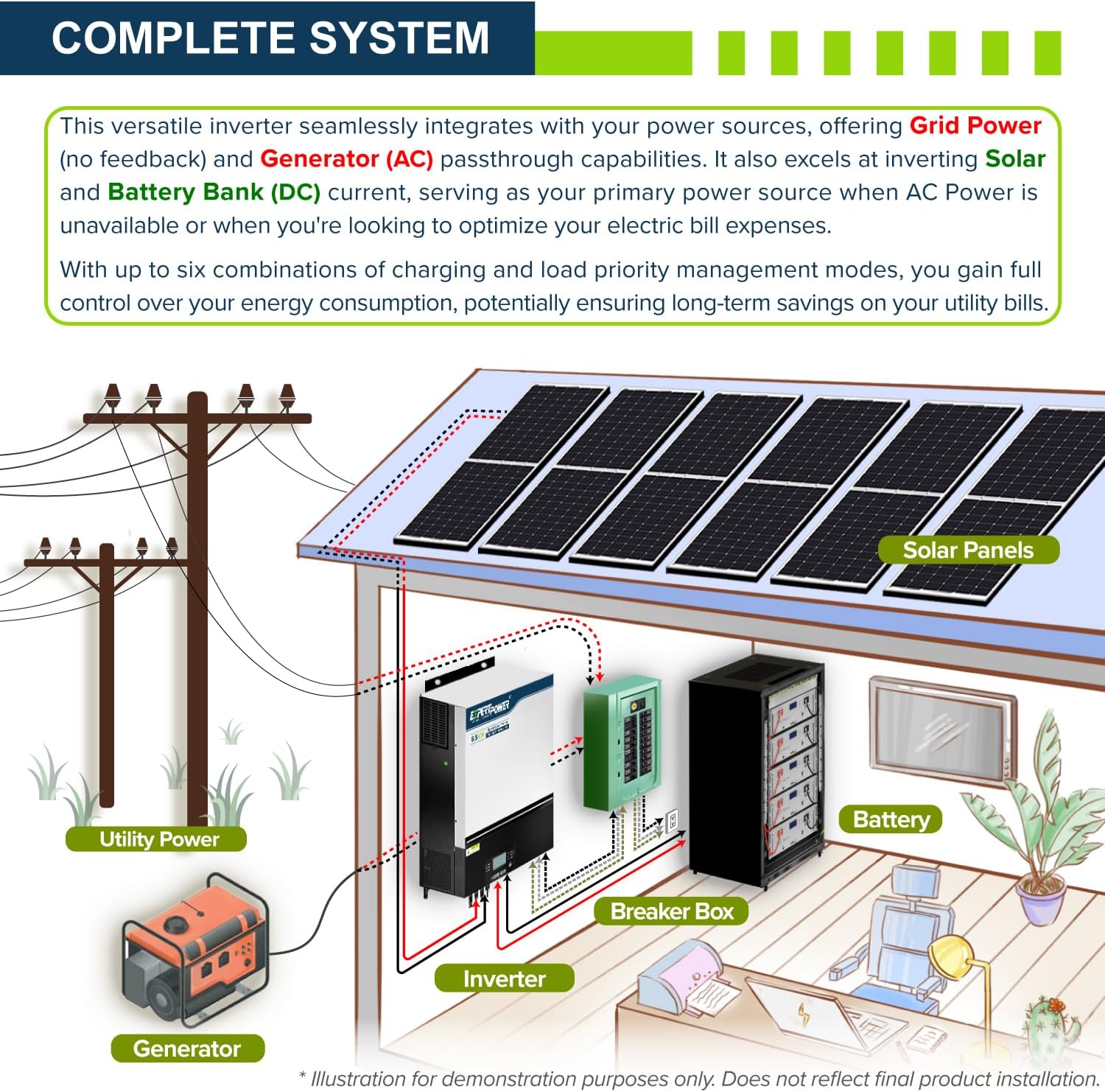
Figure 5: Diagram illustrating a complete solar system setup with the ExpertPower inverter. It shows connections between utility power, generator, solar panels, battery bank, breaker box, and the inverter, demonstrating its role in managing power flow.
Parallel and Multi-Phase Configurations
The inverter supports various configurations to meet diverse power needs, including single-phase, split-phase, and 3-phase setups.
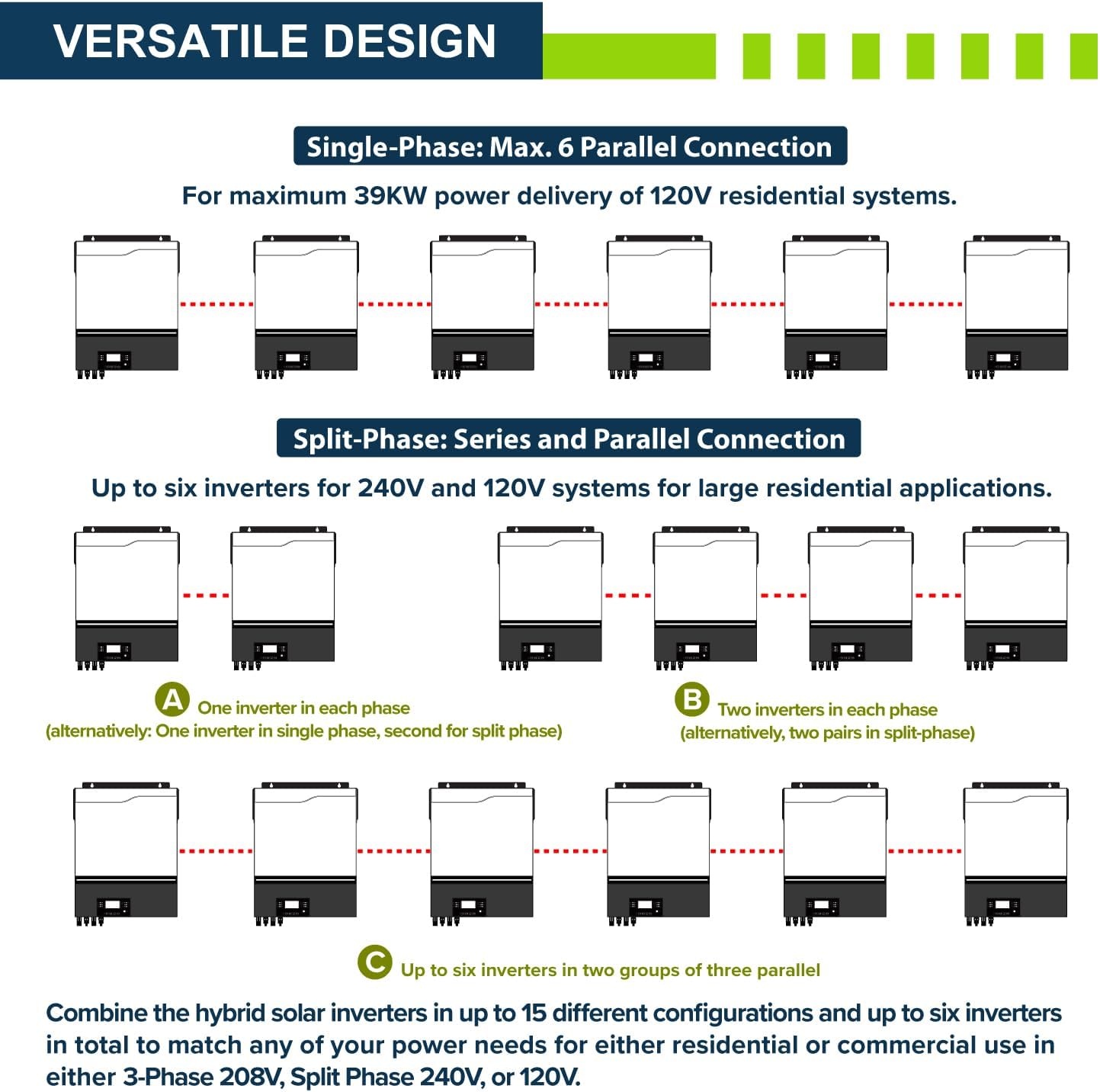
Figure 6: This image demonstrates the versatile design of the ExpertPower inverter, showing how multiple units can be connected in parallel for single-phase systems (up to 6 units for 39KW) and in series-parallel for 120V/240V split-phase systems (up to 6 units).
For detailed wiring diagrams and specific instructions for each configuration (single-phase, split-phase, 3-phase), refer to the comprehensive user manual provided with your product or available for download from the ExpertPower website.
Uputstvo za upotrebu
Power Source Prioritization
The inverter allows you to configure charging and load priorities to optimize energy usage based on your preferences and available sources.
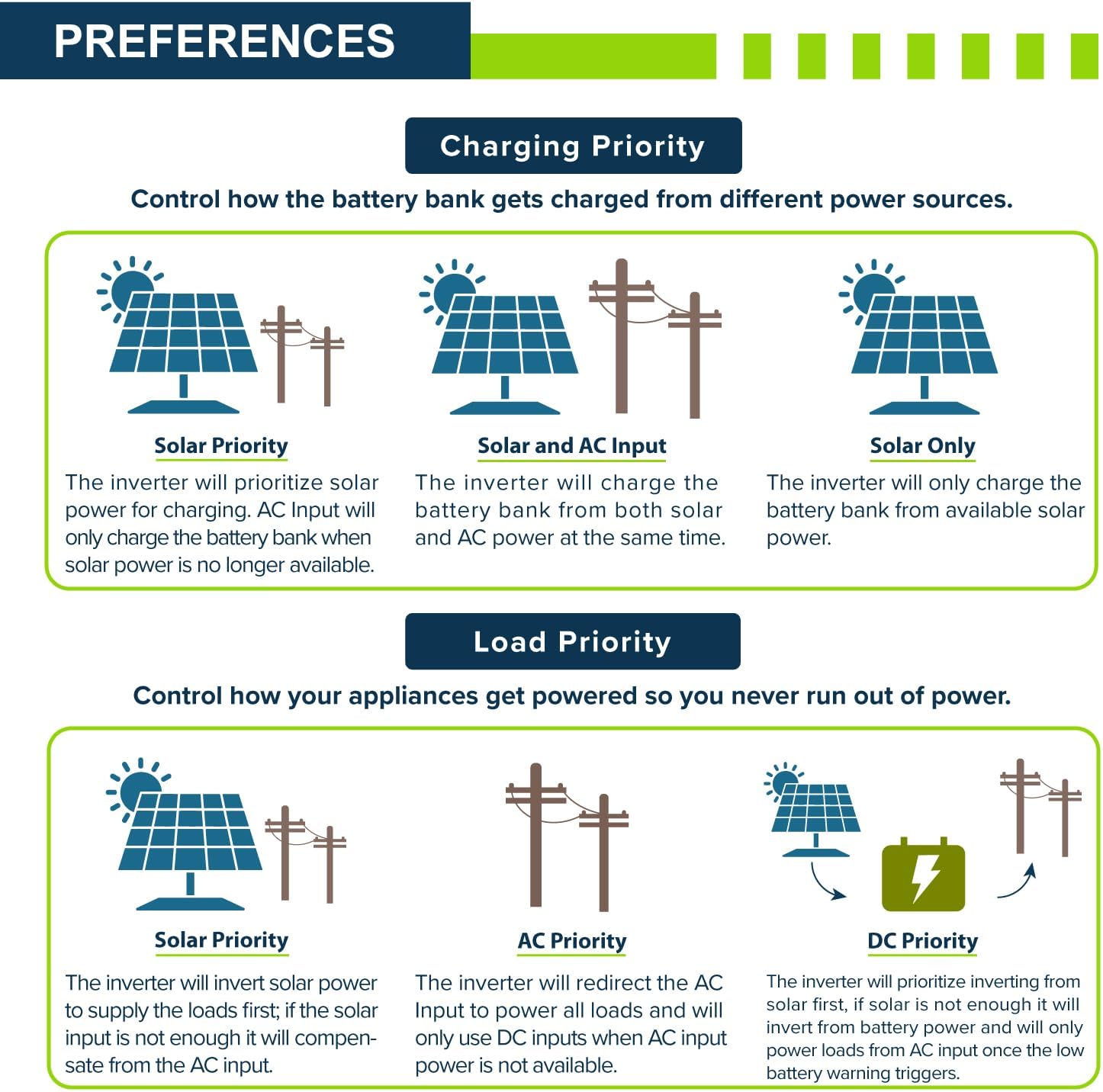
Figure 7: This graphic illustrates the charging priority options (Solar Priority, Solar and AC Input, Solar Only) and load priority options (Solar Priority, AC Priority, DC Priority) for the ExpertPower inverter, allowing users to control how the battery bank is charged and how appliances are powered.
Remote Monitoring with Wi-Fi App
The built-in Wi-Fi functionality enables remote monitoring and management of your inverter via a dedicated mobile application.

Figure 8: Screenshots of the WatchPower Wi-Fi App interface, demonstrating its capabilities for monitoring basic information, product information, history, and energy overview. The app allows users to monitor their hybrid inverter from anywhere.
Download the WatchPower Wi-Fi App from the iOS App Store or Google Play Store. Registration is required to connect and monitor your device.
Specifikacije
| Atribut | Vrijednost |
|---|---|
| Naziv modela | 48V 6.5KW Hybrid Solar Inverter |
| Wattage | 6500 vati |
| Izvor napajanja | Solar Powered |
| Preporučena upotreba | Dom |
| Brand | ExpertPower |
| Dimenzije proizvoda | 17.03 x 5.8 x 21.8 inča |
| Težina artikla | 50 funte |
| Broj modela stavke | IVV48V6.5KW |
| Zemlja porijekla | Kina |
Održavanje
Regular maintenance ensures the longevity and optimal performance of your ExpertPower Hybrid Solar Inverter.
- čišćenje: Periodically clean the exterior of the inverter with a soft, dry cloth. Ensure ventilation openings are free from dust and debris to prevent overheating.
- Veze: Annually inspect all electrical connections (PV, battery, AC input/output) for tightness and signs of corrosion. Loose connections can lead to poor performance or safety hazards.
- Okruženje: Ensure the inverter is installed in a well-ventilated area, away from direct sunlight, moisture, and flammable materials. Maintain ambient temperatures within the specified operating range.
- Ažuriranja firmvera: Check the ExpertPower website or the WatchPower app for any available firmware updates to ensure your inverter has the latest features and bug fixes.
Rješavanje problema
This section provides general guidance for common issues. For complex problems, consult the full user manual or contact ExpertPower support.
| Problem | Mogući uzrok | Rješenje |
|---|---|---|
| Inverter se ne uključuje | No DC input from battery/PV; Power switch off; Blown fuse. | Provjerite priključke baterije i voltage; Ensure PV input is sufficient; Verify power switch is ON; Inspect and replace fuses if necessary. |
| Nema izlaz naizmenične struje | Preopterećenje; Kratki spoj; Nizak napon baterijetage; Kvar invertera. | Reduce connected load; Check for short circuits in wiring; Charge batteries; Check LCD display for error codes and refer to manual. |
| Problemi sa Wi-Fi vezom | Incorrect Wi-Fi settings; Router too far; App not registered. | Verify Wi-Fi credentials; Move inverter closer to router or use a Wi-Fi extender; Ensure app registration is complete. |
Garancija i podrška
For warranty information, technical support, or service inquiries, please contact ExpertPower directly. Refer to the official user manual (PDF) for detailed warranty terms and contact methods.
Možete pronaći službeni korisnički priručnik (PDF) ovdje.
Visit the ExpertPower Store for more products and support: ExpertPower Store.


