1. Uvod
This manual provides comprehensive instructions for the installation, operation, and maintenance of your TAFFIO LMGQ9899-BO Android Head Unit. This 9-inch multimedia system is specifically designed for Porsche Cayenne models manufactured between 2003 and 2010, including compatibility with the Bose amplifier system. It features an Android 12 operating system, GPS navigation, integrated CarPlay, and Android Auto functionalities.
2. Sigurnosne informacije
Molimo vas da pažljivo pročitate sva sigurnosna uputstva prije instalacije i upotrebe. Nepoštivanje ovih uputstava može dovesti do povreda ili oštećenja uređaja ili vozila.
- Preporučena profesionalna instalacija: Due to the complexity of vehicle electronics, professional installation is highly recommended.
- Isključivanje struje: Always disconnect the vehicle's battery before beginning any installation work to prevent electrical shorts and damage.
- Ožičenje: Osigurajte da su svi spojevi ožičenja sigurni i pravilno izolirani kako biste spriječili kratki spoj. Ne mijenjajte ožičenje.
- Sigurnost u vožnji: Ne koristite uređaj na način koji vas odvlači od vožnje. Uvijek dajte prioritet sigurnosti u saobraćaju.
- ventilacija: Ensure the unit has adequate ventilation and is not obstructed by other components.
3. Sadržaj paketa
Provjerite da li se u vašem paketu nalaze sve dolje navedene stavke. Ako neke stavke nedostaju ili su oštećene, obratite se prodavaču.

Slika 3.1: Gotovoview of included components. This image displays the main head unit, frame, MOST adapter, USB cables, GPS antenna, 4G antenna, RCA plugs, SIM card slot, backup camera cable, power cable with CAN BUS, antenna adapter, and mounting screws.
- 1x TAFFIO 9-inch Multimedia + Navigation System
- 1x Frame for Porsche Cayenne (2003-2010)
- 1x Power Cable with CAN BUS Decoder
- 1x MOST Adapter for BOSE AMP (for vehicles with Bose sound system)
- 1x GPS antena
- 1x 4G Antenna
- 2x USB kablovi
- 1x RCA Audio/Video Cables Set (including video input, audio input, subwoofer output)
- 1x Backup Camera Input Cable
- 1x Antenna Adapter
- Montažni vijci
- 1x User Manual (English, PDF available for download)
4. Postavljanje i instalacija
The TAFFIO LMGQ9899-BO is designed for Plug & Play installation, minimizing the need for additional adapters or mounting frames. However, careful attention to wiring is crucial.
4.1 Dijagram ožičenja
Refer to the following diagram for proper connection of the head unit components.

Slika 4.1: Connection points for the TAFFIO LMGQ9899-BO. This diagram illustrates the rear panel connections and the main wiring harness, detailing inputs for GPS, 4G, video, audio, camera, USB, power, CAN-BUS, and connections to the original car cables.
- GPS antena: Spojite GPS antenu za navigacijsku funkciju.
- 4G antena: Connect the 4G antenna for mobile data connectivity.
- Video Plugs: Connect external video sources or outputs.
- Audio Plugs: Connect external audio sources or outputs (e.g., subwoofer).
- Camera IN: Connect a backup camera here. The unit supports automatic switching when reversing.
- USB (1 i 2): Connect USB devices for media playback or charging.
- Kabl za napajanje: Connect the main power cable to the vehicle's harness.
- CAN-BUS Connector: Connect the CAN-BUS decoder for vehicle communication.
- Connect to Original Car Cable (1 & 2): These are primary connections to the vehicle's existing wiring.
- Connect to TAFFIO Radio Cable: Specific connection for the radio antenna.
4.2 Bose AMP Integracija
For Porsche Cayenne models equipped with the Bose sound system, utilize the included MOST Adapter. This adapter ensures proper audio signal transmission and compatibility with the factory amplifier.
4.3 Početno napajanje
After installation, reconnect the vehicle's battery. The unit should power on automatically with the ignition. Follow any on-screen prompts for initial setup, such as language selection and time zone.
5. Uputstvo za upotrebu
The TAFFIO head unit features an intuitive Android interface with a capacitive multi-touch screen.
5.1 Glavni interfejs iznadview
The main screen provides quick access to core functions like Clock, Music, Navigation, and Radio.

Slika 5.1: Main user interface with shortcuts to essential applications.
5.2 Upravljanje aplikacijama
Access the full list of installed applications by swiping up or tapping the app drawer icon. You can download additional apps from the Play Store.

Slika 5.2: App drawer showing available applications.
5.3 GPS navigacija
The unit supports various navigation applications. Use the pre-installed navigation software or download your preferred app from the Play Store. The 2-Zone function allows navigation in the front while other media plays in the back.
5.4 CarPlay i Android Auto
The head unit features integrated Wireless CarPlay and Android Auto functionality, eliminating the need for external adapters.

Slika 5.3: Bežični CarPlay interfejs.

Slika 5.4: Android Auto interface.
To activate: Connect your smartphone via Bluetooth or USB. Follow the on-screen prompts to enable CarPlay or Android Auto.
5.5 Bluetooth funkcije
Pair your mobile phone via Bluetooth for hands-free calling and A2DP music streaming.
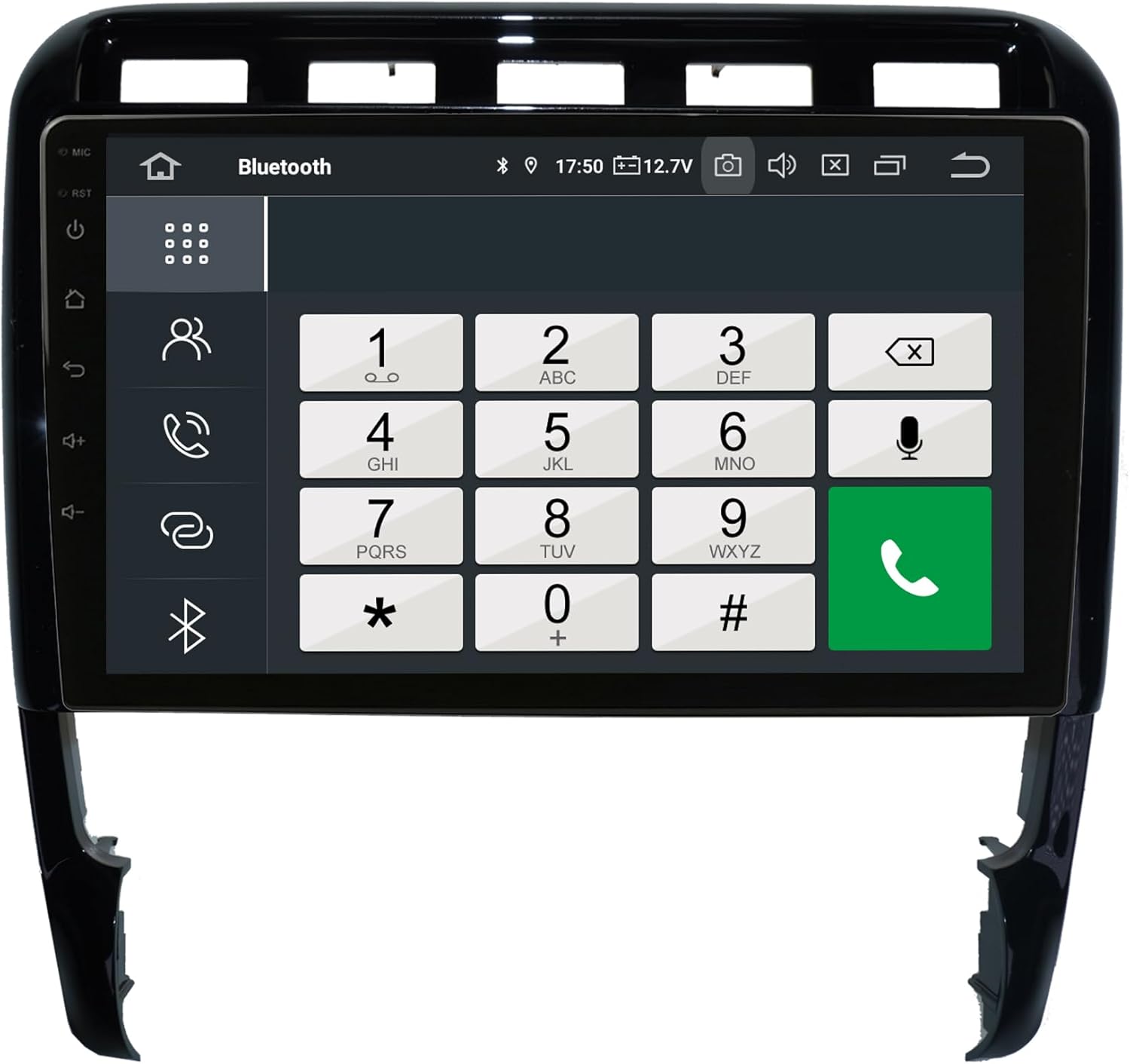
Slika 5.5: Bluetooth phone dialer interface.
Uparivanje: Go to Bluetooth settings on the head unit and your phone. Traži available devices and select the head unit. Confirm the pairing code.
5.6 Radio (FM/AM)
The unit includes an FM/AM tuner with RDS (Radio Data System) for displaying station information.

Slika 5.6: Radio tuner interface.
Skeniranje: Use the scan function to find available stations. Save your favorite stations to presets.
5.7 Audio Settings (Equalizer)
Adjust audio output using the integrated equalizer. Preset options (Pop, Classic, Rock, Jazz) and custom user settings for Bass/Treble/Balance are available.

Slika 5.7: Amplifier and audio balance settings.
5.8 Ostale karakteristike
- Reprodukcija medija: Play music, pictures, and videos directly from USB/SD/SDHC slots.
- WIFI: Connect to WLAN hotspots or your smartphone's hotspot for internet access.
- stražnja kamera: Automatic switching to the rear camera view pri vožnji unazad.
- automatska memorija: All saved settings and positions are automatically retained.
- Day and Night Display: Automatic or manual adjustment of display brightness.
6. Održavanje
Proper care ensures the longevity and optimal performance of your head unit.
- Čišćenje ekrana: Koristite meku krpu koja ne ostavlja dlačice da nježno obrišete ekran. Za tvrdokorne mrlje, lagano obrišiteampOperite krpu vodom ili sredstvom za čišćenje namijenjenim za ekrane. Izbjegavajte jake hemikalije ili abrazivne materijale.
- Generalno čišćenje: Keep the unit and surrounding area free of dust and debris. Use a soft brush or compressed air for vents and crevices.
- temperatura: Izbjegavajte izlaganje jedinice ekstremnim temperaturama.
- Ažuriranja softvera: Periodically check for software updates to ensure optimal performance and access to new features. Refer to the manufacturer's website or the unit's settings for update procedures.
7. Otkrivanje problema
If you encounter issues, refer to the following common problems and solutions before contacting support.
| Problem | Mogući uzrok | Rješenje |
|---|---|---|
| Jedinica se ne uključuje. | Nema napajanja; Pregoreli osigurač; Nepravilno ožičenje. | Check power connections and vehicle fuses. Ensure wiring is correct as per diagram. |
| Nema zvuka ili je kvalitet zvuka loš. | Incorrect audio settings; Loose speaker wires; MOST adapter issue (for Bose systems). | Check volume and equalizer settings. Verify speaker connections. Ensure MOST adapter is correctly installed and functioning. |
| GPS signal je slab ili netačan. | GPS antena je blokirana ili nepravilno instalirana. | Osigurajte da GPS antena ima čist view neba i sigurno je povezan. |
| Problemi sa Bluetooth vezom. | Phone not in pairing mode; Interference; Incorrect pairing process. | Ensure Bluetooth is enabled on both devices. Delete previous pairings and try again. Move closer to the unit. |
| CarPlay/Android Auto se ne povezuje. | Incorrect phone settings; USB cable issue; Software glitch. | Ensure your phone is compatible and has the latest OS. Try a different USB cable. Restart both the head unit and your phone. |
| Ekran osjetljiv na dodir ne reagira. | Privremeni softverski problem; oštećenje ekrana. | Perform a soft reset (refer to device settings for reset option). If issue persists, contact support. |
For issues not covered here, please consult the PDF manual available for download or contact customer support.
8. Specifikacije
| Feature | Specifikacija |
|---|---|
| Broj modela | LMGQ9899-BO |
| Operativni sistem | Android 12 |
| CPU | Octa-Core 1.6Ghz |
| RAM | 4GB |
| Interna pohrana | 64GB Flash |
| Veličina ekrana | 9 inča |
| Display Type | Kapacitivni multi-touch ekran |
| Rezolucija | FULL HD |
| Povezivanje | Bluetooth, WIFI, USB, 4G (via antenna) |
| Navigacija | GPS (Worldwide map support) |
| Posebne karakteristike | Integrated CarPlay & Android Auto, RDS Radio, 2-Zone Function, Back-Zone Function, Rear Camera Input, Play Store access |
| Način audio izlaza | AUX, 4x Audio Outputs, 1x Subwoofer Output |
| Proizvođač | Real Media GmbH & Co. KG - Germany |
9. Garancija i podrška
Your TAFFIO LMGQ9899-BO head unit comes with a 2 godine garancije od datuma kupovine. Ova garancija pokriva proizvodne nedostatke i kvarove pri normalnoj upotrebi.
For warranty claims, technical support, or further assistance, please contact your retailer or the manufacturer directly. Ensure you have your proof of purchase and product model number readily available.
Proizvođač: Real Media GmbH & Co. KG - Germany


