1. Uvod
This manual provides instructions for the setup, operation, and maintenance of your Ceybo 06-519W37-TY01X Remote Control. This remote is designed for seamless compatibility with various JVC HD LED Smart TV models, offering intuitive control over your television's functions and quick access to popular streaming services.

Slika 1: Prednja i zadnja strana view of the Ceybo 06-519W37-TY01X Remote Control, showcasing its ergonomic design and battery compartment.
2. Podešavanje
2.1 Instalacija baterije
- Pronađite odeljak za baterije na poleđini daljinskog upravljača.
- Pomaknite poklopac baterije prema dolje da biste ga otvorili.
- Umetnite dvije (2) AAA baterije (nisu uključene), pazeći da pozitivni (+) i negativni (-) terminali budu pravilno poravnati s oznakama unutar odjeljka.
- Vratite poklopac baterije tako što ćete ga pomaknuti prema gore dok ne klikne na svoje mjesto.

Image 2: The back of the remote control with the battery compartment open, illustrating the correct placement for two AAA batteries.
2.2 Početna upotreba
The Ceybo 06-519W37-TY01X Remote Control is designed for immediate use with compatible JVC Smart TVs. No programming or pairing is required. Once batteries are installed, the remote is ready to operate your television.

Image 3: The remote control, emphasizing that no programming is needed for operation.
3. Uputstvo za upotrebu
The remote control features a standard layout for easy navigation and control of your JVC Smart TV.
3.1 Osnovne funkcije
- Dugme za napajanje (⬤): Uključuje ili isključuje TV.
- Brojčani gumbi (0-9): Direktan odabir kanala.
- Pojačavanje/smanjivanje jačine zvuka (VOL +/-): Podešava nivo zvuka.
- Kanal gore/dolje (CH +/-): Changes the TV channel.
- Dugme za isključivanje zvuka (🔇): Isključuje ili uključuje zvuk televizora.
- Navigacijska tipka (gore, dolje, lijevo, desno, OK): Navigates through menus and confirms selections.
- Izvor dugme: Selects input sources (HDMI, AV, etc.).
- Dugme za izlaz: Izlazi iz trenutnog menija ili aplikacije.
- Info dugme: Prikazuje informacije o trenutnom programu ili ulazu.
3.2 Dugmad prečica
The remote includes dedicated buttons for quick access to popular streaming applications:
- Dugme za Netflix: Launches the Netflix application directly.
- YouTube dugme: Launches the YouTube application directly.

Slika 4: Detaljan view of the remote control, showing the dedicated Netflix and YouTube shortcut buttons for quick access.
4. Kompatibilnost
This Ceybo 06-519W37-TY01X Remote Control is compatible with the following JVC HD LED Smart TV models:
- S139H
- S140FS
- SI49FSC
- SI50US
- SI55FS
- SI65FS
- Sl32HS
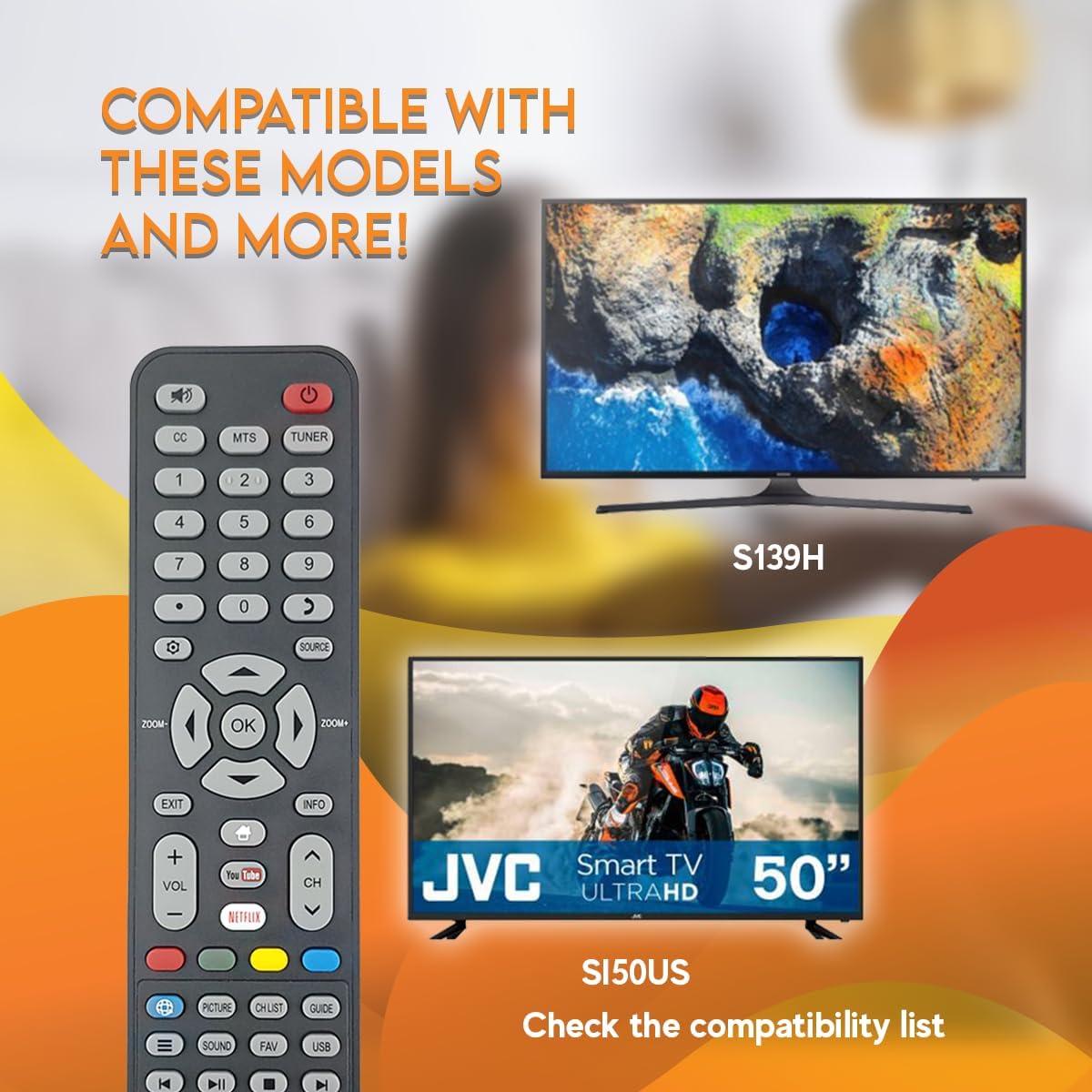
Image 5: The remote control displayed with examples of compatible JVC TV models, such as S139H and SI50US.
5. Održavanje
5.1 Čišćenje
Za čišćenje daljinskog upravljača koristite meku, suhu krpu. Za tvrdokornu prljavštinu, laganoampObrišite krpu vodom ili blagim, neabrazivnim sredstvom za čišćenje. Izbjegavajte upotrebu jakih hemikalija ili abrazivnih materijala, jer oni mogu oštetiti površinu daljinskog upravljača ili unutrašnje komponente.
5.2 Zamjena baterije
Replace batteries when the remote's response becomes sluggish or stops working. Always replace both AAA batteries at the same time with new ones. Do not mix old and new batteries, or different types of batteries.
6. Otkrivanje problema
- Daljinski ne reaguje:
- Provjerite jesu li baterije pravilno umetnute s ispravnim polaritetom.
- Zamijenite stare baterije novima.
- Osigurajte jasnu liniju vidljivosti između daljinskog upravljača i infracrvenog senzora televizora. Prepreke mogu blokirati signal.
- Make sure the remote is pointed directly at the TV.
- Određeni tasteri ne rade:
- Clean the remote control, especially around the unresponsive buttons, to remove any dirt or debris that might be causing interference.
- If only certain buttons are not working after checking batteries and line of sight, the remote may be faulty and require replacement.
7. Specifikacije
| Feature | Detalj |
|---|---|
| Broj modela | 06-519W37-TY01X |
| Brand | Ceybo |
| Kompatibilni uređaji | JVC HD LED Smart Televisions |
| Tehnologija povezivanja | infracrveni (IR) |
| Izvor napajanja | 2 x AAA baterije (nisu uključene) |
| Posebna karakteristika | Ergonomic Design, Quick Access Buttons (Netflix, YouTube) |
8. Garancija i podrška
Za informacije o garanciji ili tehničku podršku, molimo pogledajte dokumentaciju koja je priložena uz vašu kupovinu ili se direktno obratite prodavcu. Sačuvajte dokaz o kupovini za bilo kakve reklamacije u vezi sa garancijom.


