Važna sigurnosna uputstva
Please read these instructions carefully before operating the unit and retain them for future reference.
- Ne izlažite ovaj uređaj kapanju ili prskanju vode.
- Ne stavljajte predmete napunjene tekućinom, poput vaza, na uređaj.
- Osigurajte odgovarajuću ventilaciju. Ne blokirajte ventilacijske otvore.
- Ne postavljajte u blizini izvora toplote kao što su radijatori, grejni registri, peći ili drugi uređaji (uključujući ampLifiers) koji proizvode toplotu.
- Koristite samo dodatke/pribor koje je naveo proizvođač.
- Isključite ovaj uređaj iz struje tokom grmljavine ili kada ga ne koristite duže vreme.
- Sve servise prepustite kvalificiranom servisnom osoblju. Servisiranje je potrebno ako je aparat na bilo koji način oštećen.
Product Overview
The Muse M17CB is a compact dual PLL FM/MW digital alarm clock radio designed for reliable timekeeping and audio playback. It features a clear 0.9-inch white LED display with a dimmer function and a 24-hour time format. Users can set two independent alarms, choosing to wake up to either the radio or a buzzer. The digital tuner allows for 6 preset stations (3 FM and 3 MW) for quick access to your favorite broadcasts. Additional functions include SNAP, SLEEP, and SNOOZE for enhanced user convenience.
Front View

Opis slike: This image displays the front of the Muse M17CB alarm clock radio. It features a prominent 0.9-inch white LED display showing "12:00". Above the display are various control buttons and two rotary knobs. The buttons include P.1, P.2, P.3, DIM., O/SOURCE, and a large SNOOZE button. The left rotary knob is for VOLUME, and the right is for TUNING/SET. A small "muse" logo tag is visible on the left side.
Kontrole na gornjoj ploči

Opis slike: Ova slika pruža pogled odozgo prema dolje view of the Muse M17CB alarm clock radio, highlighting the control panel. It shows two large rotary knobs for Volume and Tuning/Set, along with several push buttons: P.1, P.2, P.3 (for radio presets), DIM. (dimmer), O/SOURCE (power/source selection), and a large circular SNOOZE button. The layout is clear and intuitive.
Priključci na stražnjoj ploči

Opis slike: This image shows the rear panel of the Muse M17CB alarm clock radio. It clearly displays the "AC~" power input socket, the "FM ANT." wire antenna, and an "AUX IN" 3.5mm jack for connecting external audio devices. A speaker grille is also visible on the right side.
Setup
Power Connection
- Unpack the Muse M17CB unit and all accessories.
- Connect the AC power cord to the "AC~" input on the rear of the unit.
- Drugi kraj kabla za napajanje priključite na standardnu zidnu utičnicu.
- The LED display will light up, indicating the unit is receiving power.
Postavljanje antene
- For optimal FM reception, fully extend the FM wire antenna located at the back of the unit.
- Adjust the position of the antenna for the best possible signal reception.
Uputstvo za upotrebu
Podešavanje vremena
- Uvjerite se da je jedinica uključena.
- Pritisnite i držite TUNING/SET knob for approximately 2 seconds until the hour digits flash on the display.
- Rotirajte TUNING/SET dugme za podešavanje sata.
- Pritisnite TUNING/SET knob once to confirm the hour; the minute digits will flash.
- Rotirajte TUNING/SET knob to adjust the minutes.
- Pritisnite TUNING/SET knob again to confirm the minutes and exit time setting mode.
- Vrijeme je prikazano u 24-satnom formatu.
Setting the Alarm (Alarm 1 and Alarm 2)
Uređaj ima dva nezavisna alarma (Alarm 1 i Alarm 2).
- Pritisnite P.1 dugme (za alarm 1) ili P.2 button (for Alarm 2) once. The alarm icon and hour digits will flash.
- Rotirajte TUNING/SET knob to adjust the alarm hour.
- Pritisnite TUNING/SET knob to confirm the hour; the minute digits will flash.
- Rotirajte TUNING/SET knob to adjust the alarm minutes.
- Pritisnite TUNING/SET knob to confirm the minutes. The alarm source (radio or buzzer) will flash.
- Rotirajte TUNING/SET knob to select either Radio or Zujalica as the alarm sound.
- Pritisnite TUNING/SET knob to confirm the alarm source. The alarm volume will flash (if radio is selected).
- Rotirajte VOLUME knob to set the desired alarm volume (for radio alarm).
- Pritisnite TUNING/SET knob to save the alarm settings. The corresponding alarm icon will appear on the display, indicating the alarm is active.
Da biste deaktivirali alarm, pritisnite odgovarajući P.1 or P.2 dugme dok ikona alarma ne nestane sa ekrana.
Radio Operation (FM/MW)
- Pritisnite O/SOURCE button to turn on the radio. Press it repeatedly to cycle between FM, MW, and AUX modes.
- Rotirajte TUNING/SET knob to manually tune to a desired frequency.
- Za automatsko skeniranje stanica, pritisnite i držite TUNING/SET knob for 2 seconds. The radio will scan and stop at the next available station.
Setting and Recalling Presets (P.1, P.2, P.3)
- Za pohranjivanje unaprijed postavljene postavke: Tune to the desired station. Press and hold one of the preset buttons (P.1, P.2, ili P.3) for 2 seconds until the display confirms the preset is saved.
- Za pozivanje unaprijed postavljene postavke: Briefly press the desired preset button (P.1, P.2, ili P.3) to tune to the stored station.
Dimmer funkcija
Pritisnite DIM. button repeatedly to adjust the brightness of the LED display to your preference (e.g., High, Medium, Low, Off).
Funkcija odgode
Kada se oglasi alarm, pritisnite veliko dugme SNOOZE dugme za privremeno utišavanje alarma. Alarm će se ponovo oglasiti nakon otprilike 9 minuta.
Funkcija spavanja
Funkcija spavanja vam omogućava da zaspite uz radio, koji će se automatski isključiti nakon određenog perioda.
- Dok radio svira, pritisnite dugme P.3 button (often doubles as SLEEP function) repeatedly to cycle through available sleep timer durations (e.g., 90, 60, 30, 15 minutes, or OFF).
- Radio će se automatski isključiti nakon odabranog vremena.
SNAP Function
The specific operation of the SNAP function is not detailed in the provided product description. Please refer to the full printed manual included with your device for instructions on using the SNAP feature.
Pomoćni ulaz (AUX IN)
Povežite eksterni audio uređaj (npr. MP3 plejer, pametni telefon) na AUX IN jack on the rear of the unit using a 3.5mm audio cable. Press the O/SOURCE button repeatedly until "AUX" appears on the display to switch to auxiliary input mode. Audio from the connected device will play through the alarm clock's speaker.
Održavanje
- čišćenje: Za čišćenje vanjske strane uređaja koristite meku, suhu krpu. Ne koristite abrazivna sredstva za čišćenje, voskove ili rastvarače.
- Skladištenje: If the unit is not used for an extended period, unplug it from the power outlet and store it in a cool, dry place.
- Izbjegavajte vlagu: Keep the unit away from water and high humidity.
Rješavanje problema
| Problem | Mogući uzrok | Rješenje |
|---|---|---|
| Nema napajanja / Ekran isključen | Kabl za napajanje nije pravilno priključen. | Provjerite je li kabel za napajanje naizmjeničnom strujom sigurno priključen u uređaj i ispravnu zidnu utičnicu. |
| Loš radio prijem | FM antenna not extended or positioned correctly. | Fully extend and adjust the position of the FM wire antenna for better reception. Try moving the unit to a different location. |
| Alarm se ne oglašava | Alarm nije aktiviran ili je pogrešno podešen. | Verify that the alarm icon is displayed. Recheck alarm time and source settings. Ensure alarm volume is not set to minimum if radio alarm is selected. |
| Ekran previše svijetao/tam | Potrebno je podesiti postavku zatamnjenja. | Pritisnite DIM. button repeatedly to cycle through brightness levels. |
Specifikacije
- Model: M17CB
- Prikaz: 0.9-inch White LED with Dimmer
- Format vremena: 24 sata
- tjuner: Digital FM/MW PLL
- Unaprijed postavljene postavke: 6 (3 FM + 3 MW)
- Alarmi: Dual Alarm (Radio or Buzzer)
- Funkcije: SNAP, SLEEP, SNOOZE
- Izvor napajanja: AC Power
- Dimenzije: 13 cm (dužina) x 11 cm (širina) x 6.5 cm (visina)
- Boja: Tirkizna
- Materijal: Resin or Plastic
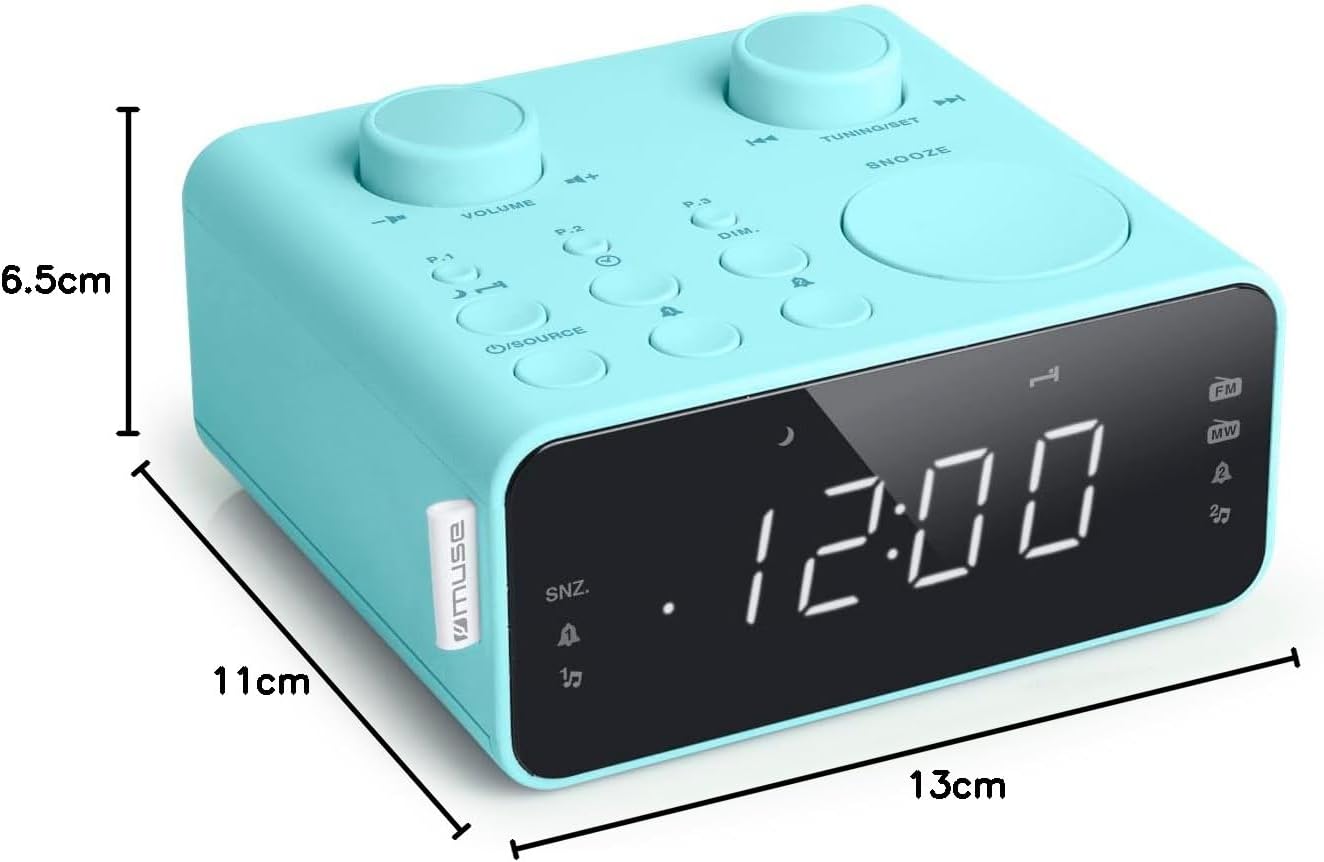
Opis slike: This image illustrates the dimensions of the Muse M17CB alarm clock radio. It shows the unit with measurements indicating a length of 13cm, a width of 11cm, and a height of 6.5cm.
Garancija i podrška
Za informacije o garanciji i tehničkoj podršci, molimo pogledajte garantni list koji dolazi uz vaš proizvod ili posjetite službenu stranicu Muse. webSačuvajte račun kao dokaz o kupovini.
The product includes a user manual (as indicated by "Pièces incluses: Manuel du propriétaire").


