1. Sigurnosne informacije
Please read all safety instructions carefully before using the LAMTTO Wireless Carplay Car Stereo. Failure to follow these instructions may result in injury or damage.
- Instalacija: Provjerite je li uređaj sigurno montiran i ne ometa vaš view or interfere with vehicle controls. Improper installation can lead to accidents.
- Izvor napajanja: Use only the provided car charger. Connecting to an incompatible power source may damage the device or cause fire.
- Sigurnost u vožnji: Do not operate the device or adjust settings while driving. Always pull over to a safe location before making any adjustments.
- temperatura: Izbjegavajte izlaganje uređaja ekstremnim temperaturama, direktnoj sunčevoj svjetlosti tokom dužeg perioda ili visokoj vlažnosti.
- čišćenje: Isključite napajanje prije čišćenja. Koristite meku, suhu krpu. Ne koristite tekuća sredstva za čišćenje ili aerosole.
- Rastavljanje: Ne pokušavajte sami rastavljati ili popravljati uređaj. Za sve servisne radove obratite se kvalifikovanom osoblju.
2. Sadržaj paketa
Provjerite da li se u vašem paketu nalaze sve dolje navedene stavke:
- 6.86 inch Carplay Screen Unit
- Car charger with 9.8 FT cable
- Backup camera with 26 FT cable
- Nosač usisne čaše
- Adhezivni nosač
- 4.9 FT AUX cable
- Uputstvo za upotrebu
- Instalirajte alat

Image: Illustration of the LAMTTO Carplay Screen unit and all included accessories, such as the car charger, backup camera, various mounts, AUX cable, and user manual.
3. Proizvod je gotovview
The LAMTTO Wireless Apple Carplay Car Stereo is a portable 6.86-inch touch screen device designed to enhance your driving experience with smart connectivity and safety features.
3.1 Ključne karakteristike
- Bežični Apple CarPlay i Android Auto: Seamlessly integrate your smartphone for navigation, music, calls, and messages.
- Wireless Mirrorlink & AndroidCast: Project your phone's screen directly onto the carplay display for video, audio, and picture sharing.
- AHD 1080P Backup Camera: Enhance parking safety with clear night vision and auxiliary lane lines.
- 6.86" HD IPS ekran osjetljiv na dodir: Capacitive touch screen with 1280x400 resolution and 170° full-viewing angle for clear visuals.
- Višestruki audio izlazi: Supports Bluetooth transmit, FM transmit, AUX output, and a high-quality built-in speaker.
- Jednostavna instalacija: Plug-and-play design with flexible mounting options, connecting directly to the cigarette lighter.

Image: The main LAMTTO 6.86-inch Carplay screen unit, along with the included backup camera, suction cup mount, and icons representing Apple CarPlay and Android Auto functionality.
3.2 Bežično povezivanje
The device offers robust wireless connectivity for both Apple CarPlay and Android Auto, allowing you to access your phone's features without cables.
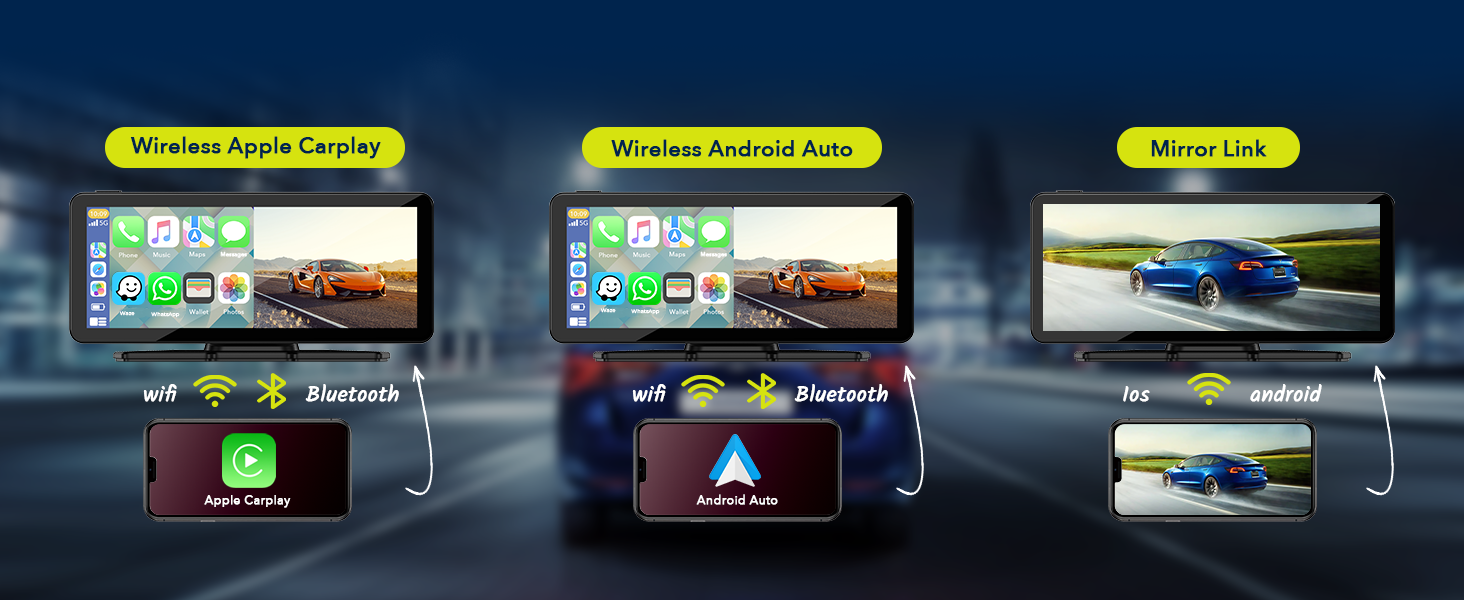
Image: A visual representation showing how the LAMTTO Carplay screen connects wirelessly via Wi-Fi and Bluetooth to both Apple CarPlay and Android Auto enabled smartphones.
3.3 Glasovna pomoć
Utilize Siri or Google Assistant for hands-free control, enabling safer driving by managing navigation, calls, and music through voice commands.

Image: Depicts a driver using voice commands like "Ok Google, call Lily" or "Hi Siri, navigate to the car park" to interact with the Carplay screen, emphasizing hands-free operation.
4. Postavljanje i instalacija
The LAMTTO Carplay Screen is designed for easy, non-destructive installation, allowing you to retain your car's original radio system.
4.1 Montaža jedinice
Choose between the suction cup mount or the adhesive mount based on your preference and dashboard surface. Ensure the chosen location does not obstruct your view ili zračne jastuke.
- Čista površina: Thoroughly clean the dashboard or windshield area where you intend to mount the unit.
- Pričvrstite nosač: Securely attach the chosen mount (suction cup or adhesive) to the desired location. For adhesive mount, press firmly for 30 seconds.
- Attach Carplay Unit: Slide the Carplay screen onto the mount until it clicks into place. Adjust the angle for optimal viewing.

Slika: pramples of various mounting positions for the Carplay screen, including dashboard suction mount, adhesive sticker bracket, and windshield suction mount, demonstrating flexibility.
4.2 Priključak za napajanje
- Insert the provided car charger into your vehicle's cigarette lighter socket.
- Connect the other end of the car charger cable to the power input port on the Carplay screen unit.
- The unit will power on automatically when the vehicle's ignition is turned on.
4.3 Ugradnja kamere za vožnju unazad (opciono)
For enhanced safety, install the included AHD 1080P backup camera.
- Montirajte kameru: Install the backup camera at the rear of your vehicle, typically near the license plate light.
- Usmjeravanje kabla: Carefully route the 26 FT camera cable from the rear of the vehicle to the Carplay screen unit, ensuring it does not interfere with moving parts or get pinched.
- Priključite napajanje: Connect the red wire of the backup camera to the positive terminal of your vehicle's reverse lamp. This ensures the camera activates automatically when reversing.
- Poveži se s jedinicom: Plug the camera's video cable into the designated camera input port on the Carplay screen unit.

Image: A visual demonstrating the 1080P waterproof reverse camera in action, showing a clear view of the area behind the car with parking guidelines on the Carplay screen.
5. Uputstvo za upotrebu
5.1 Wireless Apple CarPlay / Android Auto Connection
- Provjerite jesu li Wi-Fi i Bluetooth na vašem pametnom telefonu omogućeni.
- On the Carplay screen, select the "CarPlay" or "Android Auto" icon.
- The screen will display a Wi-Fi network name and password. Connect your phone to this Wi-Fi network.
- Once connected to Wi-Fi, pair your phone via Bluetooth with the Carplay unit.
- After successful pairing, Apple CarPlay or Android Auto will launch automatically. Subsequent connections should be automatic.
5.2 Wireless Mirrorlink / AndroidCast
This feature allows you to mirror your phone's screen onto the Carplay display.
- Connect the Carplay unit's Wi-Fi to your phone as described in section 5.1.
- On the Carplay screen, select the "Mirrorlink" or "AndroidCast" icon.
- For Android devices, you may need to scan a QR code displayed on the Carplay screen to download the "TcLink" APP to enable AndroidCast.
- Follow the on-screen prompts on your phone to initiate screen mirroring.

Image: Illustrates the wireless Apple Airplay and Android Cast features, showing how content from a smartphone can be mirrored onto the Carplay screen.
5.3 Opcije audio izlaza
The Carplay unit offers several ways to output audio to your car's sound system:
- Ugrađeni zvučnik: The unit has its own speaker for direct audio output.
- Bluetooth prijenos: Connect your car's original Bluetooth system to the Carplay unit to transmit audio wirelessly.
- FM prijenos: Select an unused FM frequency on the Carplay unit and tune your car's FM radio to the same frequency to receive audio.
- AUX izlaz: Use the provided 4.9 FT AUX cable to connect the Carplay unit's AUX output to your car's AUX input port.

Image: Displays the four audio output methods: Bluetooth, Built-in Speaker, FM transmission, and AUX connection, illustrating how sound can be routed from the Carplay unit.
5.4 Using the Backup Camera
When the backup camera is properly installed and connected to your vehicle's reverse lamp, the Carplay screen will automatically switch to the rearview display when you engage reverse gear.
- The display will show a clear 1080P image from the rear camera.
- Auxiliary parking lines will be overlaid on the image to assist with parking maneuvers.
5.5 Podešavanje svjetline ekrana
Adjust the screen brightness manually via the settings menu on the Carplay unit to suit different lighting conditions.

Image: A visual representation of the screen brightness adjustment feature, showing a slider control on the Carplay display to increase or decrease brightness.
6. Održavanje
Proper maintenance ensures the longevity and optimal performance of your LAMTTO Carplay Screen.
- Čišćenje ekrana: Koristite meku krpu koja ne ostavlja dlačice da nježno obrišete ekran. Za tvrdokorne mrlje, lagano obrišiteampOperite krpu vodom ili sredstvom za čišćenje ekrana. Izbjegavajte jake hemikalije ili abrazivne materijale.
- Generalno čišćenje: Uređaj držite čistim od prašine i ostataka. Koristite meku četku ili komprimirani zrak za čišćenje ventilacijskih otvora i priključaka.
- Upravljanje kablovima: Ensure all cables are neatly routed and secured to prevent damage from pinching or snagging.
- Skladištenje: If storing the unit for an extended period, disconnect it from power and store it in a cool, dry place away from direct sunlight.
7. Otkrivanje problema
If you encounter issues with your LAMTTO Carplay Screen, refer to the following common problems and solutions:
| Problem | Mogući uzrok | Rješenje |
|---|---|---|
| Jedinica se ne uključuje. | No power from cigarette lighter; loose power cable connection; faulty car charger. | Check if the car's cigarette lighter socket is working. Ensure the car charger is fully inserted into both the socket and the unit. Try using the supplied car charger only. |
| Nema zvuka ili isprekidan zvuk. | Incorrect audio output setting; loose AUX cable; FM frequency interference; Bluetooth not connected. | Verify the selected audio output mode (Bluetooth, FM, AUX, Built-in Speaker). Ensure AUX cable is securely connected. If using FM, try a different frequency. Re-pair Bluetooth. Restart the unit and/or car. |
| CarPlay/Android Auto se ne povezuje bežično. | Wi-Fi/Bluetooth not enabled on phone; incorrect Wi-Fi password; phone not paired. | Ensure phone's Wi-Fi and Bluetooth are on. Verify Wi-Fi password. Forget and re-pair Bluetooth connection on both devices. Ensure Android Auto is Android 11 or above. |
| Kamera za vožnju unazad se ne prikazuje. | Camera cable loose; reverse lamp connection issue; camera malfunction. | Check all camera cable connections, especially the red wire to the reverse lamp. Ensure the vehicle is in reverse gear. |
| Screen mirroring (Mirrorlink/AndroidCast) not working. | Incorrect app installed (Android); Wi-Fi connection issue; phone compatibility. | Ensure your phone is connected to the unit's Wi-Fi. For Android, confirm the "TcLink" APP is installed and updated. Check phone's mirroring settings. |
8. Specifikacije
| Feature | Detalj |
|---|---|
| Naziv modela | 6.86-Inch Carplay Screen |
| Brand | LAMTTO |
| Veličina ekrana | 6.86 inches (Visible screen diagonal: 7" / 18 cm) |
| Display Type | HD IPS Touch Screen |
| Rezolucija | 1280x400 |
| Viewing Angle | 170° Puno-viewing kut |
| Tehnologija povezivanja | Wireless, Bluetooth, Wi-Fi |
| Audio izlaz | Bluetooth Transmit, FM Transmit, AUX Output, Built-in Speaker |
| Backup Camera | AHD 1080P (Video Capture Resolution: 1080p) |
| Kontrolni metod | Dodirnite |
| Dimenzije proizvoda | 0.39 x 7.4 x 3.07 inča |
| Težina artikla | 2.2 funte |
| Vrsta montaže | Adhesive Mount, Suction Cup Mount |
| Compatible Vehicle Voltage | 12-24V Car Models |
9. Garancija i podrška
LAMTTO is committed to providing quality products and excellent customer service.
- 90-Day Return/Exchange: Enjoy a 90-day period for returns or exchanges without reason.
- Doživotna korisnička služba: LAMTTO provides lifelong customer service for products and accessories.
- Odgovor u roku od 24 sata: Expect a professional response to your inquiries within 24 hours.
For further assistance, please contact LAMTTO customer support through the platform where you purchased the product or visit the official LAMTTO store page on Amazon: LAMTTO Amazon Store.

Image: Icons representing 24-hour customer response, 90-day return/exchange policy, and lifetime customer service, highlighting LAMTTO's commitment to support.


