1. Uvod
This manual provides detailed instructions for the setup, operation, and maintenance of your Logitech POP Mouse. The POP Mouse is a compact, wireless mouse designed for multi-device use with customizable features.

Image: The Logitech POP Mouse in Graphite, showcasing svojim kompaktnim i ergonomskim dizajnom.
2. Sadržaj paketa
- Logitech POP Wireless Mouse
- 1x AA Battery (pre-installed)
- Korisnička dokumentacija

Image: The Logitech POP Mouse and a single AA battery, representing the items included in the product package.
3. Upute za postavljanje
3.1. Instalacija baterije
- Gently remove the top cover of the mouse. The cover is magnetically attached.
- Umetnite priloženu AA bateriju, pazeći na ispravan polaritet (+/-).
- Replace the top cover, ensuring it snaps securely into place.
3.2. Povezivanje putem Bluetooth-a
- Uključite miš pomoću prekidača za napajanje koji se nalazi na dnu.
- Press and hold one of the Easy-Switch buttons (1, 2, or 3) on the bottom of the mouse until the LED indicator starts blinking rapidly. This indicates pairing mode.
- On your device (computer, tablet, or phone), open Bluetooth settings.
- Select "Logitech POP Mouse" from the list of available devices to complete the pairing process.
- The LED indicator will glow solid for a few seconds, then turn off, confirming a successful connection.

Image: The underside of the POP Mouse, highlighting the Easy-Switch buttons for multi-device pairing.
4. Uputstvo za upotrebu
4.1. Osnovne funkcije
- Lijevi klik: Primary selection and interaction.
- Desni klik: Pristupa kontekstualnim menijima.
- Točak za pomicanje: Navigates vertically through documents and web stranice.
4.2. SilentTouch Technology
The POP Mouse features SilentTouch Technology, which significantly reduces click noise, providing a quieter user experience without compromising tactile feedback.

Image: A hand operating the POP Mouse, illustrating the quiet operation provided by SilentTouch Technology.
4.3. SmartWheel Scrolling
The SmartWheel automatically switches between two modes:
- Precizni način rada: For detailed, line-by-line navigation.
- Speed Scroll Mode: For rapid scrolling through long documents or web stranice.

Image: A user's hand demonstrating the use of the SmartWheel for efficient navigation.
5. Prilagodba
5.1. Customizable Top Button (Emoji Button)
The top button, located below the scroll wheel, is customizable. By default, it can be configured to open an emoji menu or assign other shortcuts.
- Download and install the Logitech Options+ Software from the official Logitech webstranica (logitech.com/optionsplus).
- Open the Logitech Options+ Software.
- Select your POP Mouse from the detected devices.
- Idite na postavke prilagođavanja dugmadi.
- Assign your desired function to the top button, such as an emoji shortcut, Snip Screen, Mic Mute, or Voice-to-Text.
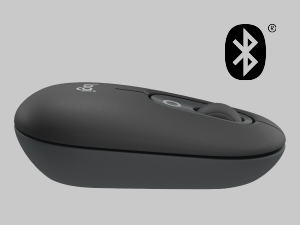
Image: A visual representation of the customizable top button on the POP Mouse, showing its function to access an emoji menu on a connected computer.
6. Povezivanje više uređaja
The Logitech POP Mouse can connect to up to three different devices simultaneously using Bluetooth. You can easily switch between these devices.
6.1. Preklopni uređaji
To switch between paired devices, press the Easy-Switch button (1, 2, or 3) on the bottom of the mouse corresponding to the desired device. The LED indicator will briefly light up to confirm the selected channel.
6.2. Logitech FLOW (Advanced Feature)
For seamless control across multiple computers, install Logitech Options+ Software on all devices. With Logitech FLOW enabled, you can move your mouse cursor across screens as if they were a single desktop, even copying and pasting text, images, and files između njih.
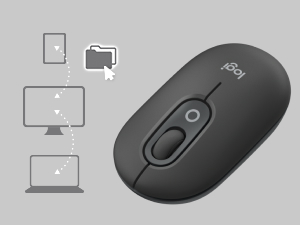
Image: A diagram showing how the POP Mouse can control multiple devices, illustrating the FLOW feature for cross-device interaction.
7. Održavanje
7.1. Zamjena baterije
The POP Mouse operates on a single AA battery with an estimated life of up to 24 months. When the battery is low, the LED indicator on the bottom of the mouse may flash. Replace the battery by following the steps in Section 3.1.
7.2. Čišćenje
Za čišćenje miša koristite meku krpu koja ne ostavlja dlačice. Za tvrdokornu prljavštinu, lagano je obrišite.ampIsperite krpu vodom. Izbjegavajte upotrebu jakih hemikalija ili abrazivnih materijala.
8. Otkrivanje problema
| Problem | Rješenje |
|---|---|
| Mouse does not turn on. | Ensure the power switch on the bottom of the mouse is in the 'ON' position. Check and replace the AA battery if necessary. |
| Miš se ne povezuje putem Bluetootha. |
|
| Kretanje kursora je nepravilno ili ne reaguje. |
|
| Custom button not working. | Ensure Logitech Options+ Software is installed and running on your computer, and the button is correctly configured. |
9. Specifikacije
| Feature | Detalj |
|---|---|
| Broj modela | 910-007165 |
| Povezivanje | Bluetooth 5.1 |
| bežični domet | Do 10 metara (32.81 stope) |
| Senzorna tehnologija | Logitech High Precision Optical Tracking |
| Broj dugmadi | 4 (Left/Right click, Scroll wheel click, Top customizable button) |
| Vrsta baterije | 1 x AA baterija |
| Trajanje baterije | Do 24 mjeseci (može varirati ovisno o korištenju) |
| Dimenzije (DxŠxV) | 14.12 x 2.34 x 1.38 inča (35.86 x 5.94 x 3.51 cm) |
| Težina | 2.89 ounces (82g with battery) |
| Kompatibilnost operativnog sistema | Windows 10 or later, macOS 10.15 or later, iPadOS, Chrome OS, Android |

Image: Technical drawing displaying the length, width, and height measurements of the Logitech POP Mouse.
10. Garancija i podrška
Za informacije o garanciji i tehničkoj podršci, posjetite službenu stranicu Logitech podrške website or refer to the user documentation included in your product package.
- Online podrška: support.logi.com
- Registracija proizvoda: Registering your product can help you receive faster support and updates.


