1. Proizvod je gotovview
The TECLAST T40Air is a high-performance tablet designed for various tasks, from entertainment to productivity. It features a 10.4-inch display, 16GB RAM, 256GB ROM, and runs on Android 13, powered by an octa-core processor. Its lightweight design and robust battery ensure portability and extended usage.

Slika 1.1: Prednja i zadnja strana view of the TECLAST T40Air Tablet, showcasing its sleek design and dual rear cameras.
Video 1.1: Službenik prekoview of the TECLAST T40Air Android Tablet, highlighting its key features and design.
2. Početno podešavanje
2.1 Unboxing and First Use
Carefully remove the tablet and all accessories from the packaging. Inspect the device for any physical damage. Before first use, it is recommended to fully charge the tablet.
2.2 Punjenje tableta
Connect the provided USB-C cable to the tablet's charging port and the other end to the 18W PD fast charging adapter. Plug the adapter into a power outlet. The battery indicator on the screen will show the charging status. A full charge typically takes approximately 2-3 hours.
2.3 Uključivanje/isključivanje
- Za uključivanje: Press and hold the Power button located on the side of the tablet until the TECLAST logo appears on the screen.
- Za isključivanje: Press and hold the Power button until a power menu appears. Select 'Power off' and confirm.
- Za ponovno pokretanje: From the power menu, select 'Restart'.
2.4 Početna konfiguracija
Prilikom prvog uključivanja, tablet će vas voditi kroz proces početnog podešavanja:
- Odabir jezika: Odaberite željeni jezik.
- Wi-Fi veza: Odaberite svoju Wi-Fi mrežu i unesite lozinku za povezivanje na internet.
- Google račun: Sign in with your Google account or create a new one. This is essential for downloading apps from the Google Play Store and syncing data.
- Datum i vrijeme: Podesite tačan datum i vrijeme ili dozvolite mreži da ih automatski podesi.
- sigurnost: Set up a screen lock (PIN, pattern, password, or Face Unlock).
2.5 Instalacija SIM kartice (opcionalno)
The T40Air supports 4G LTE connectivity. To install a SIM card:
- Pronađite ladicu za SIM karticu sa strane tableta.
- Koristite priloženi alat za izbacivanje SIM kartice da biste otvorili ladicu.
- Place the Nano-SIM card(s) into the designated slots, ensuring correct orientation.
- Lagano gurnite ladicu nazad u tablet dok ne klikne na svoje mjesto.

Image 2.1: The TECLAST T40Air Tablet highlighting its 4G LTE support and SIM card tray location.
3. Uputstvo za upotrebu
3.1 Navigacija kroz Android 13
The TECLAST T40Air runs on Android 13, offering an intuitive user experience. Use touch gestures to navigate:
- Dodirnite: Odaberite stavku.
- Prevucite: Skrolajte kroz ekrane ili liste.
- Zumiranje štipanjem: Uvećavanje ili smanjivanje slika i web stranice.
- Dugi pritisak: Pristupite kontekstualnim menijima ili premjestite ikone.
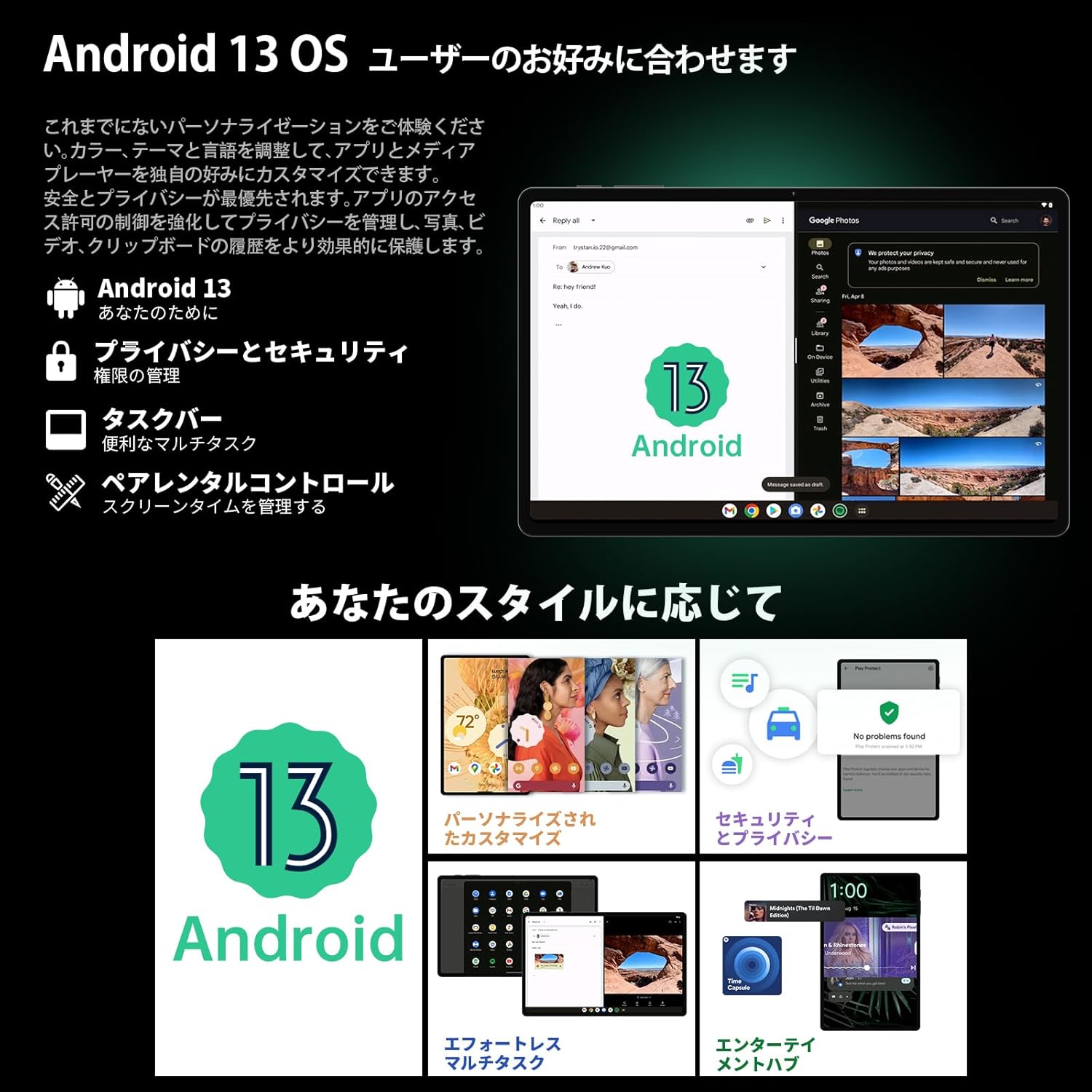
Image 3.1: The Android 13 interface on the TECLAST T40Air Tablet, showing personalization and security features.
3.2 Karakteristike ekrana
The 10.4-inch 2K FHD IPS display provides vibrant colors and sharp details. It features:
- TDDI Fully Laminated: Enhances touch responsiveness and visual clarity.
- Način zaštite očiju: Reduces blue light to prevent eye strain.
- Način čitanja: Optimizes the screen for comfortable reading.
- Dark Mode & Dim Mode: Adjusts screen brightness and color for different lighting conditions.

Image 3.2: Visual representation of the TECLAST T40Air Tablet's display features, including eye protection and reading modes.
3.3 Korištenje kamere
The tablet is equipped with a 13MP rear dual camera and an 8MP front camera.
- Slikati: Otvorite aplikaciju Kamera, kadrirajte snimak i dodirnite dugme okidača.
- Snimanje video zapisa: Prebacite se u video način rada u aplikaciji Kamera i dodirnite dugme za snimanje.
- Prednja kamera: Use for video calls and selfies.

Image 3.3: The TECLAST T40Air Tablet showcasing its camera capabilities and 3.5mm headphone jack.
3.4 Zvuk i povezivost
- SWEET 4 Speakers: Enjoy immersive audio with the tablet's quad-speaker system and Smart K Digital Amplifier.
- 3.5 mm priključak za slušalice: Connect your wired headphones for private listening.
- Wi-Fi: Supports 2.4GHz and 5GHz dual-band Wi-Fi (802.11ac) for stable and fast internet.
- Bluetooth 5.0: Povežite bežičnu dodatnu opremu poput slušalica, tastatura i miševa.
- VoLTE: Enables high-quality voice calls over 4G LTE networks.
3.5 Otključavanje licem
The tablet supports Face Unlock for convenient and secure access. Set it up in the Security settings. Ensure good lighting conditions for optimal performance.
4. Održavanje
4.1 Čišćenje tableta
Za čišćenje tableta koristite meku krpu koja ne ostavlja dlačice. Za tvrdokorne mrlje, lagano je obrišiteampen the cloth with water or a screen cleaner. Avoid using harsh chemicals, abrasive materials, or excessive moisture.
4.2 Njega baterija
- Izbjegavajte izlaganje tableta ekstremnim temperaturama.
- Ne dozvolite da se baterija često potpuno isprazni.
- Use the original charger or a certified 18W PD charger for optimal charging.
4.3 Ažuriranja softvera
Redovno provjeravajte i instalirajte ažuriranja softvera kako biste osigurali da vaš tablet ima najnovije funkcije, sigurnosne zakrpe i poboljšanja performansi. Idite na Postavke > Sistem > Ažuriranje sistema.
4.4 Upravljanje skladištem
The tablet comes with 256GB of internal storage, expandable via microSD card up to 1TB. Regularly manage your storage by:
- Brisanje nepotrebno files i aplikacije.
- Selidba velikih objekata files na microSD karticu.
- Utilizing cloud storage services.

Image 4.1: The TECLAST T40Air Tablet highlighting its 16GB RAM, 256GB ROM, and support for microSD card expansion.
5. Otkrivanje problema
This section addresses common issues you might encounter with your TECLAST T40Air Tablet.
5.1 Uređaj se ne uključuje
- Provjerite je li baterija dovoljno napunjena. Spojite punjač i pričekajte nekoliko minuta prije nego što pokušate uključiti uređaj.
- Pritisnite i držite dugme za napajanje najmanje 10-15 sekundi da biste prisilno ponovo pokrenuli računar.
5.2 Problemi s Wi-Fi vezom
- Provjerite je li Wi-Fi omogućen u Postavke > Mreža i internet > Wi-Fi.
- Provjerite jeste li unijeli ispravnu lozinku za Wi-Fi.
- Ponovo pokrenite Wi-Fi ruter i tablet.
- Try connecting to a different Wi-Fi network to isolate the issue.
5.3 Spore performanse
- Zatvorite nekorištene aplikacije u pozadini.
- Clear cache data for apps that are running slowly (Postavke > Aplikacije > [Naziv aplikacije] > Pohrana i keš memorija > Obriši keš memoriju).
- Pobrinite se da imate dovoljno slobodnog prostora za pohranu.
- Ponovo pokrenite tablet.
5.4 Ekran ne reaguje
- Ponovo pokrenite tablet držeći pritisnutim dugme za napajanje.
- Provjerite da li je ekran čist i bez vlage ili prljavštine.
5.5 Vraćanje na tvorničke postavke (posljednja opcija)
Ako problemi i dalje postoje, možete razmisliti o vraćanju na tvorničke postavke. Upozorenje: Ovo će izbrisati sve podatke na vašem tabletu. Napravite sigurnosnu kopiju važnih podataka prije nego što nastavite.
Idi na Postavke > Sistem > Opcije resetovanja > Izbriši sve podatke (vrat na tvorničke postavke) i pratite uputstva na ekranu.
6. Specifikacije
Below are the technical specifications for the TECLAST T40Air Tablet:
| Feature | Specifikacija |
|---|---|
| Broj modela | T40Air |
| Veličina ekrana | 10.4 inča |
| Rezolucija ekrana | 1920 x 1080 pixels (2K FHD IPS) |
| RAM | 16 GB |
| Veličina fleš memorije (ROM) | 256 GB |
| Marka procesora | Rockchip or Unisoc (Octa-core) |
| Operativni sistem | Android 13 |
| Bežični tip | 5 GHz Radio Frequency, 802.11a/b/g/n/ac |
| Bluetooth | Bluetooth 5.0 |
| Prosječno trajanje baterije | 5 sati (7200mAh) |
| Težina artikla | 1.01 funti (približno 460 g) |
| Dimenzije proizvoda | 9.6 x 6.1 x 0.3 inča |
| Posebna karakteristika | Lagana |
7. Garancija i podrška
7.1 Jamstvo za proizvod
The TECLAST T40Air Tablet comes with a standard manufacturer's warranty. Please refer to the warranty card included in your product packaging for specific terms, conditions, and duration. Keep your proof of purchase for warranty claims.
7.2 Korisnička podrška
If you encounter any issues not covered in this manual or require further assistance, please contact TECLAST customer support. You can typically find contact information on the official TECLAST webweb-mjestu ili putem kanala podrške vašeg prodavača.
- Visit the official TECLAST webstranica za često postavljana pitanja i resurse podrške.
- Contact the seller or retailer for product-specific support and return policies.


