Uvod
Thank you for choosing the GOBOULT Z60 Wireless Earbuds. This manual provides detailed instructions to help you set up, operate, and maintain your earbuds for an optimal audio experience. Please read this manual thoroughly before use and retain it for future reference.

Image: GOBOULT Z60 Earbuds, illustrating the brand transition from BOULT to GOBOULT, highlighting the new logo and packaging while assuring consistent product performance.
Šta je u kutiji
Provjerite da li su sve stavke prisutne u paketu:
- GOBOULT Z60 Wireless Earbuds (Left and Right)
- Futrola za punjenje
- USB kabel za punjenje tipa C
- Naušnice (različite veličine)
- Uputstvo za upotrebu
- Garantni list

Image: The GOBOULT Z60 Wireless Earbuds and their charging case, showcasing the product's design and included accessories.
Product Overview
The GOBOULT Z60 earbuds are designed for comfort and high-quality audio. Each earbud features a 13mm bass driver and multiple microphones for clear calls. The charging case provides extended battery life.
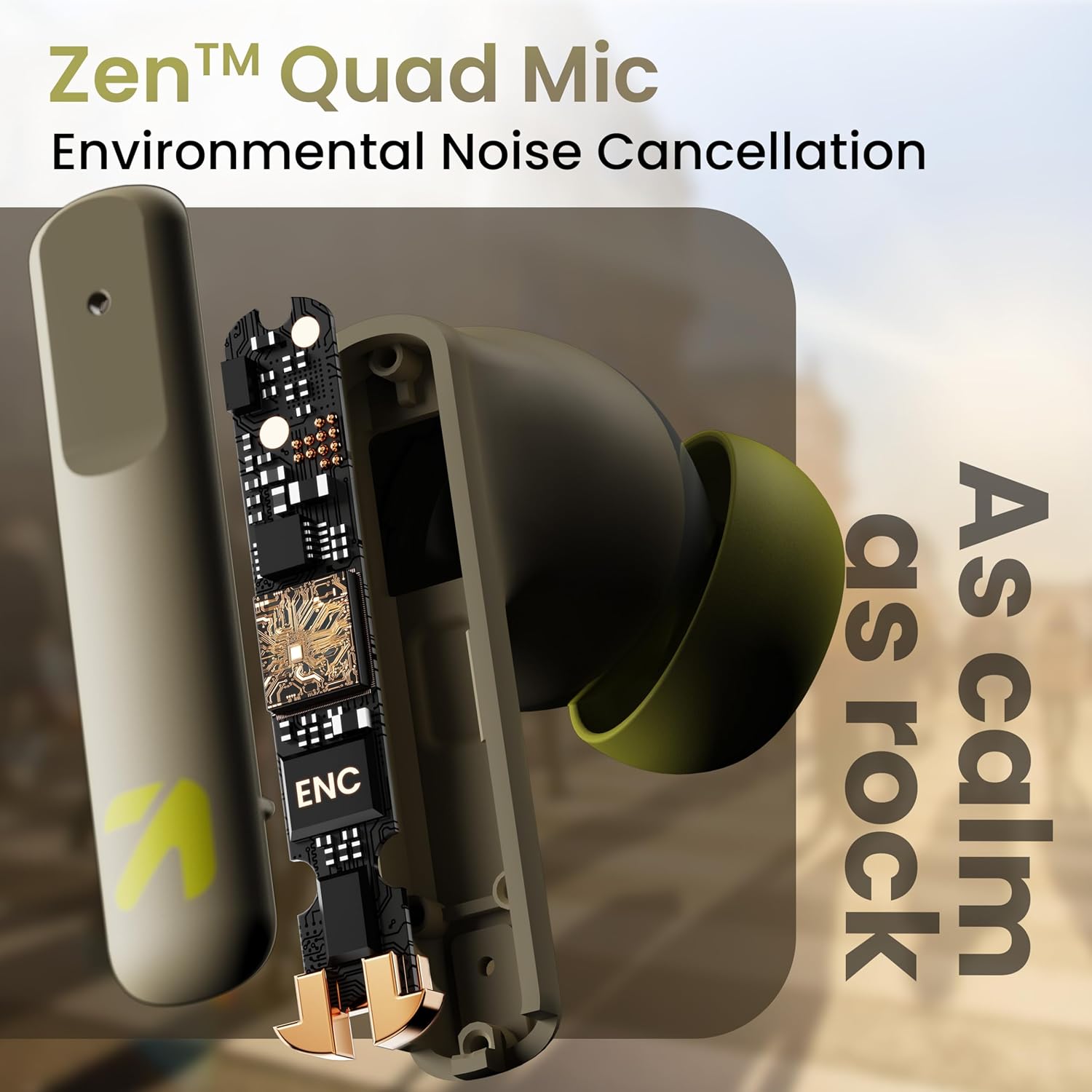
Slika: Interni view of a GOBOULT Z60 earbud, highlighting the Zen Quad Mic Environmental Noise Cancellation (ENC) technology for clear audio.

Image: A close-up of a GOBOULT Z60 earbud, emphasizing the 13mm BoomX Drivers responsible for rich bass and superior sound quality.
Punjenje
To charge your GOBOULT Z60 earbuds and charging case:
- Stavite slušalice u kutijicu za punjenje. Provjerite da li su pravilno postavljene.
- Spojite USB Type-C kabel za punjenje na priključak za punjenje na kućištu i na izvor napajanja.
- LED indikator na kućištu će prikazivati status punjenja.
A full charge provides up to 60 hours of total playtime with the charging case. A quick 10-minute charge can provide up to 150 minutes of playtime.

Image: The GOBOULT Z60 charging case connected via a Type-C cable, illustrating the fast charging capability with indicators for 10 minutes charge yielding 150 minutes playtime.

Image: GOBOULT Z60 earbuds in their charging case, highlighting the impressive 60 hours of total playtime and 8 hours of playtime on a single earbud charge.
Setup: Pairing with Your Device
The GOBOULT Z60 earbuds utilize Bluetooth 5.3 for stable and efficient wireless connectivity.
- Početno uparivanje:
- Otvorite kutijicu za punjenje. Slušalice će automatski ući u način rada za uparivanje.
- Na vašem uređaju (pametnom telefonu, tabletu, laptopu) omogućite Bluetooth.
- Traži "GOBOULT Z60" in the list of available Bluetooth devices and select it to connect.
- Once connected, you will hear an audio prompt, and the LED indicator on the case will change.
- Ponovno uparivanje: Slušalice će se automatski povezati s posljednjim uparenim uređajem kada se izvade iz kutijice, ako je Bluetooth omogućen na uređaju.

Image: GOBOULT Z60 earbuds and their open charging case next to a smartphone, illustrating the Bluetooth 5.3 "Blink & Pair" feature for quick and stable connection.
Upravljanje slušalicama
Dodirnite Kontrole
The GOBOULT Z60 earbuds feature intuitive touch controls. The specific functions are:
- Reprodukcija muzike:
- Jedan dodir: Reprodukcija/pauza
- Double tap (Right earbud): Next track
- Double tap (Left earbud): Previous track
- Triple tap (Right earbud): Volume Up
- Triple tap (Left earbud): Volume Down
- Upravljanje pozivima:
- Jedan dodir: Odgovori/Završi poziv
- Long press: Reject call
- Glasovni asistent: Long press (either earbud) to activate Google Assistant or Siri.
- Način igre: Tap 4 times on either earbud to activate/deactivate Combat Gaming Mode (50ms low latency).

Image: A visual guide to the GOBOULT Z60's touch controls, detailing actions for music playback (play/pause, next/back, volume), call management, activating voice assistance, and toggling game/music mode.
Način igranja
Activate the 50ms low latency Combat Gaming Mode for a synchronized audio-visual experience during gaming. Tap 4 times on either earbud to switch between gaming and normal modes.

Image: GOBOULT Z60 earbuds in use with a smartphone displaying a racing game, emphasizing the "Combat Gaming Mode" with 50ms ultra-low latency, activated by tapping the earbud 4 times.
Glasovni asistent
Access your device's voice assistant (Google Assistant or Siri) by long-pressing either earbud. This allows for hands-free control of your device.

Image: GOBOULT Z60 earbuds and their charging case, illustrating how to activate voice assistance (Ok Google, Hey Siri) with a long press on an earbud.
Održavanje
To ensure the longevity and optimal performance of your GOBOULT Z60 earbuds:
- čišćenje: Redovno čistite slušalice i kućište za punjenje mekom, suhom krpom. Izbjegavajte upotrebu jakih hemikalija ili abrazivnih materijala.
- uši: Remove and clean the eartips periodically. Ensure they are dry before reattaching.
- Otpornost na vodu: The earbuds are IPX5 water-resistant, meaning they can withstand sweat and light rain. Do not submerge them in water or expose them to heavy downpours. Ensure the charging port is dry before charging.
- Skladištenje: Kada se ne koriste, slušalice čuvajte u njihovoj kutijici za punjenje kako biste ih zaštitili i održali napunjenima.

Image: A GOBOULT Z60 earbud with water droplets on its surface, illustrating its IPX5 water resistance, suitable for protection against sweat, rain, and splashes.
Rješavanje problema
If you encounter issues with your GOBOULT Z60 earbuds, refer to the following common solutions:
| Problem | Moguće rješenje |
|---|---|
| Slušalice se ne uparuju |
|
| Nema zvuka iz jedne slušalice |
|
| Slušalice se ne pune |
|
| Niska jačina zvuka ili loš kvalitet zvuka |
|
Specifikacije
| Feature | Detalj |
|---|---|
| Naziv modela | AirBass (Z60) |
| Tehnologija povezivanja | bežični (Bluetooth) |
| Bluetooth verzija | 5.3 |
| Bluetooth domet | 10 metara |
| Veličina audio drajvera | 13 milimetara |
| Vrsta audio drajvera | Dynamic Driver |
| Trajanje baterije (ukupno) | Do 60 sata (s kućištem za punjenje) |
| Vrijeme punjenja | Približno 90 minuta |
| Brzo punjenje | 10 minuta punjenja = 150 minuta reprodukcije |
| Port za punjenje | Tip-C |
| Mikrofoni | 4 ENC Mics for Clear Calling |
| Audio kašnjenje | 50 milisekundi (režim igre) |
| Otpornost na vodu | IPX5 (Sweatproof, Rainproof, Splashproof) |
| Kontrolni metod | Dodir, glas |
| Težina artikla | 41.5 grama |
| Zemlja porijekla | Indija |
Garancija i podrška
Your GOBOULT Z60 Wireless Earbuds come with a 1 godina garancije proizvođača od datuma kupovine.
For any support, warranty claims, or technical assistance, please refer to the contact information provided on your warranty card or visit the official GOBOULT support website.


