1. Uvod
Thank you for choosing the TEEHO Keyless Entry Door Lock with 2 Handles. This manual provides detailed instructions for installation, operation, and maintenance to ensure optimal performance and security. Please read this manual thoroughly before installation and keep it for future reference.
Sadržaj paketa
- 1 Electronic Keypad Deadbolt
- 1 Door Lever Handle Set (2 handles)
- 1 Keypad Deadbolt Lock
- 4 AA baterije
- Montažni hardver
- Uputstvo za upotrebu
Ključne karakteristike
- Ulaz bez ključa: Supports up to 20 user access codes (4-10 digits) and one-time codes.
- Smart-Locking: Adjustable auto-lock feature (10-99 seconds) and one-touch auto-lock.
- Poboljšana sigurnost: ANSI Grade 3 smart door lock cylinder, anti-peeping password function, mute mode, vacation mode, and backlit keypad.
- Izdržljiv dizajn: Constructed from durable alloy with an IP54 weather resistance rating.
- Jednostavna instalacija: Dizajniran za jednostavno podešavanje.
2. Sigurnosne informacije
Molimo vas da se pridržavate sljedećih sigurnosnih mjera opreza kako biste spriječili ozljede ili oštećenje proizvoda:
- Ne pokušavajte rastavljati ili modificirati bravu. To može uzrokovati oštećenje i poništiti garanciju.
- Koristite samo navedene AA baterije. Ne miješajte stare i nove baterije ili različite tipove baterija.
- Sve komponente držite van dohvata djece.
- Zaštitite tastaturu od prekomjerne vlage ili direktnog izlaganja vodi.
- Ensure proper installation to prevent malfunction. If unsure, consult a qualified locksmith or installer.
3. Proizvod je gotovview
The TEEHO Keyless Entry Door Lock system combines a keypad deadbolt with a door lever for comprehensive security and convenience.
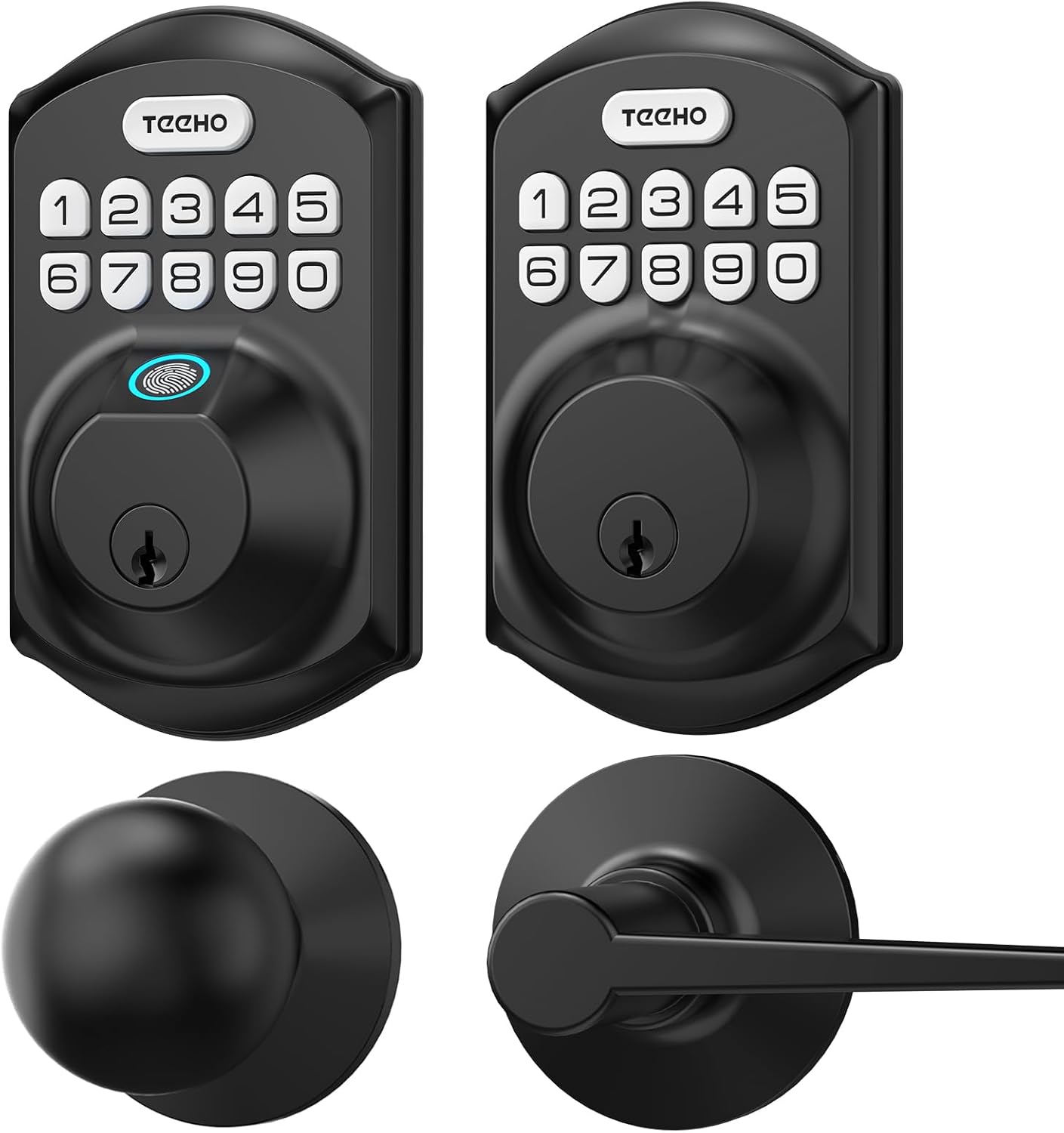
Slika 3.1: Gotovoview of the TEEHO Keyless Entry Door Lock components, including the electronic keypad deadbolt, a standard deadbolt, and two door lever handles, all in a matte black finish.

Slika 3.2: The TEEHO Keyless Entry Door Lock installed on a white door, featuring the electronic keypad deadbolt above a matching door lever. The interior view shows the corresponding hardware.
4. Postavljanje i instalacija
The TEEHO Keyless Entry Door Lock is designed for easy installation. Follow these steps carefully.
4.1 Pripremite vrata
- Ensure your door meets the required dimensions for installation (standard door thickness and backset).
- Remove any existing lock hardware.
4.2 Install the Deadbolt Latch
- Insert the deadbolt latch into the door edge. Ensure the “UP” marking is facing upwards.
- Osigurajte bravu vijcima.
4.3 Install the Exterior Keypad Assembly
- Feed the cable through the hole in the door.
- Align the exterior keypad assembly with the deadbolt latch and secure it to the door.
4.4 Ugradnja unutrašnje montažne ploče
- Attach the interior mounting plate to the door, ensuring the cable passes through the plate.
- Učvrstite montažnu ploču vijcima.
4.5 Connect Cables and Install Interior Assembly
- Spojite kabel od vanjskog sklopa na unutarnji sklop.
- Montirajte unutrašnji sklop na montažnu ploču i pričvrstite ga vijcima.
4.6 Instalirajte baterije
- Skinite poklopac baterije sa unutrašnjeg sklopa.
- Insert 4 AA batteries, observing polarity (+/-).
- Vratite poklopac baterije.

Slika 4.1: Eksplodirao je view of the TEEHO Keyless Entry Door Lock components, illustrating the internal mechanism and how the exterior keypad, interior assembly, and deadbolt latch fit together during installation.
4.7 Install Door Lever Handles
- Install the latch mechanism for the door lever into the door edge.
- Attach the exterior and interior door lever handles, securing them according to the provided instructions.
5. Uputstvo za upotrebu
Learn how to use the various features of your TEEHO Keyless Entry Door Lock.
5.1 Otključavanje vrata
- Korištenje korisničkog koda: Enter your 4-10 digit user code on the keypad, then press the “Lock” button (or checkmark/enter button if present). The lock will retract.
- Using a Physical Key: Umetnite fizički ključ u ključaonicu i okrenite ga da biste otključali.

Slika 5.1: A person using the TEEHO Keyless Entry Door Lock, highlighting the keypad and a fingerprint sensor for quick unlocking. The image suggests a rapid identification and unlocking process.
5.2 Zaključavanje vrata
- Automatsko zaključavanje: Ako je omogućeno, brava će se automatski zaključati nakon određenog perioda (10-99 sekundi) nakon što se vrata zatvore.
- Zaključavanje jednim dodirom: Pritisnite i držite bilo koji taster na tastaturi 2 sekunde da biste trenutno zaključali vrata.
- Ručno zaključavanje: From the interior, turn the thumb-turn to lock the deadbolt.

Slika 5.2: A visual representation of the auto-lock and one-touch locking features of the TEEHO Keyless Entry Door Lock. It shows a timer icon indicating automatic locking after 10-99 seconds and a lock icon for the 2-second one-touch lock.
5.3 Lozinka protiv voajeranja
To prevent others from guessing your code, you can enter random digits before or after your actual code. The lock will still recognize the correct sequence within the longer entry.

Slika 5.3: An illustration of the anti-peep tactile keypad feature. It demonstrates how random digits can be added before or after the actual password to obscure it from onlookers, enhancing security.
5.4 Mute mod
The lock can be set to mute mode to disable keypad tones for quiet operation.
5.5 Režim odmora
Activate vacation mode for enhanced security when you are away for an extended period. This mode typically disables all user codes until manually deactivated.
6. Programski kodovi
The lock supports up to 20 user codes and one-time codes.

Slika 6.1: An infographic detailing the access options for the TEEHO Keyless Entry Door Lock, showing support for up to 20 user codes, one-time PIN codes, and two physical keys for unlocking.
6.1 Dodavanje korisničkih kodova
- Press the “Program” button (usually located on the interior assembly).
- Enter the default master code (refer to quick start guide or factory settings).
- Follow the voice prompts or indicator lights to enter a new 4-10 digit user code.
- Confirm the new code.
6.2 Deleting User Codes
- Press the “Program” button.
- Unesite glavni kod.
- Follow the prompts to select the option for deleting user codes.
- Enter the specific user code to be deleted or choose to delete all user codes.
6.3 Setting One-Time Codes
One-time codes are ideal for temporary access (e.g., for delivery personnel or service providers). Once used, the code is automatically deleted.
- Press the “Program” button.
- Unesite glavni kod.
- Follow the prompts to select the one-time code option.
- Enter the desired one-time code.
7. Održavanje
7.1 Zamjena baterije
The lock is powered by 4 AA batteries, providing over 1 year of use under normal conditions. Replace batteries when the low battery indicator appears or when the lock becomes unresponsive.
- Uklonite poklopac baterije na unutrašnjem sklopu.
- Uklonite stare baterije.
- Umetnite 4 nove AA baterije, pazeći na ispravan polaritet.
- Vratite poklopac baterije.
7.2 Čišćenje
Očistite vanjski dio brave mekom krpomamp krpom. Izbjegavajte abrazivna sredstva za čišćenje ili rastvarače koji bi mogli oštetiti završnu obradu ili elektroničke komponente.
8. Otkrivanje problema
| Problem | Mogući uzrok | Rješenje |
|---|---|---|
| Brava ne reaguje na unos sa tastature. | Low batteries; incorrect code; keypad malfunction. | Replace batteries; re-enter code carefully; contact support if issue persists. |
| Funkcija automatskog zaključavanja ne radi. | Feature disabled; incorrect time setting. | Ensure auto-lock is enabled and set to desired time in programming. |
| Lock is difficult to turn or operate. | Misalignment during installation; worn components. | Check installation alignment; lubricate moving parts if necessary; contact support for severe issues. |
| Keypad backlight not working. | Batteries low; setting disabled. | Replace batteries; check programming settings for backlight. |
9. Specifikacije
- Brand: TEEHO
- Model: Keyless Entry Door Lock with 2 Handles
- Vrsta brave: Keypad Deadbolt with Door Lever
- Posebna karakteristika: Keyless Entry, Auto-Lock, One-Time Code, Anti-Peep Password, Mute Mode, Vacation Mode, Backlit Keypad
- Ocjena sigurnosti: ANSI razred 3
- Otpornost na vremenske uvjete: IP54
- Izvor napajanja: 4 AA Batteries (approx. 1 year lifespan)
- Pristupni kodovi: Up to 20 user codes (4-10 digits)
- Metoda kontrole: Touch Keypad, Mechanical Key
10. Garancija i podrška
TEEHO products are manufactured to high-quality standards. For warranty information, technical support, or assistance with your product, please refer to the warranty card included in your package or visit the official TEEHO webstranica. Molimo vas da prilikom kontaktiranja podrške pripremite model proizvoda i datum kupovine.


