1. Uvod
The TAUROX gaming mouse is designed to provide precise and responsive control for an enhanced gaming experience. With an impressive sensor resolution of up to 7,200 DPI and customizable features, it adapts to various gaming styles.
Ključne karakteristike
- High-precision sensor with up to 7,200 DPI for accurate tracking.
- Two integrated DPI switches for on-the-fly sensitivity adjustment.
- 5 configurable buttons for personalized control and macros.
- Lightweight design (135 grams with cable) for comfortable extended use.
- Customizable RGB lighting to personalize your gaming setup.
- Durable fabric-covered cable with 1.8-meter length for flexibility.
- USB-A connection for easy and universal compatibility.

Image: The TAUROX Gaming Mouse showcasing its multi-coloured LED lighting and ergonomic design.
2. Sadržaj paketa
Molimo Vas da se uvjerite da su svi artikli prisutni u paketu:
- TAUROX Gaming Mouse
- Configuration Software (downloadable or included)

Slika: Front view of the TAUROX Gaming Mouse retail packaging, highlighting key features.
3. Vodič za postavljanje
3.1 Povezivanje miša
Connect the USB-A connector of the TAUROX Gaming Mouse to an available USB port on your computer. The mouse is plug-and-play for basic functionality.
3.2 Instalacija softvera
For full utilization of all functions, including macro programming and advanced customization, the installation of the dedicated configuration software is necessary. This software is typically provided via a download link or included on a small disc. Refer to the product packaging or Speedlink's official website for the download location.
Image: Side of the product box indicating the need for configuration software.
4. Operating Your TAUROX Gaming Mouse
4.1 DPI podešavanje
The TAUROX Gaming Mouse features two integrated DPI switches located behind the scroll wheel. Use these buttons to cycle through different sensitivity levels (up to 7,200 DPI) to match your gaming style or task requirements. The current DPI setting may be indicated by the mouse's LED lighting color, depending on software configuration.

Image: Screenshot of the Speedlink software's 'Performance' tab, showing DPI control settings.
4.2 Programabilna dugmad
The mouse is equipped with 5 configurable buttons. These buttons can be assigned various functions, including keyboard macros, multimedia controls, or specific in-game actions, using the configuration software. Launch the software and navigate to the 'Button' or 'Macro' section to customize these settings.
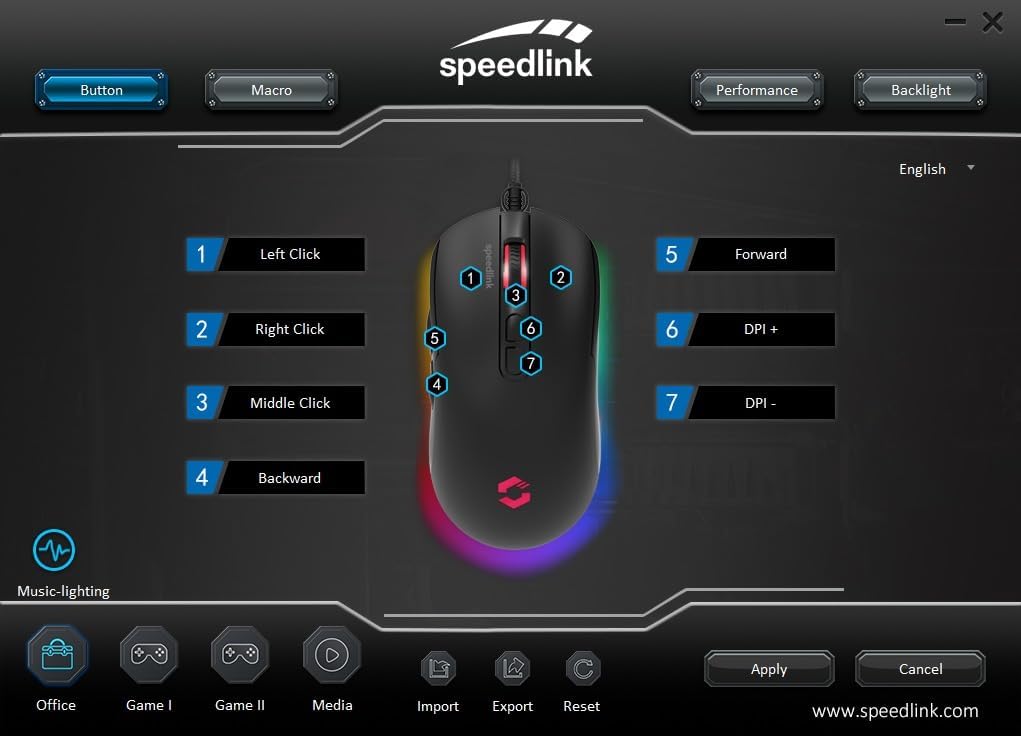
Image: Screenshot of the Speedlink software's 'Button' tab, illustrating the mapping of the mouse's 7 buttons.
4.3 RGB osvjetljenje
The TAUROX Gaming Mouse features multi-coloured RGB lighting that can be customized through the configuration software. You can select from various lighting effects, colors, and brightness levels to match your personal preference or gaming setup. Access the 'Backlight' section in the software to adjust these settings.

Image: Screenshot of the Speedlink software's 'Backlight' tab, showing options for customizing the mouse's RGB lighting effects.
5. Održavanje
To ensure the longevity and optimal performance of your TAUROX Gaming Mouse, follow these maintenance guidelines:
- čišćenje: Za čišćenje površine miša koristite meku, suhu krpu. Za tvrdokornu prljavštinu, laganoamp cloth can be used, but ensure no liquid enters the mouse. Avoid abrasive cleaners.
- Održavanje kablova: Avoid sharp bends, kinks, or excessive pulling on the cable. Store the cable neatly when not in use to prevent damage.
- Održavanje senzora: Optički senzor na donjoj strani miša održavajte čistim i bez prašine ili ostataka kako biste osigurali precizno praćenje.
6. Otkrivanje problema
If you encounter issues with your TAUROX Gaming Mouse, consider the following:
- Miš ne reaguje: Ensure the USB cable is securely connected to your computer. Try plugging the mouse into a different USB port.
- Netačno praćenje: Clean the optical sensor on the bottom of the mouse. Ensure you are using the mouse on a suitable surface (e.g., a mouse pad).
- Problemi sa softverom: If the configuration software is not functioning correctly, try reinstalling it. Ensure your operating system is up to date.
- Dugmad ne rade: Check the button assignments in the configuration software to ensure they are correctly configured.
- Rasvjeta ne radi: Verify the RGB lighting settings in the configuration software.
For persistent issues, refer to the support section on the Speedlink website.
7. Tehničke specifikacije
| Feature | Specifikacija |
|---|---|
| Dimenzije proizvoda | 4.92 x 2.48 x 0.04 inches (125x63x40 mm LxWxH) |
| Težina artikla | 5.7 ounces (135 grams with cable) |
| Broj modela | SL-680016-BK |
| Brand | Speedlink |
| Boja | Crna |
| Tehnologija povezivanja | USB-A (žični) |
| Posebne karakteristike | Programmable Buttons, Multi-coloured LED Lighting |
| Tehnologija detekcije pokreta | Optički |
| DPI rezolucija | Do 7,200 DPI (podesivo) |
| Dužina kabla | 1.8 metara |
| Proizvođač | Speedlink |
8. Safety Instructions and Compliance
8.1 Važna sigurnosna uputstva
Please note that the failure to observe these instructions can cause product damage, explosion, fire and/or electric shock!
- Koristite uređaje samo onako kako je navedeno u korisničkom priručniku. Nemojte ih otvarati niti popravljati.
- Ne izlažite uređaje tečnostima, toploti ili hladnoći.
- Nemojte koristiti uređaje u oglasuamp okruženje. Očistite uređaj suvom krpom.
- Držite uređaje i sve slobodne dijelove podalje od djece, kućnih ljubimaca i neovlaštenih osoba.
- Only use the devices with the appropriate provided accessories.
- Disconnect cables from the devices if they will not be used for a long time. When disconnecting by cables, don't pull on the cord but on the plug.
- Don't use the cables in any way other than mentioned in the user guide. Don't bend, cut, extend, knot or step on them.
- Don't insert any foreign objects into the openings of the device.
- Ako su uređaji na bilo koji način oštećeni ili se previše zagreju, odmah prestanite da ih koristite.
- Take caution when using devices that emit radio signals if you have a pacemaker or are dependent on other sensitive electronic aids.
Sigurnosne upute na drugim jezicima: www.speedlink.com
8.2 Warning Symbols and Markings
Extended use of input devices may cause health problems such as discomfort or pain. As such, take regular breaks and consult a doctor if problems persist.
8.3 FCC izjava
Ova oprema je testirana i utvrđeno je da je u skladu s ograničenjima za digitalne uređaje klase B, u skladu s dijelom 15 FCC pravila. Ova ograničenja su dizajnirana da pruže razumnu zaštitu od štetnih smetnji u stambenoj instalaciji. Ova oprema stvara, koristi i može emitovati radiofrekventnu energiju i, ako nije instalirana i korištena u skladu s uputama, može uzrokovati štetne smetnje radio komunikacijama. Međutim, ne postoji garancija da se smetnje neće pojaviti u određenoj instalaciji. Ako ova oprema uzrokuje štetne smetnje radio ili televizijskom prijemu, što se može utvrditi isključivanjem i uključivanjem opreme, korisnik se ohrabruje da pokuša ispraviti smetnje jednom ili više sljedećih mjera:
- Preusmjerite ili premjestite prijemnu antenu.
- Povećajte razmak između opreme i prijemnika.
- Povežite opremu na utičnicu u strujnom kolu različitom od onog na koji je priključen prijemnik.
- Za pomoć se obratite prodavaču ili iskusnom radio/TV tehničaru.
Ovaj uređaj je usklađen sa dijelom 15 FCC pravila. Rad je podložan sljedeća dva uslova: (1) Ovaj uređaj ne smije uzrokovati štetne smetnje i (2) ovaj uređaj mora prihvatiti sve primljene smetnje, uključujući smetnje koje mogu uzrokovati neželjeni rad.
Napomena: Modifications to this product will void the user's authority to operate this equipment.
8.4 Conformity Notice
UVOZNIK/PROIZVOĐAČ: Zocherl Media GmbH, Im Dorf 5, 29303 Hemslingen, GERMANY
Telefon: +49 4267 9341 0
DETALJI O PROIZVODU:
Tip br.: SL-680016-BK
Opis proizvoda: TAUROX Gaming Mouse, crni
PROIZVOD JE U SKLADU SA SLJEDEĆIM DIREKTIVAMA:
EMC: 2014/30/EU
RoHS: 2011/65/EU
For a full declaration of conformity, the latest user guide, FAQ or further information, please visit: www.speedlink.com
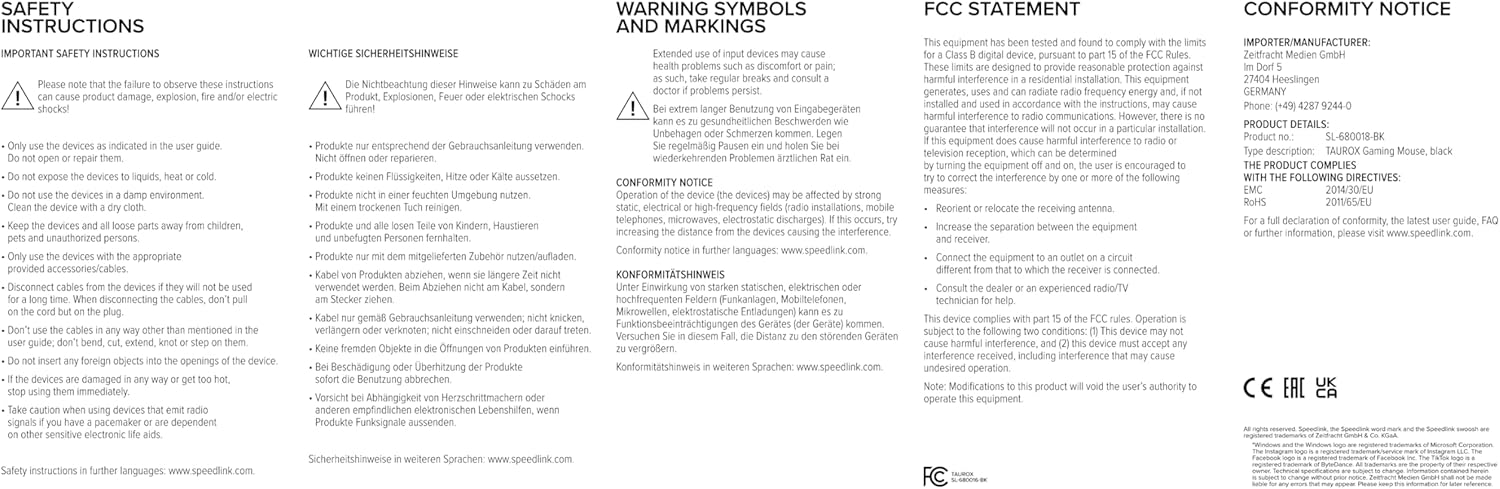
Image: Product packaging displaying various certifications and multilingual product names.
9. Garancija i podrška
For warranty information, technical support, frequently asked questions (FAQs), and the latest user guides, please visit the official Speedlink webstranica:


