1. Proizvod je gotovview
The Ovsuqu A3 UV DTF Printer is a versatile 2-in-1 printing machine designed for creating durable stickers and direct prints on various materials. It features dual XP 600 print heads for enhanced performance and includes an automatic film pressing function, eliminating the need for a separate laminator. This manual provides essential information for the safe and efficient operation of your printer.

Image 1.1: The Ovsuqu A3 UV DTF Printer, showing the main unit, ink bottles, and AB films.
Ključne karakteristike:
- 2-in-1 Printing: Combines automatic printing and film pressing in one machine, streamlining the UV DTF sticker production process.
- Dual XP 600 Print Head: Equipped with two XP 600 print heads for faster printing speed and brighter color output.
- White Ink Stirring System: Prevents ink sedimentation and nozzle clogging, ensuring consistent print quality and extending print head lifespan.
- Automatic Warning System: Alerts users when ink levels are low to prevent empty printing and potential damage.
- Raznovrsna kompatibilnost materijala: Capable of printing on a wide range of materials including plastic, glass, ceramics, paper, wood, leather, and metal.
- Fleksibilna primjena: Supports printing on flat, cylindrical, curved, rhombic, and other irregular shapes for diverse sticker applications.
2. Sadržaj paketa
Provjerite da li se u vašem paketu nalaze sve dolje navedene stavke. Ako neke stavke nedostaju ili su oštećene, obratite se korisničkoj podršci.

Slika 2.1: Vizuelni prikaz glavnih komponenti uključenih u paket.
- Ovsuqu A3 UV DTF Printer Unit
- Ink Bottles (CMYK+White+Varnish)
- AB Films (100M)
- RIIN Software
3. Vodič za postavljanje
Follow these steps to set up your Ovsuqu A3 UV DTF Printer for the first time.
3.1 Početna priprema
- Raspakivanje: Carefully remove the printer and all accessories from the packaging. Due to the large quantity of products, the package may be split into multiple deliveries.
- plasman: Place the printer on a stable, level surface in a well-ventilated area.
- Water Pump Setup: Locate the water pump reservoir. Remove it, add clean water up to the 'Highest' mark, and then securely reinsert it into its compartment.
- Protective Film Removal: Peel off any protective films from the printer's surfaces, especially from the print bed.
- Instalacija mastila: Carefully add the provided UV inks (Yellow, Black, Varnish, Magenta, Cyan, White) into their respective labeled reservoirs. Ensure the correct ink color is added to the corresponding tank.
Video 3.1: Demonstrates the initial setup process, including adding water to the pump and installing UV inks.
3.2 Instalacija softvera
Install the RIIN software on your computer (compatible with Windows PCs). Refer to the software's specific installation guide for detailed instructions.
4. Uputstvo za upotrebu
This section outlines the general steps for operating your UV DTF printer.
4.1 Basic Printing Workflow
- Priprema dizajna: Create or import your desired pattern using the RIIN software on your computer.
- Load Film: Load the AB film onto the printer's film feeding mechanism. Ensure it is correctly aligned.
- Započni štampanje: Send the print job from the software to the printer. The printer will automatically print the design onto the A film and then laminate it with the B film.
- Apply Sticker: Once printed and laminated, carefully peel the sticker from the film and apply it to your desired item.
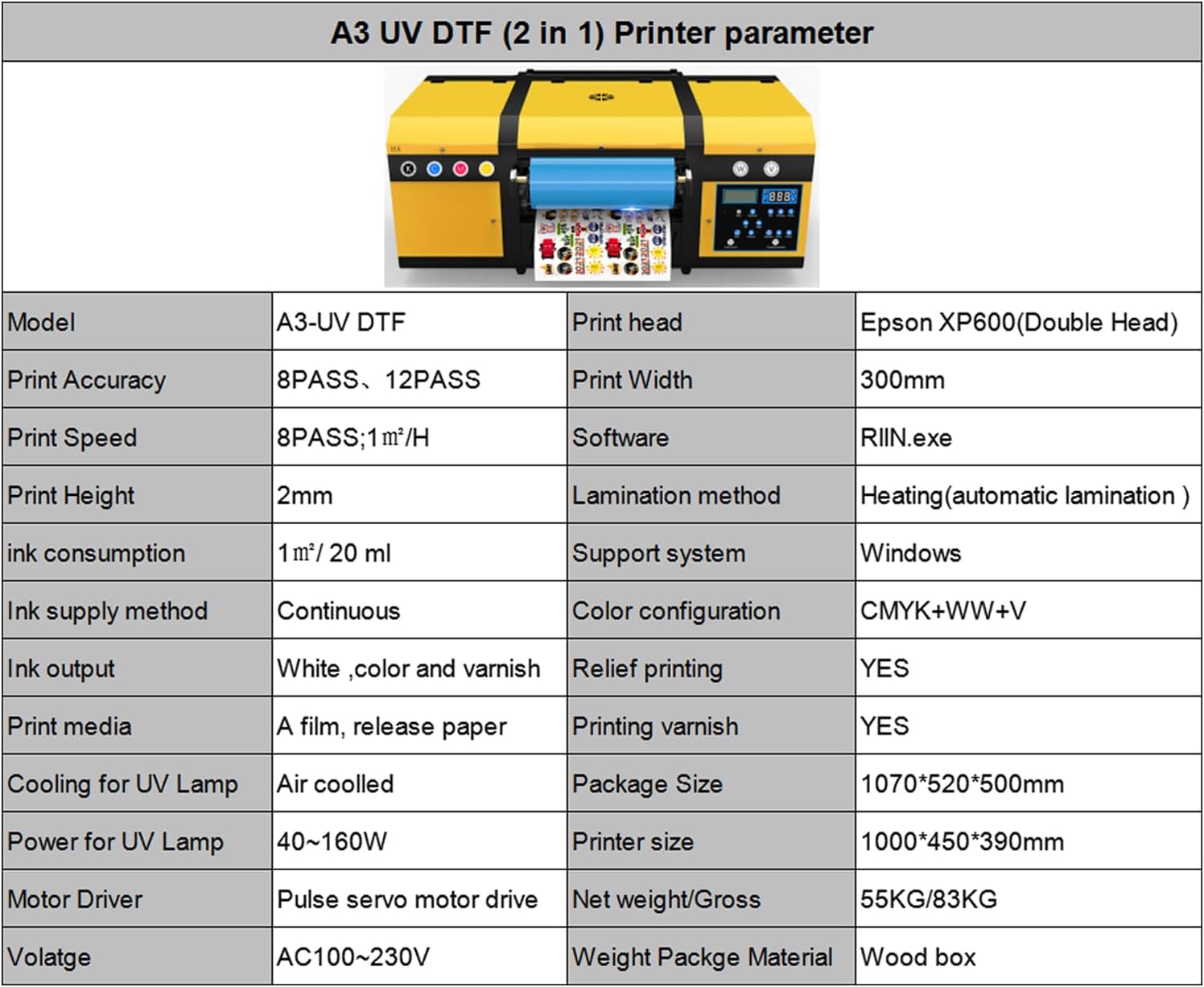
Image 4.1: Step-by-step visual guide for the UV DTF printing process.
4.2 Printing on Various Materials
The printer supports direct printing on a variety of materials and also produces UV DTF stickers for application on irregular surfaces.
- Sticker Printing: Produce high-quality, durable stickers for application on glass, wood, leather, plastic, and more.
- Embossed Effect Printing: Achieve tactile, raised effects on prints for a premium finish.
- Varnish Effect Printing: Apply a clear varnish layer for enhanced gloss and protection.
- Bottle Printing: Utilize the specialized rotary attachment for direct printing on cylindrical objects like bottles and mugs.
Video 4.2: Demonstration of printing on gold and ordinary AB films, showcasing different sticker types.
Video 4.3: Illustrates the process of achieving an embossed effect during UV printing.
Video 4.4: Shows the UV printer applying a varnish effect to a bottle.

Image 4.5: Various print samples demonstrating the printer's capabilities on different items.
5. Održavanje
Redovno održavanje osigurava dugotrajnost i optimalne performanse vašeg štampača.
5.1 White Ink Stirring System
The printer is equipped with an automatic white ink stirring system. This system operates periodically to prevent white ink pigments from settling, which can lead to clogs and print quality issues. Ensure this system is functioning correctly.

Image 5.1: Detail of the white ink stirring mechanism.
5.2 Generalno čišćenje
- Regularly clean the print head and surrounding areas with appropriate cleaning solutions to prevent ink buildup.
- Keep the printer's exterior free from dust and debris.
- Check and clean the UV lamps as per the manufacturer's recommendations to ensure proper curing.
6. Otkrivanje problema
Ovaj odjeljak se bavi uobičajenim problemima na koje možete naići pri radu s vašim pisačem.
- Loš kvalitet štampe: Check ink levels, perform a print head cleaning cycle, and ensure the print media is correctly loaded. Verify that the UV lamps funkcionišu.
- Štampač ne reaguje: Ensure the printer is powered on and correctly connected to the computer. Restart both the printer and the computer.
- Ink Clogging: Run a print head cleaning cycle. If the issue persists, perform a deeper cleaning or contact technical support. The white ink stirring system should prevent most clogs.
- Film Feed Issues: Ensure the AB film is loaded correctly and free from wrinkles or obstructions.
For more complex issues, refer to the detailed user manual provided with the machine or contact customer support for remote assistance.
7. Specifikacije
Detailed technical specifications for the Ovsuqu A3 UV DTF Printer.
| Feature | Specifikacija |
|---|---|
| Naziv modela | A3 UV DTF Printer |
| Brand | Ovsuqu |
| Proizvođač | ACHI |
| Tehnologija štampe | Inkjet |
| Izlaz štampača | Boja |
| Maksimalna rezolucija ispisa u boji | 600 dpi |
| Maksimalna rezolucija crno-belog štampe | 600 dpi |
| Maksimalna brzina ispisa (u boji) | 36 |
| Maksimalna brzina štampanja Monohrom | 36 |
| Podržane veličine medija | A3 (297x420 Millimeters) |
| Maksimalna veličina medija | Širina: 33 mm |
| Vrsta tinte za printer | UV Color Ink |
| Tehnologija povezivanja | USB |
| Hardversko sučelje | USB |
| Dimenzije proizvoda | 39.37"D x 17.7"Š x 15.35"H |
| Težina artikla | 182.6 funte |
| Power for UV Lamp | 40-160W |
| Voltage | AC100-230V |
8. Garancija i podrška
Your Ovsuqu A3 UV DTF Printer comes with a 2-year warranty. Please note that damaged ink contact parts are not covered under warranty.
8.1 Korisnička podrška
Ovsuqu provides professional after-sales support. If you encounter any issues or have questions, you can contact us for consultation, exchange, or refund. We offer comprehensive installation videos, detailed user manuals, accessory warranties, and lifetime remote assistance.
For assistance, please refer to the contact information provided with your product documentation or visit the Ovsuqu Store on Amazon.


