1. Uvod
Welcome to the user manual for your Hoppstar Expert Digital Camera. This manual provides essential information on how to set up, operate, and maintain your camera, ensuring a fun and creative experience for young photographers. Please read this manual carefully before using the camera and keep it for future reference.
The Hoppstar Expert is designed specifically for children, offering a user-friendly interface, durable construction with interchangeable silicone covers, and a range of exciting features including a selfie camera, video recording, picture frames, photo filters, and face detection.
2. Sigurnosne informacije
- This product is intended for children aged 3 years and older. Adult supervision is recommended during use.
- Ne izlažite kameru vodi ili prekomjernoj vlazi.
- Avoid dropping the camera or subjecting it to strong impacts, even with the protective silicone cover.
- Keep small parts, such as memory cards, out of reach of very young children to prevent choking hazards.
- Use only the charging cable provided or a compatible USB charger.
- Do not attempt to disassemble or repair the camera yourself. Contact customer support if issues arise.
3. Sadržaj paketa
Molimo označite kućicu za sljedeće stavke:
- Hoppstar Expert Digital Camera
- Uputstvo za upotrebu
- USB kabl za punjenje
- Lanyard/Strap
- USB-C na USB-A adapter
- USB-C to Micro-USB Adapter
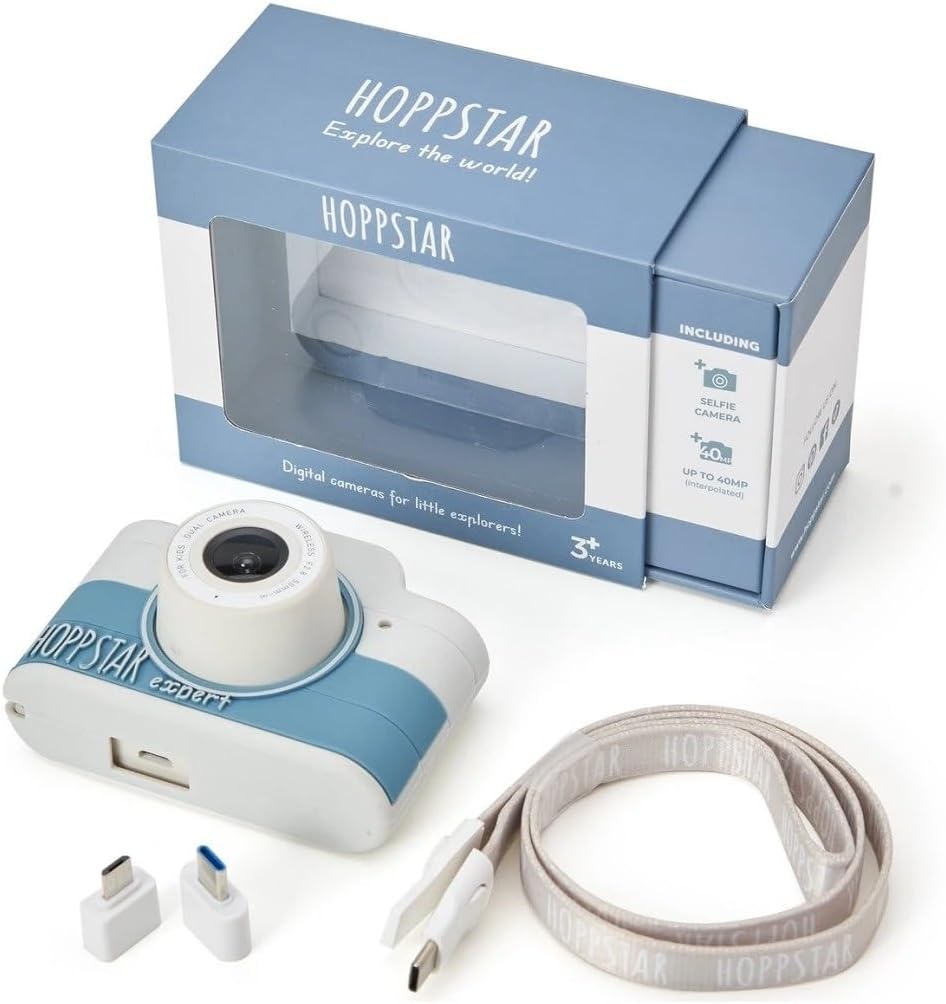
Image: Hoppstar Expert camera shown with its retail packaging, USB charging cable, lanyard, and two USB adapters.
4. Proizvod je gotovview
Front View

Image: The front of the Hoppstar Expert camera, featuring the main lens, flash, and the 'Hoppstar Expert' branding on the blue and white body.
- Glavni objektiv: For taking standard photos and videos.
- Flash/Light: Obezbjeđuje osvjetljenje u uslovima slabog osvjetljenja.
- mikrofon: Snima zvuk tokom snimanja videa.
Pozadi View

Image: The back of the Hoppstar Expert camera, displaying the LCD screen and the control buttons on either side.
- LCD ekran: Displays menus, live view, i reprodukcija.
- Selfi kamera: Located above the screen for self-portraits.
- Kontrolna dugmad: Navigation, OK, Menu, and other function buttons.
5. Podešavanje
5.1 Punjenje kamere
Before first use, fully charge the camera's internal battery. Connect the provided USB charging cable to the camera's USB port and to a USB power source (e.g., computer, wall adapter). The charging indicator light will show the charging status and turn off when fully charged.
5.2 Umetanje memorijske kartice
The Hoppstar Expert comes with 16 GB of internal storage. If you wish to expand storage, locate the memory card slot (usually on the side or bottom) and insert a compatible microSD card (not included) until it clicks into place. Ensure the camera is powered off before inserting or removing the card.
5.3 Uključivanje/isključivanje
Pritisnite i držite dugme za napajanje (obično se nalazi na vrhu ili sa strane) nekoliko sekundi da biste uključili ili isključili kameru.
6. Uputstvo za upotrebu
6.1 Osnovne kontrole
- Dugme OK: Confirms selections in menus, takes photos, or starts/stops video recording.
- Navigacijski gumbi: Used to move through menu options (Up, Down, Left, Right).
- Dugme menija: Accesses the camera's settings and feature options.
- Dugme za način rada: Prebacuje se između načina rada za fotografije, videozapise i reprodukciju.
6.2 Fotografisanje
In photo mode, frame your shot using the LCD screen. Press the OK button to capture a photo. The camera supports both front and selfie cameras. To switch between cameras, navigate to the camera settings in the menu or use a dedicated button if available.
6.3 Snimanje video zapisa
Switch to video mode. Press the OK button once to start recording and press it again to stop. Videos are saved to the internal memory or inserted memory card.
6.4 Using Creative Features
The Hoppstar Expert includes several creative features:
- Picture Frames: Apply fun borders to your photos. Access this feature through the camera's menu.
- Photo Filters: Change the look and feel of your photos with various color and effect filters.
- Prepoznavanje lica: The camera can automatically detect faces in the frame, assisting with focus.
Explore these options within the camera's menu settings to enhance your photos and videos.
7. Održavanje
- čišćenje: Use a soft, dry cloth to clean the camera body and screen. For the lens, use a specialized lens cleaning cloth. Do not use liquid cleaners.
- Silikonski omotač: The interchangeable silicone cover can be removed and cleaned with mild soap and water if necessary. Ensure it is completely dry before reattaching.
- Održavanje baterije: To prolong battery life, avoid fully discharging the battery frequently. Charge the camera regularly, even if not in use for extended periods.
- Skladištenje: Čuvajte kameru na hladnom i suhom mjestu, dalje od direktne sunčeve svjetlosti i ekstremnih temperatura.
8. Otkrivanje problema
Kamera se ne uključuje
- Provjerite je li baterija napunjena. Spojite kameru na izvor napajanja i pokušajte ponovo.
- Pritisnite i držite dugme za napajanje duže vrijeme (5-10 sekundi).
Loš kvalitet slike/videa
- Provjerite da li je objektiv čist i bez mrlja ili prašine.
- Check lighting conditions. Optimal results are achieved in well-lit environments.
- Ensure the camera is held steady during capture.
Camera Freezes/Unresponsive
- Try resetting the camera by pressing the reset button (if available, often a small pinhole) or by holding the Power button until it turns off and then restarting.
Cannot Save Photos/Videos
- Check if the internal memory or inserted memory card is full. Delete unnecessary files or insert a new card.
- Ensure the memory card is properly inserted and not corrupted.
If you encounter issues not listed here or if troubleshooting steps do not resolve the problem, please contact Hoppstar customer support.
9. Specifikacije
| Feature | Specifikacija |
|---|---|
| Brand Name | Hoppstar |
| Naziv modela | Hoppstar Expert Yale |
| Broj modela | 76893 |
| Boja | Yale |
| Dimenzije paketa | 14.3 x 8.7 x 5.1 cm |
| Brzina kontinuiranog snimanja | 30 fps |
| Ugrađene komponente | Camera + Instruction Manual |
| Model Year | 2023 |
| Boja filma | Boja |
| Vrsta kontrole ekspozicije | Automatski |
| Shutter Type | Electronic |
10. Garancija i podrška
The Hoppstar Expert Digital Camera comes with a standard manufacturer's warranty. Please refer to the warranty information provided with your purchase or visit the official Hoppstar webstranicu za detalje o uslovima i odredbama garancije.
For technical support, product inquiries, or warranty claims, please contact Hoppstar customer service through their official webweb-mjesto ili kontakt informacije navedene u dokumentaciji o kupovini.


