Uvod
The FLAMMA FX150B is a versatile multi-effects processor designed for electric guitarists, offering a wide range of features including amp modeling, cabinet simulation, and various effects. This battery-powered unit provides flexibility for practice, recording, and live performance. It features a touchscreen interface for intuitive control and extensive customization options.
The FX150B supports 1024-point impulse response files for detailed amp emulations and includes 30 high-quality preinstalled cabinet simulations. With 160 unique preloaded effects and 180 editable user effects slots, guitarists have extensive control over their sound. Additional features include a looper with up to 52 seconds of recording time, 80 drum machine variations, and 10 metronome options.
Šta je u kutiji
- Adapter za napajanje
- USB kabel
- Kratki vodič
Ključne karakteristike
- Amp Simulations: Supports 1024-point impulse response files for flexible and detailed amp emulacije.
- 30 High-Quality Cabinet Simulations: Preinstalled cab emulations, replaceable with edited versions or 3rd-party IR files via FX150 editing software and touchscreen.
- Drum & Looper: Features 80 drum machine and 10 metronome variations. Looping functionality up to 52 seconds.
- Na baterije: Built-in 3000mA battery provides approximately 5.5 hours of use on a full charge.
- 160 Unique Preloaded Effects: A wide range of effects including modulation, delay, tonal presets, preamps, i amp simulation models.
- 180 Editable User Effects Slots: Full control over effects and amp simulators, allowing modification and overwriting of presets using the FX150 editor software.
- Touchscreen: High-quality touchscreen for easy navigation and control of features.
Postavljanje i veze
Before powering on your FLAMMA FX150B, ensure all connections are made correctly. The unit can be powered via the included power adapter or its internal battery.
Priključci na stražnjoj ploči
The rear panel of the FX150B provides various input and output options for versatile integration into your setup.
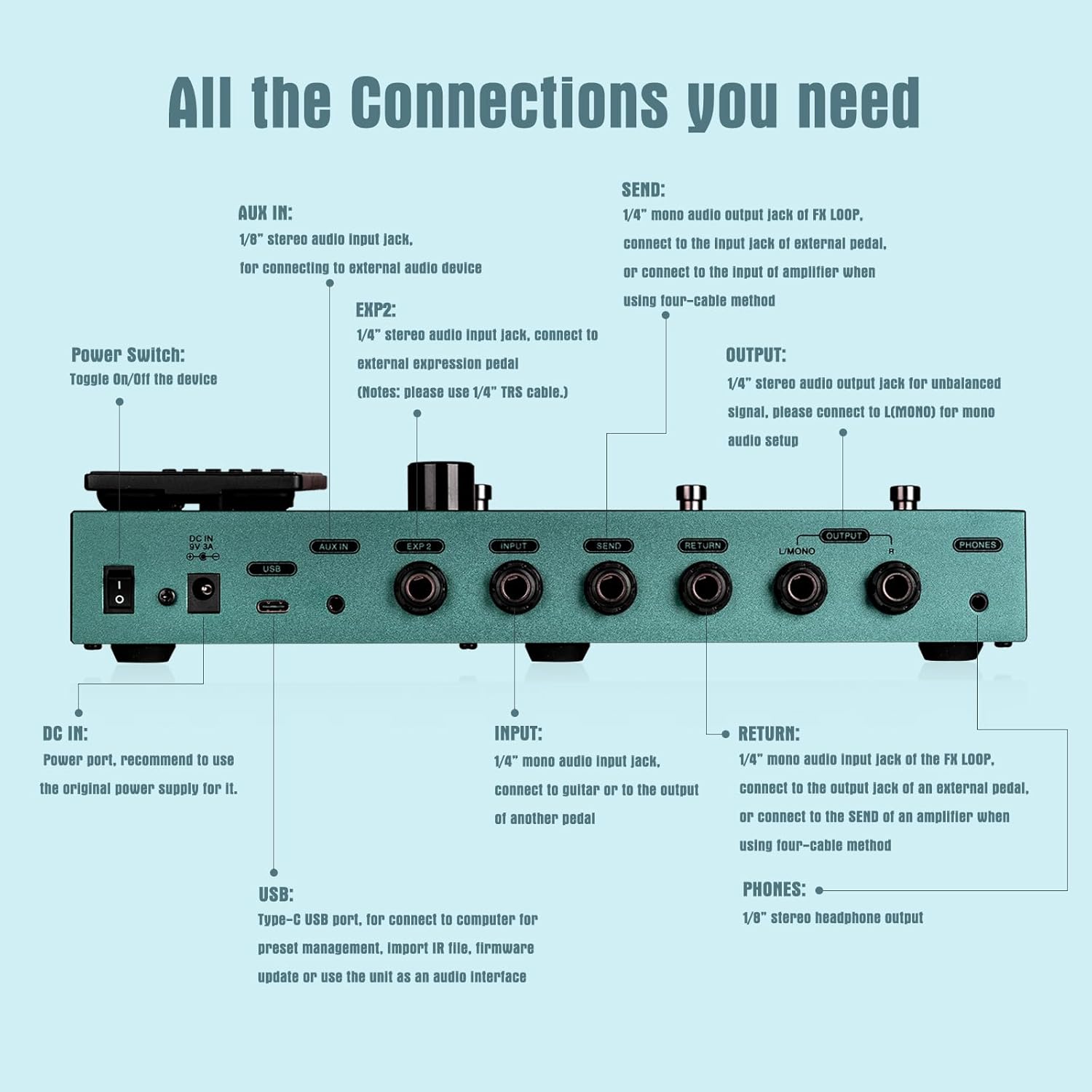
Image: Rear panel of the FLAMMA FX150B showing all input and output jacks.
- Prekidač: Uključuje/isključuje uređaj.
- DC IN: Power port (9V 500mA). Use the original power supply for optimal performance.
- USB: Type-C USB port for computer connection, preset management, IR file import, firmware updates, and using the unit as an audio interface.
- AUX IN: 1/8" stereo audio input jack for connecting external audio devices like phones or music players.
- EXP2: 1/4" stereo audio input jack for connecting an external expression pedal (use 1/4" TRS cable).
- ULAZ: 1/4" mono audio input jack for connecting your guitar.
- POŠALJITE/POVRATITE: 1/4" mono audio input/output jacks for the FX Loop. Connect to an external pedal or use the four-cable method with an amppetlja efekata života.
- IZLAZ (L/MONO, R): 1/4" stereo audio output jacks for unbalanced signal. Connect to L(MONO) for mono audio setups.
- TELEFONI: 1/8" stereo headphone output.
Povezivanje na Amplifiers and PA Systems
When connecting the FX150B, consider the destination device:
- To the front of a guitar ampdizalica: It is almost always recommended to turn off cabinet emulations on the FX150B to avoid double-coloring the sound.
- To a full-range device (headphones, interface, PA system): It is almost always recommended to keep cabinet emulations turned on for optimal sound.
Operating the FX150B
Main Screen and Navigation
Upon powering on, the main screen displays the preset name, preset location (e.g., Bank 04, Preset A), input/output meters, DSP usage, and expression pedal indicators. The effect chain is shown at the bottom, indicating the order of effects and which are active.

Image: The main display screen of the FLAMMA FX150B showing preset information and effect chain.
- Glavno dugme: Controls the overall master volume of the pedal.
- Dugme za vrijednost: Used to scroll through presets in standard bank mode or adjust parameters when editing effects.
- Footswitches (A, B, C): Navigate through presets A, B, and C within a bank.
- Bank Navigation: Hold footswitches A and B together to go down a bank, and B and C together to go up a bank.
- Način kontrole: Pressing the currently selected preset footswitch again engages control mode, allowing you to bypass or engage effect blocks in the chain, effectively creating a second preset.
- Tap Tempo: Hold down the current preset footswitch to access tap tempo.
Built-in Tuner and Looper/Drum Machine
- tjuner: Hold footswitches A and B together to access the onboard tuner.
- Looper & Drum Machine: Hold footswitches B and C together to access both the looper and drum machine functions. The looper offers up to 52 seconds of recording, and the drum machine has 80 drum grooves and 10 rhythm types.
Pedala za izražavanje
The integrated expression pedal can be used for volume control or to manipulate effect parameters. An LED indicator next to the pedal shows its current mode:
- LED isključen: Volume control mode.
- LED Lit: Expression parameter control mode (e.g., wah, delay mix).

Image: The FLAMMA FX150B supports both its internal expression pedal and an external pedal via the EXP2 input.
Editing Presets
To customize your sound, you can edit existing presets or create new ones.

Image: The touchscreen interface showing the editable effects chain for a preset.
- Access Edit Menu: Tap anywhere on the main screen to enter the editing menu. This displays your effects chain and individual effect blocks.
- Rearrange Effect Blocks: Effect blocks can be freely moved around the signal path to create custom routing.
- Modify a Block: Click on an effect block to bring up its parameters. You can adjust parameters using the touchscreen sliders or by selecting a parameter and using the Value knob for finer control.
- Spremi unaprijed postavljeno: After editing, click the save button (usually an icon in the top right). You can rename the preset using the on-screen keyboard. Press OK to save. Unsaved changes will be lost.
Brza podešavanja
The Quick Settings menu provides access to global parameters that affect the entire unit.
- Ulazni nivo: Adjusts the overall input level for the pedal. This is useful for matching different guitar pickup outputs (e.g., attenuating active pickups or boosting low-output pickups).
- Cab Sync: When enabled, the cabinet simulation will automatically change to correspond with the selected amplifier type. When disabled, cabs can be controlled independently.
- Global Cab On/Off: Allows you to globally enable or disable cabinet simulations for both left and right outputs. This is crucial when connecting to a guitar cabinet (turn off) versus a full-range system (turn on).
- Odaberite jezik: Odaberite željeni jezik za interfejs.
Expression & Footswitch Editing
Customize the behavior of the footswitches and expression pedal to suit your playing style.
- Pristupni meni: Tap the menu icon (usually in the top right) to access settings for footswitches and system parameters.
- Footswitch Control Mode: Select which effect blocks are bypassed or engaged when entering control mode (by pressing the current preset footswitch). You can also set footswitches to 'Off' if you don't want them to activate any extended functions.
- Expression Pedal Settings: Access the pedal menu to configure both the internal (Pedal 1) and external (Pedal 2) expression pedals.
- Volume Parameters: Adjust the minimum and maximum volume values when the expression pedal is in volume control mode.
- Expression Parameters: Select any number of effect parameters (e.g., delay mix, wah position) to be controlled by the expression pedal when it's engaged. You can set the minimum and maximum values for these parameters.
Sistemski meni
The System menu provides access to global settings for the FX150B.
- Svjetlina: Podesite svjetlinu ekrana.
- Global EQ: Access a global equalizer with controls for low frequency, middle frequency, high frequency, and corresponding gain levels. This also includes global high-cut and low-cut filters.
- Delay/Reverb Spill-Over: Configure whether delay and reverb trails continue after switching presets.
- Looper Position: Set the looper to pre or post effects chain.
- USB audio: Configure USB audio settings.
- Left/Right Output: Adjust output settings for left and right channels (e.g., dry/effects mix).
- Record/Play Volume: Adjust recording and playback volumes for the looper.
Specifikacije
- Težina artikla: 4.8 funti (2.18 kilograma)
- Dimenzije proizvoda: 10.7 x 5.9 x 2.2 inča
- Broj modela stavke: FX150
- baterije: 1 Lithium Polymer battery required (3000mA, approx. 5.5 hours battery life)
- Materijal kućišta: Metal
- Boja: FX150 Battery (Green/Teal)
- Tip konektora: USB TYPE-C, 1/4" unbalanced mono, 1/8" unbalanced stereo, 1/8" stereo
- Hardverski interfejs: USB
- Format signala: Digital
- Podržani softver: FX150 Software
- Nivo znanja: Sve
- Izvor napajanja: Battery Powered
- Voltage: 9 Volts
- Stil: Delay, Looper, Modulation, Multi Effects
Video snimci proizvoda
FLAMMA FX150 Battery Powered Multi Effects Pedal
Video: Prekorview of the FLAMMA FX150 Battery Powered Multi Effects Pedal, highlighting its features and portability.
FLAMMA FX150B Battery-Powered Guitar Multifx-By Perfecto De Castro
Video: Perfecto De Castro demonstrates the capabilities and sound of the FLAMMA FX150B Battery-Powered Guitar Multi-effects processor.
FLAMMA FX150 Battery Powered Multi Effects Processor Demo-By Mike Hermans
Video: Mike Hermans provides a demonstration of the FLAMMA FX150 Battery Powered Multi Effects Processor, showcasing različitih tonova i karakteristika.
FLAMMA FX150 Multi Effects Processor Amp Modelling Cabinet Simulation
Video: A tutorial video on the FLAMMA FX150, covering hardware, controls, connections, editing presets, quick settings, and expression pedal functions.


