Uvod
The Inrico S300 is a robust Push-to-Talk Over Cellular (PoC) radio designed for reliable communication across 3G, 4G, and LTE networks. It features an IP54 waterproof rating, an Android operating system, and a portable handheld design, making it suitable for various professional environments. This manual provides essential information for the proper setup, operation, and maintenance of your S300 device.
Product Overview
Ključne karakteristike
- Nationwide coverage via cell towers for video, voice, and message communication.
- 3.1-inch touchscreen display with built-in antenna.
- One-Click SOS function for emergency situations.
- Dual cameras: 5MP front and 13MP rear with 170-degree wide-angle lens.
- Android operating system with 4G LTE, Wi-Fi, Bluetooth, and NFC connectivity.
- Integrated GPS, AGPS, and BDS for navigation.
- Baterija od 4600 mAh za produženi rad.
- Compact dimensions: 156.8 x 75.7 x 16mm.
- IP67 rated for waterproof and dust-proof performance, tested for 1.2-meter drops.
Komponente uređaja

Front view of the Inrico S300, displaying the user interface with group communication options.

Bočno i prednje views illustrating the Power button, PTT button, programmable keys (F1, F2), SIM card slot, and USB port.

Top view showing the headphone jack and SOS button. Bottom view showing charging contacts.
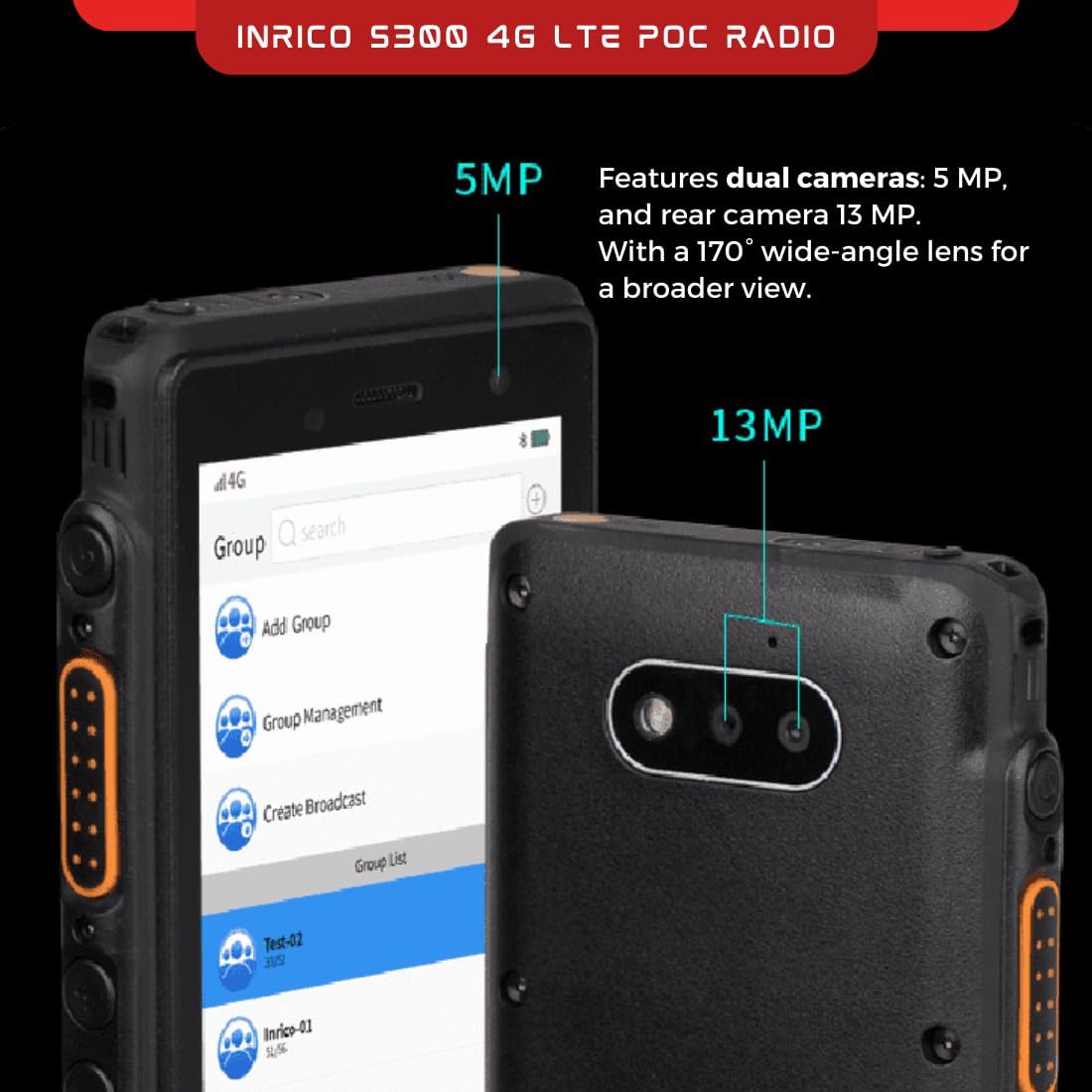
Detail of the 5MP front camera and 13MP rear camera, highlighting their positions on the device.
Setup
Šta je u kutiji
- Inrico S300 PoC radio
- Uputstvo za upotrebu
- Baterija
- Lanyard
Početni koraci podešavanja
- Instalirajte SIM karticu: Locate the SIM card slot on the side of the device. Insert your activated 3G/4G LTE SIM card into the designated slot. Ensure it is correctly oriented.
- Instalirajte bateriju: Open the battery compartment cover on the rear of the device. Insert the provided Lithium Polymer battery, ensuring the contacts align. Close the cover securely.
- Uređaj za punjenje: Connect the device to a power source using the appropriate charging cable. Allow the device to fully charge before first use. The charging indicator will show the charging status.
- Uključeno: Press and hold the Power button (located on the side) until the Inrico logo appears on the screen.
- Početna konfiguracija: Follow the on-screen prompts to complete the initial Android setup, including language selection, Wi-Fi connection (if desired), and Google account setup (optional).
Uputstvo za upotrebu
Rad pritisni za razgovor (PTT)
The Inrico S300 functions primarily as a Push-to-Talk (PTT) device over cellular networks. Communication is managed through dedicated PoC applications.
- Access PoC Application: From the home screen, tap on the installed PoC application (e.g., Inrico App, Zello).
- Select Group/Contact: Within the application, navigate to the desired group or individual contact you wish to communicate with.
- Initiate Talk: Press and hold the dedicated PTT button on the side of the device. Speak clearly into the microphone. Release the PTT button when you have finished speaking to listen for a response.
- Primi komunikaciju: When another user is transmitting, the device will automatically play their audio.
SOS funkcija
The S300 includes a dedicated SOS button for emergency situations.
- Aktivirajte SOS: Press and hold the orange SOS button (located on the top of the device) for a few seconds.
- Hitno upozorenje: This action will trigger a pre-configured emergency alert, which may include sending your location, an audio message, or initiating a call to designated contacts or a dispatch center, depending on the PoC application's settings.
Upotreba kamere
The device is equipped with front (5MP) and rear (13MP) cameras for capturing images and videos.
- Pristup kameri: Open the camera application from the app drawer.
- Mediji za snimanje: Koristite kontrole na ekranu za prebacivanje između prednje i zadnje kamere, snimanje fotografija ili videa.
Programmable Keys (F1, F2)
The F1 and F2 keys on the side of the device can be customized through the Inrico App or other compatible PoC applications to perform specific functions, such as quick access to contacts, groups, or other features.
Održavanje
Čišćenje
- Koristite meku, damp krpom za čišćenje spoljašnjosti uređaja.
- Ne koristite jake hemikalije, rastvarače ili abrazivna sredstva za čišćenje.
- Ensure all port covers are securely closed before cleaning, especially if using a damp cloth, to maintain IP67 rating.
Battery Care
- Charge the battery regularly, avoiding complete discharge when possible.
- Ne izlažite bateriju ekstremnim temperaturama.
- Ako uređaj nećete koristiti duži period, čuvajte ga sa djelomično napunjenom baterijom (oko 50%) na hladnom i suhom mjestu.
Otpornost na vodu i prašinu (IP67)
The Inrico S300 is IP67 rated, meaning it is protected from dust ingress and can withstand immersion in water up to 1 meter for 30 minutes. To maintain this rating:
- Ensure all port covers (USB, headphone jack) and the battery compartment cover are firmly sealed before exposing the device to water or dusty environments.
- Do not intentionally submerge the device beyond the specified depth or duration.
- If the device gets wet, dry it thoroughly before opening any covers or charging.

The Inrico S300 demonstrating its IP67 water and dust resistance, suitable for harsh environments.
Rješavanje problema
| Problem | Mogući uzrok | Rješenje |
|---|---|---|
| Uređaj se ne uključuje. | Low battery; Battery not installed correctly; Software issue. | Charge the device for at least 30 minutes. Ensure battery is properly seated. Perform a forced restart (refer to device support for specific key combinations). |
| Nema mrežnog signala. | Out of network coverage; SIM card issue; Network settings. | Move to an area with better cellular coverage. Check if the SIM card is properly inserted and activated. Verify APN settings in Android network settings. |
| Cannot transmit/receive PTT. | No network connection; PoC application not running; Incorrect group selected; Microphone/speaker issue. | Ensure device has active cellular data. Open and log into the PoC application. Confirm the correct group or contact is selected. Check microphone and speaker for obstructions. |
| Ekran osjetljiv na dodir ne reagira. | Privremeni softverski kvar; oštećenje ekrana. | Ponovo pokrenite uređaj. Ako problem i dalje postoji, obratite se korisničkoj podršci. |
Specifikacije
| Feature | Detalj |
|---|---|
| Broj modela | S300 |
| Kompatibilnost mreže | 2G/3G/4G/WLAN |
| Operativni sistem | Android |
| Display | 5.0-inch intelligent touch display |
| Prednja kamera | 5MP |
| Zadnja kamera | 13MP |
| Otpornost na vodu | IP67 (Vodootporan i otporan na prašinu) |
| Otpor na pad | 1.2 Meters (MIL-STD 810G) |
| Kapacitet baterije | 4600mAh litijum -polimer |
| Dimenzije (D x Š x V) | 156.8 x 75.7 x 16mm (0.63 x 2.98 x 0.63 inča) |
| Težina | 1.1 funte |
| Navigacija | GPS, AGPS, BDS |
| Povezivanje | Wi-Fi, Bluetooth, NFC |
Scenariji aplikacija
The Inrico S300 PoC radio is versatile and suitable for a wide range of professional applications requiring reliable and wide-area communication.

Examples of environments where the Inrico S300 can be effectively utilized, such as transportation, retail, public safety, and outdoor activities.
- prijevoz: Ideal for logistics, fleet management, and delivery services, enabling real-time communication across large areas.
- maloprodaja: Enhances coordination among staff in large stores or multiple locations.
- Public Safety: Supports communication for security personnel, event management, and emergency response teams.
- Construction & Industrial: Durable design suitable for rugged environments, facilitating communication on job sites.
- Leisure & Outdoor Activities: Provides reliable communication for groups engaged in hiking, cycling, or other outdoor pursuits where cellular coverage is available.
Garancija i podrška
Garancija proizvođača
The Inrico S300 comes with a 1-godišnja garancija proizvođačaOva garancija pokriva nedostatke u materijalu i izradi pri normalnoj upotrebi. Molimo sačuvajte dokaz o kupovini za potrebe reklamacije.
Korisnička podrška
For technical assistance, troubleshooting beyond this manual, or warranty inquiries, please contact Inrico customer support through their official webweb-mjesto ili kontakt informacije navedene u dokumentaciji o kupovini.


