Uvod
Thank you for choosing the Agunto AGU-OC1 Outdoor Security Camera. This manual provides detailed instructions for setting up, operating, and maintaining your camera to ensure optimal performance and security for your property. The AGU-OC1 is designed for outdoor surveillance, featuring 1080p video resolution, advanced night vision, motion and sound detection, and seamless integration with smart home systems like Google Assistant.

Slika 1: Prednja strana view of the Agunto AGU-OC1 Outdoor Security Camera.
Sigurnosne informacije
- Ensure the camera is installed in a location where it is protected from direct tampering.
- Use only the provided USB-C cable and power adapter.
- Ne izlažite kameru ekstremnim temperaturama izvan njenog radnog raspona.
- Izbjegavajte postavljanje kamere u blizinu jakih elektromagnetnih polja.
- Isključite napajanje prije čišćenja ili izvođenja radova na održavanju.
Sadržaj paketa
Molimo Vas da provjerite paket za sljedeće stavke:
- Agunto AGU-OC1 Outdoor Security Camera
- USB-C Power Cable (3 meters)
- Vijci za montažu i zidni tiplovi
- Korisnički priručnik (ovaj dokument)
Setup
1. Montaža kamere
The Agunto AGU-OC1 is designed for wall mounting. Choose a location that provides the desired viewing angle and is within reach of a power outlet.
- Mark the drilling points on the wall using the camera's mounting base as a template.
- Drill holes at the marked points. Insert the wall plugs if necessary.
- Secure the mounting base to the wall using the provided screws.
- Attach the camera to the mounted base and adjust the angle as needed. The camera features a 180-degree rotatable function for optimal positioning.

Slika 2: Pod uglom view of the Agunto AGU-OC1, showing its mounting bracket.

Figure 3: The camera installed outdoors, demonstrating its weather resistance.
2. Priključak za napajanje
Connect the provided 3-meter USB-C cable to the camera's USB-C port and plug the other end into a suitable power adapter (not always included, but implied by "Elektrisch met snoer" and "USB-C").

Figure 4: USB-C power connection for the Agunto AGU-OC1 camera.
3. Instalacija i uparivanje aplikacije
Za kontrolu i view your camera, you will need to install the dedicated Agunto app on your smartphone or tablet. The app is available for both iOS and Android devices.
- Download the "Agunto Smart" app from the App Store (iOS) or Google Play Store (Android).
- Otvorite aplikaciju i kreirajte novi račun ili se prijavite ako ga već imate.
- Follow the in-app instructions to add your new AGU-OC1 camera. This typically involves scanning a QR code on the camera or entering a device ID.
- Ensure your smartphone is connected to a 2.4GHz Wi-Fi network during the pairing process, as the camera uses Wi-Fi connectivity.
Upravljanje kamerom
Uživo View i Snimanje
Once paired, you can access the live video feed from your camera through the Agunto Smart app. From the live view ekranu, možete:
- View u realnom vremenu footage.
- Manually record video clips or capture screenshots.
- Access recorded events stored on a microSD card (if installed) or cloud storage (if subscribed).
Night Vision
The AGU-OC1 features advanced night vision capabilities, providing clear images even in low-light conditions. It supports color night vision for enhanced detail up to 10 meters.
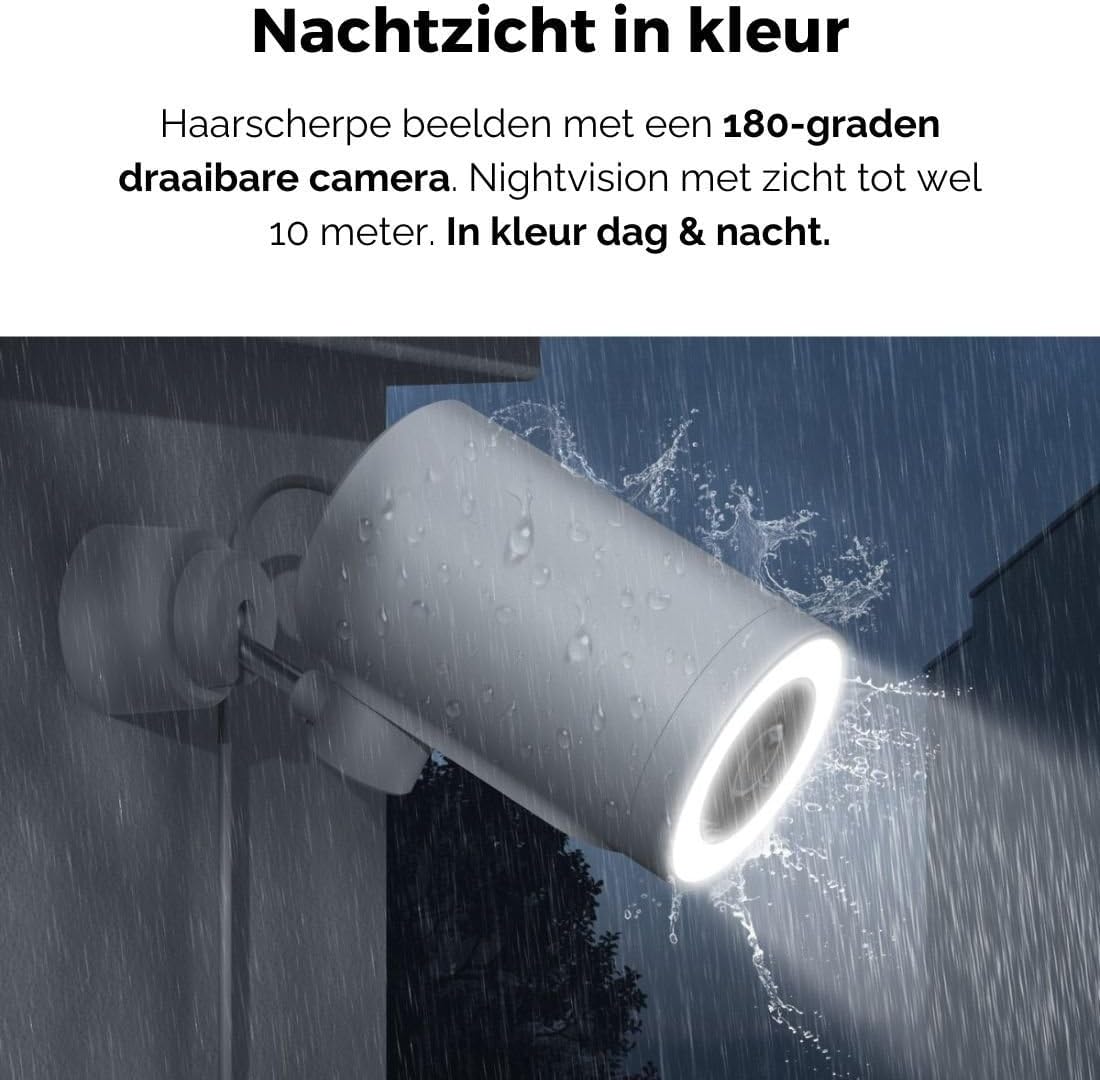
Figure 5: The camera's color night vision in action, providing clear images in the dark.
Detekcija pokreta i zvuka
The camera is equipped with intelligent motion and sound detection. When activity is detected, you will receive instant notifications on your smartphone or tablet, allowing you to monitor your property effectively.
You can customize detection zones and sensitivity settings within the app to minimize false alarms.
Integracija Google asistenta
The Agunto AGU-OC1 seamlessly integrates with Google Assistant. You can link your camera to Google Home and stream live footage to compatible devices such as Google Nest Hub or Chromecast-enabled displays by voice command.
Exampnaredba: "Hey Google, show me the backyard camera."
Održavanje
- čišćenje: Pažljivo obrišite objektiv i kućište kamere mekom, suhom krpom. Ne koristite jake hemikalije ili abrazivna sredstva za čišćenje.
- Ažuriranja softvera: Regularly check the Agunto Smart app for firmware updates. Keeping your camera's software up-to-date ensures optimal performance, security, and access to new features.
- Inspekcija kablova: Periodically inspect the USB-C cable for any signs of wear or damage, especially if exposed to outdoor elements.
Rješavanje problema
| Problem | Moguće rješenje |
|---|---|
| Kamera se ne uključuje. | Check the USB-C cable connection and ensure the power adapter is plugged into a working outlet. Try a different outlet or adapter if available. |
| Nije moguće povezati se na Wi-Fi. | Ensure your Wi-Fi network is 2.4GHz. Check Wi-Fi signal strength at the camera's location. Restart your router and the camera. Re-attempt pairing through the app. |
| Loš kvalitet videa. | Clean the camera lens. Ensure adequate lighting. Check your internet connection speed. |
| Detekcija pokreta ne radi. | Verify motion detection is enabled in the app settings. Adjust sensitivity and detection zones. Ensure there are no obstructions blocking the camera's view. |
| Obavještenja nisu primljena. | Check app notification settings on your phone. Ensure the app has permission to send notifications. Verify your phone has an active internet connection. |
Specifikacije
| Feature | Detalj |
|---|---|
| Broj modela | AGU-OC1 |
| Efektivna video rezolucija | 1080 piksela |
| Materijal | Plastika |
| Wattage | 4 vati |
| Dimenzije artikla (D x Š x V) | 10 x 4.4 x 7.3 centimetara |
| Težina artikla | 78 grama |
| Tehnologija povezivanja | Wireless, Wired (USB-C) |
| Posebne karakteristike | Night Vision (Color), Motion Detection, Sound Detection, 180-degree rotatable |
| Usage Environment | Na otvorenom |
| Kompatibilni uređaji | Smartphone (via Agunto Smart app), Google Assistant devices |
| Izvor napajanja | Corded Electric (USB-C) |
| Vrsta montaže | Zidni nosač |
Garancija i podrška
Agunto products are designed for reliability and performance. For information regarding warranty coverage, technical support, or service, please refer to the warranty card included with your product or visit the official Agunto website. You can also contact Agunto customer support through the contact information provided on their website or within the Agunto Smart app.
For the latest information and FAQs, please visit: Agunto Official Store


