1. Uvod
Thank you for choosing the AVATTO WT400-16A-B Smart WiFi Thermostat. This device is designed to provide intelligent temperature control for your water heater and gas boiler systems, offering convenience through programmable schedules, app control, and voice commands. Please read this manual carefully before installation and operation to ensure proper use and optimal performance.
2. Sigurnosne informacije
- Always disconnect power to the heating system before installing or servicing the thermostat.
- Installation should be performed by a qualified electrician or heating technician.
- Ne izlažite termostat vodi ili prekomjernoj vlazi.
- Osigurajte da su svi spojevi ožičenja sigurni i da su u skladu s lokalnim električnim propisima.
- Držite baterije van dohvata djece. Iskorišćene baterije odložite odgovorno.
3. Sadržaj paketa
Provjerite da li se sve stavke nalaze u vašem paketu:
- AVATTO WT400-16A-B Thermostat Unit
- Uputstvo za upotrebu
- Vijci za montažu (2 kom)
- NTC Sensor Cable (3 meters)
4. Proizvod je gotovview
4.1 Ključne karakteristike
- Pametna WiFi kontrola: Connects directly to 2.4 GHz Wi-Fi for remote control via smartphone app.
- upravljanje glasom: Kompatibilno s Amazon Alexom i Google Assistantom za rad bez upotrebe ruku.
- Programabilni rasporedi: Offers 6 distinct heating programs for weekdays and 2 for weekends, optimizing energy use.
- Heating and Cooling Functionality: Supports both heating and cooling modes for year-round comfort.
- Veliki LCD ekran: A 4.6-inch screen clearly shows room temperature, set temperature, operating status, battery level, day, and time.
- Jednostavna instalacija: Designed for surface mounting with potential-free output (NO, NC, COM).
- Opcije dvostrukog napajanja: Operates on AAA batteries with an optional Type-C power input.
4.2 Prikaz i kontrole
The thermostat features a clear LCD screen and an intuitive rotary knob for adjustments.
4.3 Kompatibilnost
This thermostat is designed for use with water heaters and gas boilers that have dry contact connections. Jeste not compatible with electric underfloor heating systems or instantaneous electric water heaters.

Image: This diagram illustrates the thermostat's compatibility. It is compatible with gas boilers featuring dry contact connections (indicated by a checkmark) and is not compatible with electric heating systems or actuator valves (indicated by cross marks).
5. Podešavanje
5.1 Instalacija
The thermostat is designed for surface mounting. Choose a suitable location on an interior wall, away from direct sunlight, drafts, or heat sources that could affect temperature readings.
- Isključite napajanje: Isključite glavni dovod struje u vaš sistem grijanja na prekidaču.
- Montirajte pozadinu: Detach the front panel of the thermostat from its backplate. Secure the backplate to the wall using the provided screws.
- Ožičenje: Connect the heating system wires to the NO (Normally Open), NC (Normally Closed), and COM (Common) terminals on the backplate. Refer to your heating system's manual for specific wiring diagrams. The thermostat provides a potential-free output.
- Pričvrstite prednju ploču: Once wiring is complete and secure, reattach the front panel to the backplate.
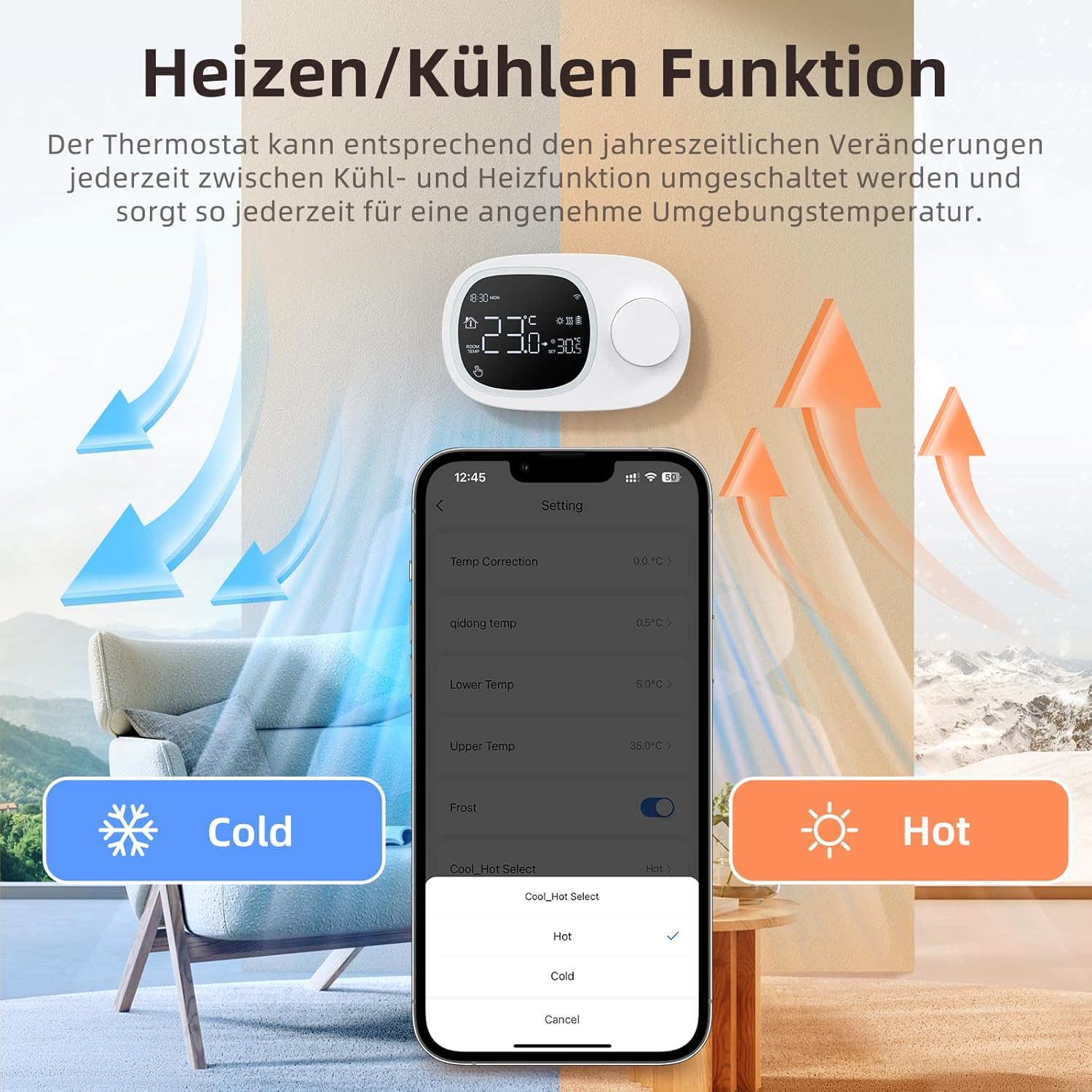
Image: This image shows the thermostat's backplate with wiring terminals and its physical dimensions (13.3 cm width, 8.6 cm height, 2.5 cm depth).
5.2 Napajanje
The thermostat can be powered by three AAA batteries or via a Type-C USB connection.
- Instalacija baterije: Open the battery compartment on the back of the thermostat and insert three AAA batteries, observing the correct polarity. The screen will display the battery level. Under normal operation, batteries typically last about 6 months.
- Type-C Power (Optional): For continuous power, you can connect a Type-C USB cable to the designated port.

Image: This image illustrates the battery compartment for AAA batteries and the Type-C port for alternative power input.
5.3 WiFi veza
To enable smart features, connect your thermostat to your home's 2.4 GHz Wi-Fi network.
- Preuzmi aplikaciju: Download and install the 'Smart Life' or 'AVATTO' app from your smartphone's app store.
- Registracija/Prijava: Kreirajte nalog ili se prijavite na aplikaciju.
- Dodaj uređaj: In the app, select 'Add Device' or the '+' icon. Choose 'Thermostat' or 'Heating Control'.
- Način uparivanja: Follow the in-app instructions to put the thermostat into pairing mode (usually involves pressing and holding a button on the thermostat until a Wi-Fi icon flashes).
- Povežite se na Wi-Fi: Ensure your mobile phone is connected to your home's 2.4 GHz Wi-Fi network. Enter your Wi-Fi password in the app.
- Kompletno podešavanje: The app will guide you through the final steps to connect the thermostat.
6. Uputstvo za upotrebu
6.1 Osnovni rad
- Uključivanje/isključivanje: Pritisnite dugme za napajanje da uključite ili isključite termostat.
- Podesite temperaturu: Rotate the knob to set your desired room temperature. The display will show both the current room temperature and the set temperature.
6.2 Programmable Modes
The thermostat allows you to set a weekly schedule to automatically adjust the temperature.
- Weekday Programs: Set up to 6 different heating periods for Monday to Friday.
- Weekend Programs: Set up to 2 heating periods per day for Saturday and Sunday.
- Setting Schedule: Access the programming menu via the thermostat's interface or the Smart Life/AVATTO app to configure your desired times and temperatures for each period.

Image: This image displays the app interface for setting a weekly programmable schedule, showing different time slots and temperatures for each day.
6.3 Kontrola aplikacija
Control your thermostat remotely using the Smart Life or AVATTO app.
- Daljinsko podešavanje temperature: Change the set temperature from anywhere.
- Upravljanje rasporedom: Easily create, modify, or disable heating schedules.
- Promjena načina rada: Switch between heating and cooling modes.
- Dijeljenje uređaja: Podijelite kontrolu nad termostatom s članovima porodice.
6.4 Upravljanje glasom
Integrate your thermostat with Amazon Alexa or Google Assistant for convenient voice commands.
- Povezivanje računa: Follow the instructions in the Smart Life/AVATTO app to link your account with Alexa or Google Assistant.
- Glasovne komande: Koristite komande kao što su:
- "Alexa, podesi [Naziv termostata] na 22 stepena."
- "Hey Google, what is the temperature in [Room Name]?"

Image: This image demonstrates remote control via the Smart Life app and voice control using an Alexa device, showing a command to set the room temperature.
6.5 Heating and Cooling Function
The thermostat supports both heating and cooling modes. You can switch between these functions as needed to maintain a comfortable ambient temperature throughout the year.
- Odabir načina rada: The mode can typically be changed through the thermostat's menu settings or directly within the Smart Life/AVATTO app.
- Temperaturna histereza: The thermostat features precise temperature control with adjustable hysteresis (0.5-10°C) to prevent rapid cycling of your heating/cooling system.
- Temperaturne granice: Set minimum and maximum temperature limits (e.g., 5-35°C) to ensure safe and efficient operation.

Image: This image illustrates the heating and cooling functions, showing temperature arrows and the app interface for selecting 'Hot' or 'Cold' modes.
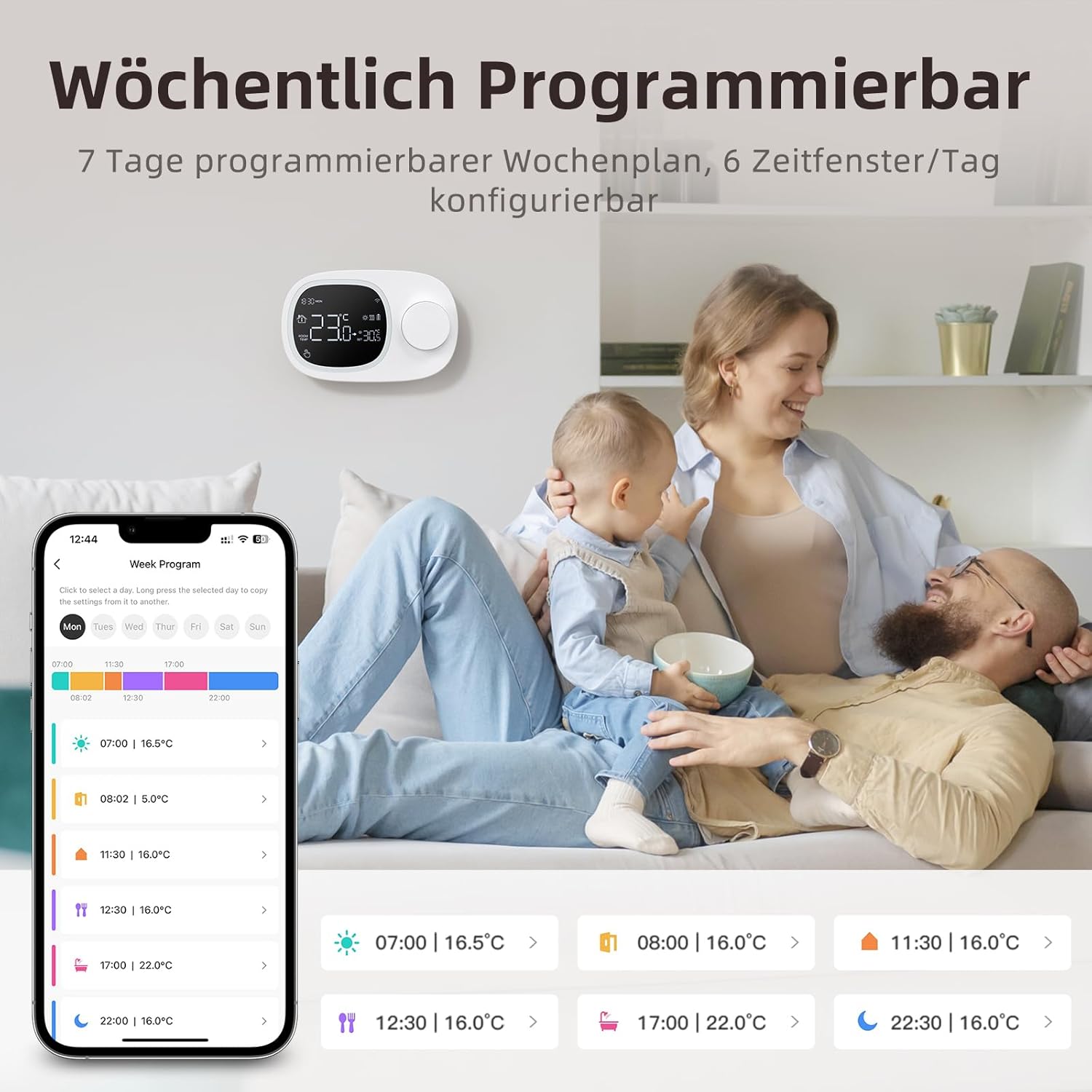
Image: This image highlights the precise temperature control features, including temperature hysteresis (0.5-10°C), minimum temperature setting (0.5°C), and upper/lower temperature limits (5-35°C).
7. Održavanje
7.1 Zamjena baterije
When the battery level indicator on the screen shows low power, replace the three AAA batteries promptly to ensure continuous operation. Refer to section 5.2 for battery installation instructions.
8. Otkrivanje problema
Ako imate problema s termostatom, pogledajte sljedeće uobičajene probleme i rješenja:
| Problem | Mogući uzrok / rješenje |
|---|---|
| Termostat se ne uključuje. | Check if the AAA batteries are correctly inserted and charged. Ensure the power button is functioning. If using Type-C power, verify the cable connection. |
| Confused characters appear on the screen. | This may indicate an installation issue. Reinstall the device, ensuring all connections are secure. |
| Displayed temperature is inaccurate. | Access the advanced menu mode on the thermostat or the calibration menu in the Smart Life/Tuya app to adjust temperature settings. |
| Device starts normally, but screen does not show output temperature. | Check the connection between the main control board and the power board. Verify that all wiring is correct according to the markings on the device connector. |
| Nije moguće povezati se na Wi-Fi. | Ensure your router is broadcasting a 2.4 GHz Wi-Fi signal. Confirm your mobile phone is connected to the 2.4 GHz network during pairing. Check Wi-Fi password. |
9. Specifikacije
- Brand: AVATTO
- Broj modela: WT400-16A-B (also referred to as WT580)
- Boja: Crna
- Dimensions (Thermostat): Približno 13.3 x 8.6 x 2.5 cm
- Težina artikla: 270 grama
- Power Output (Heating System): Do 3800 W
- Voltage: 240 volti (AC)
- Materijal: Plastika
- Power Source (Thermostat): 3 x AAA Batteries (sold separately), optional Type-C USB
- Povezivanje: Wi-Fi (2.4 GHz), Bluetooth
- Tip kontrolera: Amazon Alexa, Google Assistant
- Posebne karakteristike: Voice control, LCD display (temperature, weather, time, date, room temp, heating icon), 0.5°C temperature increments, Silent operation, Smart Life/Tuya Smart remote control.
- Specific Product Uses: Water heaters and gas boilers with dry contact.
10. Garancija i podrška
Information regarding specific warranty details is not available in this document. For technical assistance, troubleshooting, or any questions not covered in this manual, please contact AVATTO customer support. You may also find additional support resources through the Smart Life or AVATTO application.


