1. Uvod
Thank you for choosing the PELONIS Bladeless Tower Fan. This manual provides important information for the safe operation, maintenance, and troubleshooting of your new fan. Please read it thoroughly before use and retain it for future reference.

Image: The PELONIS Bladeless Tower Fan demonstrating its powerful airflow.
2. Važna sigurnosna uputstva
Uvijek se pridržavajte osnovnih sigurnosnih mjera opreza prilikom korištenja električnih uređaja kako biste smanjili rizik od požara, strujnog udara i ozljeda osoba.
- Prije upotrebe ovog ventilatora pročitajte sva uputstva.
- Ensure the power source matches the fan's requirements.
- Nemojte koristiti ventilator sa oštećenim kablom ili utikačem.
- Keep the fan away from water or wet surfaces.
- Ne stavljajte prste ili strane predmete u bilo kakve otvore.
- Unplug the fan from the outlet when not in use or before cleaning.
- Ovaj uređaj je samo za upotrebu u zatvorenom prostoru.
- Keep out of reach of children and pets. The bladeless design enhances safety.
3. Podešavanje
The PELONIS Bladeless Tower Fan requires minimal assembly.
- Pažljivo uklonite ventilator i sav materijal za pakovanje iz kutije.
- Postavite ventilator na čvrstu, ravnu površinu.
- Uvjerite se da kabel za napajanje nije priklješten ili oštećen.
- Uključite ventilator u standardnu električnu utičnicu.
- For smart features, download the PELONIS app from your smartphone's app store and follow the in-app instructions to connect your fan to your Wi-Fi network.
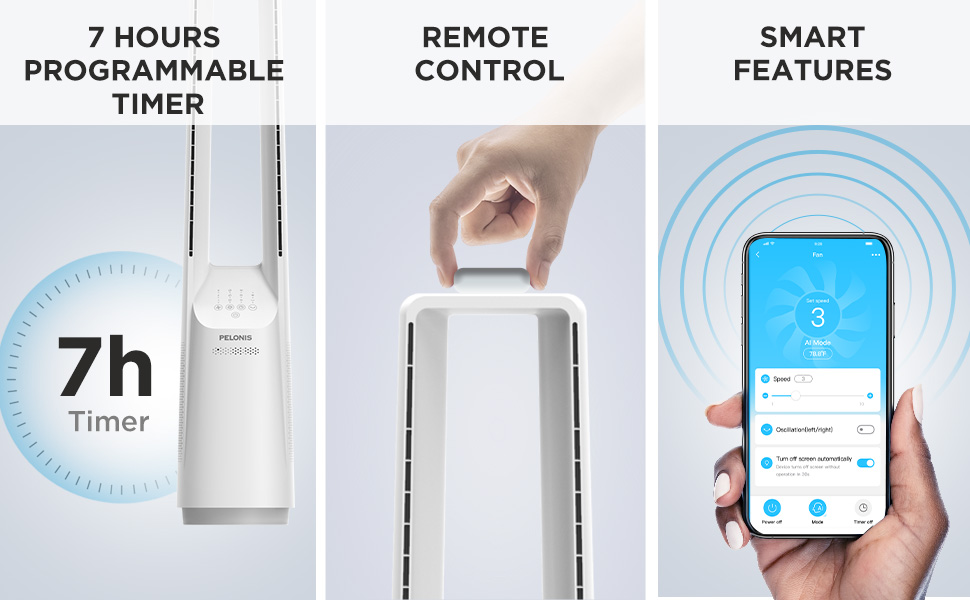
Image: The fan can be controlled via remote or a smartphone app, enabling smart features.
4. Uputstvo za upotrebu
Your PELONIS Bladeless Tower Fan offers multiple ways to customize your cooling experience.
Kontrolna tabla i daljinski upravljač

Slika: Detaljna view of the fan's intuitive control panel, showing buttons for speed, modes, timer, and oscillation.
- Dugme za napajanje: Pritisnite da biste uključili ili isključili ventilator.
- Speed Settings (6-Speed): Adjust the fan speed from 1 (lowest) to 6 (highest) for personalized airflow.
- Wind Modes (4 Modes): Cycle through different wind modes:
- normalno: Konstantan protok zraka odabranom brzinom.
- Prirodno: Simulates a natural breeze with varying speeds.
- spavanje: Postepeno smanjuje brzinu ventilatora za tihi rad tokom spavanja.
- AI Mode (Sensi Cool Technology): Automatically adjusts fan speed based on ambient room temperature.
- Oscillation (120°): Press to activate or deactivate the 120-degree oscillation function, distributing air across a wider area.
- Timer (7-Hour): Set the fan to automatically turn off after a specified period (1, 2, 4, or 7 hours).
Smart Control (Wi-Fi and Voice Control)
This fan is compatible with Alexa and Google Assistant for convenient voice control. After connecting the fan to your Wi-Fi network via the PELONIS app, you can use voice commands such as:
- "Alexa, turn on the fan."
- "Hey Google, set the fan speed to 3."
- "Alexa, turn off oscillation on the fan."
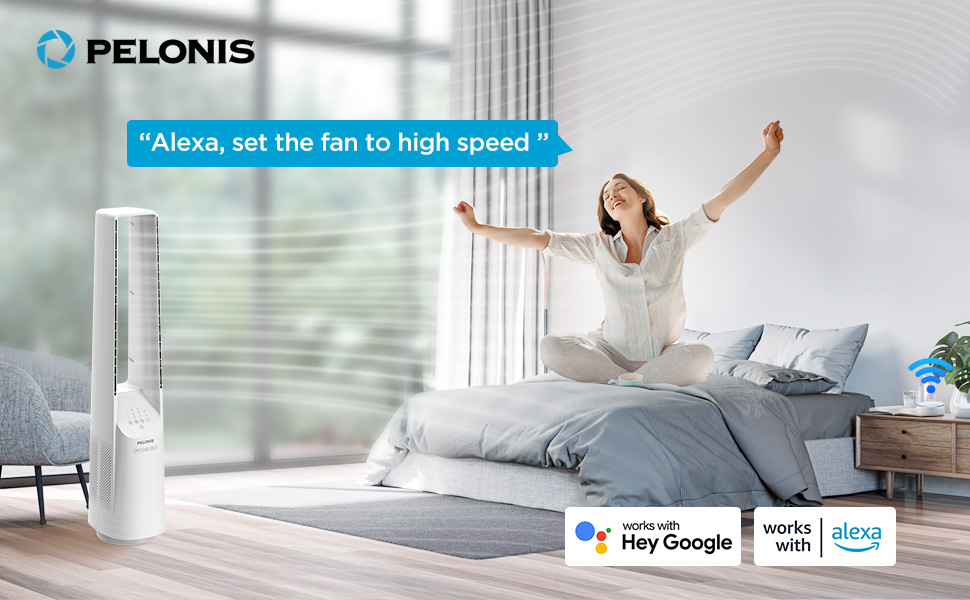
Image: The fan integrates seamlessly with smart home systems like Alexa and Google Assistant for voice-activated control.
Video: Proizvod prekoview demonstrating the features and operation of the PELONIS Bladeless Tower Fan.
5. Održavanje i čišćenje
Regular cleaning will help maintain your fan's performance and extend its lifespan. Always unplug the fan before cleaning.
- Eksterijerno čišćenje: Koristite meku, damp cloth (towel) to wipe the exterior surfaces of the fan. Do not use abrasive cleaners or solvents.
- Ulaz/izlaz zraka: Use a vacuum cleaner with a brush attachment to gently remove dust from the air inlet and outlet grilles. The bladeless design makes cleaning easier compared to traditional fans.
- Ne uranjajte ventilator u vodu i nemojte dozvoliti da voda kapne u kućište motora.
- Čuvajte ventilator na hladnom i suvom mestu kada nije u upotrebi.
6. Otkrivanje problema
| Problem | Mogući uzrok | Rješenje |
|---|---|---|
| Ventilator se ne uključuje. | Nije uključeno; utičnica ne radi; dugme za napajanje nije pritisnuto. | Ensure fan is securely plugged into a working outlet. Press the power button. |
| Slab protok vazduha. | Low speed setting; air inlets/outlets blocked by dust. | Increase fan speed. Clean air inlets and outlets as per maintenance instructions. |
| Ventilator se neočekivano zaustavlja. | Timer activated; safety auto-off feature (after 10-15 hours of no commands). | Check timer settings. This is a built-in safety feature to prevent overheating. Turn the fan back on if desired. |
| Smart features not working. | Fan not connected to Wi-Fi; incorrect app setup; Wi-Fi signal issues. | Ensure fan is connected to your home Wi-Fi via the PELONIS app. Check Wi-Fi signal strength. Refer to app instructions for troubleshooting connectivity. |
| Neobična buka. | Fan not on a level surface; internal obstruction. | Place fan on a stable, flat surface. If noise persists, contact customer support. |
7. Specifikacije
- Model: PBF15T4AWW
- Brand: PELONIS
- Dimenzije (D x Š x V): 8.07" x 9.76" x 39.76"
- Težina: 3.46 funte
- Nivo buke: 32 dB (minimalno)
- Raspon protoka zraka: 26-33 ft
- Postavke brzine: 6
- Režimi vjetra: 4 (Normal, Natural, Sleep, AI Mode)
- Oscilacija: 120°
- Tajmer: 7-satno programabilno
- Metoda kontrole: Touch Panel, Remote Control, Voice (Alexa/Google), App
- Izvor napajanja: DC
- Materijal oštrice: Plastic (Bladeless Design)
- Certifikati: UL
8. Garancija i podrška
PELONIS provides a 1-godišnja garancija proizvođača with the purchase of this product. This warranty covers defects in materials and workmanship under normal use.
For warranty claims, technical support, or any questions regarding your PELONIS Bladeless Tower Fan, please contact PELONIS Customer Service. Please have your model number (PBF15T4AWW) and proof of purchase ready.
You can also refer to the official PELONIS website for additional support resources and FAQs: Posjetite PELONIS trgovinu na Amazonu


