Uvod
Thank you for choosing the Epson EB-L210SF projector. This manual provides essential information for the safe and efficient use of your projector. Please read it thoroughly before operating the device and keep it for future reference.
The Epson EB-L210SF is a 3LCD Full-HD projector designed for clear and vibrant image projection. It features a laser light source for long-lasting performance.
Važne informacije o sigurnosti
- Laserska sigurnost: Do not look directly into the projector lens when the laser light source is active. Avoid direct eye exposure to the laser beam.
- ventilacija: Ensure adequate ventilation around the projector. Do not block ventilation openings. Overheating can cause damage.
- Izvor napajanja: Koristite samo napajanje koje je specificirano za ovaj projektor.
- Rukovanje: Pažljivo rukujte projektorom. Izbjegavajte ispuštanje ili izlaganje jakim udarcima.
- čišćenje: Isključite kabel za napajanje prije čišćenja. Koristite meku, suhu krpu. Ne koristite tekuća ili aerosolna sredstva za čišćenje.
Setup
1. Raspakivanje i postavljanje
Carefully remove the projector and all accessories from the packaging. Place the projector on a stable, level surface. Ensure there is sufficient space around the projector for proper ventilation.

Slika 1: Prednja i bočna strana view of the Epson EB-L210SF projector, showing the lens and ventilation grilles.
2. Povezivanje napajanja
- Spojite priloženi kabel za napajanje na AC utičnicu projektora.
- Uključite drugi kraj kabla za napajanje u uzemljenu električnu utičnicu.
3. Povezivanje ulaznih izvora
The projector supports various input sources. Connect your device (computer, Blu-ray player, etc.) to the appropriate port on the projector's rear panel.

Figure 2: Rear panel of the projector, displaying various input and output ports including HDMI, Computer (VGA), Video, USB, and Audio connections.
- HDMI: Connect an HDMI cable from your device to one of the HDMI ports (HDMI 1 or HDMI 2).
- Računar (VGA): Connect a VGA cable from your computer to the Computer 1 or Computer 2 port. For audio, connect a separate audio cable to Audio 1 or Audio 2.
- video: Connect composite video and audio cables to the Video and Audio (R/L) ports.
- USB: Use the USB-A port for connecting USB storage devices or the USB-B port for display over USB.
- LAN: Spojite Ethernet kabel za upravljanje i nadzor mreže.
4. Početno uključivanje i podešavanje slike
- Press the power button on the projector or remote control to turn on the device. The power indicator will illuminate.
- Podesite prsten za fokusiranje around the lens until the image is sharp and clear.
- Koristite ručica za zumiranje (if available) to adjust the image size.
- Ako slika izgleda trapezoidno, koristite korekcija keystone feature (manual or automatic) to square the image. Refer to the Operating section for details on menu navigation.
Upravljanje projektorom
1. Control Panel Overview
The control panel on top of the projector allows access to various functions and settings.
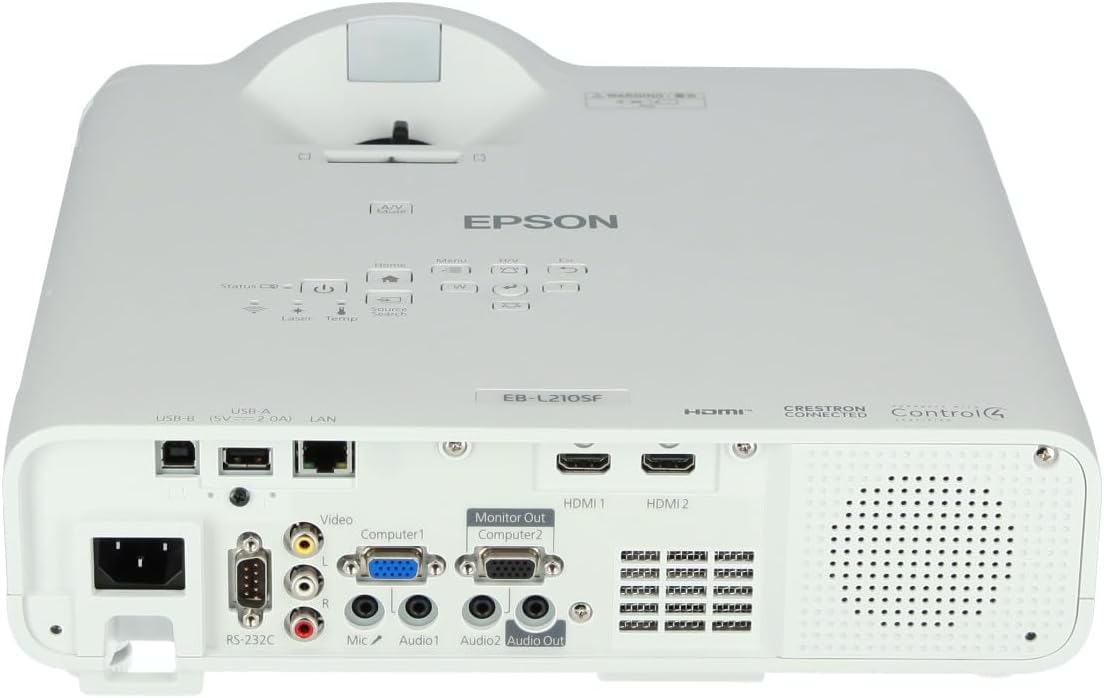
Slika 3: Vrh view of the projector, highlighting the control panel with buttons for power, menu, source selection, and navigation.
- Dugme za napajanje: Uključuje ili isključuje projektor.
- Pretraga izvora: Ciklično prelazi kroz dostupne ulazne izvore.
- Dugme menija: Otvara meni na ekranu (OSD).
- Navigation Buttons (Arrow keys): Koristi se za navigaciju kroz opcije menija.
- Dugme Enter: Potvrđuje odabire u meniju.
- Dugme Esc: Izlazi iz trenutnog menija ili se vraća na prethodni ekran.
- Dugme za početnu stranicu: Accesses the home screen or quick settings.
- A/V utišavanje: Temporarily mutes audio and blanks the screen.
2. Odabir ulaznog izvora
Pritisnite Pretraživanje izvora button on the control panel or remote control to cycle through the connected input sources (e.g., HDMI 1, HDMI 2, Computer 1, Video). The projector will automatically detect and display the active source.
3. Adjusting Image and Audio Settings
Pritisnite Meni button to access the projector's on-screen display (OSD) menu. Use the navigation buttons to browse categories such as:
- slika: Podesite svjetlinu, kontrast, boju, nijansu, oštrinu i temperaturu boje.
- signal: Configure input signal settings, aspect ratio, and overscan.
- Postavke: General projector settings like language, display options, and power management.
- audio: Adjust volume, mute, and audio input selection.
Odaberite opciju i pritisnite Enter to modify its value. Press Esc da izađete iz menija.
Održavanje
1. Čišćenje projektora
- Eksterijer: Wipe the projector's exterior with a soft, dry, lint-free cloth. For stubborn dirt, dampen the cloth slightly with water, then wipe dry.
- Objektiv: Pažljivo obrišite objektiv krpom za čišćenje objektiva ili papirom za čišćenje objektiva. Izbjegavajte upotrebu abrazivnih materijala ili prekomjernu silu.
- Filter zraka: Regularly check and clean the air filter to prevent dust buildup, which can affect performance and cause overheating. Refer to the projector's on-screen menu for filter maintenance reminders.
2. Laser Light Source
The Epson EB-L210SF uses a laser light source, which offers a long operational life and does not require lamp replacement. No user maintenance is typically required for the laser light source itself.
Rješavanje problema
Ako naiđete na probleme s projektorom, pogledajte sljedeće uobičajene probleme i rješenja:
| Problem | Mogući uzrok / rješenje |
|---|---|
| Nema projicirane slike |
|
| Slika je mutna ili van fokusa |
|
| Slika je iskrivljena (trapezoidna) |
|
| Nema zvuka |
|
| Projector is not wireless | The Epson EB-L210SF is not inherently a wireless projector. Wireless functionality typically requires an optional external wireless adapter, which is sold separately. Please consult Epson's official website or your retailer for compatible wireless adapters. |
| Overheating warning (Temp indicator) |
|
Specifikacije
| Feature | Detalj |
|---|---|
| Broj modela | V11HA75080 |
| Rezolucija ekrana | 1920 x 1080 (Full HD) |
| Tehnologija povezivanja | HDMI, VGA, USB, LAN |
| Dimenzije proizvoda | 11.81 x 11.81 x 11.81 inča |
| Težina artikla | 10.14 funte |
| Izvor svjetlosti | Laser |
| Proizvođač | Epson |
| Preporučena upotreba | Monitoring |
| Posebna karakteristika | Lagana |
| Baterije su potrebne | 1 AAAA (for remote control, not included with projector unit) |
| Datum prve dostupnosti | 14. novembra 2023 |
Garancija i podrška
Za detaljne informacije o garanciji, molimo pogledajte garantni list koji ste dobili uz proizvod ili posjetite službenu Epson stranicu webstranica. Uslovi garancije mogu se razlikovati u zavisnosti od regije.
Za tehničku podršku, registraciju proizvoda ili preuzimanje najnovijih upravljačkih programa i softvera, posjetite službenu Epsonovu stranicu za podršku. website or contact Epson customer service in your region. Contact information can typically be found on the Epson website.


