1. Važna sigurnosna uputstva
Molimo pročitajte i razumite sva sigurnosna uputstva prije upotrebe ovog proizvoda. Nepoštivanje ovih uputstava može dovesti do strujnog udara, požara ili ozbiljnih povreda.
- Ne izlažite uređaj ekstremnim temperaturama, direktnoj sunčevoj svjetlosti ili visokoj vlažnosti.
- Keep the device away from water and other liquids. If it gets wet, turn it off immediately and allow it to dry completely before reuse.
- Ne pokušavajte rastavljati, popravljati ili modificirati uređaj. Za sve servisne radove obratite se kvalifikovanom osoblju.
- Use only specified charging methods (USB-C, solar, hand crank).
- Čuvati van domašaja djece.
- Baterije odložite u skladu sa lokalnim propisima.
2. Proizvod je gotovview
The FosPower Emergency Weather Radio Model A6 is a versatile device designed for emergency preparedness and outdoor activities. It features multiple power sources, radio reception, lighting, and a power bank function.
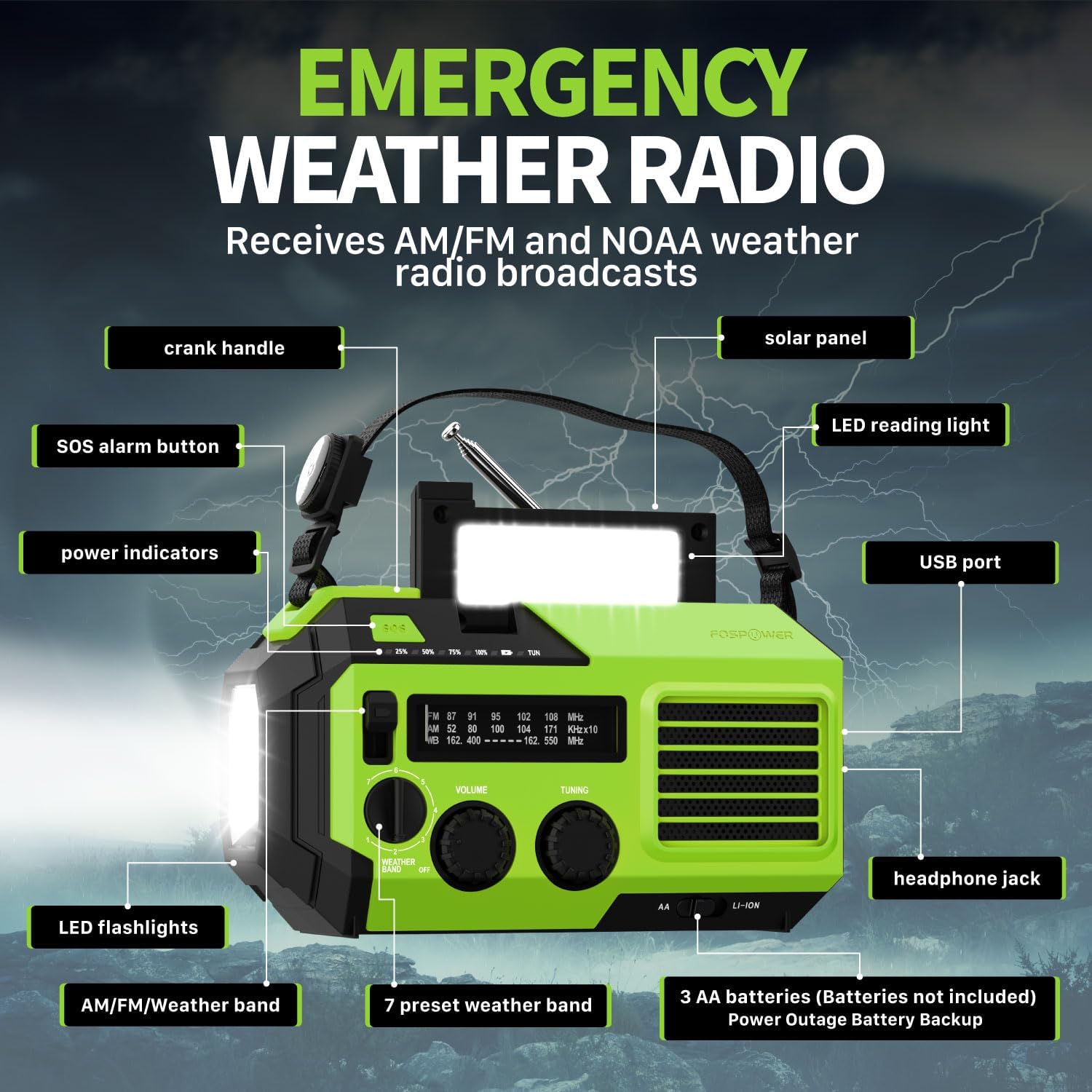
Slika 2.1: Prednja strana view of the FosPower Emergency Weather Radio with key components labeled, including the crank handle, solar panel, SOS alarm button, power indicators, LED reading light, USB port, LED flashlights, AM/FM/Weather band selector, volume and tuning knobs, and headphone jack.
Ključne karakteristike:
- NOAA/AM/FM Radio: Access local weather information and emergency hazard alerts, as well as standard AM/FM broadcasts.
- 19240mWh (5200mAh) Power Bank: Charge USB devices during power outages or in outdoor settings.
- Višestruki izvori napajanja: Recharge via USB-C cable, solar panel, or hand crank. Can also be powered by AA batteries (not included).
- SOS alarm: Activates a loud siren and flashing light for emergency signaling.
- Integrisana rasvjeta: Features a powerful flashlight and a reading light.
- IPX3 vodootpornost: Pruža zaštitu od prskanja vode.
3. Podešavanje
3.1 Početno punjenje
Before first use, fully charge the internal battery using the provided USB-C cable. Connect the USB-C cable to the radio's USB-C port and the other end to a USB power adapter (not included) or a computer USB port. The power indicators will illuminate to show charging progress.
3.2 AA Battery Installation (Optional)
The radio can also operate on 3 AA batteries (not included) as a backup power source. Open the battery compartment cover on the back of the radio and insert 3 AA batteries, ensuring correct polarity. Close the cover securely.

Slika 3.1: Pozadi view of the radio highlighting the solar panel, hand-crank, AA battery compartment, and USB charging port, illustrating the multiple power sources.
4. Uputstvo za upotrebu
4.1 Radio operacije
- Uključivanje/isključivanje: Rotate the 'VOLUME' knob clockwise to turn the radio on and adjust the volume. Rotate counter-clockwise until it clicks to turn off.
- Odabir benda: Use the 'WEATHER BAND' switch to select between AM, FM, or WB (Weather Band).
- tuning: Rotate the 'TUNING' knob to scan for radio stations. Extend the telescopic antenna for improved reception, especially for FM and WB.
- NOAA vremenski opseg: When WB is selected, the radio will receive NOAA weather alerts. The radio supports 7 preset weather bands.
- Priključak za slušalice: Za privatno slušanje, priključite 3.5 mm slušalice na priključak za slušalice.
4.2 Flashlight and Reading Light

Image 4.1: The radio demonstrating its high-power flashlight and cool-tone reading lamp karakteristike.
- svjetiljka: Press the flashlight button located on the front of the radio to turn the flashlight on or off.
- Svjetlo za čitanje: Lift the solar panel to reveal the LED reading light. Press the reading light button to turn it on or off.
4.3 SOS alarm
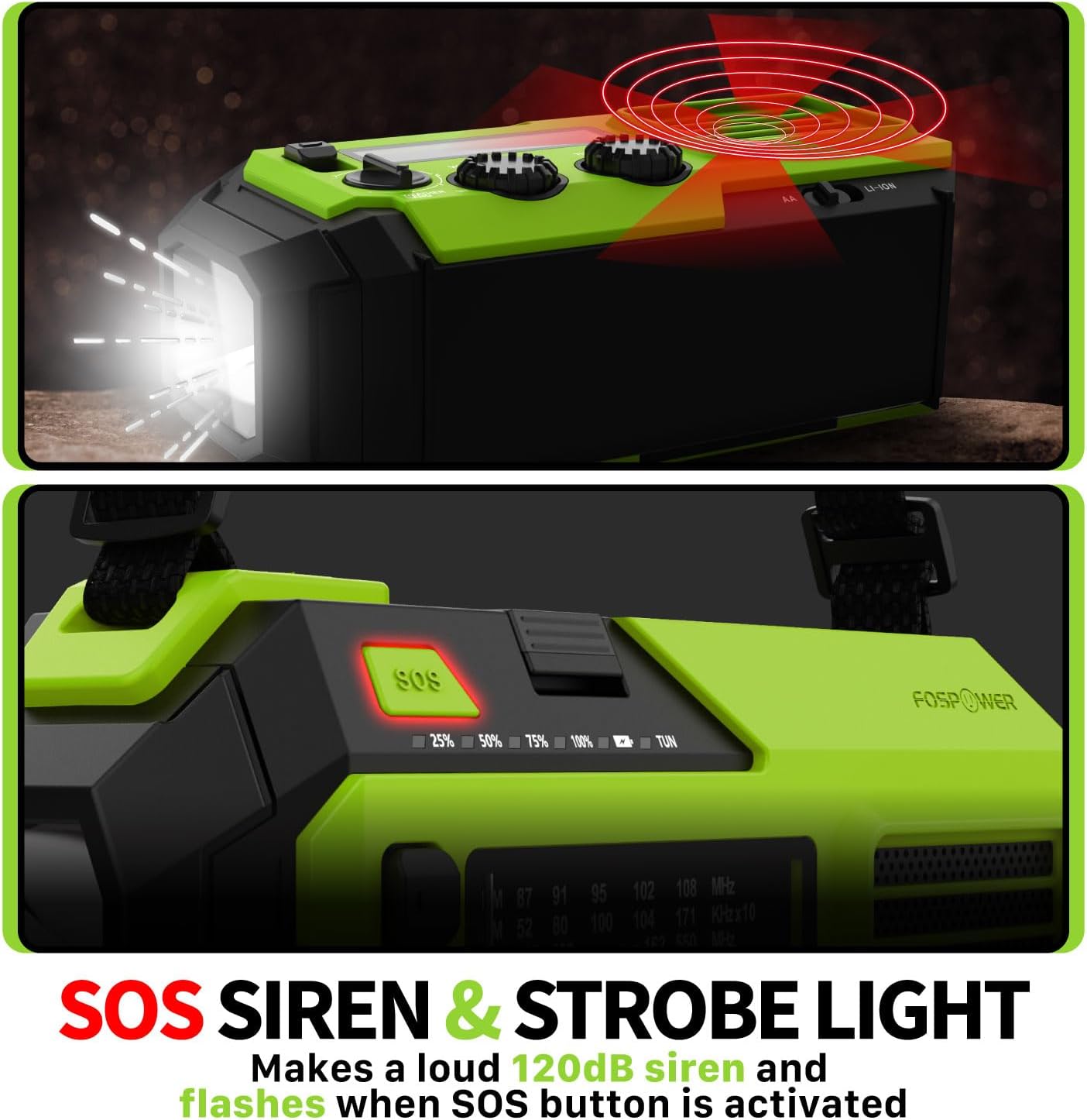
Image 4.2: Close-up of the radio's SOS button and an illustration of the siren and strobe light being activated.
In an emergency, press and hold the 'SOS' button to activate a loud 120dB siren and a flashing strobe light. Press the 'SOS' button again to deactivate.
4.4 Punjenje eksternih uređaja (Power Bank)

Image 4.3: The radio connected via USB to a smartphone, demonstrating its power bank capability for charging small electronics.
Connect your USB-powered device (e.g., smartphone, tablet) to the radio's USB-A output port using your device's charging cable. The radio's internal battery will begin charging your device.
4.5 Punjenje radija
- USB-C punjenje: Connect the provided USB-C cable to the radio's USB-C input port and a USB power source. This is the most efficient charging method.
- Solarno punjenje: Place the radio with the solar panel facing direct sunlight. The solar panel charges the internal battery, primarily for maintaining charge or slow charging in emergencies.
- Punjenje rucicom: Rotate the hand crank clockwise or counter-clockwise at a steady pace (approximately 130-150 RPM) for 3-5 minutes to generate power for short-term use or to initiate charging.
5. Održavanje
- čišćenje: Obrišite radio mekom, suhom krpom. Ne koristite abrazivna sredstva za čišćenje ili rastvarače.
- Skladištenje: Store the radio in a cool, dry place away from direct sunlight when not in use for extended periods. For optimal battery health, fully charge the internal battery every 3-6 months.
- Održavanje baterije: If using AA batteries, remove them if the radio will not be used for a long time to prevent leakage.
6. Otkrivanje problema
| Problem | Mogući uzrok | Rješenje |
|---|---|---|
| Radio se ne uključuje. | Internal battery is depleted; AA batteries are depleted or incorrectly installed. | Charge the internal battery via USB-C or hand crank. Check and replace AA batteries if used. |
| Loš radio prijem. | Antena nije ispružena; područje slabog signala; smetnje. | Fully extend the telescopic antenna. Adjust radio position. Try tuning to a stronger station. |
| Vanjski uređaj se ne puni. | Radio's internal battery is low; incorrect cable; device not compatible. | Ensure the radio's internal battery is sufficiently charged. Use a functional USB charging cable. Verify device compatibility. |
| Ručna kurbla je kruta ili ne generira snagu. | Mechanism obstruction; improper cranking speed. | Ensure no obstructions. Crank at a steady, moderate pace (130-150 RPM). |
7. Specifikacije
| Feature | Detalj |
|---|---|
| Broj modela | FOSPWB-2419 |
| Dimenzije proizvoda | 6.76 x 3.52 x 2.59 inča |
| Težina artikla | 1.08 funte |
| Interna baterija | 19240mWh (5200mAh) |
| External Battery Support | 3 x AA baterije (nisu uključene) |
| Radio Bands | AM, FM, NOAA Weather Band (WB) |
| Metode punjenja | USB-C, Solar, Hand Crank |
| Posebne karakteristike | Built-In Flashlight, Reading Light, SOS Alarm, Power Bank |
| Otpornost na vodu | IPX3 |
8. Garancija i podrška
FosPower provides a limited lifetime warranty for this product. For warranty claims, technical assistance, or customer service inquiries, please contact FosPower's USA-based customer support team. Refer to the official FosPower webweb-mjesto ili vašu dokumentaciju o kupovini za kontakt podatke.


