1. Uvod
The FLIPSKY 75100 Pro is a high-performance Electronic Speed Controller (ESC) designed for various electric mobility applications, including electric skateboards, scooters, ebikes, and robotics. Built on VESC technology, it offers precise control, robust power delivery, and advanced programmability. This manual provides essential information for the safe and effective use of your FLIPSKY 75100 Pro speed controller.

Figure 1: FLIPSKY 75100 Pro Speed Controller
2. Sigurnosne informacije
Please read and understand all safety warnings before operating the FLIPSKY 75100 Pro. Failure to follow these instructions may result in product damage, property damage, or serious injury.
- Kompatibilnost firmvera: It is strongly recommended to maintain firmware version 5.2 as shipped from the factory. Upgrading to newer firmware versions may potentially damage the ESC. If upgrading, proceed with extreme caution and consult official FLIPSKY resources.
- Trenutna ograničenja: Ensure the Absolute Maximum Current setting is limited to below 250A within the VESC_Tool software. Exceeding this limit can lead to component failure.
- Phase Filtering: Phase filtering is NE available for FLIPSKY ESC75100 and 75200 models. When using firmware version 5.3 or above (e.g., VESC_TOOL 3.01), you MUST turn off the phase filter function and set it to "false" in VESC_Tool. Failing to disable the phase filter will result in ESC damage. Do not restore default parameters using the wizard interface if this setting is affected.
- Ensure all connections are secure and correctly polarized before applying power.
- Operate the ESC within its specified voltage i strujne granice.
- Keep the ESC away from water, moisture, and extreme temperatures.
3. Proizvod je gotovview
3.1 Ključne karakteristike
- Compact Size: L103mm x W58mm x H27.7mm.
- Supports BLDC square wave mode control and FOC sine wave mode.
- Programmable via VESC_Tool with integrated overheat and overcurrent protection.
- Wide Voltage Range: 14-84V (4-20S battery configurations).
- High Current Capability: 100A continuous, 120A burst.
- High ERPM: Up to 150,000.
- Multiple Control Interface Ports: USB, CAN, UART.
- Supports various sensors: ABI, HALL, AS5047, AS5048A.
- Input Set Support: PPM, ADC, NRF, UART.
- Upgraded Wire Size: Now features 10AWG wires for improved current handling.
- Enhanced Temperature Detection: More sensitive temperature monitoring.
- Integrated Bluetooth Module: For convenient wireless configuration.
- Regenerative Braking Capacity.
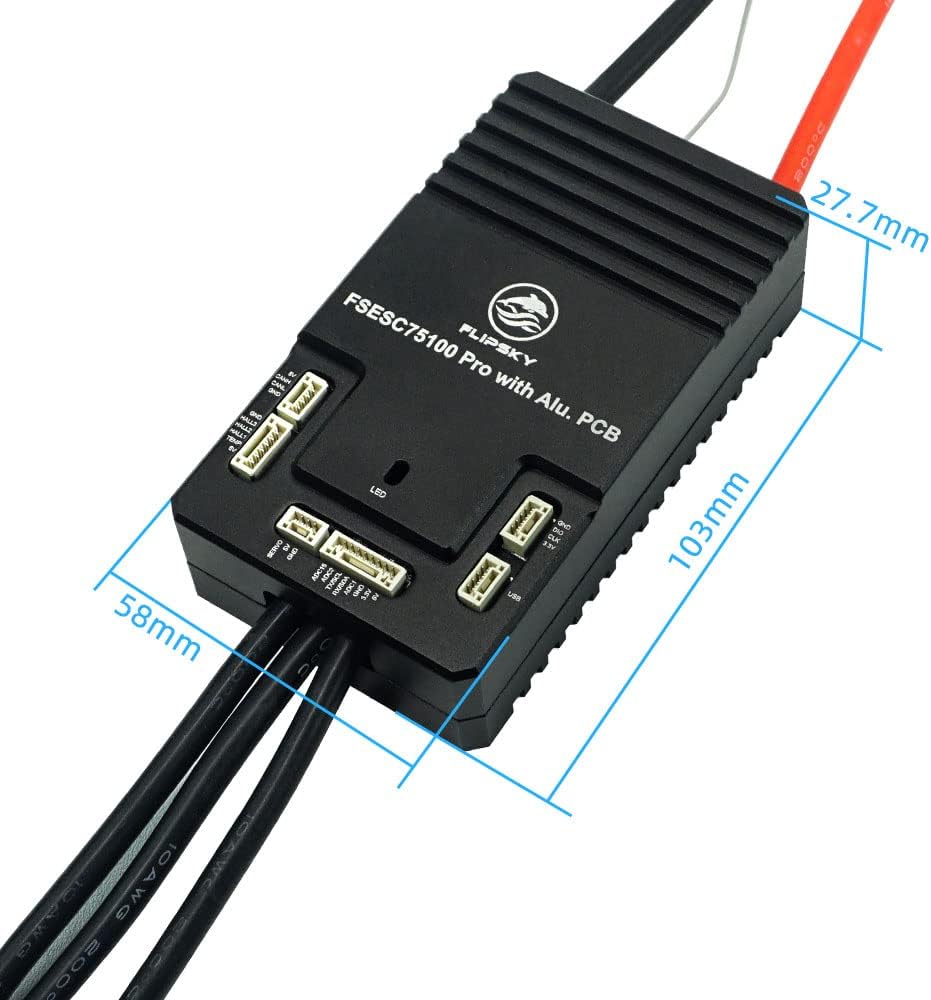
Figure 2: Dimensions of the FLIPSKY 75100 Pro Speed Controller
3.2 Komponente
The FLIPSKY 75100 Pro includes the main controller unit with an aluminum PCB for efficient heat dissipation. It comes with pre-attached 10AWG power wires and various ports for connectivity.

Figure 3: FLIPSKY 75100 Pro with typical wiring harness
4. Podešavanje
Proper setup is crucial for the performance and longevity of your FLIPSKY 75100 Pro. Always ensure power is disconnected before making any physical connections.
4.1 Ožičenje
Refer to the connection diagram below for proper wiring of the battery, motor, and peripheral devices. Ensure all connections are firm and correctly oriented.

Figure 4: Detailed Connection Diagram for FLIPSKY 75100 Pro
- Povezivanje baterije: Connect your battery pack to the main power leads (red for positive, black for negative). Ensure correct polarity.
- Priključak motora: Connect the three phase wires from your motor to the corresponding outputs on the ESC.
- Priključci senzora: Connect Hall sensors, ABI, AS5047, or AS5048A sensors to the designated sensor ports if your motor uses them.
- Kontrolni interfejs: Utilize the USB, CAN, or UART ports for connecting to VESC_Tool for configuration, or for connecting other control devices like remote receivers (PPM, NRF) or ADC inputs.
4.2 Initial Configuration (VESC_Tool)
The FLIPSKY 75100 Pro is configured using the VESC_Tool software. It is crucial to follow the safety warnings regarding firmware and phase filtering mentioned in Section 2.
- Connect the ESC to your computer via USB or use the integrated Bluetooth module to connect via a mobile device.
- Launch VESC_Tool.
- VAŽNO: If your firmware is version 5.3 or higher, navigate to the motor settings and ensure the phase filter function is turned off and set to "false". Do not use the wizard's default parameter restoration if it affects this setting.
- Set the Absolute Maximum Current to below 250A.
- Run the motor detection wizard to automatically configure motor parameters.
- Adjust other parameters such as battery limits, input type (PPM, ADC, etc.), and braking settings according to your application's requirements.
5. Uputstvo za upotrebu
Once configured, the FLIPSKY 75100 Pro will control your motor based on the input signals (e.g., throttle from a remote, ADC input). Always perform a low-power test before full operation.
- Uvjerite se da su sve veze sigurne prije uključivanja.
- Apply power to the ESC. The integrated LED will indicate status.
- Control the motor via your chosen input method (e.g., remote control, joystick).
- Monitor the system for any unusual behavior, sounds, or excessive heat.
- Utilize the regenerative braking feature for efficient energy recovery during deceleration.
6. Održavanje
Regular maintenance helps ensure the longevity and reliable operation of your speed controller.
- Keep the ESC clean and free from dust, dirt, and debris.
- Periodically inspect all wiring connections for signs of wear, corrosion, or looseness.
- Ensure adequate airflow around the ESC to prevent overheating, especially during high-current operation.
- Avoid exposing the ESC to direct water or excessive moisture. While the aluminum casing offers some protection, it is not fully waterproof.
7. Otkrivanje problema
If you encounter issues with your FLIPSKY 75100 Pro, consider the following troubleshooting steps:
| Problem | Mogući uzrok | Rješenje |
|---|---|---|
| ESC not powering on / No LED indication | Incorrect battery connection, low battery voltage, faulty power switch. | Provjerite zapreminu baterijetage, verify power connections and polarity. |
| Motor not spinning / Erratic behavior | Incorrect motor wiring, sensor issues, incorrect VESC_Tool configuration (e.g., phase filter enabled). | Verify motor phase wire connections. Check sensor connections. Ensure phase filter is disabled in VESC_Tool if using firmware 5.3+. Re-run motor detection. |
| ESC pregrijavanje | Excessive current draw, insufficient cooling, incorrect motor parameters. | Reduce load, improve airflow, check VESC_Tool settings for motor current limits. |
| ESC damaged after firmware update | Incompatible firmware version, phase filter not disabled. | Refer to Section 2.1 regarding firmware compatibility and phase filter settings. Contact support if damage persists. |
8. Specifikacije
| Parametar | Vrijednost |
|---|---|
| Naziv modela | 75100 Pro |
| Dimenzije (D x Š x V) | 103 mm x 58 mm x 27.7 mm |
| Voltage domet | 14-84V (4-20S) |
| Kontinuirana struja | 100A |
| Burst Current | 120A |
| BEC izlaz | 5V @ 1.5A |
| Max ERPM | 150,000 |
| Portovi kontrolnog interfejsa | USB, CAN, UART |
| Podržani senzori | ABI, DVORANA, AS5047, AS5048A |
| Podrška za ulazni skup | PPM, ADC, NRF, UART |
| Wire Size | 10AWG |
| Materijal | Aluminijum |
| Boja | Crna |
| Zemlja porijekla | Kina |
9. Garancija i podrška
9.1 Informacije o garanciji
The FLIPSKY 75100 Pro comes with a 6-month warranty from the date of purchase. This warranty covers manufacturing defects under normal use. Damage resulting from improper installation, incorrect configuration (e.g., not disabling phase filter), exceeding specified limits, or physical abuse is not covered.
9.2 Korisnička podrška
For any questions, technical assistance, or support needs, please feel free to contact FLIPSKY customer service. We are committed to assisting you within 24 hours.
Molimo pogledajte službenu stranicu FLIPSKY-ja website or your purchase platform for contact details.


