Uvod
This manual provides comprehensive instructions for the setup, operation, maintenance, and troubleshooting of your DXPICR Smart Watch. Please read this manual carefully to ensure proper use and to maximize the functionality of your device.
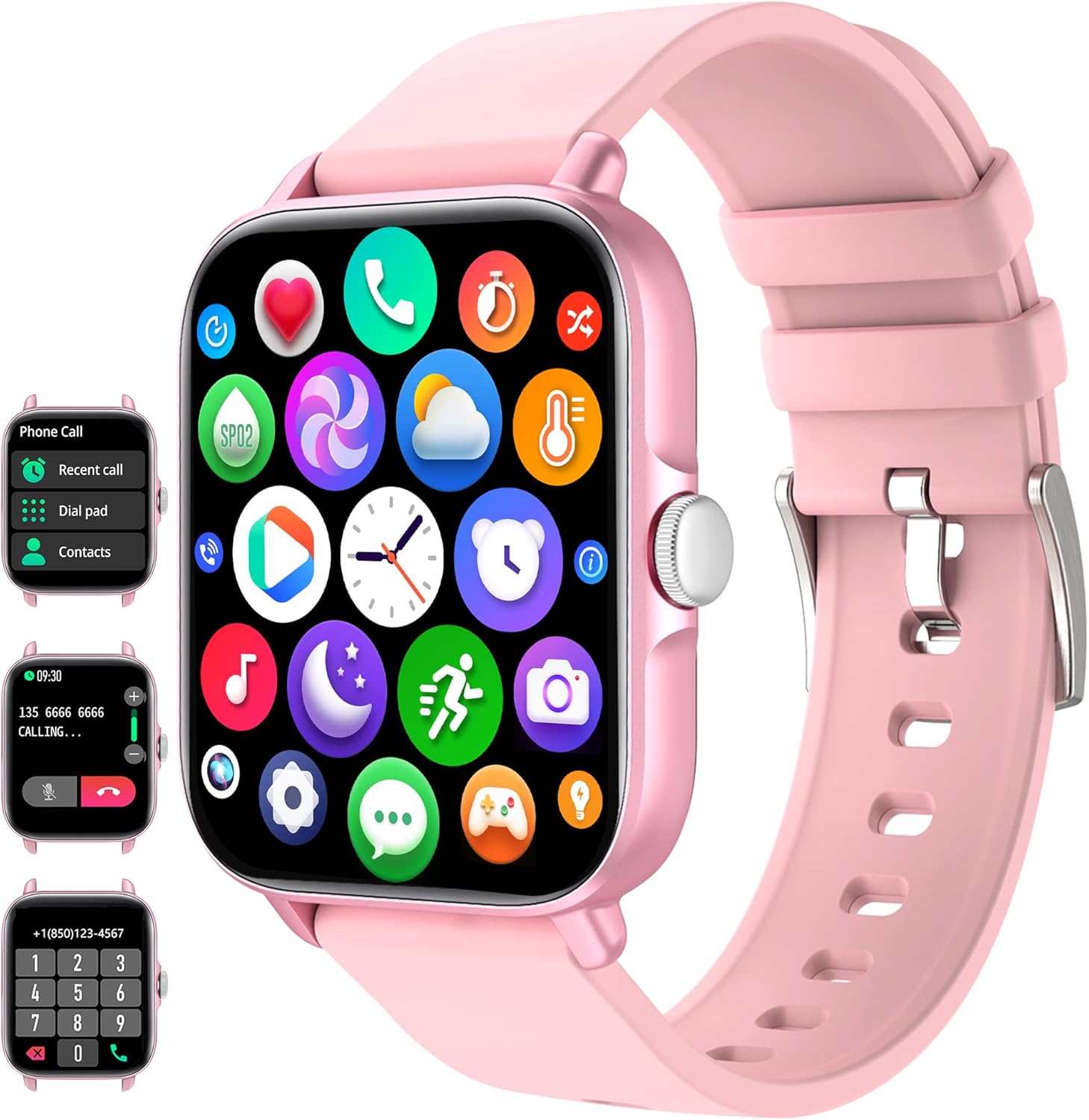
Figure 1: DXPICR Smart Watch Overview
The DXPICR Smart Watch features a full touch screen, Bluetooth call capabilities, and a range of health and fitness tracking functions. The image displays the watch's main interface, including icons for various applications and a detailed view of the call and dial pad screens.
Setup
1. Početno punjenje
Before first use, fully charge your DXPICR Smart Watch. Connect the magnetic charging cable to the charging points on the back of the watch and plug the USB end into a standard USB power adapter (not included).
- Potpuno punjenje obično traje otprilike 2 sata.
- Ekran sata će prikazivati status punjenja.
2. Preuzimanje i instalacija aplikacije
To unlock the full features of your smartwatch, download the companion application on your smartphone.
- Scan the QR code provided in the watch's quick start guide or search for the app name (usually indicated on the watch screen or packaging) in your phone's app store (Google Play Store for Android, Apple App Store for iOS).
- Instalirajte aplikaciju na svoj pametni telefon.
- Grant necessary permissions when prompted by the app for full functionality (e.g., Bluetooth, notifications, location).
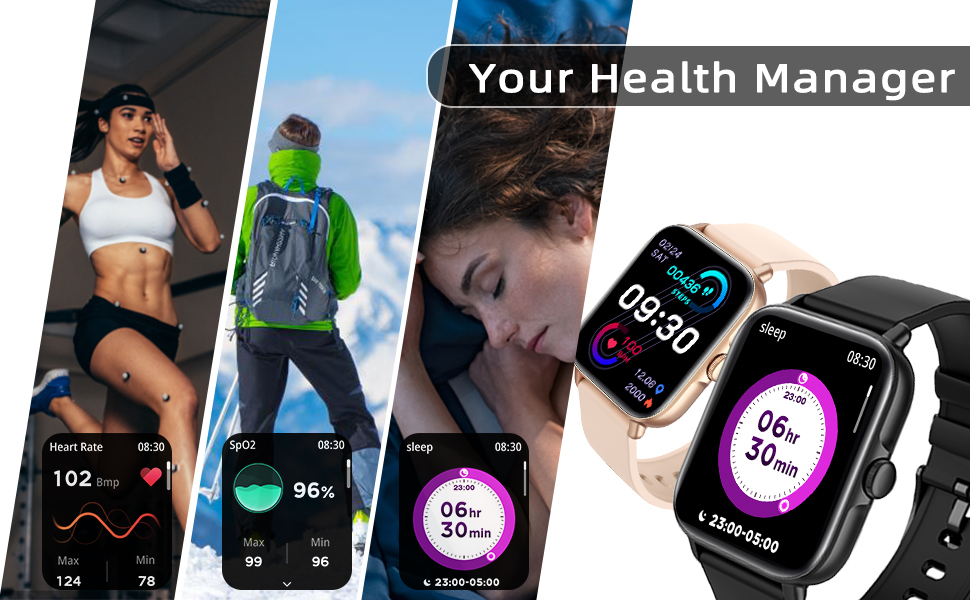
Figure 2: Smart Watch Connection Guide
This diagram illustrates the step-by-step process for connecting your DXPICR Smart Watch to your smartphone. It highlights downloading the app, enabling Bluetooth, and pairing the device for full functionality, including call answering and dialing.
3. Device Pairing (Bluetooth Connection)
After installing the app, pair your smartwatch with your phone via Bluetooth.
- Provjerite je li Bluetooth omogućen na vašem pametnom telefonu.
- Open the installed app and navigate to the "Add Device" or "Connect Device" section.
- The app will search for available devices. Select "DXPICR Smart Watch" or a similar device name (e.g., "Y20 GT") from the list.
- Follow any on-screen prompts to confirm the pairing on both your phone and the watch.
- For the Bluetooth call function, you may need to connect to a second Bluetooth device named "Y20 GT_Phone" in your phone's Bluetooth settings after the initial app connection. This enables call audio through the watch.
Uputstvo za upotrebu
1. Osnovna navigacija
- Ekran na dodir: Prevucite prstom lijevo/desno, gore/dolje za navigaciju kroz menije i funkcije. Dodirnite za odabir.
- Bočno dugme: Typically used to return to the home screen, wake/sleep the display, or access the main menu.
2. Bluetooth Call and Smart Notifications
The DXPICR Smart Watch allows you to make and receive calls directly from your wrist and receive notifications from your smartphone.
- Upućivanje/primanje poziva: Once the "Y20 GT_Phone" Bluetooth connection is established, you can dial numbers or answer incoming calls directly on the watch.
- Obavještenja: The watch will vibrate and display notifications for incoming calls, messages (SMS), and app alerts (e.g., Facebook, WhatsApp, Twitter) from your connected phone. Ensure notification permissions are enabled in the app.

Slika 3: Funkcionalnost Bluetooth poziva
This image demonstrates the convenience of answering or dialing calls directly from your DXPICR Smart Watch, highlighting the watch's call interface and its integration with your phone's Bluetooth.

Figure 4: Smart Notifications Display
The DXPICR Smart Watch provides timely smart notifications, ensuring you stay updated with messages, calls, and app alerts directly on your wrist, as depicted by the various notification icons.
3. Praćenje zdravlja
The watch is equipped with sensors to monitor various health metrics.
- Praćenje srčanog ritma: Access the heart rate function on the watch to measure your current heart rate. The app provides historical data and analysis.
- Praćenje kiseonika u krvi (SpO2): Izmjerite nivo zasićenosti krvi kisikom. Za tačna očitanja, provjerite da li vam sat čvrsto prianja uz zapešće.
- Praćenje spavanja: The watch automatically tracks your sleep patterns, including awake time, light sleep, and deep sleep. View detaljna analiza sna u aplikaciji.

Figure 5: Heart Rate Monitoring
The DXPICR Smart Watch continuously monitors your heart rate, providing real-time data and historical trends to help you understand your cardiovascular health during various activities and rest periods.

Figure 6: Sleep Monitoring
The watch tracks your sleep quality, differentiating between awake time, light sleep, and deep sleep, providing insights into your rest patterns for improved well-being.
4. Sportski načini rada i praćenje aktivnosti
The watch supports 28 sports modes to track your workouts and daily activity.
- Select the desired sport mode (e.g., walking, running, cycling, swimming) before starting your activity.
- The watch will record data such as steps, calories burned, distance, and active hours in real-time.
- Review your fitness data analysis in the app to track progress and achieve exercise goals.

Figure 7: 28 Sports Modes and Activity Tracking
The DXPICR Smart Watch offers 28 dedicated sports modes to accurately track your physical activities, providing detailed metrics such as steps, calories, distance, and heart rate to help you monitor and improve your performance.
5. Ostale praktične funkcije
Your DXPICR Smart Watch includes several additional features for daily convenience:
- AI glasovni asistent: Interact with your phone's voice assistant directly from the watch.
- Trening disanja: Vođene vježbe disanja koje će vam pomoći da se opustite.
- Kontrola muzike: Kontrolirajte reprodukciju muzike na svom pametnom telefonu (reprodukcija, pauza, preskakanje pjesama).
- Kontrola kamere: Koristite sat kao daljinski okidač za kameru vašeg telefona.
- Pronađite telefon: Locate your misplaced phone by triggering an alarm sound.
- Sedentarni podsjetnici: Get alerts to move if you've been inactive for too long.
- Alarm: Set alarms that vibrate on your wrist.
- Štoperica i tajmer: Osnovne funkcije mjerenja vremena.
- Prikaz vremena: View trenutni vremenski uslovi i prognoze.
- svjetiljka: A simple screen-based flashlight function.

Figure 8: Life Partner Features
This image highlights the DXPICR Smart Watch's practical features that enhance daily life, such as weather updates, blood oxygen tracking, music playback control, and alarm functionalities.
6. Prilagodite brojčanik
Personalize your watch by choosing from various watch faces available in the app, or upload your own photos.
Održavanje
1. Čišćenje sata
- Redovno brišite ekran i remen sata mekom,amp, krpa koja ne ostavlja dlačice.
- Izbjegavajte upotrebu jakih hemikalija, abrazivnih sredstava za čišćenje ili rastvarača.
- Prije punjenja provjerite jesu li kontakti za punjenje čisti i suhi.
2. Najbolje prakse punjenja
- Koristite samo priloženi magnetni kabel za punjenje.
- Ne punite sat u vlažnim uslovima.
- Avoid exposing the watch to extreme temperatures during charging.
3. Otpornost na vodu
The DXPICR Smart Watch is designed to be waterproof, suitable for daily use like hand washing or light rain. However, it is not recommended for hot showers, saunas, or diving, as steam and hot water can compromise the seals.
Rješavanje problema
If you encounter issues with your DXPICR Smart Watch, refer to the following common problems and solutions:
1. Connectivity Issues (Frequent Disconnections)
- Provjerite je li Bluetooth uključen: Verify Bluetooth is active on both your watch and smartphone.
- App Running in Background: Make sure the companion app is running in the background and not closed by your phone's system.
- Ponovo uparite uređaj: If disconnections persist, try unpairing the watch from your phone's Bluetooth settings and then re-pairing it through the app.
- Postavke telefona: Check your phone's battery optimization settings; some phones may restrict background app activity, affecting connectivity.
2. Watch Not Charging
- Provjerite kabl i adapter: Ensure the charging cable is securely connected to both the watch and the power adapter. Try a different USB port or power adapter.
- Čisti kontakti: Inspect the magnetic charging contacts on the watch and cable for dirt or debris. Clean gently with a dry cloth.
- Restart Watch: Sometimes a simple restart of the watch can resolve charging issues.
3. Notifications Not Appearing/Vibrating
- Odobrenja aplikacije: Verify that the companion app has all necessary notification permissions enabled in your phone's settings.
- App Notification Settings: Within the app, ensure that notifications for specific applications (e.g., SMS, social media) are turned on.
- Watch Do Not Disturb: Check if "Do Not Disturb" mode or a similar silent mode is active on your watch.
- Bluetooth veza: Ensure the watch is properly connected via Bluetooth to your phone.
4. Inaccurate Activity/Health Readings (Steps, Heart Rate, Sleep)
- Pravilno pristajanje: Ensure the watch is worn snugly on your wrist, about one finger's width above the wrist bone. It should not be too loose or too tight.
- Movement for Steps: For step tracking, ensure natural arm swing. Excessive stillness or very slight movements may not be registered.
- Čistoća senzora: Keep the optical sensors on the back of the watch clean and free from sweat or dirt.
- Sinhronizacija aplikacija: Regularly sync data with the app to get the most accurate and updated readings.
5. Bluetooth Audio Conflicts (Car/Earbuds)
- Ručni odabir: When connecting to car Bluetooth or wireless earbuds, you may need to manually select the desired audio output device in your phone's Bluetooth settings. The watch's call audio connection ("Y20 GT_Phone") might take precedence.
- Disable Watch Call Audio: If you primarily use other devices for calls, you can disable the "Y20 GT_Phone" Bluetooth connection in your phone's settings to prevent conflicts, while keeping the main watch connection active for data sync and notifications.
Specifikacije
| Feature | Specifikacija |
|---|---|
| Brand | DXPICR |
| Model | DXPICR Smart Watch |
| Operativni sistem | Android and iOS (Compatible with iOS 8.0+/Android 4.4+ and Bluetooth 4.0+) |
| Veličina ekrana | 1.7 inča |
| Display Type | Digitalni LCD |
| Povezivanje | Bluetooth |
| Vrsta baterije | Litijum polimer (uključen) |
| Posebne karakteristike | Bluetooth Call, Heart Rate Monitor, Sleep Monitor, Blood Oxymeter (SpO2), Music Player, Camera Control, Sedentary Reminder, Alarm Clock, Calorie Tracker, Time Display, Voice Call, Waterproof, Multisport Tracker (28 modes), Notifications, Activity Tracker, Breath Monitor |
| Dimenzije proizvoda | 9.4 x 8.64 x 4.32 cm |
| Težina artikla | 100 g |
Garancija i podrška
DXPICR provides a standard warranty for its products. For specific warranty terms and conditions, please refer to the warranty card included with your product or contact the seller directly.
If you require technical assistance, have questions about your device, or need to report an issue, please contact DXPICR customer support or the retailer from whom you purchased the product. Provide your model number and a detailed description of the issue for faster service.


