1. Uvod
Thank you for choosing the SPLITSKY NZFS Kids Alarm Clock. This device combines an alarm clock, white noise sleep aid, and an 8-mode RGB night light, designed to assist with sleep and wake-up routines for children and adults. Please read this manual thoroughly to understand its features and ensure proper operation.
Sigurnosne informacije:
- Držite uređaj dalje od vode i okruženja sa visokom vlažnošću.
- Ne pokušavajte sami rastaviti ili popraviti uređaj.
- Use only the provided USB-C power cable or a certified equivalent.
- Osigurajte odgovarajuću ventilaciju oko uređaja.
2. Sadržaj paketa
Provjerite da li se sve stavke nalaze u vašem paketu:
- SPLITSKY NZFS Kids Alarm Clock
- 1.2M (4.7 inch) USB-C Power Cable
- Korisnički priručnik (ovaj dokument)
- 1 x CR2032 Lithium Ion Battery (pre-installed for memory backup)
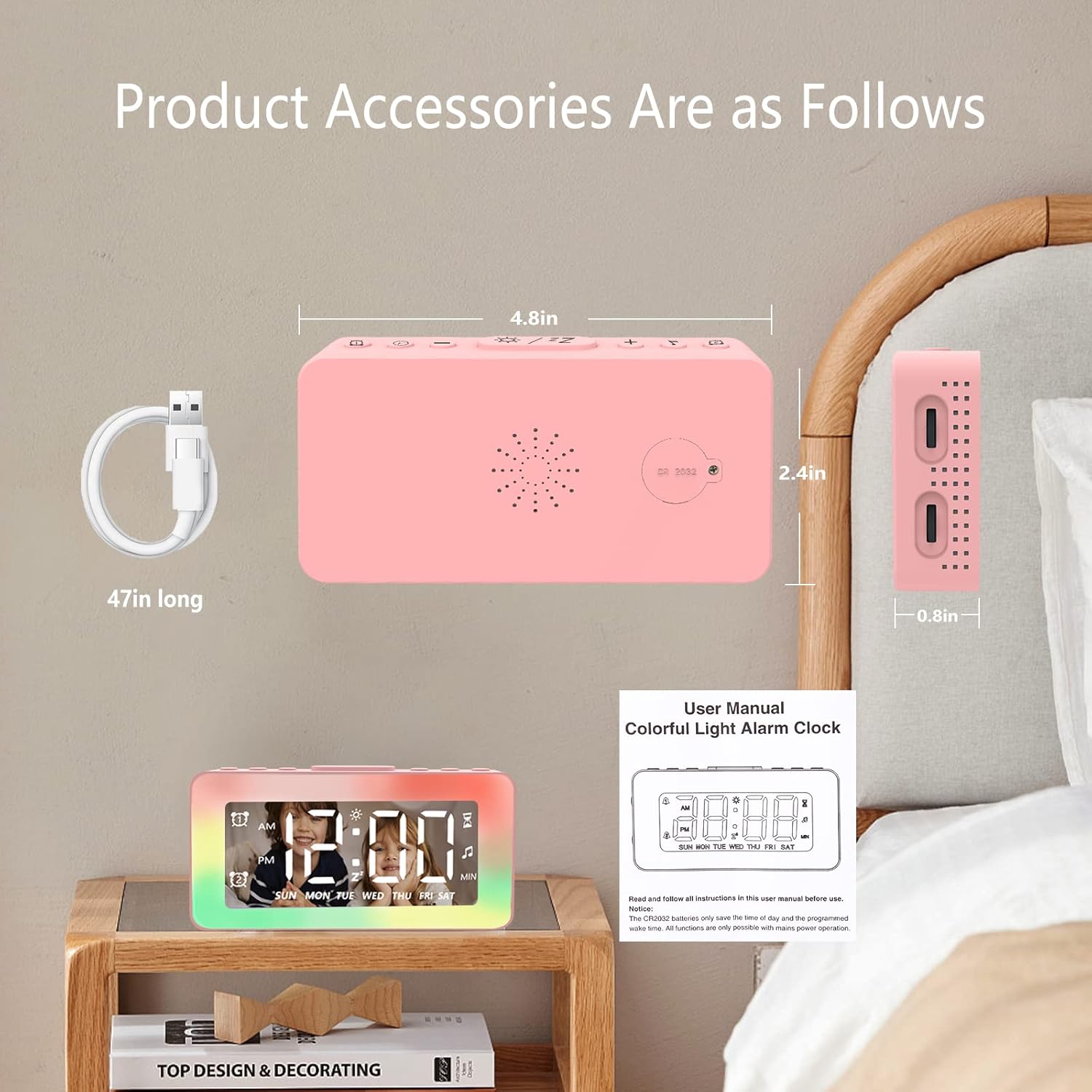
Image: The SPLITSKY NZFS Kids Alarm Clock, a USB-C power cable, and the user manual are included in the package.
3. Proizvod je gotovview
Familiarize yourself with the buttons and ports on your alarm clock:

Slika: Detaljna view of the alarm clock's top buttons and side ports, including Alarm 1, Time Setting, Light Minus/Settings, Snooze/Light Mode Switch, Light Plus/Setup, Music Switch, Alarm 2, Volume Setting, Time Brightness Setting, USB Output Charging Port, and Type-C Input Interface.
- Alarm 1 dugme: Set and activate Alarm 1.
- Dugme za podešavanje vremena: Podesite trenutno vrijeme.
- Light Minus / Settings Button: Decrease light brightness or navigate settings.
- Snooze / Light Mode Switch Button: Activate snooze, or cycle through light modes.
- Light Plus / Setup Button: Increase light brightness or confirm settings.
- Music Switch Button: Cycle through white noise sounds.
- Alarm 2 dugme: Set and activate Alarm 2.
- Volume Setting Wheel (Side): Adjust alarm and white noise volume.
- Time Brightness Setting Wheel (Side): Podesite osvetljenost ekrana.
- USB Output Charging Port (Side): Charge external devices.
- Type-C Input Interface (Side): Connect power cable to the alarm clock.
4. Podešavanje
4.1 Priključak za napajanje
- Connect the provided USB-C power cable to the Type-C Input Interface on the side of the alarm clock.
- Uključite drugi kraj USB-C kabla u kompatibilni USB adapter za napajanje (nije uključen) ili USB port.
- Displej će se osvijetliti, što označava da je sat uključen.

Image: The SPLITSKY NZFS Kids Alarm Clock is shown powered on and connected via its USB-C port, also demonstrating its capability to charge a smartphone.
4.2 Battery Installation (Memory Backup)
The alarm clock includes a pre-installed CR2032 battery. This battery serves as a memory backup to retain time and alarm settings during a power outage or when the main power is disconnected. It does not power the clock for regular operation.
- If the battery needs replacement, locate the battery compartment on the back of the unit.
- Koristite mali odvijač da otvorite pretinac.
- Zamijenite novom CR2032 baterijom, vodeći računa o ispravnom polaritetu.
- Čvrsto zatvorite odjeljak.
5. Uputstvo za upotrebu
5.1 Setting the Time (12H/24H Format)
- Pritisnite i držite Dugme za podešavanje vremena until the hour digits begin to flash.
- Koristite Light Minus / Settings Button (dolje) ili Light Plus / Setup Button (up) to adjust the hour.
- Pritisnite Dugme za podešavanje vremena again to move to minute adjustment. Adjust minutes using the Light Minus/Plus buttons.
- Pritisnite Dugme za podešavanje vremena a third time to select 12-hour or 24-hour format. Adjust using the Light Minus/Plus buttons.
- Pritisnite Dugme za podešavanje vremena još jednom da biste potvrdili i izašli iz načina podešavanja vremena.
5.2 Setting Alarms (Dual Alarm, Daily/Weekday/Weekend Mode)
Sat podržava dva nezavisna alarma (Alarm 1 i Alarm 2).
- Pritisnite i držite Dugme alarma 1 (for Alarm 1) or Dugme alarma 2 (for Alarm 2) until the alarm hour digits flash.
- Koristite Light Minus / Settings Button or Light Plus / Setup Button da podesite sat.
- Press the respective Alarm Button again to move to minute adjustment. Adjust minutes using the Light Minus/Plus buttons.
- Press the respective Alarm Button again to select the alarm mode:
- Dnevni način rada: Alarm se oglašava svaki dan.
- Weekday Mode: Alarm se oglašava od ponedjeljka do petka.
- Vikend režim: Alarm se oglašava u subotu i nedjelju.
- Press the respective Alarm Button once more to confirm and exit alarm setting mode.
- To enable/disable an alarm, short press the Dugme alarma 1 or Dugme alarma 2Ikona alarma će se pojaviti/nestati na ekranu.
5.3 Funkcija odgode
When an alarm sounds, tap the Snooze / Light Mode Switch Button on top to activate snooze. The alarm will pause for 9 minutes and then sound again. This can be repeated multiple times.
5.4 Night Light (8 Modes RGB, 10-level dimming)
The alarm clock features 6 solid color lights and 2 ambient colorful lights.
- Kratko pritisnite Snooze / Light Mode Switch Button to turn on the night light and cycle through the 8 color modes.
- To adjust the brightness (10 levels), use the Light Minus / Settings Button or Light Plus / Setup Button while the night light is active.
- To turn off the night light, continue pressing the Snooze / Light Mode Switch Button dok se svjetlo ne ugasi.

Image: Multiple SPLITSKY NZFS Kids Alarm Clocks are shown, each displaying a different color from the 8 available RGB night light modes.
5.5 White Noise Sleep Aid (8 Sounds)
The clock offers 8 soothing sounds to aid sleep.
- Kratko pritisnite Dugme za prebacivanje muzike to turn on the white noise and cycle through the available sounds.
- To adjust the volume (16 levels), use the Volume Setting Wheel on the side of the clock.
- To turn off the white noise, continue pressing the Dugme za prebacivanje muzike until the sound stops.

Image: The SPLITSKY NZFS Kids Alarm Clock is displayed on a bedside table, with icons illustrating the various white noise options such as rain, cicadas, piano, bonfire, waves, birdsong, and church bells.
5.6 Sleep Timer (10-120 minutes)
The sleep timer allows you to set a duration for the white noise and/or night light to play before automatically turning off.
- While white noise or night light is active, press and hold the Dugme za prebacivanje muzike (for white noise timer) or Snooze / Light Mode Switch Button (for light timer).
- Koristite Light Minus / Settings Button or Light Plus / Setup Button to select the desired timer duration (10, 20, 30, 60, 90, 120 minutes).
- Press the respective button again to confirm the timer setting. The timer icon will appear on the display.
5.7 Podešavanje svjetline ekrana
Adjust the brightness of the LED time display using the Time Brightness Setting Wheel on the side of the clock.
5.8 USB priključak za punjenje
The USB output charging port on the side of the alarm clock can be used to charge other small electronic devices, such as smartphones. Connect your device's charging cable to this port.
6. Održavanje
6.1 Čišćenje
- Prije čišćenja provjerite je li uređaj isključen.
- Obrišite površinu mekom, suhom krpom.
- Ne koristite abrazivna sredstva za čišćenje, rastvarače ili hemijske sprejeve.
6.2 Skladištenje
When not in use for extended periods, store the alarm clock in a cool, dry place, away from direct sunlight and extreme temperatures.
7. Otkrivanje problema
If you encounter issues with your SPLITSKY NZFS Kids Alarm Clock, refer to the table below for common problems and solutions.
| Problem | Mogući uzrok | Rješenje |
|---|---|---|
| Prikaz sata je isključen ili taman. | Not connected to power; Time brightness set too low. | Ensure USB-C cable is securely connected to a power source. Adjust the Time Brightness Setting Wheel. |
| Alarm se ne oglašava. | Alarm nije aktiviran; Jačina zvuka alarma je preniska. | Check if the alarm icon is displayed. If not, short press the respective Alarm Button to activate. Adjust the Volume Setting Wheel. |
| Time/settings reset after power disconnection. | CR2032 backup battery is depleted or missing. | Replace the CR2032 battery in the battery compartment. |
| Night light or white noise not working. | Function not activated; Sleep timer active. | Kratko pritisnite Snooze / Light Mode Switch Button or Dugme za prebacivanje muzike to activate. Check if a sleep timer is set. |
8. Specifikacije
| Feature | Detalj |
|---|---|
| Brand | SPLITSKY |
| Broj modela | NZFS |
| Display Type | Digitalna LED |
| Dimenzije proizvoda | 3.17"W x 3.17"H (approximately 8.05 cm W x 8.05 cm H) |
| Težina artikla | 8.1 unce (približno 230 grama) |
| Izvor napajanja | Corded Electric (USB-C), Battery Powered (CR2032 for memory) |
| Režimi noćnog svjetla | 8 (6 solid colors, 2 ambient colorful) with 10-level dimming |
| Zvukovi bijelog šuma | 8 umirujućih zvukova |
| Tonovi alarma | 7 wake-up alarm tones with 16-level volume control |
| Karakteristike alarma | Dual Alarm, Daily/Weekday/Weekend modes, 9-minute Snooze |
| Funkcija tajmera | 10-120 minute sleep timer for sounds and lights |
| Povezivanje | USB-C Input, USB-A Output (for charging external devices) |
| Materijal | Akrilonitril butadien stiren |
9. Garancija i podrška
9.1 Informacije o garanciji
Please refer to the warranty information provided at the time of purchase or contact your retailer for details regarding the product warranty. Keep your proof of purchase for any warranty claims.
9.2 Korisnička podrška
For technical assistance, troubleshooting beyond this manual, or general inquiries, please contact the seller through the platform where you purchased the product. Provide your order number and a detailed description of the issue for prompt support.


