1. Proizvod je gotovview
The EPOMAKER Aura75 is a 75% layout mechanical keyboard kit designed for customization and versatile connectivity. It features a compact design, hot-swappable switch sockets, and dynamic RGB backlighting. This kit supports multiple connection modes and is compatible with various operating systems.
Ključne karakteristike:
- 75% Raspored: Optimized for functionality and space efficiency.
- Trostruka povezanost: Podržava bežičnu vezu od 2.4 GHz, Bluetooth 5.0 i USB-C žičanu vezu.
- PCB sa mogućnošću vruće zamjene: Allows for easy installation and removal of 3-pin and 5-pin mechanical switches without soldering.
- Dinamičko RGB pozadinsko osvjetljenje: Features per-key RGB lighting and unique side lighting effects.
- Multifunkcionalno dugme: Provides control over volume and RGB brightness.
- Apsorpcija zvuka: Equipped with silicone pads and IXPE switch cushioning for a quieter typing experience.
- Izdržljiva konstrukcija: Crafted with a robust injection-molded casing and PC plate.
2. Vodič za postavljanje
Sadržaj paketa:
- EPOMAKER Aura75 Keyboard Kit
- USB-C kabl
- 2.4GHz bežični ključ
- Izvlakač ključeva
- Switch Puller
2.1 Instaliranje prekidača i tipki
The Aura75 is a barebone kit, meaning switches and keycaps are not pre-installed. You will need to install your preferred 3-pin or 5-pin mechanical switches and keycaps.
- Align the pins of your mechanical switch with the hot-swappable socket on the PCB.
- Gently press the switch until it clicks into place. Ensure the pins are straight to avoid bending.
- Ponovite za sve željene položaje prekidača.
- Place your chosen keycaps onto the installed switches, pressing firmly until they are secure.
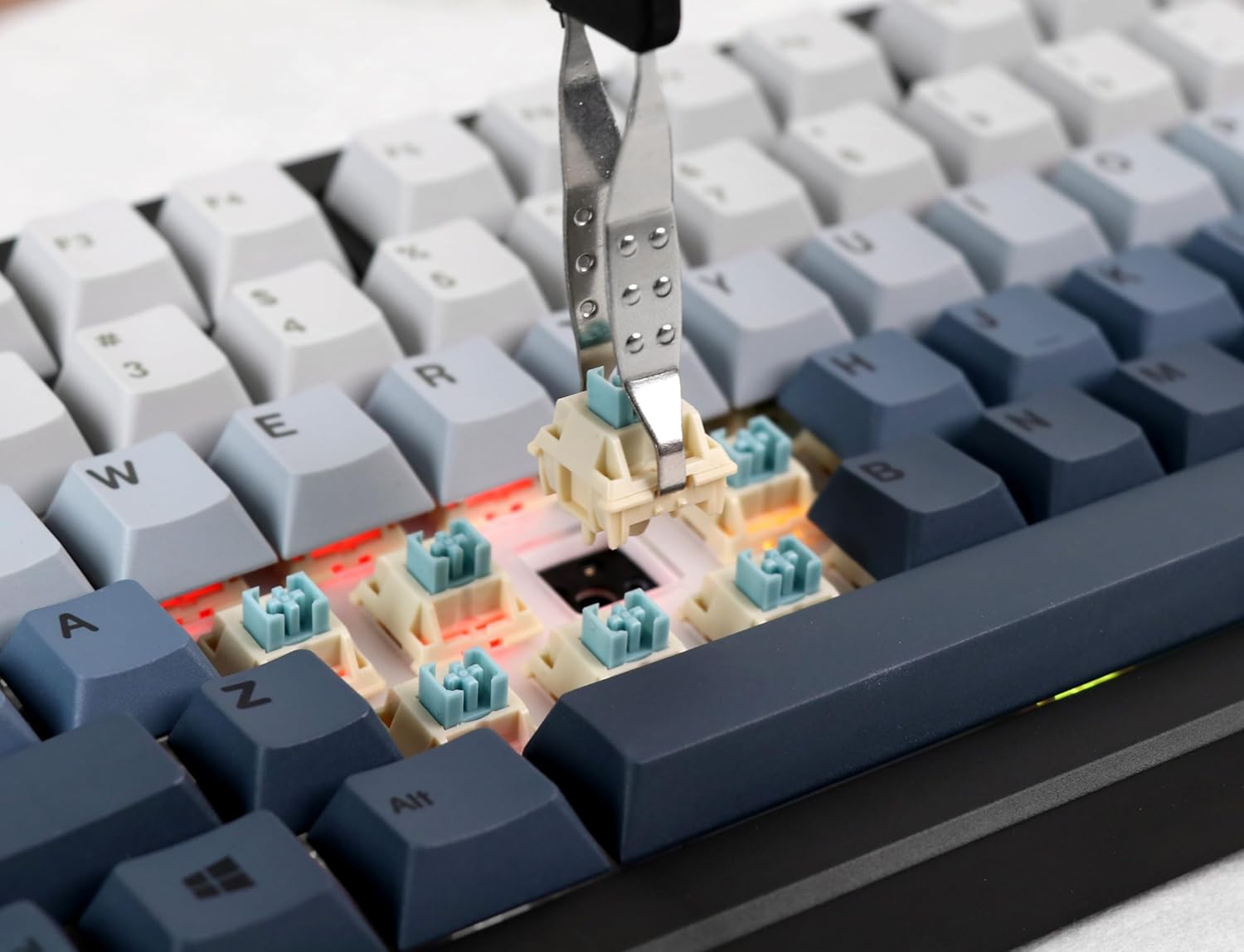
Image: Proper installation of a mechanical switch into the hot-swappable PCB.

Image: The hot-swappable barebone kit featuring south-facing RGB LEDs and tuned plate-mounted stabilizers.
2.2 Connecting the Keyboard:
The Aura75 offers three connectivity options:
- USB-C žičani: Povežite tastaturu direktno sa svojim uređajem pomoću priloženog USB-C kabla.
- Bežično 2.4 GHz: Insert the 2.4GHz USB dongle into your device. Flip the switch on the back of the keyboard to the 2.4G position.
- Bluetooth 5.0: Flip the switch on the back of the keyboard to the Bluetooth position. Press FN + 1/2/3 to enter pairing mode for up to three different devices. The indicator light will flash, then become solid upon successful connection.
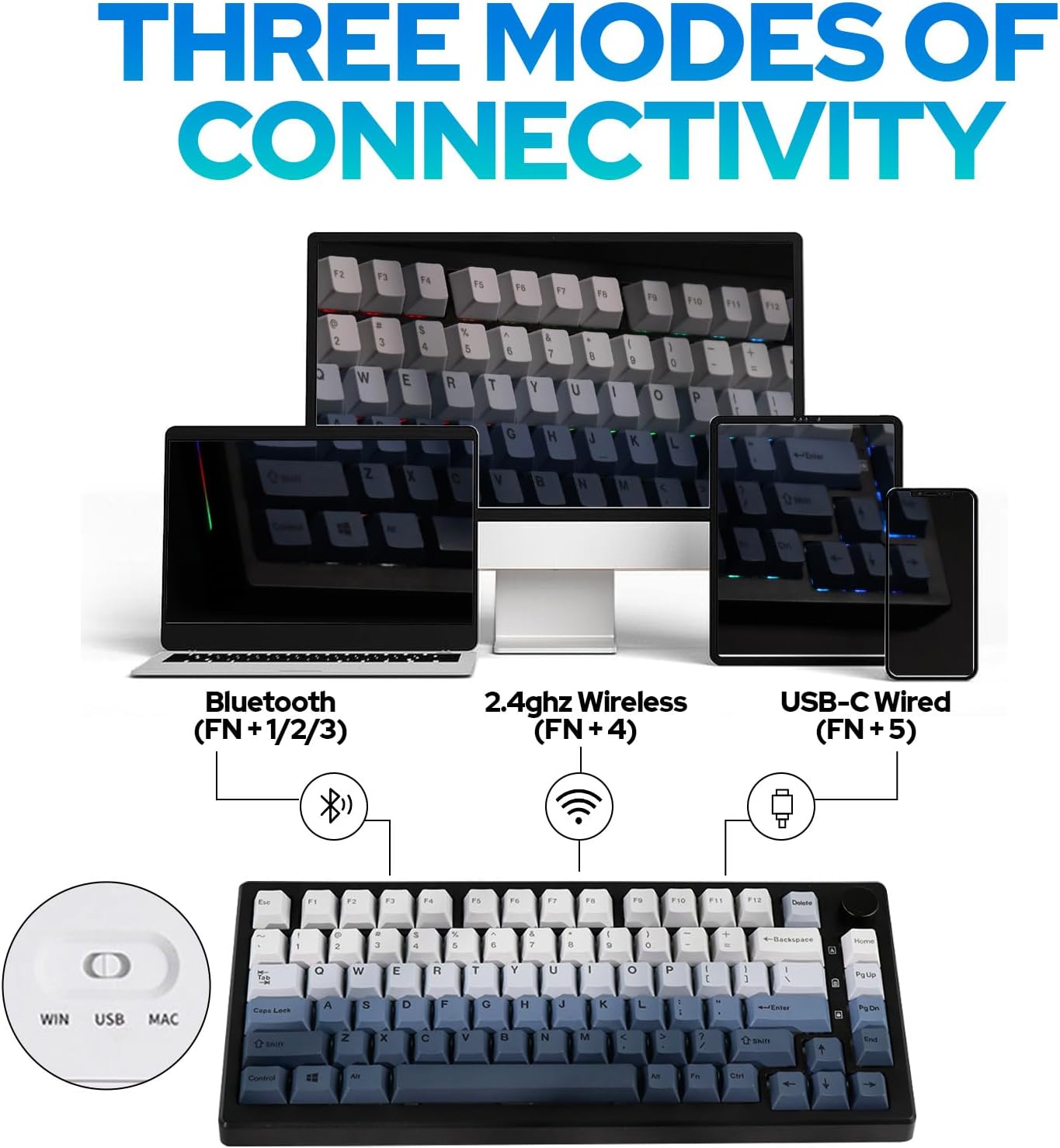
Slika: Prekoview of the three connectivity modes: Bluetooth (FN+1/2/3), 2.4GHz Wireless (FN+4), and USB-C Wired (FN+5).

Slika: Detaljna view of the keyboard's rear, highlighting the connectivity switch, 2.4GHz dongle storage, and USB-C port.
2.3 Adjusting Keyboard Height:
Tastatura ima dvatage adjustable feet on the underside to customize the typing angle for ergonomic comfort.
3. Uputstvo za upotrebu
3.1 RGB Backlight Control:
The Aura75 features extensive RGB lighting options, including per-key and side lighting.
- FN + \|: Cycle through different backlight effects (Light Effect 1-20).
- FN + Home/PU: Cycle through different backlight colors/brightness (Light Effect 1-10).
- FN + L: Uključivanje/isključivanje pozadinskog osvjetljenja.
- FN + L_Ctrl: Toggle sidelight effect on/off.
- FN + L_Alt: Cycle through sidelight colors.
- FN + Z/X: Adjust sidelight brightness/speed.

Slika: Izložba tastaturaasing its RGB backlight and unique side light effects.

Image: FN key combinations for adjusting backlight effects, colors, brightness, and speed.
3.2 Multifunction Knob:
The knob located on the top right of the keyboard serves dual functions:
- rotirati: Adjusts system volume or RGB brightness.
- Pritisnite: Toggles between volume control and RGB brightness control.

Image: The multifunction knob, used to switch between volume and RGB brightness adjustments.
3.3 Operating System Mode Switching:
The keyboard supports both Windows and Mac operating systems.
- Windows način rada: Pritisnite FN + W.
- Mac način rada: Pritisnite FN + E. If this does not work, try FN + Q.
3.4 Programiranje softvera:
The EPOMAKER Aura75 is programmable using the dedicated EPOMAKER software. This software allows for:
- Remapiranje tipki
- Kreiranje makroa
- Customizing lighting effects
- Setting sleep modes

Image: The EPOMAKER software interface for advanced keyboard customization.
4. Održavanje
Regular maintenance helps ensure the longevity and optimal performance of your EPOMAKER Aura75 keyboard.
- Čišćenje tipki: Use a keycap puller to remove keycaps. Clean them with a mild soap solution and a soft cloth, then air dry completely before reattaching.
- Cleaning the PCB/Switches: Use compressed air to remove dust and debris from between switches. For deeper cleaning, carefully remove switches with a switch puller and clean the PCB with a soft brush.
- Održavanje kablova: Izbjegavajte oštre savijanja ili pretjerano povlačenje USB-C kabela kako biste spriječili oštećenje.
- Održavanje baterije: For wireless modes, ensure the keyboard is charged regularly. Avoid fully depleting the battery for extended periods.
5. Otkrivanje problema
Uobičajeni problemi i rješenja:
- Tastatura ne reaguje:
- Ensure the keyboard is fully charged or connected via USB-C.
- Check the connectivity switch on the back of the keyboard (Wired, 2.4G, Bluetooth).
- For 2.4GHz, ensure the dongle is securely inserted.
- Za Bluetooth, ponovo uparite uređaj ako je potrebno.
- Incorrect key functions in Mac OS:
- Ensure the keyboard is set to Mac mode by pressing FN + E. If this does not resolve the issue, try pressing FN + Q.
- RGB lights not working or flickering:
- Check brightness settings using the multifunction knob or FN key combinations.
- Provjerite da tastatura nije u stanju niske potrošnje energije.
- Update keyboard firmware using the EPOMAKER software.
- Accidental key presses (high sensitivity):
- Some users may find the actuation point of certain switches sensitive. Adjust your typing style or consider different switch types if customization is desired.
6. Specifikacije
| Feature | Detalj |
|---|---|
| Brand | EPOMAKER |
| Broj modela | Aura75 |
| Layout | 75% |
| Tehnologija povezivanja | 2.4 GHz bežično, Bluetooth 5.0, USB-C žičano |
| Kompatibilni uređaji | Igraća konzola, laptop, računar, pametni telefon, tablet |
| Posebne karakteristike | Backlit, Ergonomic, Hot-Swappable, Programmable Keys |
| Pozadinsko osvetljenje tastature | RGB |
| Materijal | Plastika |
| Težina artikla | 2.12 funte |
| Dimenzije paketa | 14.92 x 8.11 x 1.77 inča |
| Proizvođač | EPOMAKER |
| First Available | 6. maja 2023 |
7. Garancija i podrška
Za informacije o garanciji i tehničkoj podršci, obratite se službenom EPOMAKER-u. webweb-mjesto ili direktno kontaktirajte njihovu korisničku službu. Sačuvajte račun za kupovinu u slučaju reklamacije.
Zvanična EPOMAKER prodavnica: Visit EPOMAKER Store
8. Dodatni resursi
Video snimci proizvoda:
EPOMAKER Sea Salt Switch VS Sea Salt Silent Switch
Video: A comparison between EPOMAKER Sea Salt Switches and Sea Salt Silent Switches, demonstrating their sound and feel differences.
AURA75 Keyboard Kit Typing Sound
Video: Demonstrates the typing sound profile of the AURA75 Keyboard Kit, highlighting its acoustic characteristics.
F75 purple gaming keyboard
Video: Kratak pregledview of the F75 keyboard, showcasing its design and RGB lighting in a purple variant.
Typing Video Epomaker AULA F75 Black Pink Gradient
Video: A short typing demonstration on an Epomaker AULA F75 keyboard with a black and pink gradient keycap set.


