Uvod
Thank you for choosing the Faber 34L Double Glazed 1600W Oven Toaster Grill (OTG). This manual provides essential information for the safe and efficient operation, maintenance, and troubleshooting of your appliance. Please read these instructions thoroughly before first use and retain them for future reference.

Slika: Front view of the Faber 34L OTG with its control panel and glass door.
Važna sigurnosna uputstva
Uvijek se pridržavajte osnovnih sigurnosnih mjera opreza prilikom korištenja električnih uređaja kako biste smanjili rizik od požara, strujnog udara i ozljeda osoba.
- Prije upotrebe OTG-a pročitajte sva uputstva.
- Ne dodirujte vruće površine. Koristite ručke ili dugmad. Uvijek koristite rukavice za pećnicu ili zaštitne rukavice prilikom rukovanja vrućim materijalima.
- To protect against electrical shock, do not immerse cord, plug, or any non-removable parts of the oven in water or other liquid.
- Neophodan je strogi nadzor kada bilo koji uređaj koriste djeca ili u blizini djece.
- Isključite iz utičnice kada nije u upotrebi i prije čišćenja. Ostavite da se ohladi prije stavljanja ili skidanja dijelova.
- Nemojte koristiti uređaj s oštećenim kablom ili utikačem, ili nakon što uređaj pokvari ili je na bilo koji način oštećen.
- Ne koristiti na otvorenom.
- Nemojte dozvoliti da kabl visi preko ivice stola ili pulta, niti da dodiruje vruće površine.
- Ne stavljajte na ili blizu vrućeg plinskog ili električnog gorionika, ili u zagrijanu pećnicu.
- Morate biti izuzetno oprezni kada premještate uređaj koji sadrži vruće ulje ili druge vruće tekućine.
- Nemojte koristiti uređaj za drugu upotrebu osim za predviđenu.
- Prevelika hrana ili metalni pribor ne smiju se stavljati u toster pećnicu jer mogu izazvati požar ili opasnost od strujnog udara.
- Do požara može doći ako je pećnica pokrivena ili ako dodirne zapaljivi materijal, uključujući zavjese, draperije, zidove i slično, dok je u radu.
- Ne stavljajte sljedeće materijale u pećnicu: papir, karton, plastiku ili slične materijale.
- Ne skladištite nikakve materijale, osim pribora preporučenog od strane proizvođača, u ovoj pećnici kada se ne koristi.
- Always wear protective, heat-resistant gloves when inserting or removing items from the hot oven.
- Osigurajte odgovarajuću ventilaciju oko uređaja tokom rada.
Komponente proizvoda i pribor
Your Faber OTG comes with the following components and accessories:
- Faber 34L OTG Unit
- Enamelled Bake Tray
- Pladanj za roštilj
- Pladanj za mrvice
- Pizza Plate (9-inch)
- Rotisserie Rod
- Rotisserie Handle (Tongs)
- SS Wire Tray
- Silicon Heat Guard Glove

Image: All included accessories for the Faber 34L OTG, laid out for clear identification.
Postavljanje i prva upotreba
Raspakivanje
- Pažljivo izvadite OTG i svu dodatnu opremu iz ambalaže.
- Remove any protective films, stickers, or packaging materials from the appliance and accessories.
- Pregledajte uređaj na eventualna oštećenja. Ne koristite ga ako je oštećen.
Plasman
- Place the OTG on a stable, flat, heat-resistant surface.
- Ensure there is adequate space (at least 10-15 cm) around all sides of the oven for proper ventilation. Do not place it directly against a wall or under cabinets.
- Keep the appliance away from flammable materials like curtains, tablecloths, and paper.
Početno čišćenje
- Prije prve upotrebe, obrišite unutrašnjost i vanjštinu pećnice sredstvom za čišćenje.amp tkanina.
- Wash all accessories (bake tray, grill tray, rotisserie rod, etc.) in warm, soapy water, rinse thoroughly, and dry completely.
- Stavite posudu za mrvice na dno rerne.
First Use Burn-in
It is recommended to run the oven empty for about 15 minutes on its highest temperature setting (250°C) with the Function Selector set to 'Top + Bottom Heating' to burn off any manufacturing residues. A slight odor or smoke may be present during this process; this is normal. Ensure the area is well-ventilated.
Uputstvo za upotrebu
The Faber OTG features intuitive controls for various cooking functions.

Slika: Krupni plan view of the control knobs on the Faber 34L OTG, indicating their respective functions.
Kontrolna tabla završenaview
- Dugme za funkciju: Selects the cooking function (Off, Rotisserie, Convection, Rotisserie + Convection).
- Dugme za temperaturu: Podešava temperaturu kuhanja od 100°C do 250°C.
- Dugme za izbor: Chooses the heating mode (Defrost, Top Heating, Bottom Heating, Top + Bottom Heating).
- Tajmer dugme: Sets the cooking time up to 60 minutes. Includes an auto-cutoff feature.
Cooking Functions and Modes
Your OTG supports 6 cooking functions and various heating modes:

Image: Visual representation of the various cooking modes available with the Faber 34L OTG, including baking, roasting, and grilling.
- pečenje: Ideal for cakes, cookies, and bread. Use Top + Bottom Heating with or without Convection.
- pečenje: Perfect for meats and vegetables. Use Top + Bottom Heating, often with Convection.
- roštiljanje: For browning and crisping. Use Top Heating.
- tost: For bread and similar items. Use Top Heating.
- Odmrzavanje: Thaws frozen foods. Use the Defrost setting on the Selector Knob.
- podgrijavanje: Warms up cooked food. Use Top + Bottom Heating at a lower temperature.
Rotisserie Function
The auto motorized rotisserie allows for even grilling of whole chickens or large cuts of meat.
- Skewer the food onto the rotisserie rod, securing it with the forks.
- Place the rotisserie rod into the designated slots inside the oven.
- Set the Function Knob to 'Rotisserie' or 'Rotisserie + Convection'.
- Adjust Temperature and Timer as required for your recipe.
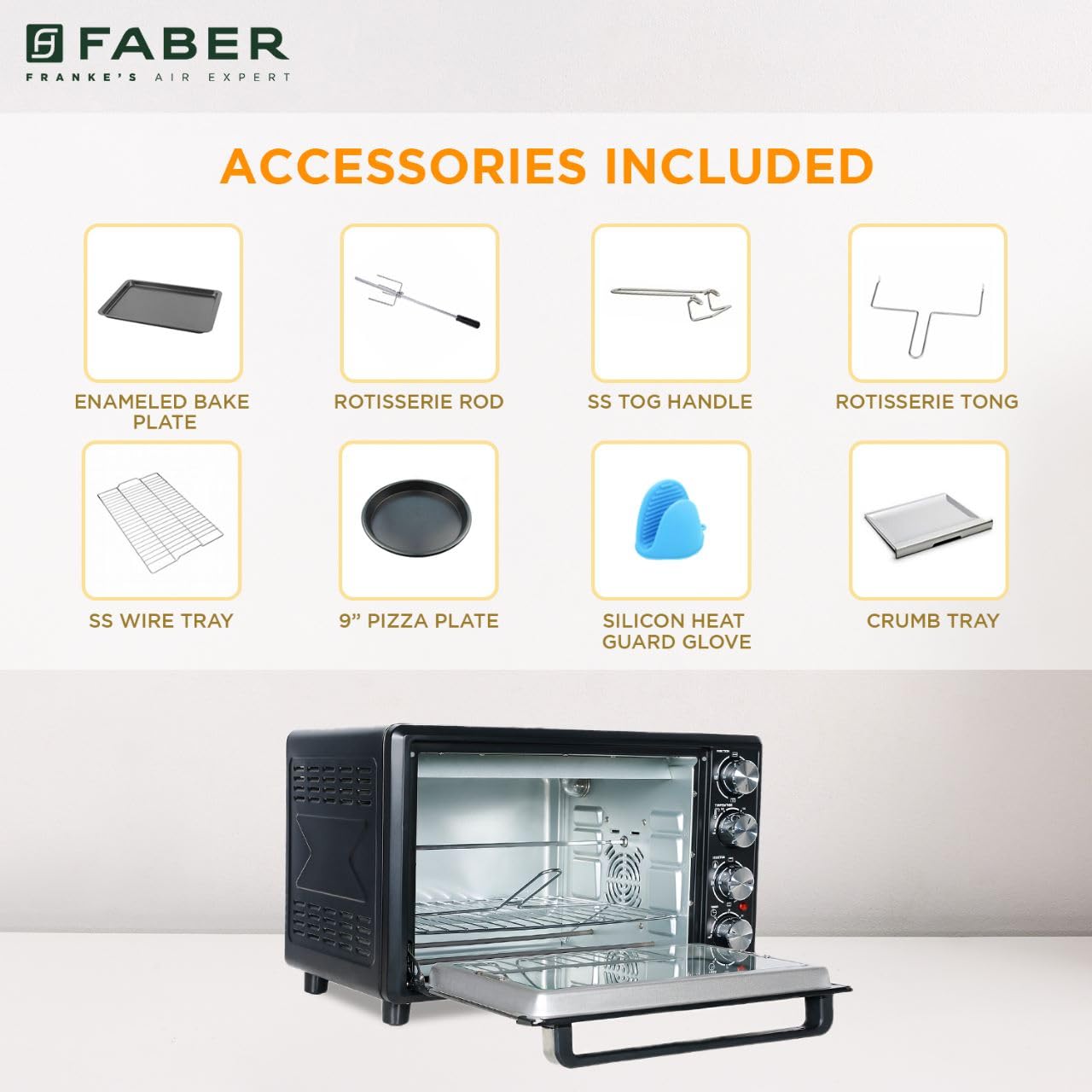
Image: The auto motorized rotisserie feature of the OTG, demonstrating two chickens being evenly grilled.
360° Convection Technology
The 360° Convection Technology ensures uniform cooking by circulating hot air throughout the oven chamber. This results in optimum browning, better crispiness, and higher nutrient retention.
- To activate convection, turn the Function Knob to 'Convection' or 'Rotisserie + Convection'.
- Convection cooking often requires slightly lower temperatures and shorter cooking times compared to conventional baking.

Image: Diagram illustrating the 360° convection technology, showing hot air circulating inside the oven for even cooking.
Timer with Auto Cut-off
The mechanical timer can be set for up to 60 minutes. Once the set time elapses, the oven will automatically switch off, indicated by a bell sound.
- Turn the Timer Knob clockwise to set the desired cooking duration.
- For shorter times (less than 10 minutes), turn the knob past 10 minutes and then back to the desired time for better accuracy.
Održavanje i čišćenje
Regular cleaning and maintenance will ensure the longevity and optimal performance of your OTG.
General Cleaning
- Uvijek isključite pećnicu iz električne utičnice i ostavite je da se potpuno ohladi prije čišćenja.
- Obrišite vanjske površine mekom krpom, damp tkanina. Nemojte koristiti abrazivna sredstva za čišćenje ili jastučiće za ribanje.
- Clean the interior walls, floor, and ceiling with a damp cloth and mild detergent. For stubborn stains, a non-abrasive oven cleaner designed for OTGs can be used, following the product instructions carefully.
- The double glazed glass door can be cleaned with a glass cleaner. The double glazing helps retain heat and prevents burns from touching the outer glass.
- Remove and empty the crumb tray regularly. Wash it in warm, soapy water, rinse, and dry thoroughly.
Čišćenje pribora
- All removable accessories (bake tray, grill tray, wire rack, rotisserie rod, pizza plate, tongs, silicon glove) can be washed in warm, soapy water. Rinse well and dry completely before storing or reusing.
- Do not use metal scouring pads or abrasive cleaners on non-stick surfaces (if applicable) to avoid damage.

Slika: Unutrašnjost view of the Faber 34L OTG with the chamber light on, highlighting the clean racks and crumb tray, ready for use or after cleaning.
Rješavanje problema
If you encounter any issues with your Faber OTG, refer to the following table for common problems and solutions.
| Problem | Mogući uzrok | Rješenje |
|---|---|---|
| Pećnica se ne uključuje. | Nije uključeno; napajanje je isključenotage; neispravna utičnica; tajmer nije podešen. | Ensure the power cord is securely plugged into a working outlet. Check your household's circuit breaker. Set the timer knob to the desired cooking duration. |
| Hrana se ne kuha ravnomjerno. | Incorrect temperature/mode; overcrowding; improper rack position; convection fan issue. | Verify temperature and heating mode settings. Avoid overcrowding the oven. Use the appropriate rack position. Ensure the convection fan is not obstructed (if using convection). |
| Prekomjerno dimljenje tokom rada. | Prolijevanje hrane; nakupljanje masnoće; početno paljenje. | Clean the oven interior and accessories thoroughly. Ensure the crumb tray is clean. If it's the first use, some smoke is normal. |
| Ražanj se ne okreće. | Rotisserie rod not properly seated; Function Knob not set to Rotisserie. | Ensure the rotisserie rod is correctly inserted into the drive socket and support. Set the Function Knob to 'Rotisserie' or 'Rotisserie + Convection'. |
| Tajmer ne radi. | Knob not turned past 10 minutes for short times; mechanical issue. | For times under 10 minutes, turn the knob past 10 and then back to the desired time. If the issue persists, contact customer support. |
Ako problem i dalje postoji nakon isprobavanja ovih rješenja, obratite se korisničkoj podršci kompanije Faber.
Specifikacije
Detailed technical specifications for the Faber 34L OTG:
- Brand: Faber
- Broj modela: 131.0676.817
- Kapacitet: 34 litara
- Wattage: 1600 Watts
- Boja: Crna
- Posebna karakteristika: Temperature Control, 360° Convection, Rotisserie, Double Glazed Glass
- Vrsta kontrole: Knob
- Stil vrata: Dropdown Door
- Vrsta materijala vrata: Kaljeno staklo
- Izvor napajanja: Corded Electric
- Težina artikla: 10 kg 900 g
- Dimenzije artikla (DxŠxV): 51 x 39 x 32 centimetara
- Zemlja porijekla: Kina

Image: Diagram showing the physical dimensions (Length, Width, Height) of the Faber 34L OTG.
Garancija i podrška
Informacije o garanciji
Your Faber OTG is covered by a manufacturer's warranty. Please refer to the warranty card included with your product for specific terms, conditions, and duration of the warranty. Keep your purchase receipt as proof of purchase for warranty claims.
Korisnička podrška
For any service, repair, or technical assistance, please contact Faber customer support. You can find contact details on the warranty card or the official Faber website.
- Online podrška: Visit the official Faber webstranica za često postavljana pitanja i resurse podrške.
- Servisni centar: Locate authorized service centers in your region.


