1. Uvod
This manual provides essential instructions for the safe and efficient operation of your Motorola Six-Pocket Multi-Unit Charger. This charger is designed to simultaneously charge up to six compatible Motorola radios or batteries, ensuring your communication devices are always ready for use. Please read this manual thoroughly before using the charger.
2. Sigurnosne informacije
Always observe the following safety precautions to prevent injury or damage to the charger or connected devices:
- Use only the power supply provided with the charger.
- Ne izlažite punjač kiši ili vlazi.
- Nemojte koristiti punjač ako je na bilo koji način oštećen.
- Osigurajte odgovarajuću ventilaciju oko punjača tokom rada.
- Ne pokušavajte da rastavite ili modifikujete punjač.
- Čuvati van domašaja djece.
3. Sadržaj paketa
Provjerite da li vaš paket sadrži sljedeće stavke:
- Motorola Six-Pocket Multi-Unit Charger (PMLN7101A / PMLN7101 / PMLN8569)
- US/NA Power Supply
4. Podešavanje
- Place the multi-unit charger on a flat, stable surface in a well-ventilated area.
- Connect the provided US/NA power supply to the charger's power input port.
- Plug the power supply into a standard electrical outlet. The charger is now ready for use.
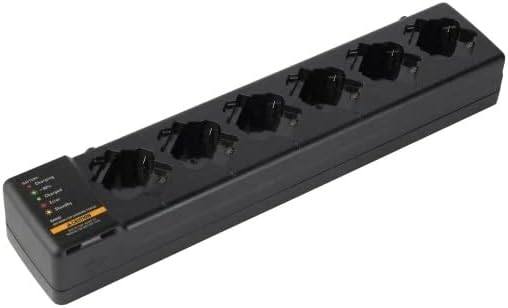
Slika 4.1: Nadzemni trošak view of the Motorola Six-Pocket Multi-Unit Charger, showing six charging pockets and an indicator panel on the left side.
5. Uputstvo za upotrebu
The charger is designed for use with compatible Motorola radios and batteries, including models SL300, TLK100, SL500, SL500E, and SLN1000.
5.1 Charging Radios or Batteries
- Provjerite je li punjač uključen.
- Insert a compatible radio or battery into one of the six charging pockets. Ensure it is seated correctly.
- Observe the LED indicator for the corresponding pocket to determine the charging status.
5.2 Status LED indikatora
Each charging pocket features an LED indicator to provide real-time status:
- Crvena (puna): Baterija se puni.
- Zelena (puna): Baterija je potpuno napunjena.
- Amber (Solid): Battery is charging to 90% capacity.
- Crveno (treperi): Error condition (e.g., battery fault, temperature issue). Remove the battery and reinsert. If the error persists, refer to the Troubleshooting section.
- bez svjetla: Standby mode or no battery/radio inserted.
The indicator panel on the left side of the charger provides a legend for these LED statuses.
6. Održavanje
To ensure optimal performance and longevity of your charger:
- Punjač održavajte čistim i bez prašine i ostataka. Za čišćenje koristite meku, suhu krpu.
- Ne koristite jake kemikalije ili abrazivna sredstva za čišćenje.
- Čuvajte punjač na hladnom i suvom mestu kada ga ne koristite.
- Redovno provjeravajte da li kabel za napajanje ima znakova oštećenja.
7. Otkrivanje problema
| Problem | Mogući uzrok | Rješenje |
|---|---|---|
| Punjač se ne uključuje. | No power to the outlet; power supply not connected; faulty power supply. | Check outlet with another device; ensure power supply is securely connected; try a different power supply if available. |
| LED indikator treperi crveno. | Battery fault; incorrect battery type; temperature outside operating range. | Remove and reinsert the battery; ensure battery is compatible; move charger to a room temperature environment. |
| Baterija se ne puni. | Battery not properly seated; dirty contacts; faulty battery. | Ensure battery is fully inserted; clean battery and charger contacts; try a different battery. |
8. Specifikacije
| Feature | Detalj |
|---|---|
| Brojevi modela | PMLN7101A, PMLN7101, PMLN8569 |
| Brand | Motorola Solutions |
| Dimenzije proizvoda | 3 x 4 x 15 inča (7.62 x 10.16 x 38.1 cm) |
| Težina artikla | 3.29 funte (1.49 kg) |
| Boja | Crna |
| Ulazni voltage | 240 Volts |
| Output Voltage | 7.4 Volts |
| Kompatibilni radio | SL300, TLK100, SL500, SL500E, SLN1000 |
9. Garancija i podrška
Specific warranty information for this product was not provided in the available data. For detailed warranty terms and conditions, please refer to the documentation included with your purchase or visit the official Motorola Solutions website. For technical support or service inquiries, please contact Motorola Solutions customer service.


