Važne informacije o sigurnosti
Please read all instructions carefully before using the Lexibook Paw Patrol Karaoke CD Player. Keep this manual for future reference.
- Ne izlažite jedinicu kiši ili vlazi.
- Nemojte blokirati otvore za ventilaciju.
- Koristite samo dodatke/pribor koje je odredio proizvođač.
- Isključite uređaj iz struje tokom oluja sa grmljavinom ili kada ga ne koristite duži period.
- Osigurajte pravilnu ugradnju i odlaganje baterija.
Sadržaj paketa
Provjerite da li su sve stavke prisutne u paketu:
- Lexibook Paw Patrol Karaoke CD Player
- 2 mikrofona
- Adapter za napajanje
- Uputstvo za upotrebu
Product Overview
The Lexibook Paw Patrol Karaoke CD Player is designed for children to enjoy music and sing along with their favorite characters. It features a front-load CD player, two microphones, an LED display, and a headphone jack for private listening.

Slika 1: The Lexibook Paw Patrol Karaoke CD Player, featuring a blue and red design with Paw Patrol characters, and two attached red microphones.
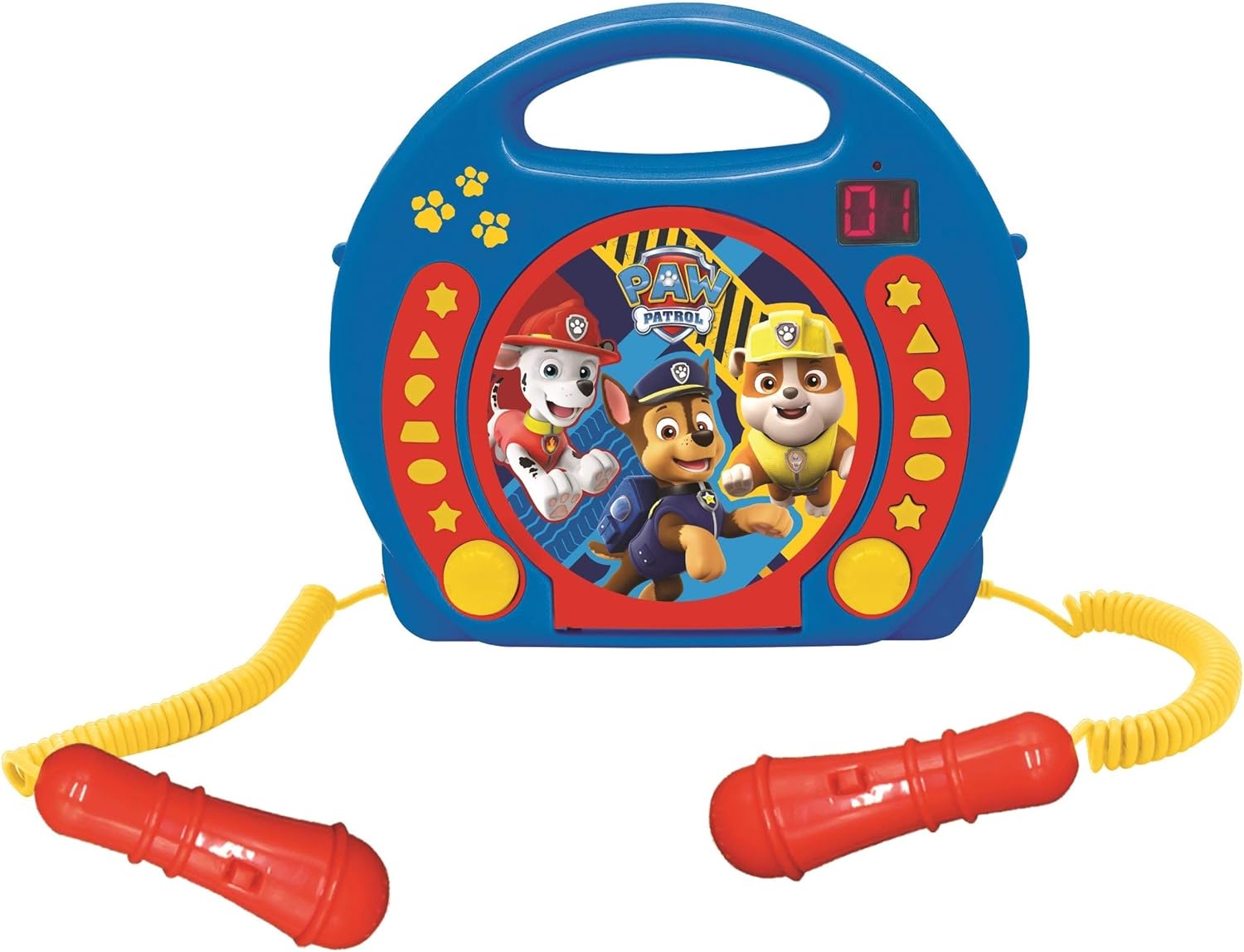
Slika 2: A top-down perspective of the karaoke CD player, showing the central Paw Patrol shield design, control buttons, and the two microphones.
Klip 1: Proizvod je gotovview video demonstrating the features and design of the Lexibook Paw Patrol Karaoke CD Player.
Setup
Priključak za napajanje
- Locate the DC IN jack on the back of the unit.
- Insert the small plug of the provided power adapter into the DC IN jack.
- Drugi kraj adaptera za napajanje priključite u standardnu zidnu utičnicu.
Instalacija baterije
For portable use, the unit requires 4 'C' batteries (not included).
- Pronađite odjeljak za baterije na dnu uređaja.
- Pomoću odvijača otvorite poklopac odeljka za baterije.
- Insert 4 'C' batteries, ensuring correct polarity (+/-).
- Vratite poklopac odeljka za baterije i pričvrstite ga vijkom.
Uputstvo za upotrebu
CD reprodukcija
- Open the CD compartment cover located on the top of the unit.
- Postavite CD na osovinu tako da strana s etiketom bude okrenuta prema gore.
- Čvrsto zatvorite poklopac pretinca za CD.
- Press the 'PLAY/PAUSE' button to start playback.
- Use the 'SKIP' buttons (forward/backward) to navigate between tracks.
- Press the 'STOP' button to end CD playback.
Korišćenje mikrofona
- Ensure the microphones are securely plugged into their respective jacks.
- During CD playback, speak or sing into the microphones.
- Adjust the microphone volume using the dedicated volume control (if available) or the main volume control.
Funkcija programiranja
The programming function allows you to create a custom playlist of tracks.
- With the CD stopped, press the 'PROGRAM' button.
- Use the 'SKIP' buttons to select the desired track.
- Press 'PROGRAM' again to add the track to the playlist.
- Repeat steps 2 and 3 to add more tracks.
- Press 'PLAY' to start playing your programmed sequence.
Upotreba slušalica
- Plug standard 3.5mm headphones (not included) into the headphone jack.
- Podesite jačinu zvuka na ugodan nivo slušanja.
- Note: Using headphones will mute the main speakers.
Održavanje
- Čistite uređaj mekom, suhom krpom. Ne koristite abrazivna sredstva za čišćenje ili rastvarače.
- Keep the CD compartment free of dust and debris.
- Čuvajte jedinicu na hladnom i suvom mestu kada se ne koristi.
Rješavanje problema
| Problem | Rješenje |
|---|---|
| Jedinica se ne uključuje. | Check power adapter connection or ensure batteries are correctly installed and not depleted. |
| CD se ne reprodukuje. | Ensure the CD is clean, not scratched, and correctly placed in the compartment. Close the compartment lid completely. |
| Microphones are not working. | Verify microphones are securely plugged in. Check microphone volume levels. |
| Zvuk je izobličen ili prenizak. | Adjust the main volume control. Ensure the CD is not damaged. |
Specifikacije
| Feature | Detalj |
|---|---|
| Dimenzije proizvoda | 10.35 x 3.98 x 8.27 inča |
| Težina artikla | 1.63 funte |
| Preporučena starost proizvođača | 3 godina i više |
| Baterije | Potrebne su 4 C baterija (nisu uključene) |
| Posebna karakteristika | LED displej |
| Boja | Plava / Crvena |
| Uključene komponente | Power adapter, CD player, handle, 2 microphones |
| Datum izlaska | 11. aprila 2023 |
Garancija i podrška
Ovaj proizvod dolazi sa a 2 godina ograničene garancije from the manufacturer, Lexibook.
For technical support, warranty claims, or further assistance, please contact Lexibook customer service. Refer to the product packaging or the official Lexibook webstranicu za najnovije kontakt informacije.


