Uvod
This manual provides detailed instructions for the installation, operation, and maintenance of your Gravity D96CP HiFi Audio Processor Car Stereo. Please read this manual thoroughly before using the product to ensure proper function and to prevent damage.
Sigurnosne informacije
- Provjerite da li su svi kablovi ispravno spojeni kako biste spriječili kratki spoj ili oštećenje uređaja i vozila.
- Ne rukujte uređajem na način koji vas odvlači od vožnje. Uvijek dajte prioritet sigurnosti u saobraćaju.
- Ako niste sigurni u vezi s bilo kojim koracima instalacije, obratite se stručnjaku.
- Držite uređaj dalje od vode i prekomjerne vlage.
- Do not attempt to repair the unit yourself. Refer servicing to qualified personnel.
Šta je u kutiji
Nakon otvaranja pakovanja, provjerite da li su sve komponente prisutne:
- Gravity D96CP Car Stereo Unit
- Daljinski upravljač
- kabelskog svežnja
- Korisnički priručnik (ovaj dokument)
Note: Additional accessories such as a trim kit, specific vehicle wiring harness, or RCA cables may be required for installation and are sold separately.
Product Overview
Prednja ploča

Slika 1: Front view of the Gravity D96CP Car Stereo. The 6.5-inch touchscreen displays the main interface with icons for various functions. Physical buttons for IR, RST, Power, Band, Volume Up/Down, and Disc Eject are located on the left side. A USB port is at the bottom left.
Rear Panel and Connections

Slika 2: Rear panel of the Gravity D96CP Car Stereo. This view highlights the multiple RCA jacks for audio/video input and output, a TV antenna port (functionality may vary), a radio antenna input, and the main connector for the wiring harness.
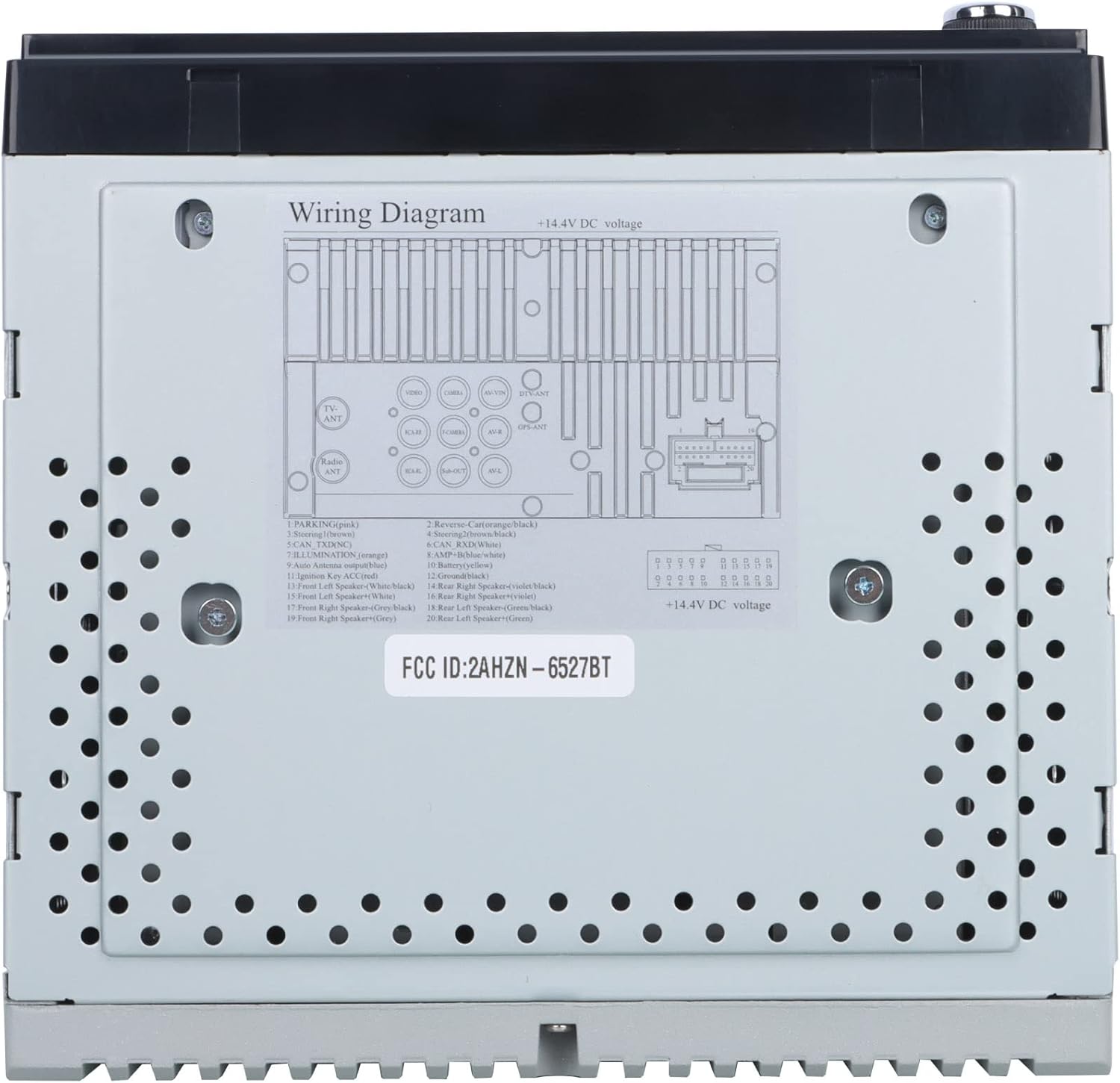
Slika 3: Detailed wiring diagram for the Gravity D96CP. This diagram illustrates the pin assignments for the main power and speaker harness, including connections for parking brake, reverse, illumination, antenna, and ampkontrola lifiera.
Postavljanje i instalacija
Proper installation is crucial for the performance and safety of your car stereo. If you are not confident in performing the installation yourself, seek professional assistance.
Kontrolna lista prije instalacije
- Prije početka bilo kakvog ožičenja provjerite je li akumulator vozila isključen.
- Verify the stereo's dimensions fit your vehicle's dashboard opening. A trim kit may be necessary.
- Obtain a vehicle-specific wiring harness adapter if not included, to avoid cutting factory wires.
Ožičenje
Pogledajte Slika 3 for the detailed wiring diagram. Key connections include:
- Napajanje (žuto): Konstantno napajanje od 12V.
- Paljenje (crveno): Prekidano napajanje od 12 V (ACC).
- zemlja (crna): Spojite na čistu tačku uzemljenja šasije.
- Žice zvučnika: Connect to corresponding vehicle speakers (Front Left, Front Right, Rear Left, Rear Right). Ensure correct polarity.
- Reverse (Orange/Black): Connect to the vehicle's reverse light circuit for automatic camera display.
- Parking (Pink): This unit may not have a dedicated parking brake interlock. Exercise caution when operating video functions while driving.
- Antenna (Blue): Snažna antena/ampDaljinsko uključivanje Liferiera.
- Vanjski mikrofon: Povežite eksterni mikrofon za bolji kvalitet poziva.
Note: The unit features RCA jacks for video in/out and audio in/out, allowing connection of external sources or additional screens. RCA cables are not included.
Uputstvo za upotrebu
Basic Operation
- Uključivanje/isključivanje: Pritisnite dugme za napajanje na prednjoj ploči.
- Kontrola jačine zvuka: Use the VOL+ and VOL- buttons on the front panel or the touchscreen controls.
- Odabir načina rada: Tap the desired icon on the touchscreen (e.g., Radio, Bluetooth, USB, AUX, Phonelink, Settings).
Apple CarPlay / Android Auto
Connect your iPhone (for CarPlay) or Android phone (for Android Auto) to the stereo via a certified USB cable. The system will automatically detect and launch the respective interface. This allows access to phone functions like navigation, music, calls, and messages directly from the stereo's touchscreen or via voice commands (Siri/Google Assistant).
- Provjerite da li je operativni sistem vašeg telefona ažuriran.
- Use the original USB cable for optimal connection stability.
- The phone screen and stereo screen operate independently, allowing different content to be displayed on each.
Mirror Link
The Mirror Link function projects your smartphone's screen directly onto the car stereo display. Connect your phone via a USB cable, and follow the on-screen prompts to activate mirroring. Any content displayed on your phone will be synchronized in real-time on the 6.5-inch stereo screen.
Bluetooth povezivanje
- Uparivanje: Go to the Bluetooth menu on the stereo. Enable Bluetooth on your smartphone and search for available devices. Select "Gravity D96CP" (or similar name) and confirm pairing.
- Hands-free pozivanje: Once paired, you can answer/make calls directly from the stereo. The external microphone picks up your voice, and audio plays through the car speakers.
- Audio prijenos: Stream music and audio from your phone to the stereo. Control playback (play/pause, skip) via the stereo's touchscreen or your phone.
DVD/CD plejer
Insert a DVD or CD into the disc slot. The unit will automatically detect the disc and begin playback. Use the touchscreen controls for playback functions (play, pause, skip, menu).
Radio
- U glavnom meniju odaberite ikonu "Radio".
- Koristite funkciju skeniranja da biste pronašli dostupne stanice ili ručno podesili frekvenciju.
- Save preferred stations to preset buttons for quick access.
USB reprodukcija
Insert a USB drive into the front USB port. The unit will automatically detect compatible media files (audio, video, images) and allow you to browse and play them.
Pozadi View Backup Camera
Ako je kompatibilni stražnji view camera (sold separately) is connected and the reverse wire is properly installed, the stereo will automatically display the camera feed when the vehicle is shifted into reverse.
Održavanje
- Čišćenje ekrana: Koristite meku krpu koja ne ostavlja dlačice da nježno obrišete ekran osjetljiv na dodir. Nemojte koristiti abrazivna sredstva za čišćenje ili rastvarače.
- Generalno čišćenje: Keep the unit free from dust and debris. Use a soft, dry cloth for exterior cleaning.
- Ažuriranja firmvera: Provjerite proizvođača webperiodično provjeravajte web-mjesto za dostupna ažuriranja firmvera kako biste poboljšali performanse i dodali nove funkcije.
Rješavanje problema
| Problem | Mogući uzrok | Rješenje |
|---|---|---|
| Jedinica se ne uključuje. | Incorrect wiring (power/ground), blown fuse. | Check all power and ground connections. Inspect the fuse on the wiring harness. |
| Nema zvuka. | Speaker wires incorrectly connected, volume too low, mute activated. | Verify speaker wiring polarity and connections. Increase volume. Check if mute is active. |
| Apple CarPlay/Android Auto not connecting or unstable. | Non-original USB cable, outdated phone OS, loose connection. | Use a certified, original USB cable. Ensure phone OS is updated. Reconnect the USB cable firmly. |
| Bluetooth connection issues or poor call quality. | Interference, phone not paired, microphone issue. | Re-pair the device. Ensure the external microphone is properly connected and positioned. |
| DVD player plays sound but no video. | Disc issue, video format incompatibility, parking brake safety feature (if present). | Try a different DVD. Ensure the video format is supported. Verify parking brake connection if applicable. |
| Screen goes black when headlights are turned on. | Illumination wire incorrectly connected. | Check the illumination wire connection (orange wire) to ensure it's correctly wired to the vehicle's dimmer circuit or constant 12V if no dimmer is desired. |
Specifikacije
| Broj modela | VGR-D96CP |
| Brand | Gravitacija |
| Veličina ekrana | 6.5 inča |
| Tehnologija povezivanja | Pomoćni, Bluetooth, USB |
| Tip kontrolera | Android, Google Assistant, iOS |
| Posebne karakteristike | Spotify, Touchscreen, Apple CarPlay, Android Auto, Mirror Link, DVD/CD Player |
| Kompatibilni uređaji | Mobile Phone, Speaker |
| Način audio izlaza | Surround |
| Konfiguracija kanala surround zvuka | 5.1 |
| Video Encoding | MPEG-2 |
| Broj kanala | 4 |
| Težina artikla | 3.89 funte |
| Dimenzije paketa | 9.69 x 9.41 x 7.17 inča |
Informacije o garanciji
Specific warranty details for the Gravity D96CP are not provided in the available product information. Please refer to the warranty card included with your purchase or contact Gravity customer support for detailed warranty terms and conditions.
Korisnička podrška
For technical assistance, troubleshooting beyond this manual, or inquiries regarding your Gravity D96CP car stereo, please contact Gravity customer support. Contact information is typically found on the product packaging or the manufacturer's official website.


