Uvod
This manual provides detailed instructions for the safe and efficient operation of your Fosmon 7 Day Digital Outlet Timer. This device is designed to automate the power supply to various indoor electrical appliances, offering programmable on/off cycles over a 7-day period, including a random function for enhanced security. Please read this manual thoroughly before use and retain it for future reference.

Image: Two Fosmon 7 Day Digital Outlet Timers, showcasing their compact design and digital interface.
Sigurnosne informacije
- Samo za unutrašnju upotrebu. Ne izlagati vlazi ili ekstremnim temperaturama.
- Do not exceed the maximum load capacity of 15A/1875W.
- Provjerite je li tajmer sigurno uključen u uzemljenu utičnicu.
- Ne rastavljajte niti pokušavajte popraviti uređaj. Za pomoć se obratite korisničkoj podršci.
- Čuvati van domašaja djece.
- Isključite tajmer iz zidne utičnice prije čišćenja.
Product Overview
The Fosmon 7 Day Digital Outlet Timer features a clear digital display and intuitive buttons for programming. It includes two grounded outlets, allowing control of two devices simultaneously. A built-in battery backup retains settings during power outages.
Ključne karakteristike:
- 8 Individual Programs: Set up to 8 distinct ON/OFF cycles daily or weekly.
- Slučajna funkcija: Activates lights or devices at random intervals to simulate occupancy.
- Dvostruko uzemljene utičnice: Control two devices from a single timer.
- Rezervna kopija baterije: Retains programmed settings during power interruptions.
- Kompaktan dizajn: Minimizira začepljenje susjednih utičnica.

Image: The timer's compact design and key features such as automatic operation and battery backup.

Image: The timer in a kitchen setting, demonstrating its user-friendly interface and application with common appliances.
Setup
- Početna naplata: Plug the timer into a live electrical outlet for at least 30 minutes to charge the internal battery. The display will activate.
- Resetiranje tajmera: If the display is erratic or unresponsive, use a pointed object (like a pen tip) to press the recessed Reset button located on the front panel. This will clear all previous settings.
- Postavljanje trenutnog vremena:
- Pritisnite i držite CLOCK dugme.
- Dok drži CLOCK, pritisnite WEEK da postavite trenutni dan u sedmici.
- Dok drži CLOCK, pritisnite HOUR to set the current hour (AM/PM will adjust automatically).
- Dok drži CLOCK, pritisnite MIN za postavljanje trenutne minute.
- Otpustite CLOCK dugme. Trenutno vrijeme je sada postavljeno.
Slika: Detaljna view of the timer's digital display and programming buttons.
Uputstvo za upotrebu
Programming ON/OFF Cycles (Up to 8 Programs):
- Pritisnite PROG button once. The display will show "1 ON". This is your first ON program.
- Pritisnite WEEK da odaberete dan(e) za ovaj program. Opcije uključuju pojedinačne dane, dane u sedmici, vikende ili svih 7 dana.
- Pritisnite HOUR i MIN da biste podesili željeno vrijeme uključivanja.
- Pritisnite PROG again. The display will show "1 OFF". This is your first OFF program.
- Pritisnite WEEK da biste odabrali dan(e) za ovaj ISKLJUČENI program (obično se podudara s programom UKLJUČIVANJA).
- Pritisnite HOUR i MIN da biste podesili željeno vrijeme ISKLJUČIVANJA.
- Repeat steps 1-6 for additional programs (2 ON/OFF through 8 ON/OFF). Press PROG to cycle through programs.
- Nakon što podesite sve željene programe, pritisnite dugme CLOCK dugme za povratak na prikaz trenutnog vremena.

Slika: pramples of setting multiple ON/OFF programs for various days of the week.

Image: User interaction with the timer's buttons during programming.
Manual Override Modes:
Pritisnite MANUAL dugme za kretanje kroz sledeće režime:
- ON: The connected device will remain ON indefinitely.
- ISKLJUČENO: The connected device will remain OFF indefinitely.
- AUTOMATSKI: Tajmer će raditi u skladu s programiranim ciklusima UKLJUČIVANJA/ISKLJUČIVANJA. Ovo je standardni način rada.
Slučajna funkcija:
The random function is designed to deter potential intruders by turning connected lights or devices ON and OFF at irregular intervals. This function only works when the timer is in AUTO način rada.
- To activate the random function, press the R dugme. Na ekranu će se pojaviti slovo "R".
- Da biste deaktivirali, pritisnite dugme R ponovo pritisnite dugme. "R" će nestati.
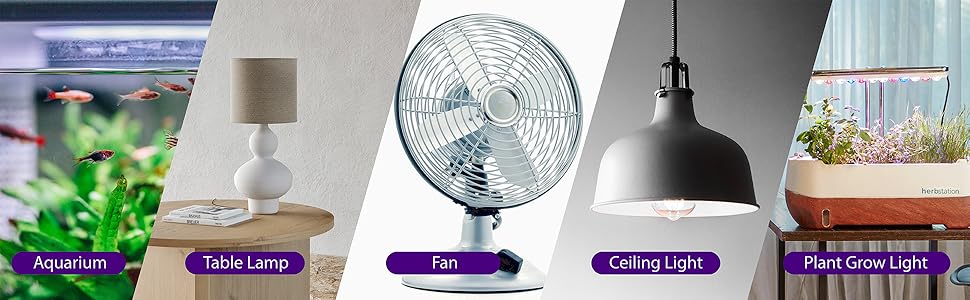
Image: The random function helps enhance home security by simulating occupancy.
Održavanje
- Clean the timer with a dry, soft cloth. Do not use liquid cleaners or aerosols.
- Prije čišćenja provjerite je li tajmer isključen iz struje.
- Čuvajte na hladnom i suvom mestu kada se ne koristi.
Rješavanje problema
| Problem | Mogući uzrok | Rješenje |
|---|---|---|
| Prikaz je prazan ili nepravilan. | Internal battery is low or needs reset. | Plug the timer into a live outlet for 30 minutes to charge. Press the Reset dugme. |
| Device does not turn ON/OFF at programmed times. | Timer is not in AUTO mode, or program is incorrect. | Pritisnite MANUAL until "AUTO" is displayed. Verify program settings (ON/OFF times, days). |
| Random function is not working. | Timer is not in AUTO mode, or random function is not activated. | Ensure timer is in AUTO način rada. Pritisnite R button to activate (an "R" should appear). |
| Connected device is not receiving power. | Timer is OFF, or device is faulty. | Provjerite je li tajmer uključen ON or AUTO mode with an active ON program. Test the connected device in a different outlet. |
Specifikacije
- Broj modela: C-10800FCUS
- Voltage: 125V AC
- trenutno: 15A
- Wattage: 1875W
- Prodajna mjesta: 2 uzemljenih utičnica
- Programi: 8 programa za uključivanje/isključivanje
- baterija: Nonstandard Battery (included, non-replaceable)
- Dimenzije: Približno 3.5 x 3.5 x 1.7 inča (88.9 x 88.9 x 43.5 mm)
- Certifikati: ETL Listed

Image: Physical dimensions and ETL certification details of the timer.
Garancija i podrška
Fosmon provides a Ograničena doživotna garancija for this product. This warranty covers defects in materials and workmanship under normal use. For warranty claims or technical support, please contact Fosmon customer service.
Korisnička podrška: Refer to the official Fosmon webkontakt informacije potražite na web-mjestu ili pakiranju proizvoda.


