1. Uvod
This manual provides detailed instructions for the installation, operation, and maintenance of your VIMIN VM-GS1620 18-Port Gigabit Ethernet Switch. Please read this manual thoroughly before using the device to ensure proper setup and optimal performance. Keep this manual for future reference.
2. Proizvod je gotovview
The VIMIN VM-GS1620 is an unmanaged 18-port Gigabit Ethernet switch designed for high-speed network expansion. It features 16 Gigabit Ethernet ports (10/100/1000 Mbps) and 2 dedicated 1000Mbps uplink ports. The switch supports IEEE802.3af/at standards and includes a One Key VLAN function for enhanced network security and bandwidth management. Its durable metal housing allows for versatile desktop or rack-mount installation.
2.1 Prednja i stražnja ploča

Slika 1: Front and Rear Panels of the VIMIN VM-GS1620 Switch. The front panel displays 16 Gigabit ports (1-16), 2 Uplink ports (17-18), LED indicators for Power and Data, and a VLAN switch. The rear panel shows the AC power input.
Karakteristike prednjeg panela:
- Portovi 1-16: 10/100/1000 Mbps Gigabit Ethernet ports for connecting network devices.
- Ports 17-18 (Uplink): Dedicated 1000 Mbps Gigabit uplink ports for connecting to a router or main network.
- LED za napajanje: Označava status napajanja.
- Data/Link/Act LEDs: Indicate data activity and link status for each port.
- VLAN prekidač: Toggles the One Key VLAN function on or off.
Karakteristike stražnjeg panela:
- Ulaz za izmjeničnu struju: Connects to the provided power cord (AC/IN 100-240V).
2.2 Ključne karakteristike
- Povezivanje velike brzine: 16 Gigabit Ethernet ports and 2 Gigabit uplink ports for fast data transfer.
- One Key VLAN: Enhances network security by isolating ports 1-16 while allowing communication with uplink ports.
- Robusna zaštita: Features 4KV lightning protection for device and network safety.
- Izdržljiv dizajn: Sturdy metal housing ensures longevity and efficient heat dissipation.
- Rad bez ventilatora: Provides quiet operation, suitable for various environments.
- Plug and Play: No complex configuration required for basic network setup.
Slika 2: The VIMIN VM-GS1620 features a fanless, quiet design within a durable metal case for reliable performance.
3. Sadržaj paketa
Please verify the contents of your package. If any items are missing or damaged, contact VIMIN support immediately.
- VIMIN VM-GS1620 18-Port Gigabit Ethernet Switch
- AC strujni kabl
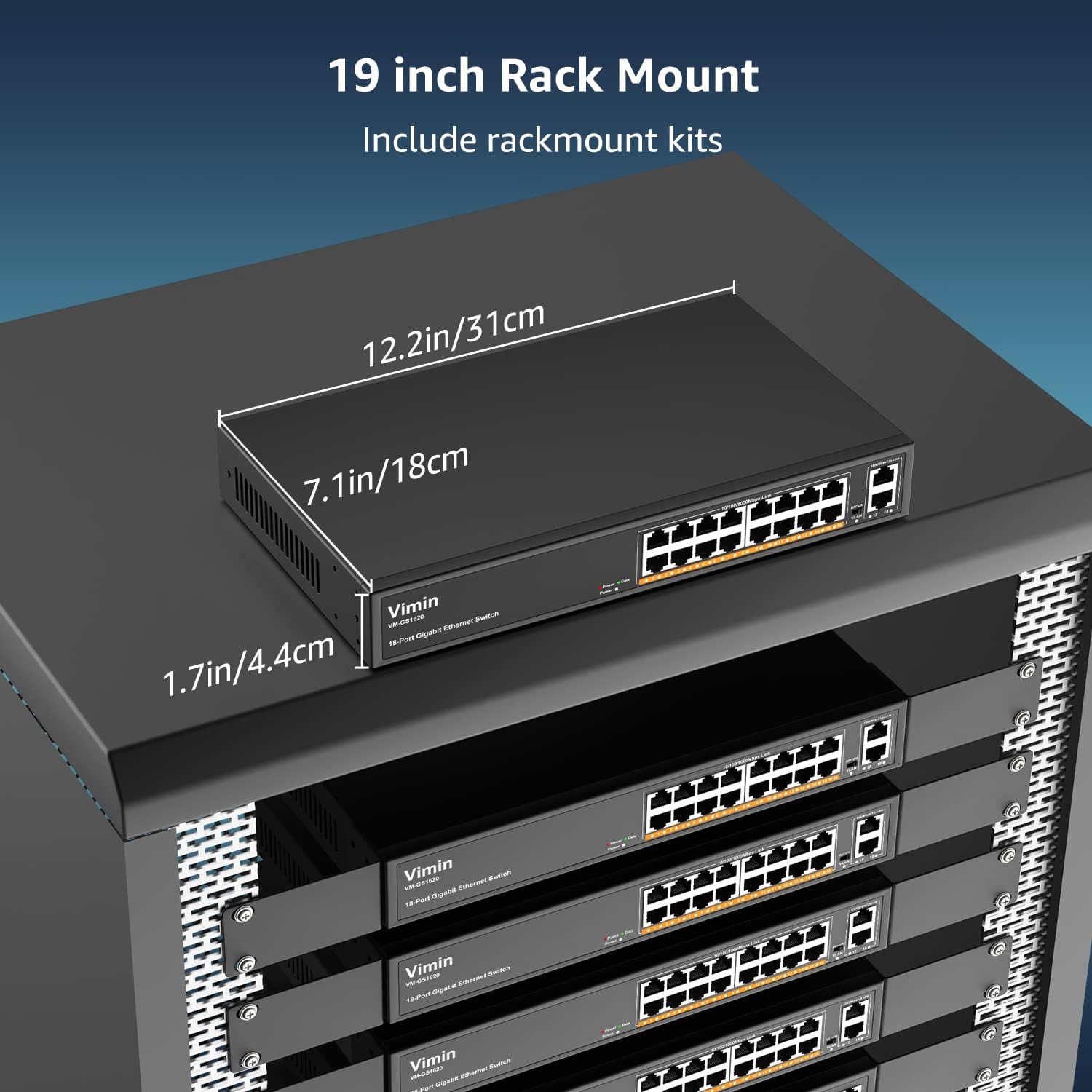
- Rack-Mount Kits (for 19-inch rack installation)
- Korisnički priručnik (ovaj dokument)
4. Upute za postavljanje
4.1 Fizička instalacija
The VIMIN VM-GS1620 switch can be installed on a desktop or mounted in a 19-inch rack.
Položaj na radnoj površini:
- Postavite prekidač na ravnu, stabilnu površinu.
- Ensure adequate ventilation around the device. Do not block the ventilation holes.
- Keep the switch away from heat sources, direct sunlight, and excessive moisture.
Instalacija u rack:
- Attach the provided rack-mount brackets to the sides of the switch using the included screws.
- Pričvrstite prekidač u standardni 19-inčni nosač opreme pomoću odgovarajućih vijaka za nosač (nisu uključeni).
- Ensure proper airflow within the rack to prevent overheating.

Slika 3: The VIMIN VM-GS1620 switch can be installed in a 19-inch rack using the included rack-mount kits. Dimensions are approximately 12.2in (31cm) wide, 7.1in (18cm) deep, and 1.7in (4.4cm) high.
4.2 Priključak za napajanje
- Connect one end of the AC power cord to the power input on the rear panel of the switch.
- Plug the other end of the power cord into a standard electrical outlet (AC 100-240V).
- LED dioda za napajanje na prednjoj ploči trebala bi svijetliti, što ukazuje na to da prekidač prima napajanje.
4.3 Mrežne veze
The VIMIN VM-GS1620 is a Plug and Play device, requiring no software configuration for basic operation.
- Connect your network devices (e.g., computers, printers, IP cameras, access points) to any of the Gigabit Ports 1-16 using standard Ethernet cables.
- Connect your router or main network backbone to one of the Uplink Ports 17-18.
- Once a device is connected and powered on, the corresponding Link/Act LED for that port will illuminate, indicating a successful connection and activity.

Slika 4: Simple Plug and Play connection. Insert an Ethernet cable into any available port.

Slika 5: Connection diagram illustrating power connection, device connections to the switch, and the resulting network functionality.
5. Uputstvo za upotrebu
5.1 Osnovni rad
Once the switch is powered on and devices are connected, the VIMIN VM-GS1620 operates automatically. It functions as an unmanaged switch, forwarding data packets between connected devices at Gigabit speeds without requiring any user configuration.
5.2 One Key VLAN Mode
The switch features a physical VLAN switch on the front panel. This function allows you to quickly enable or disable VLAN isolation.
- VLAN OFF (Default): All ports (1-18) operate as a standard switch, allowing all connected devices to communicate with each other.
- VLAN ON: When the VLAN switch is set to ON, ports 1-16 are isolated from each other. Devices connected to ports 1-16 can only communicate with the uplink ports (17-18) and not directly with other devices on ports 1-16. This enhances network security and can improve bandwidth utilization by preventing broadcast storms within the isolated segments.

Slika 6: The One Key VLAN switch isolates ports 1-16 from each other, allowing them to communicate only with the uplink ports (17-18). This setup is useful for segmenting a network for security or performance.
6. Održavanje
The VIMIN VM-GS1620 switch is designed for minimal maintenance. Follow these guidelines to ensure its longevity:
- čišćenje: Za čišćenje vanjske strane prekidača koristite meku, suhu krpu. Ne koristite tekuća ili aerosolna sredstva za čišćenje.
- ventilacija: Ensure that the ventilation holes are not obstructed to allow for proper heat dissipation.
- Okruženje: Operate the switch within its specified environmental conditions (temperature, humidity).
- Upravljanje kablovima: Održavajte mrežne kablove urednima i bez uvrtanja ili prekomjernih savijanja kako biste spriječili degradaciju signala.
7. Otkrivanje problema
If you encounter issues with your VIMIN VM-GS1620 switch, refer to the following common troubleshooting steps:
- Nema napajanja:
- Provjerite je li kabel za napajanje sigurno spojen i na prekidač i na električnu utičnicu.
- Provjerite da li je električna utičnica funkcionalna.
- Provjerite da li LED dioda za napajanje na prednjoj ploči svijetli.
- Nema veze/aktivnosti na portu:
- Provjerite je li Ethernet kabel sigurno spojen i na priključak prekidača i na povezani uređaj.
- Isprobajte drugi Ethernet kabel kako biste isključili mogućnost neispravnog kabela.
- Spojite uređaj na drugi port na prekidaču.
- Provjerite je li povezani uređaj uključen i ispravno funkcionira.
- Mala brzina mreže:
- Provjerite da li svi povezani uređaji i kablovi podržavaju Gigabit Ethernet (Cat5e ili noviji).
- Provjerite prekomjerni mrežni promet ili aplikacije koje intenzivno koriste propusni opseg.
- Consider enabling VLAN mode if network segmentation is desired to reduce broadcast domains.
- Devices Cannot Communicate (VLAN ON):
- If the VLAN switch is ON, devices on ports 1-16 are isolated from each other and can only communicate with uplink ports. This is expected behavior.
- If you require direct communication between all devices, ensure the VLAN switch is set to OFF.
If the problem persists after trying these steps, please contact VIMIN technical support.
8. Specifikacije
| Feature | Opis |
|---|---|
| Model | VM-GS1620 |
| Luke | 16 x 10/100/1000Mbps RJ45 Ports, 2 x 1000Mbps Uplink RJ45 Ports |
| Brzina prijenosa podataka | 1000 megabita u sekundi (gigabit) |
| Preklopni kapacitet | 36 Gbps |
| Standardi | IEEE 802.3, IEEE 802.3u, IEEE 802.3ab, IEEE 802.3x, IEEE 802.3af/at |
| VLAN podrška | One Key VLAN (Port Isolation) |
| Zaštita od groma | 4KV |
| Power Input | AC 100-240V |
| Materijal kućišta | Metal |
| Instalacija | Desktop, 19-inch Rack-Mount |
| Dimenzije (uređaj) | Pribl. 12.2 x 7.1 x 1.7 inča (31 x 18 x 4.4 cm) |
| Težina artikla | 3.85 funte (1.75 kg) |
| Kompatibilni uređaji | Desktop, Gaming Console, Laptop, Printer, IP Camera, Access Point |
9. Garancija i podrška
VIMIN stands behind the quality and reliability of its products.
9.1 Informacije o garanciji
This VIMIN VM-GS1620 switch comes with a jednogodišnja garancija od datuma kupovine. Ova garancija pokriva proizvodne nedostatke i kvarove pri normalnoj upotrebi. Ne pokriva štetu uzrokovanu zloupotrebom, nesrećama, neovlaštenim modifikacijama ili prirodnim katastrofama.
9.2 Tehnička podrška
VIMIN provides doživotna tehnička podrška for this product. If you have any questions, require assistance with installation, or encounter any issues not covered in the troubleshooting section, please contact our professional technical team.

Slika 7: VIMIN offers dedicated customer support.
Kontakt informacije:
- Email: support@vimintech.com
- Our support team is available to provide 24-hour high-quality service.


