1. Uvod
This manual provides detailed instructions for the safe and effective operation of your VETEK A06-2 8K Camcorder. Please read this manual thoroughly before using the device to ensure proper functionality and to prevent damage. This camcorder is designed for amateur use and may not include advanced professional features such as autofocus or optical zoom.

Image: The VETEK A06-2 8K Camcorder, showcasing its 8K Ultra HD video resolution, 48.0 megapixels still image recording, 3.0-inch IPS touch screen, and WiFi capabilities. The camera is positioned against a backdrop of mountains.
2. Sadržaj paketa
Provjerite da li se u vašem paketu nalaze sve dolje navedene stavke:
- VETEK A06-2 8K Camcorder
- 2 x litijum-polimerske baterije
- USB kabel
- Korisnički priručnik (ovaj dokument)
3. Proizvod je gotovview
3.1 Komponente kamere

Image: A diagram illustrating the front and top controls of the VETEK A06-2 camcorder. Key components include the Power/OK button, Mode button, UP/WiFi button, Menu button, DOWN button, Built-in flash, Built-in microphone sound, and IR Night Vision Function.
- Dugme za uključivanje/isključivanje: Used to power on/off the camera and confirm selections. Short press to display night vision or built-in flash functions. Long press to shut down.
- Dugme MODE: Switches between different camera modes.
- UP/WiFi Button: Navigates up in menus or activates WiFi function.
- Dugme MENU: Accesses the camera's menu settings.
- Dugme DOLE: Navigates down in menus.
- Ugrađeni blic: Provides illumination for photos and videos in low light.
- Ugrađeni mikrofon: Snima zvuk.
- IR Night Vision Function: Enables recording in low-light or dark conditions.

Image: A diagram illustrating the side ports and controls of the VETEK A06-2 camcorder. Key components include the Zoom Key, Quick photo key, Hot boots, Fast video key, Microphone interface, HDMI interface, and USB interface.
- Taster zumiranja: Adjusts the digital zoom level.
- Quick Photo Key: Snima fotografiju.
- Vruća papučica: Za pričvršćivanje vanjske dodatne opreme poput mikrofona ili svjetala.
- Fast Video Key: Quickly starts video recording.
- Interfejs mikrofona: Connects an external microphone for improved audio.
- HDMI interfejs: Connects the camera to a TV or monitor for playback.
- USB sučelje: Connects to a computer for charging, data transfer (storage mode), or webcam functionality (PC camera mode).
4. Podešavanje
4.1 Ugradnja i punjenje baterije
The camcorder uses Lithium Polymer batteries. Ensure batteries are fully charged before first use.

Image: A visual representation of the two charging methods for the VETEK A06-2 camcorder batteries. One method shows batteries being charged in an external dual charger, and the other shows a battery installed in the camera being charged via a USB cable.
- Instalirajte bateriju: Open the battery compartment and insert the battery according to the polarity indicators.
- Metode punjenja:
- Use the dual charger to charge the batteries directly.
- Install a battery in the camera and connect the camera to a power source using the provided USB cable.
4.2 Instalacija memorijske kartice
The camcorder supports SD flash memory cards (4-128GB SD Card Class 10 or higher recommended). A memory card is required for recording.
- Pronađite utor za memorijsku karticu na fotoaparatu.
- Umetnite SD karticu s metalnim kontaktima okrenutim u ispravnom smjeru dok ne klikne na svoje mjesto.
- For first-time use, format the memory card through the camera's menu settings. This ensures compatibility and optimal performance.
5. Uputstvo za upotrebu
5.1 Osnovni rad
- Uključivanje/isključivanje: Long press the Power/OK button to turn the camera on or off.
- Odabir načina rada: Press the MODE button to switch between video recording, photo taking, and playback modes.
- Navigacija menijem: Use the MENU button to access settings. Use the UP/WiFi and DOWN buttons to navigate, and the Power/OK button to confirm.
5.2 Snimanje videa
Provjerite je li kamera u načinu snimanja videa.
- Press the Fast Video Key or the Power/OK button to start recording.
- Pritisnite isto dugme ponovo da zaustavite snimanje.
- The camcorder records in 8K video resolution.

Image: A visual demonstrating the ULTRA HD 8K video resolution and 48MP image resolution capabilities of the VETEK A06-2 camcorder. It also highlights the 18x digital zoom feature with comparative shots.
5.3 Fotografisanje
Ensure the camera is in photo taking mode.
- Press the Quick Photo Key to capture a still image.
- The camcorder supports 48MP image resolution.

Image: Three sequential images demonstrating time-lapse photography with the VETEK A06-2 camcorder, showing options for 2-second, 5-second, and 10-second intervals.
5.4 Noćni vid
The camera features IR Night Vision for recording in low-light conditions.
- Short press the Power/OK button to activate the night vision function.
- The camera will record in black and white in night vision mode.

Image: The VETEK A06-2 camcorder displaying an image captured using its IR Night Vision feature, showing a vivid black and white scene in the dark.

Slika: Podijeljena slika koja uspoređuje view from the VETEK A06-2 camcorder in Night Vision mode (left, monochrome) versus Normal mode (right, color) of a city skyline at night.
5.5 WiFi veza
The camcorder features built-in WiFi for remote control and sharing.
- Press the UP/WiFi button to activate the WiFi function.
- Connect your smartphone or tablet to the camera's WiFi network.
- Use the dedicated app to control the camera remotely and share photos/videos.

Image: The VETEK A06-2 camcorder on a tripod, being controlled remotely by a smartphone and a physical remote control, demonstrating its WiFi connectivity for sharing content on social media.

Image: A user interacting with the VETEK A06-2 camcorder's touch screen while a smartphone displays the camera's WiFi connection interface and live view, illustrating remote control via an app.
5.6 Webcam Funkcija
The camcorder can be used as a webkamera za video pozive i prijenos uživo.
- Povežite kameru sa računarom preko USB kabla.
- Select "PC camera mode" when prompted on the camera screen.
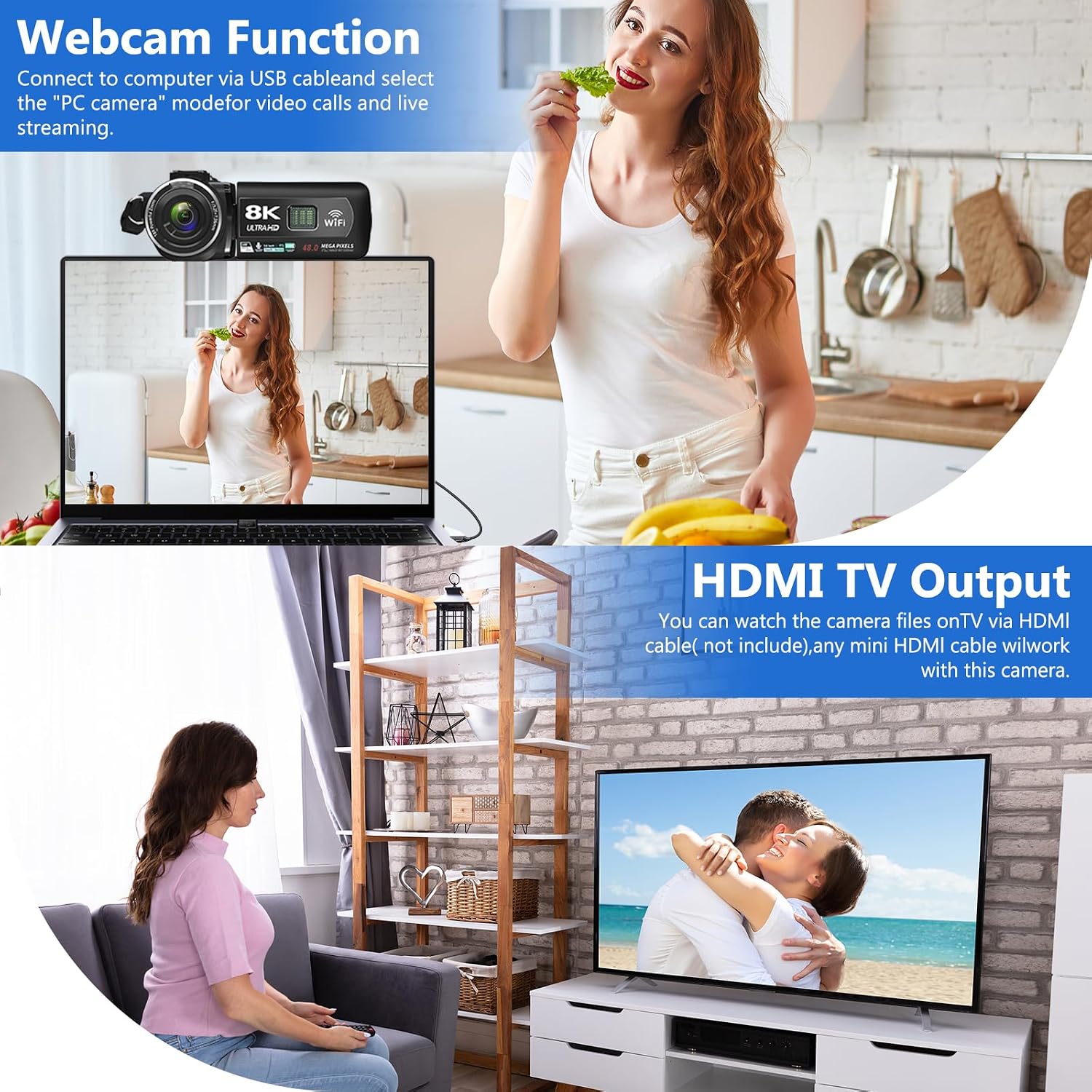
Image: The VETEK A06-2 camcorder connected to a laptop via USB, demonstrating its webcam function for video calls. Below, the camera is connected to a television via HDMI for viewsnimljenog sadržaja.
5.7 HDMI TV Output
View your recorded videos and photos on a larger screen.
- Connect the camera to a TV or monitor using an HDMI cable (not included).
- Odaberite odgovarajući HDMI ulaz na TV-u.

Image: The VETEK A06-2 camcorder connected to a large television screen via an HDMI cable, showing content from the camera being displayed on the TV for a family to watch.
5.8 Smanjenje buke
The camcorder includes a built-in noise reduction function to improve audio quality.
- Activate the noise reduction function in the camera's settings menu.
- For enhanced audio, an external microphone can be connected to the microphone interface.

Image: A woman playing a guitar, with a VETEK A06-2 camcorder recording her. Text indicates that the camera's built-in noise reduction and external microphone support help improve audio quality.
6. Održavanje
6.1 Čišćenje
- Za čišćenje kućišta fotoaparata koristite meku, suhu krpu.
- Za objektiv koristite specijaliziranu krpu i otopinu za čišćenje objektiva. Izbjegavajte direktan dodir s objektivom.
6.2 Skladištenje
- Čuvajte kameru na hladnom i suhom mjestu, dalje od direktne sunčeve svjetlosti i ekstremnih temperatura.
- Izvadite baterije ako se kamera neće koristiti duži period.
7. Otkrivanje problema
Ako naiđete na probleme s kamkorderom, pogledajte sljedeće uobičajene probleme i rješenja:
| Problem | Mogući uzrok | Rješenje |
|---|---|---|
| Kamera se ne uključuje. | Baterija je prazna ili nepravilno instalirana. | Napunite bateriju ili je ponovo pravilno instalirajte. |
| Ne može se snimati video/fotografirati. | Memorijska kartica je puna, nije umetnuta ili nije formatirana. | Insert a memory card, format it, or delete unnecessary files. |
| Loš kvalitet slike/videa. | Insufficient lighting, dirty lens, or shooting too close. | Ensure adequate lighting, clean the lens, and maintain a shooting distance of over 1.5m/4ft. |
| Problemi s WiFi vezom. | Incorrect password or app issues. | Verify WiFi password, restart camera and device, or reinstall the app. |
Ako problem i dalje postoji, obratite se korisničkoj podršci.
8. Specifikacije
| Feature | Detalj |
|---|---|
| Brand | VETEK |
| Broj modela | A06-2 |
| Rezolucija video snimanja | 8K |
| Tehnologija foto senzora | CMOS |
| Rezolucija slike | 48 megapiksela |
| Veličina ekrana | 3 inča |
| Tehnologija povezivanja | USB, WiFi |
| Vrsta Flash memorije | SD (Supports 4-128GB Class 10 or higher) |
| Posebne karakteristike | Face Detection, Night Vision, Anti-Shake, Image Stabilization, Time Lapse, Low Light, Noise Reduction |
| Baterije | 2 litijum-polimerska baterija (uključena) |
| Dimenzije proizvoda | 5.12 x 2.36 x 2.17 inča |
| Težina artikla | 2.2 funte |
9. Važne napomene
- This camcorder is designed for amateurs and does not feature autofocus or optical zoom.
- The camera does not have a focus function. Maintain a shooting distance above 1.5m (4ft) for clear pictures or videos.
- After recording video, check the video effect on a computer. Checking it on the camera reduces the resolution of the video.
- To connect to a computer, use the digital cable provided, select the storage method, and then view the video on the computer.

Image: A graphic titled 'Warm Tips' reiterating key usage instructions such as reading the manual, the camera being for amateurs, lack of autofocus, checking video on a computer, maintaining shooting distance, and formatting the memory card.
10. Korisnička podrška
For any questions, technical assistance, or warranty claims, please contact VETEK customer service. All products are eligible for a free return within 30 days of purchase.

Image: A smiling customer service representative wearing a headset, indicating 24-hour customer service availability.


