1. Uvod
Hvala na kupoviniasing the Shanrya Digital Mirror Alarm Clock. This manual provides essential information for the proper setup, operation, and maintenance of your device. Please read these instructions carefully before use and retain them for future reference.

Slika 1: Prednja strana view of the Shanrya Digital Mirror Alarm Clock displaying 4:30 in red LED digits.
2. Podešavanje
2.1 Sadržaj paketa
- Shanrya Digital Mirror Alarm Clock
- USB kabel za napajanje
- Korisnički priručnik (ovaj dokument)
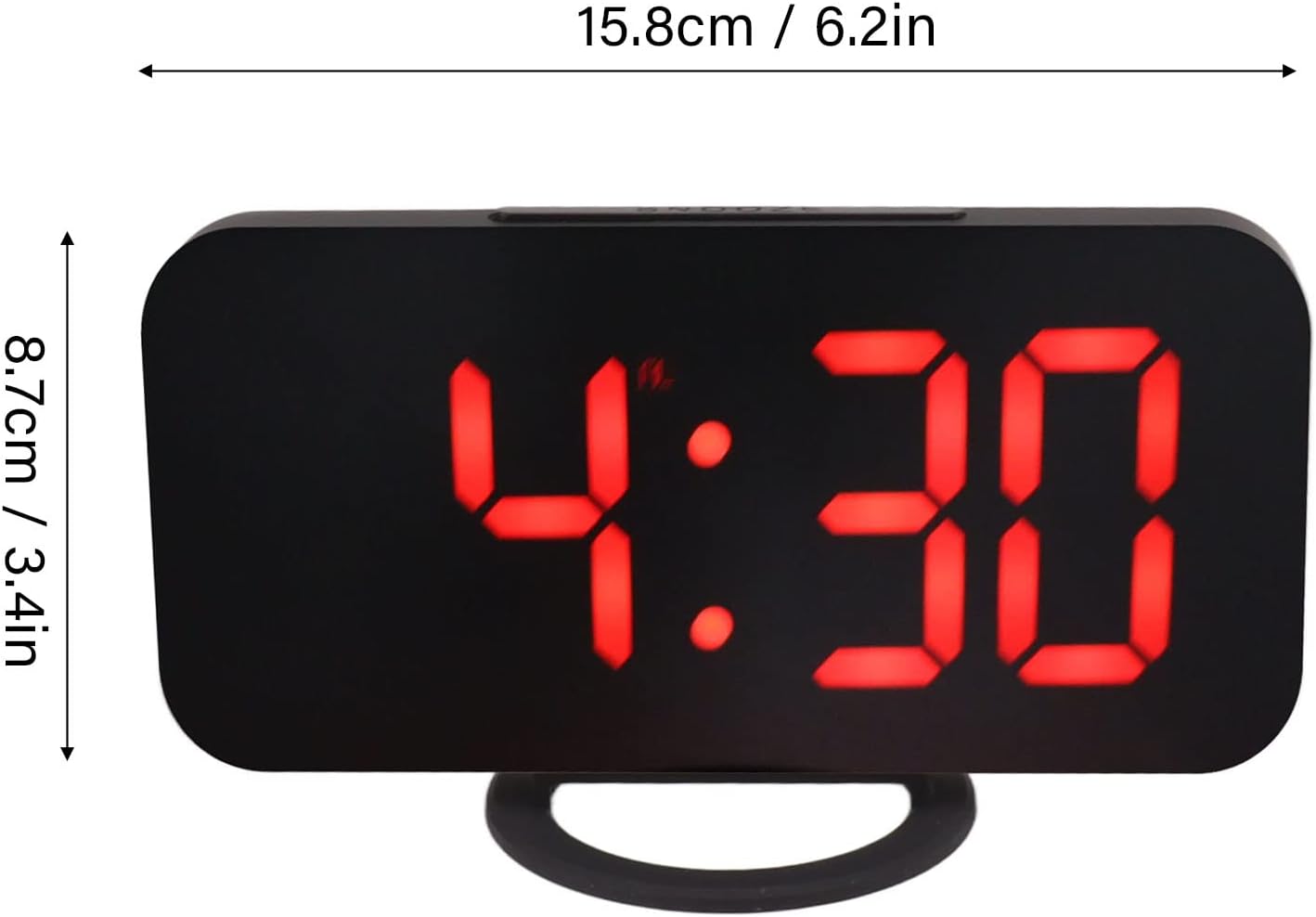
Figure 2: The alarm clock shown with its USB power cable, ready for connection.
2.2 Priključak za napajanje
- Connect the small end of the provided USB power cable to the DC 5V input port on the back of the alarm clock.
- Spojite standardni USB kraj kabela na USB adapter za napajanje (nije uključen) ili napajani USB priključak.
- Displej će se upaliti, što označava da je sat uključen.
Napomena: This clock requires continuous power via USB. It does not operate on batteries for primary function, but may have a small internal battery for time memory during power outages (not user-replaceable).
3. Uputstvo za upotrebu
3.1 Funkcije dugmadi
The clock features several buttons, typically located on the top or side. Refer to Figure 3 for button identification.

Slika 3: Detaljno view of the clock's control buttons and examples of different display brightness levels.
- Dugme MODE: Used to switch between time display, alarm setting, and other modes.
- GORE/DOLJE tipke: Used to adjust values (time, alarm) or brightness levels.
- Dugme SNOOZE: Aktivira funkciju odgode alarma kada se alarm oglasi.
3.2 Postavljanje vremena
- Pritisnite MODE dugme dok ne počne treptati prikaz vremena.
- Koristite UP i DOLJE dugmad za podešavanje sata.
- Pritisnite MODE again to switch to minute adjustment.
- Koristite UP i DOLJE dugmad za podešavanje minuta.
- Pritisnite MODE za potvrdu i izlazak iz načina podešavanja vremena.
3.3 Postavljanje alarma
- Pritisnite MODE button repeatedly until the alarm icon (e.g., a bell) appears and the alarm time flashes.
- Koristite UP i DOLJE dugmad za podešavanje željenog sata alarma.
- Pritisnite MODE again to switch to minute adjustment.
- Koristite UP i DOLJE dugmad za podešavanje željenih minuta alarma.
- Pritisnite MODE to confirm and activate the alarm. The alarm icon will remain displayed.
- To deactivate the alarm, repeat the steps and press MODE dok ikona alarma ne nestane.
3.4 Funkcija odgode
Kada se oglasi alarm, pritisnite SNOOZE button (usually located on top of the clock) to temporarily silence the alarm. The alarm will sound again after a preset interval (e.g., 5-10 minutes). To turn off the alarm completely, press any other button or let it ring for its full duration.
3.5 Podešavanje svjetline
The clock offers multiple brightness levels for its LED display, including manual adjustment, automatic adjustment, and a night mode. This allows for optimal visibility in various lighting conditions.
- Ručno podešavanje: U režimu prikaza vremena, pritisnite UP or DOLJE buttons to cycle through different brightness levels (e.g., Dark, Mid Gear, Bright).
- Automatsko podešavanje: Some models may feature an ambient light sensor that automatically adjusts display brightness based on room lighting. Refer to Figure 3 for visual representation of brightness levels.
- Noćni način rada: A specific setting that dims the display significantly during predefined night hours to prevent disturbance. Consult the specific button sequence for your model to activate/deactivate night mode.
4. Održavanje
4.1 Čišćenje
To clean the clock, gently wipe the surface with a soft, dry, or slightly damp cloth. Do not use abrasive cleaners, solvents, or chemical sprays, as these can damage the mirror finish and electronic components.
4.2 Skladištenje
If storing the clock for an extended period, disconnect it from the power source and store it in a cool, dry place away from direct sunlight and extreme temperatures.
5. Otkrivanje problema
| Problem | Mogući uzrok | Rješenje |
|---|---|---|
| Ekran je prazan ili se ne pali. | Nema napajanja ili je konekcija labava. | Ensure the USB cable is securely connected to both the clock and a powered USB port/adapter. Try a different USB port or adapter. |
| Alarm se ne oglašava. | Alarm not set or deactivated. Volume too low (if applicable). | Verify the alarm is set and the alarm icon is displayed. Check if there's a volume setting (though most digital clocks have fixed alarm volume). |
| Vrijeme je netačno. | Vrijeme nije ispravno podešeno ili je došlo do prekida struje. | Reset the time according to section 3.2. If power was interrupted, the clock may need to be reset. |
| Ekran je previše svijetao ili previše taman. | Potrebno je podesiti postavku svjetline. | Adjust the brightness manually using the UP/DOWN buttons as described in section 3.5. |
6. Specifikacije
- Broj modela: Shanrya1am475rqfe-12
- ASIN: B0BVC2VWF3
- Brand: Shanrya
- Vrsta prikaza: Digitalna LED lampica (crvena)
- Karakteristike: Alarm, Snooze, Dimmable Display (Manual, Auto, Night Mode)
- Izvor napajanja: DC 5V via USB cable
- Dimenzije: Approximately 15.8 cm (6.2 in) x 8.7 cm (3.4 in) (Width x Height)
- Prvi dostupan datum: 25. marta 2023

Figure 4: Diagram illustrating the approximate dimensions of the alarm clock.
7. Garancija i podrška
Ovaj proizvod je pokriven standardnom garancijom proizvođača. Za specifične uslove garancije, molimo pogledajte dokumentaciju koja je dostavljena prilikom kupovine ili kontaktirajte prodavača.
For technical support or inquiries, please contact the seller or manufacturer through the platform where the product was purchased. Please have your model number (Shanrya1am475rqfe-12) and ASIN (B0BVC2VWF3) ready when contacting support.


