1. Uvod
This manual provides comprehensive instructions for the setup, operation, and maintenance of your iDPRT 320E Thermal Label Printer. Please read this manual thoroughly before using the device to ensure proper functionality and to prevent damage. The iDPRT 320E is designed for efficient label printing in various environments, supporting multiple operating systems and connectivity options.
2. Šta se nalazi u kutiji
Prilikom raspakivanja provjerite da li su sve komponente prisutne:
- iDPRT 320E Thermal Label Printer
- Uputstvo za upotrebu
- USB kabl za prenos podataka
- Adapter za napajanje
- Sample Labels
3. Proizvod je gotovview
The iDPRT 320E Thermal Label Printer is a compact device designed for high-speed, high-resolution label printing. It features a simple design with essential ports for connectivity and an intuitive LED indicator for operational status.
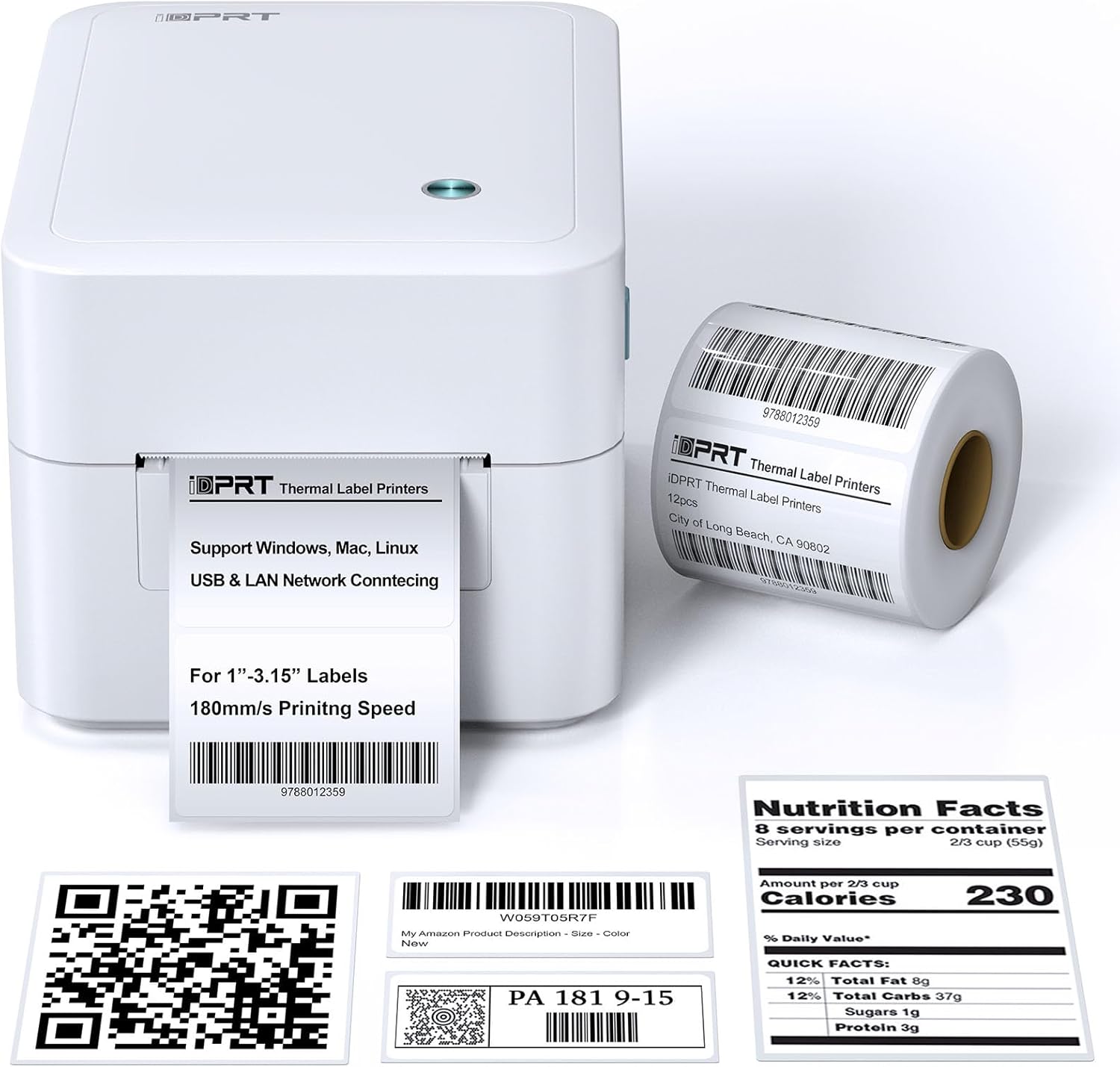
Slika 3.1: Prednja strana view of the iDPRT 320E Thermal Label Printer with sample etikete.
Ključne komponente:
- Izlazni otvor za etiketu: Gdje se pojavljuju štampane etikete.
- Cover Release Latches: Used to open the printer cover for label loading.
- Napajanje: Povezuje se na strujni adapter.
- USB port: For direct connection to a computer.
- LAN port: Za mrežnu povezanost.
- LED indikator: Prikazuje status štampača.
4. Upute za postavljanje
4.1 Priključak za napajanje
- Spojite adapter za napajanje na priključak za napajanje štampača.
- Uključite adapter za napajanje u odgovarajuću električnu utičnicu.
4.2 Učitavanje etiketa
The printer supports thermal labels with widths between 1 and 3.15 inches.
- Gently press the cover release latches on both sides of the printer to open the top cover.
- Place the roll of thermal labels into the label compartment, ensuring the labels feed from the bottom of the roll and the printable side faces upwards.
- Podesite vodilice etiketa tako da odgovaraju širini etiketa, bez savijanja.asing njih.
- Pull a few labels past the print head and out through the label exit slot.
- Čvrsto zatvorite gornji poklopac dok ne klikne na svoje mjesto.

Figure 4.1: Correct method for loading thermal labels into the printer.
4.3 Instalacija upravljačkih programa i softvera
To use the printer with your computer, you must install the appropriate drivers and the Label Designer software.
- Visit the official iDPRT website to download the latest drivers for your operating system (Windows, Mac, or Linux).
- Download and install the free Label Designer software from the official website. This software is available for Windows and as an online editor for Mac users.
- Follow the on-screen instructions to complete the installation process for both the drivers and the software.

Figure 4.2: The iDPRT 320E printer supports multiple operating systems.
4.4 Opcije povezivanja
The iDPRT 320E offers flexible connectivity:
- USB veza: Povežite štampač direktno sa računarom pomoću priloženog USB kabla.
- LAN Network Connection: Connect the printer to your local area network using an Ethernet cable for shared access.
- Mobilna aplikacija: For direct printing from your smartphone, download the iDPRT mobile application.

Figure 4.3: USB and LAN network connectivity options.
5. Uputstvo za upotrebu
5.1 Creating Labels with Label Designer Software
The Label Designer software allows you to create and customize various label types.
- Launch the Label Designer software on your computer.
- Odaberite predložak ili započnite novi dizajn etikete.
- Customize your labels with text, barcodes, QR codes, images, and various fonts. The software supports different label sizes and layouts.
- Ensure the label dimensions in the software match the physical labels loaded in the printer.

Figure 5.1: Designing labels using the Label Designer software.
5.2 Štampanje etiketa
Once your label design is complete and labels are loaded:
- In the Label Designer software, click the 'Print' button.
- Select the iDPRT 320E printer from the list of available printers.
- Adjust print settings such as quantity and print speed if necessary. The printer supports speeds up to 180mm/s and a resolution of 203 DPI.
- Confirm the settings and initiate printing.

Figure 5.2: The printer delivers high-quality 203 DPI resolution for clear labels.
Figure 5.3: The printer is capable of high-speed printing up to 180mm/s.
5.3 Značenja LED indikatora
The LED indicator on the printer provides visual feedback on its status:
- Green (Solid On): The printer is currently printing.
- Red (Solid On): The printer cover is not properly closed, or there is a paper jam/error.
- Blue (Solid On): Štampač je spreman za rad.
6. Održavanje
6.1 Čišćenje štampača
Redovno čišćenje pomaže u održavanju kvalitete ispisa i produžava vijek trajanja pisača.
- Ensure the printer is powered off and unplugged before cleaning.
- Koristite meku krpu koja ne ostavlja dlačice dampened with isopropyl alcohol to gently wipe the print head. Avoid touching the print head with bare hands.
- Clean the exterior of the printer with a dry, soft cloth. Do not use abrasive cleaners or solvents.
- Remove any dust or label debris from the label compartment.
7. Otkrivanje problema
If you encounter issues with your iDPRT 320E printer, refer to the following common problems and solutions:
| Problem | Mogući uzrok | Rješenje |
|---|---|---|
| Štampač se ne uključuje | Power cable disconnected; Power outlet faulty | Check power connections; Try a different outlet. |
| Etikete se ne štampaju | Labels loaded incorrectly; Printer cover open; No drivers installed; Incorrect printer selected | Reload labels correctly; Close cover firmly; Install drivers; Select iDPRT 320E in print dialog. |
| Poor print quality (faded, blurry) | Print head dirty; Low-quality labels; Incorrect print density settings | Clean the print head; Use recommended thermal labels; Adjust print density in software settings. |
| Cannot connect via USB/LAN | Cable faulty; Driver issue; Network configuration problem | Try a different cable; Reinstall drivers; Verify network settings (for LAN). |
| Cannot connect via mobile app | App not installed; Printer not discoverable; Network issue | Ensure app is installed and updated; Check printer's network connection; Restart printer and app. |
| Mac Bluetooth connectivity issues | Direct Bluetooth printing to Mac is not supported; Driver limitations | Connect via USB or LAN for Mac systems. Mobile app connectivity is available for smartphones. |
8. Specifikacije
Detailed technical specifications for the iDPRT 320E Thermal Label Printer:
| Feature | Specifikacija |
|---|---|
| Naziv modela | 320E |
| Tehnologija štampe | Thermal |
| Maksimalna brzina štampe | 180 mm/s (monohromatski) |
| Maksimalna rezolucija štampe | 203 DPI |
| Maksimalna veličina medija | 1"-3.15" inches width |
| Tehnologija povezivanja | USB, LAN |
| Kompatibilni uređaji | PC (Windows, Mac, Linux), Mobile (iOS/Android via App) |
| Kontrolni metod | App, Software |
| Dimenzije proizvoda | 8.11"D x 6.1"Š x 5.28"H |
| Težina artikla | 3.78 funte |
| Posebne karakteristike | Automatic Label Recognition, LAN Network Connectivity |
9. Garancija i podrška
9.1 Informacije o garanciji
The iDPRT 320E Thermal Label Printer comes with a limited warranty. Please refer to the warranty card included in your product packaging or visit the official iDPRT websajt za detaljne uslove.
9.2 Korisnička podrška
For technical assistance, troubleshooting, or any inquiries regarding your iDPRT 320E printer, please contact our customer service team. You can reach us via the Amazon messaging system or through the contact information provided on the official iDPRT website. Our team is available to assist you with any pre-sales or after-sales support needs.


