Uvod
The Edifier CX7 is an active 2.1 home entertainment system designed to deliver high-quality audio for various devices, including televisions, personal computers, and notebooks. This system features Bluetooth V5.0 connectivity, an 8-inch subwoofer, and an infrared remote control for convenient operation. This manual provides essential information for setting up, operating, and maintaining your CX7 system.
Sadržaj paketa
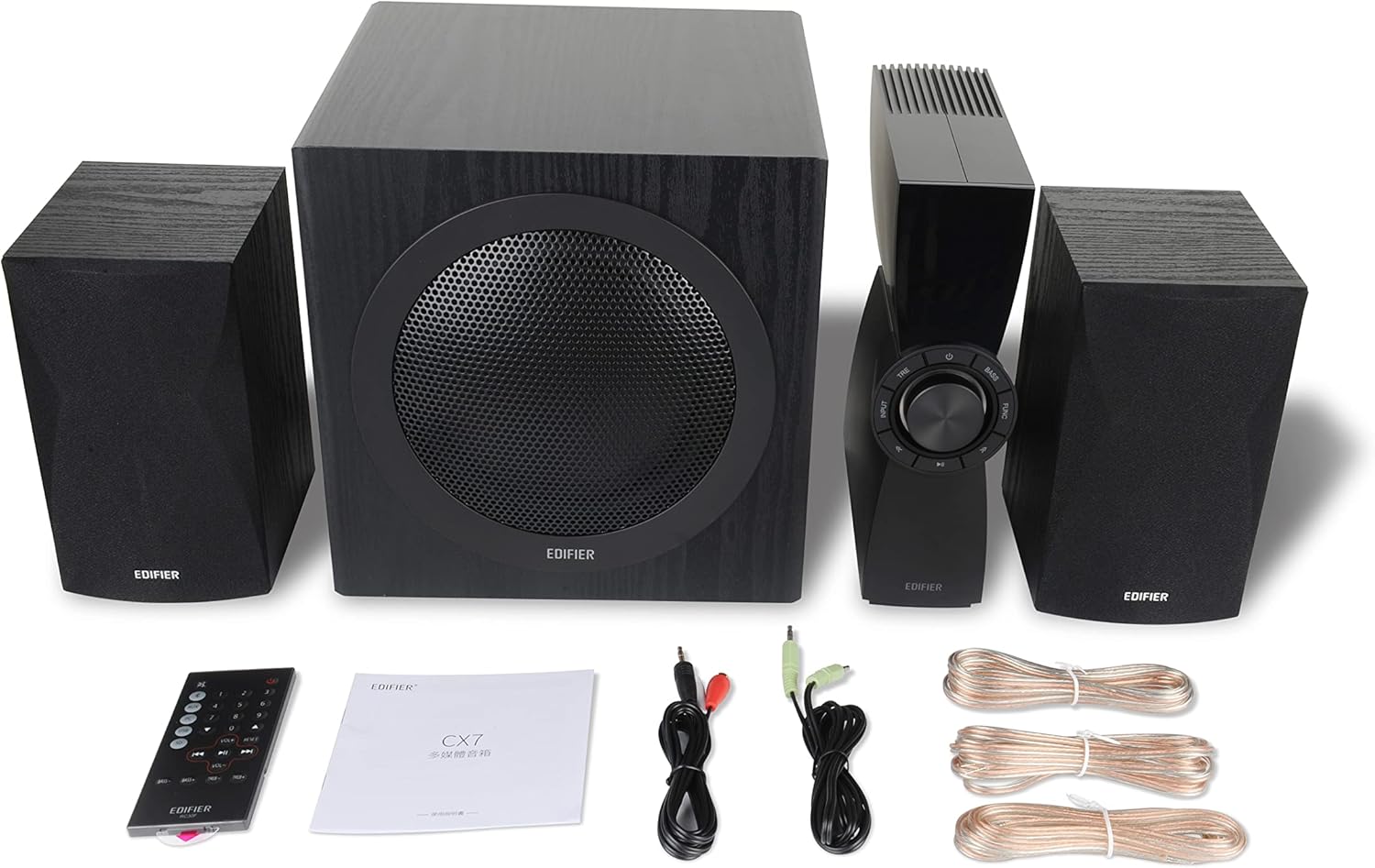
Figure 1: Edifier CX7 System Components
Molimo Vas da provjerite da li se u Vašem paketu nalaze sve dolje navedene stavke:
- subwoofer (1)
- Satellite Speakers (2)
- Control Unit (1)
- Infrared Remote Control (1)
- 3.5mm to RCA Audio Cable (1)
- RCA to RCA Audio Cable (1)
- Speaker Connection Cables (2)
- Korisnički priručnik (1)
Vodič za postavljanje
1. Plasman
Position the subwoofer on the floor, preferably in a corner or near a wall for optimal bass response. Place the satellite speakers on either side of your listening area, equidistant from the listener, and at ear level if possible. Ensure the control unit is easily accessible.

Figure 2: Recommended System Placement
2. Povezivanje zvučnika
Connect the satellite speakers to the speaker output terminals on the rear of the control unit using the provided speaker cables. Ensure correct polarity (red to red, black to black) for each speaker.
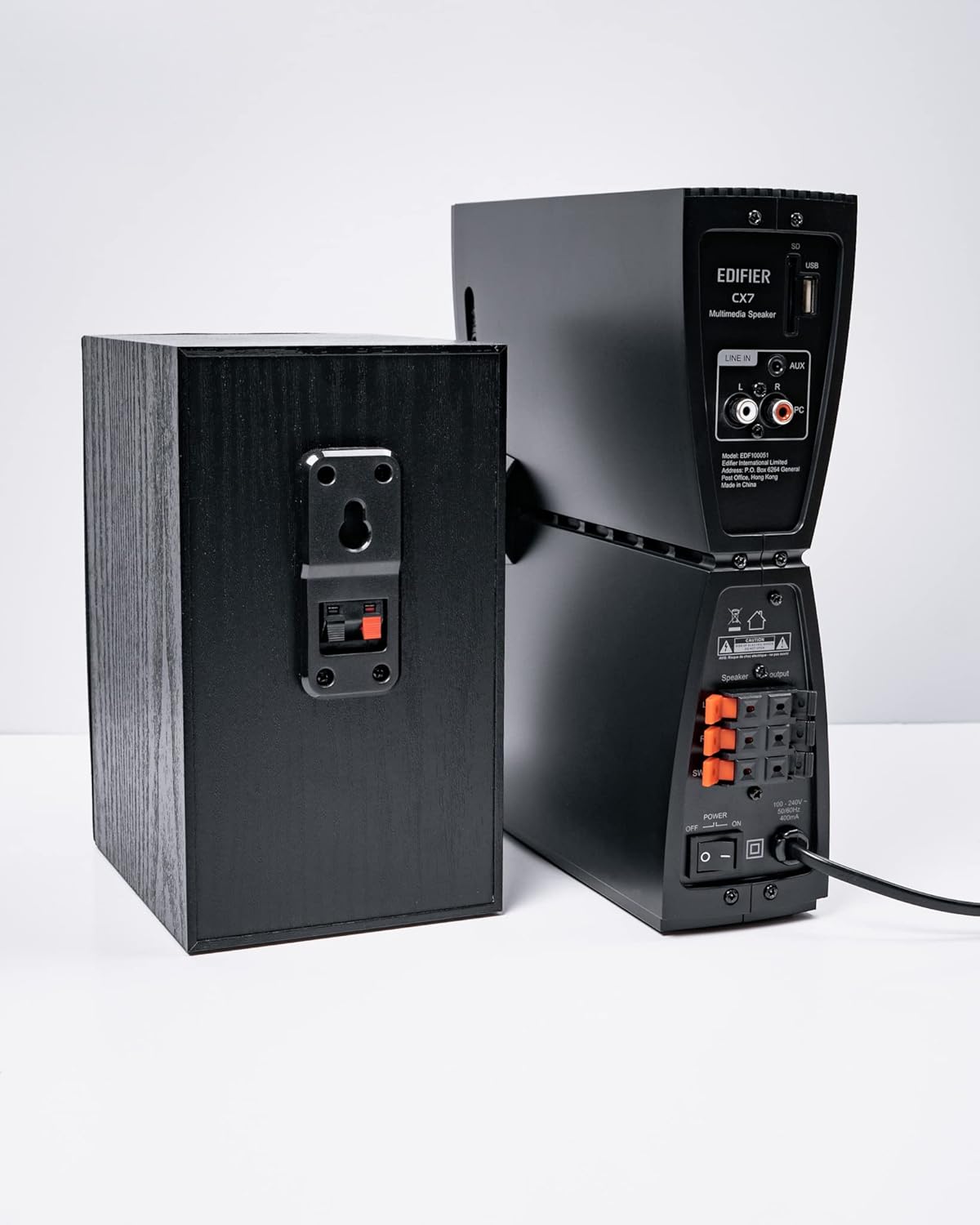
Slika 3: Priključci zvučnika
3. Povezivanje audio izvora
The CX7 system supports multiple audio input options:
- AUX ulaz: Use the 3.5mm to RCA audio cable to connect devices like smartphones, tablets, or computers to the AUX input on the control unit.
- PC ulaz: Use the RCA to RCA audio cable to connect your PC's audio output to the PC input on the control unit.
- Bluetooth: Za bežičnu vezu, pogledajte odjeljak "Uparivanje putem Bluetootha" u Uputama za upotrebu.
4. Priključak za napajanje
Connect the power cable to the control unit and then plug it into a standard wall outlet. Turn on the power switch located on the rear of the control unit.
Uputstvo za upotrebu
1. Uključivanje/isključivanje
After connecting the power, press the power button on the control unit or the remote control to turn the system on or off. The display on the control unit will illuminate when powered on.

Figure 4: Control Unit Display
2. Izbor ulaza
Press the "INPUT" button on the control unit or the remote control to cycle through available audio sources: AUX, PC, and Bluetooth. The selected input will be displayed on the control unit's screen.

Figure 5: Control Knob and Input Buttons
3. Kontrola jačine zvuka
Rotate the large knob on the control unit clockwise to increase volume and counter-clockwise to decrease it. Alternatively, use the "VOL+" and "VOL-" buttons on the remote control.
4. Podešavanje basa i visokih tonova
Press the "BASS" or "TRE" (Treble) buttons on the control unit or remote control, then rotate the main knob to adjust the respective levels. The display will show the current bass/treble setting.
5. Bluetooth uparivanje
- Select the Bluetooth input on the CX7 system. The display will show "BT" and flash, indicating it's in pairing mode.
- Na svom uređaju (pametnom telefonu, tabletu itd.) omogućite Bluetooth i potražite dostupne uređaje.
- Select "EDIFIER CX7" from the list of found devices.
- Once paired, the "BT" indicator on the CX7 display will stop flashing and remain solid.
To disconnect a Bluetooth device, press and hold the "FUNC" button on the control unit or the Bluetooth button on the remote control for a few seconds.
6. Funkcije daljinskog upravljača

Slika 6: Infracrveni daljinski upravljač
The remote control provides convenient access to all major functions:
- Snaga: Uključuje/isključuje sistem.
- Odabir ulaza: Cycles through AUX, PC, Bluetooth.
- Volumen: Podešava glavnu jačinu zvuka.
- bas/visoki tonovi: Podešava nivo basa i visokih tonova.
- Isključi zvuk: Isključuje/uključuje zvuk.
- Kontrole reprodukcije: Play/Pause, Previous/Next track (for Bluetooth mode).
Održavanje
- čišćenje: Use a soft, dry cloth to clean the surfaces of the speakers and control unit. Do not use liquid cleaners or abrasive materials.
- ventilacija: Ensure adequate ventilation around the control unit and subwoofer to prevent overheating. Do not block ventilation openings.
- Okruženje: Izbjegavajte izlaganje sistema ekstremnim temperaturama, vlazi, prašini ili direktnoj sunčevoj svjetlosti.
- Iskljuciti: If the system will not be used for an extended period, disconnect it from the power outlet.
Rješavanje problema
| Problem | Mogući uzrok | Rješenje |
|---|---|---|
| Nema zvuka |
|
|
| Bluetooth veza nije uspjela |
|
|
| Izobličen zvuk |
|
|
Specifikacije
| Feature | Detalj |
|---|---|
| Naziv modela | CX7 |
| Vrsta zvučnika | 2.1 sistem zvučnika |
| Tehnologija povezivanja | Bluetooth |
| Bežična komunikacijska tehnologija | Bluetooth V5.0 |
| Bluetooth domet | 10 metara |
| Način audio izlaza | Surround |
| Maksimalna izlazna snaga zvučnika | 69 Watts |
| Tehnologija povezivanja subwoofera | Bežični |
| Woofer Diameter | 8 inča |
| Materijal | Polipropilen |
| Boja | Crna |
| Dimenzije proizvoda | 16.93"D x 17.72"Š x 13.39"H |
| Težina artikla | 29 funti (13.2 kilograma) |
| Izvor napajanja | Corded Electric |
| Tip kontrolera | Daljinski upravljač |
| Preporučena upotreba | Za televizore, za kompjutere, za pametne telefone ili tablete |
Garancija i podrška
For warranty information and technical support, please refer to the warranty card included with your product or visit the official Edifier webSačuvajte račun kao dokaz o kupovini za reklamacije u slučaju reklamacije.
Edifier Official Webstranica: www.edifier.com


