1. Uvod
Welcome to the instruction manual for the Supermicro X13SEM-TF motherboard. This document provides essential information for the proper installation, configuration, and maintenance of your motherboard. Please read this manual thoroughly before proceeding with any installation or operation.
The Supermicro X13SEM-TF is designed to support Intel Xeon SPR-SP CPUs with up to 56 cores and 350W TDP, featuring EBGPCH and 8-channel DDR5 memory support.
2. Proizvod je gotovview
Below is an image of the Supermicro X13SEM-TF motherboard, highlighting its key components.
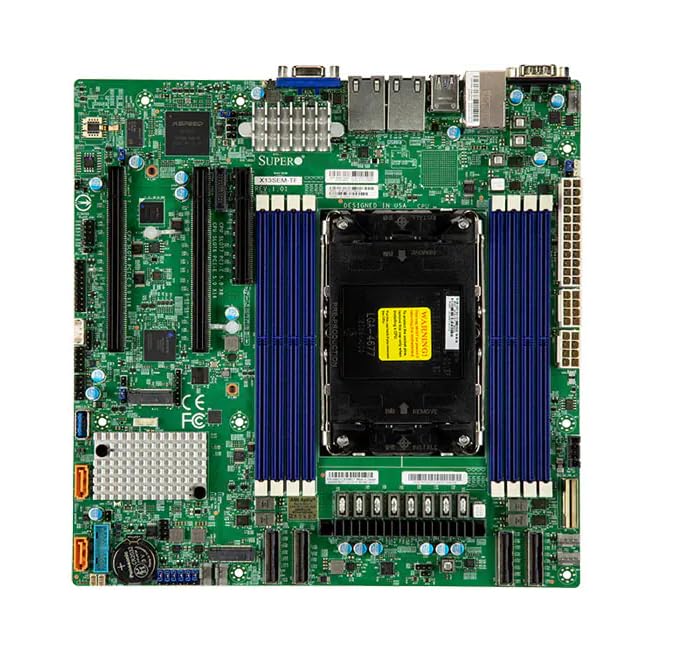
Image Description: This image displays the Supermicro X13SEM-TF motherboard. Key visible components include the large LGA 4677 CPU socket at the center, surrounded by eight DDR5 DIMM slots (blue). Various PCIe slots, SATA ports, USB headers, and power connectors are distributed across the green PCB. The rear I/O panel features USB ports, Ethernet ports, and a VGA port. Heatsinks are visible over the VRM and chipset areas.
3. Sigurnosne informacije
Always observe standard electrostatic discharge (ESD) precautions when handling the motherboard.
- Disconnect all power sources before installation or maintenance.
- Nosite antistatičku narukvicu.
- Avoid touching components directly unless necessary.
- Ensure proper ventilation within the system chassis.
- Refer to professional assistance if unsure about any procedure.
4. Postavljanje i instalacija
4.1. Sadržaj paketa
Provjerite da li su sve komponente prisutne u paketu:
- Supermicro X13SEM-TF Motherboard
- I/O štit (ako nije integriran)
- SATA kablovi
- Korisnički priručnik (ovaj dokument)
- CD/USB sa drajverima (ili uputstva za preuzimanje)
4.2. Instalacija matične ploče
- Pripremite šasiju: Ensure the computer chassis is ready for motherboard installation. Install standoffs in the appropriate locations.
- Instalirajte I/O štit: If provided separately, install the I/O shield into the chassis opening.
- Montaža matične ploče: Carefully place the motherboard into the chassis, aligning it with the standoffs and I/O shield. Secure it with screws.
- Instalacija CPU-a:
- Otvorite polugu za utičnicu procesora.
- Align the CPU (Intel Xeon SPR-SP) with the socket, matching the triangular markers.
- Pažljivo umetnite CPU u utičnicu. Nemojte ga silom umetnuti.
- Zatvorite polugu utičnice kako biste osigurali CPU.
- Instalacija hladnjaka za procesor: Attach the compatible CPU cooler according to its manufacturer's instructions. Ensure proper thermal paste application.
- Instalirana memorija (RAM):
- Open the clips on the DDR5 DIMM slots.
- Align the memory modules with the slots, ensuring the notch matches.
- Press down firmly on both ends until the clips snap into place. Refer to the motherboard layout for optimal memory population.
- Priključite napajanje:
- Connect the 24-pin ATX main power connector.
- Connect the 8-pin (or 4+4-pin) CPU power connector(s).
- Povežite uređaje za pohranu podataka: Connect SATA data and power cables to your storage drives (HDDs/SSDs) and the motherboard's SATA ports.
- Connect Front Panel Headers: Connect the power switch, reset switch, HDD LED, power LED, and front panel USB/audio headers to their respective pins on the motherboard. Refer to the motherboard diagram for correct pin assignments.
- Instalirajte kartice za proširenje: Insert any necessary PCIe expansion cards (e.g., graphics cards, network cards) into the appropriate PCIe slots and secure them.
5. Uputstvo za upotrebu
5.1. Početno uključivanje
After completing all connections, connect the power supply to an electrical outlet and power on the system.
The system should boot to the BIOS/UEFI interface or an installed operating system.
5.2. Konfiguracija BIOS-a/UEFI-ja
To enter the BIOS/UEFI setup, press the designated key (usually DEL or F2) during startup.
Configure boot order, system time, and other necessary settings. Save changes before exiting.
5.3. Instalacija drajvera
Install all necessary drivers for the motherboard chipset, network, audio, and any other integrated components. Drivers can be found on the Supermicro website or the provided driver media.
6. Održavanje
Regular maintenance ensures optimal performance and longevity of your motherboard.
- Uklanjanje prašine: Povremeno čistite prašinu sa matične ploče i komponenti pomoću komprimiranog zraka. Provjerite je li sistem isključen iz struje i iskopčan iz struje.
- Ažuriranja BIOS-a/UEFI-ja: Provjerite Supermicro website for BIOS/UEFI updates. Update only if necessary and follow the provided instructions carefully.
- Ažuriranja drajvera: Keep drivers updated for optimal compatibility and performance.
- fizicki pregled: Periodically inspect the motherboard for any signs of damage, loose connections, or bulging capacitors.
7. Otkrivanje problema
7.1. Nema struje
- Provjerite sve priključke za napajanje (24-pinski ATX, 8-pinski CPU).
- Uvjerite se da je napajanje uključeno.
- Test the power supply with another system or a power supply tester.
- Verify front panel power switch connection.
7.2. Nema displeja
- Provjerite je li monitor povezan i uključen.
- Check if the graphics card (if dedicated) is properly seated and powered.
- Try reseating RAM modules.
- If using integrated graphics, ensure the CPU supports it and the display cable is connected to the motherboard's video output.
7.3. Nestabilnost sistema / Ruševi sistema
- Provjerite temperaturu CPU-a i GPU-a.
- Verify RAM is correctly installed and compatible.
- Pokrenite alate za dijagnostiku memorije.
- Provjerite jesu li svi upravljački programi instalirani i ažurirani.
- Check for loose cables or components.
8. Specifikacije
| Feature | Detalj |
|---|---|
| Model | Supermicro X13SEM-TF (MBD-X13SEM-TF-B) |
| Podrška za CPU | Intel Xeon SPR-SP, up to 56 cores, 350W TDP |
| CPU Socket | LGA 4677 |
| Čipset | EBGPCH |
| Memorija | 8-channel DDR5 DIMM slots |
| Dimenzije (DxŠxV) | 16 x 12 x 5 inča |
| Težina | 2.86 funte |
| Proizvođač | SuperMicro |
| Datum prve dostupnosti | 20. januara 2023 |
9. Garancija i podrška
9.1. Informacije o garanciji
For detailed warranty information, please refer to the official Supermicro webweb-mjesto ili garantni list koji dolazi s vašim proizvodom.
9.2. Tehnička podrška
If you encounter issues that cannot be resolved using this manual, please contact Supermicro technical support.
Visit the official Supermicro website for support resources, driver downloads, and contact information: www.supermicro.com/support