1. Uvod
Thank you for choosing the DELTACO Gaming PM80 Wireless Optical Gaming Mouse. This manual provides essential information for setting up, operating, and maintaining your new gaming mouse. Please read these instructions carefully before use to ensure optimal performance and longevity of your device.
2. Sadržaj paketa
- DELTACO Gaming PM80 Wireless Optical Gaming Mouse
- USB bežični prijemnik
- USB kabl za punjenje
- Uputstvo za upotrebu
3. Proizvod je gotovview
The DELTACO Gaming PM80 is a high-performance wireless optical gaming mouse designed for precision and comfort. It features 7 programmable buttons, adjustable DPI up to 4800, and customizable illumination. The mouse is rechargeable, ensuring uninterrupted gaming sessions.
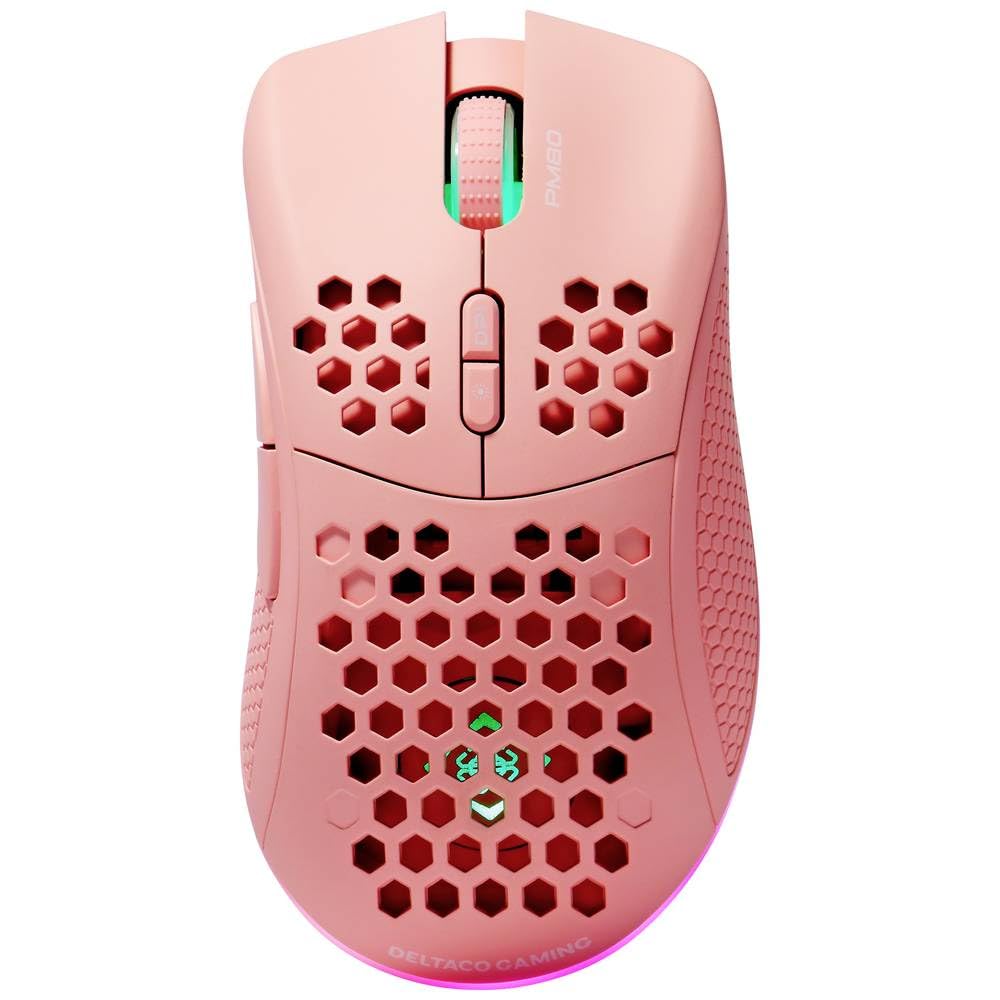
Image: DELTACO Gaming PM80 Wireless Optical Gaming Mouse. This image displays the mouse from a top-down perspective, highlighting its ergonomic design, the central scroll wheel, and the arrangement of its seven buttons.
Funkcije dugmadi:
- Lijevi klik na dugme: Standardna primarna funkcija klika.
- Desni klik: Standardna funkcija sekundarnog klika.
- Točak za pomicanje: Scrolls up/down, and acts as a middle click button.
- Dugme za cikliranje DPI-ja: Changes the mouse's sensitivity (DPI).
- Dugme naprijed: Navigira naprijed u web pretraživači ili file istraživači.
- Dugme za nazad: Navigacija unazad web pretraživači ili file istraživači.
- Illumination Mode Button: Cycles through different lighting effects or turns illumination on/off.
4. Podešavanje
4.1. Punjenje miša
- Spojite manji kraj USB kabela za punjenje na priključak za punjenje na prednjoj strani miša.
- Connect the larger end of the USB charging cable to an available USB port on your computer or a USB wall adapter.
- The mouse's illumination will indicate charging status (e.g., breathing effect, specific color). A full charge typically takes 2-3 hours.
- Once fully charged, the illumination may change or turn off. Disconnect the charging cable.
4.2. Povezivanje bežičnog USB prijemnika
- Locate the USB wireless receiver, usually stored in a compartment on the underside of the mouse.
- Izvadite prijemnik iz njegovog utora za odlaganje.
- Priključite bežični USB prijemnik u dostupan USB priključak na računaru.
- Vaš računar bi trebao automatski prepoznati i instalirati potrebne upravljačke programe. Ovo može potrajati nekoliko trenutaka.
4.3. Uključivanje / isključivanje napajanja
- Pronađite prekidač za napajanje na donjoj strani miša.
- Slide the switch to the 'ON' position to power on the mouse. The illumination will light up.
- To conserve battery life, slide the switch to the 'OFF' position when the mouse is not in use for extended periods.
5. Uputstvo za upotrebu
5.1. Osnovna upotreba
Once connected and powered on, the mouse is ready for use. Move the mouse on a flat surface to control the cursor on your screen. Use the left and right click buttons for primary and secondary actions, and the scroll wheel for navigation.
5.2. DPI podešavanje
The DPI (Dots Per Inch) setting determines the sensitivity of your mouse. The DELTACO Gaming PM80 offers multiple DPI levels up to 4800 DPI. To adjust the DPI:
- Pritisnite Dugme za ciklus DPI (typically located behind the scroll wheel).
- Each press will cycle through the available DPI settings. The mouse's illumination may change color or flash to indicate the current DPI level.
- Select the DPI setting that best suits your preference for gaming or general use.
5.3. Illumination Control
The DELTACO Gaming PM80 features customizable illumination. To change the lighting effects:
- Pritisnite Illumination Mode Button (refer to Product Overview za lokaciju).
- Each press will cycle through different lighting modes, such as static colors, breathing effects, or off.
6. Održavanje
6.1. Čišćenje
- Prije čišćenja provjerite je li miš isključen iz napajanja.
- Koristite meku, suhu krpu koja ne ostavlja dlačice za brisanje površine miša.
- Za tvrdokornu prljavštinu, lagano dampOperite krpu vodom ili blagim, neabrazivnim sredstvom za čišćenje. Izbjegavajte prekomjernu vlagu.
- Ne koristite jake hemikalije, rastvarače ili abrazivne materijale, jer oni mogu oštetiti završnu obradu miša.
- Use a cotton swab or compressed air to clean around the scroll wheel and button crevices.
6.2. Skladištenje
When not in use for extended periods, store the mouse in a cool, dry place away from direct sunlight and extreme temperatures. Ensure the power switch is in the 'OFF' position to preserve battery life.
7. Otkrivanje problema
- Miš ne reaguje:
- Uvjerite se da je miš uključen.
- Check if the USB wireless receiver is securely plugged into a working USB port.
- Verify the mouse battery is charged. Connect the charging cable and try again.
- Pokušajte uključiti prijemnik u drugi USB priključak.
- Ponovo pokrenite računar.
- Kašnjenje ili povremena veza:
- Ensure the mouse is within close proximity to the USB receiver (ideally within 10 meters).
- Avoid placing the receiver near other wireless devices or sources of interference (e.g., Wi-Fi routers, cordless phones).
- Provjerite je li miš potpuno napunjen.
- Kretanje kursora je nepravilno ili neprecizno:
- Očistite optički senzor na donjoj strani miša mekom, suhom krpom.
- Pobrinite se da koristite miš na odgovarajućoj površini (npr. podlozi za miša). Izbjegavajte površine koje jako reflektiraju ili su prozirne.
- Podesite DPI postavku na nižu osjetljivost ako se kursor kreće prebrzo.
- Illumination not working:
- Uvjerite se da je miš uključen.
- Press the Illumination Mode Button to cycle through modes, ensuring it's not set to 'off'.
- Check battery level; low battery might disable illumination.
8. Specifikacije
| Feature | Detalj |
|---|---|
| Brand | DELTACO GAMING |
| Broj modela | GAM-120-P |
| Povezivanje | bežični (USB prijemnik) |
| Tip senzora | Optički |
| DPI | Do 4800 DPI (podesivo) |
| Broj dugmadi | 7 |
| Hand Orientation | U redu |
| Iluminacija | Da |
| Punjiva | Da |
| Baterije su potrebne | No (Internal Rechargeable) |
9. Garancija i podrška
For warranty information and technical support, please refer to the warranty card included with your product or visit the official DELTACO Gaming webSačuvajte dokaz o kupovini za eventualne reklamacije.


