Uvod
This user manual provides comprehensive instructions for the setup, operation, maintenance, and troubleshooting of your UNITED LED24HS82A11 24-inch HD Ready Smart Android TV. Please read this manual thoroughly before using your television to ensure proper and safe operation.
The UNITED LED24HS82A11 is a versatile 24-inch HD Ready Smart TV powered by Android 11, offering a wide range of entertainment options. It features pre-installed applications, built-in Chromecast and Airplay for seamless content streaming, and full internet connectivity via Wi-Fi and Ethernet. It also supports DVB/T2/S2/C, MPEG-4, and HEVC Main 10 for various broadcasting standards.
Sigurnosne informacije
Uvijek se pridržavajte sljedećih sigurnosnih mjera opreza kako biste spriječili požar, strujni udar ili ozljede:
- Ne izlažite televizor kiši ili vlazi.
- Ne blokirajte otvore za ventilaciju.
- Uvjerite se da kabel za napajanje nije priklješten ili da se po njemu hoda.
- Isključite televizor iz struje tokom oluje sa grmljavinom ili kada ga ne koristite duži period.
- Sav servis prepustite kvalifikovanom serviseru.
Setup
1. Raspakivanje i postavljanje postolja
Carefully remove the TV and all accessories from the packaging. Place the TV face down on a soft, clean surface to prevent screen damage.
Attach the two stand feet to the bottom of the TV using the provided screws. Ensure they are securely fastened.

Slika 1: Bočna strana view of the UNITED LED24HS82A11 TV, illustrating its slim profile and potential port locations.
2. Povezivanje kablova
- Snaga: Spojite kabel za napajanje na ulaz za napajanje televizora, a zatim na zidnu utičnicu.
- Antena/kabel: Connect your antenna or cable TV coaxial cable to the "RF In" port.
- HDMI uređaji: Connect external devices like Blu-ray players, game consoles, or set-top boxes to the HDMI ports.
- Ethernet (opciono): Za žičanu internet vezu, spojite Ethernet kabel s rutera na LAN priključak televizora.
3. Čarobnjak za početno podešavanje
Once powered on, the TV will guide you through the initial setup process. Follow the on-screen prompts to:
- Odaberite željeni jezik.
- Connect to your Wi-Fi network (if not using Ethernet).
- Prijavite se sa svojim Google računom (opciono, ali se preporučuje za sve funkcije Smart TV-a).
- Scan for available TV channels (Antenna/Cable).
Operating
Daljinski upravljač gotovview
Familiarize yourself with the buttons on the remote control for easy navigation and control of your TV's functions.
Osnovne funkcije televizora
- Uključivanje/isključivanje: Pritisnite dugme za napajanje na daljinskom upravljaču ili televizoru.
- Kontrola jačine zvuka: Koristite tipke za pojačavanje/smanjivanje jačine zvuka.
- Odabir kanala: Koristite tipke za odabir kanala gore/dolje ili numeričku tastaturu.
- Izvor ulaza: Press the "Source" or "Input" button to switch between HDMI, TV, and other inputs.
Smart TV Features (Android 11)
Your TV runs on Android 11, providing access to a vast ecosystem of apps and services.

Figure 2: The UNITED LED24HS82A11 TV showcasing its Android TV home screen, featuring popular streaming applications like YouTube, Prime Video, and Netflix.
- Početni ekran: Navigate the home screen to access pre-installed apps (Netflix, YouTube, Prime Video), recommended content, and settings.
- Google Play trgovina: Download additional apps, games, and content from the Google Play Store.
- Ugrađen Chromecast: Cast content directly from your compatible smartphone, tablet, or computer to the TV. Look for the Cast icon in supported apps.
- emitiranje: For Apple devices, use Airplay to stream videos, photos, and music from your iPhone, iPad, or Mac to the TV.
- Internet konekcija:
- Wi-Fi: Go to Settings > Network & Internet to connect to your wireless network.
- Ethernet: If an Ethernet cable is connected, the TV will automatically use the wired connection.
Održavanje
Čišćenje TV-a
- Uvijek isključite TV iz struje prije čišćenja.
- Koristite meku krpu koja ne ostavlja dlačice da nježno obrišete ekran. Za tvrdokorne mrlje, dampLagano navlažite krpu vodom ili sredstvom za čišćenje ekrana posebno namijenjenim za elektroniku.
- Obrišite TV casinObrišite mekom, suhom krpom. Izbjegavajte upotrebu abrazivnih sredstava za čišćenje ili rastvarača.
Ažuriranja softvera
Your TV may receive software updates to improve performance and add new features. You can check for updates via Settings > Device Preferences > About > System update.
Rješavanje problema
Ako imate problema s televizorom, pogledajte sljedeće uobičajene probleme i rješenja:
| Problem | Mogući uzrok / rješenje |
|---|---|
| Nema snage | Provjerite je li kabel za napajanje sigurno priključen u TV i zidnu utičnicu. Pokušajte s drugom utičnicom. |
| Nema slike / Nema zvuka | Ensure the correct input source is selected (e.g., HDMI 1, TV). Check cable connections. For TV channels, perform a channel scan. |
| Nije moguće povezivanje na Wi-Fi | Potvrdite svoju Wi-Fi lozinku. Ponovo pokrenite ruter i TV. Provjerite je li TV u dometu vašeg Wi-Fi signala. |
| Daljinski upravljač ne radi | Provjerite i zamijenite baterije. Pazite da nema prepreka između daljinskog upravljača i IR senzora televizora. |
| Aplikacije se ne učitavaju / spore performanse | Check your internet connection speed. Clear app cache (Settings > Apps > [App Name] > Clear cache). Restart the TV. |
Specifikacije
Below are the technical specifications for the UNITED LED24HS82A11 TV:
| Feature | Specifikacija |
|---|---|
| Brand | United |
| Broj modela | LED24HS82A11 |
| Veličina ekrana | 24 inča |
| Display Technology | LED |
| Rezolucija | 768p (1366 x 768 piksela) |
| Refresh Rate | 60 Hz |
| Operativni sistem | Android 11 |
| Povezivanje | Wi-Fi, Ethernet, HDMI, RF, USB |
| Posebne karakteristike | Flat Screen, Chromecast Built-in, Airplay, Pre-installed Apps (Netflix, YouTube, Prime Video) |
| Aspect Ratio | 16:9 |
| Dimenzije proizvoda (D x Š x V) | 12D x 60.5W x 43.2H centimetara |
| Uključene komponente | 1 mini AV adapter cable, 1 remote control with 2 AAA 1.5V batteries |
| Klasa energetske efikasnosti | F |
| Potrošnja energije (SDR) | 21.0 W |
| Potrošnja energije (HDR) | 21.0 W |
| Potrošnja energije (stand-by) | 0.3 W |

Figure 3: The energy efficiency label for the UNITED LED24HS82A11 TV, indicating an 'F' energy class rating and 21 kWh per 1000 hours of operation.
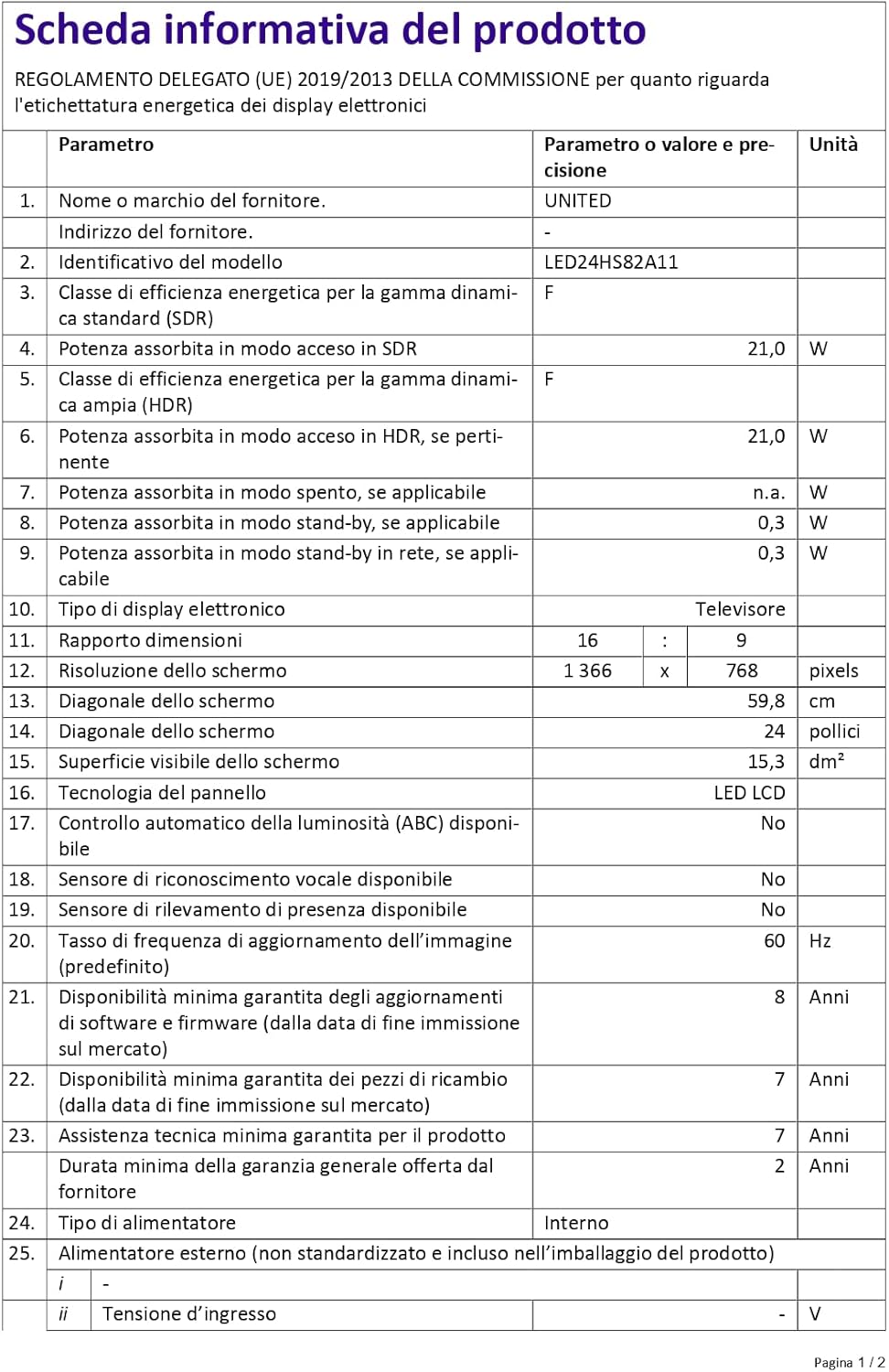
Figure 4: A detailed product information sheet for the UNITED LED24HS82A11 TV, providing comprehensive technical specifications and compliance details.
Za detaljnije informacije, molimo pogledajte službenu EPREL bazu podataka: https://eprel.ec.europa.eu/qr/1087921
Garancija i podrška
Your UNITED LED24HS82A11 TV comes with the following support and warranty provisions:
- Minimum General Warranty: 2 godina
- Technical Assistance Availability: 7 godina
- Ažuriranja softvera zagarantovana do: 8 Years from market placement date
- Dostupnost rezervnih dijelova: 7 Years from market placement date
For technical support or warranty claims, please contact your retailer or the manufacturer's authorized service center. Keep your proof of purchase for warranty validation.


