1. Uvod
Thank you for choosing the SEHMUA 2K Light Bulb Security Camera. This manual provides detailed instructions for the setup, operation, and maintenance of your new security camera. Please read this manual thoroughly before use to ensure proper functionality and safety.

Figure 1: SEHMUA 2K Light Bulb Security Camera and Mobile Application Interface.
2. Proizvod je gotovview
2.1 Sadržaj paketa
- SEHMUA 2K Light Bulb Security Camera (Model L1)
- Uputstvo za upotrebu
- Mounting Accessories (if applicable, not specified in data but common)
2.2 Ključne karakteristike
- 2K Full HD Resolution: Pruža jasan i detaljan video zapistage.
- 360° Pan/Tilt/Zoom (PTZ) & Remote Control: Allows for comprehensive area coverage and remote adjustment via mobile app.
- Noćni vid u boji: Enhanced visibility in low-light conditions with integrated spotlight.
- Motion Detection & Siren Alert: Automatically detects movement and can trigger an audible siren for deterrence.
- Automatsko praćenje: Follows detected motion within its field of view.
- Dvosmjerni zvuk: Omogućava komunikaciju putem ugrađenog mikrofona i zvučnika kamere.
- SD Card & Cloud Storage: Supports local storage (SD card not included) and optional cloud storage for continuous recording.
- Jednostavna instalacija: Designed for E26/E27 light bulb sockets.
- Wi-Fi povezivanje: Connects to your home 2.4GHz Wi-Fi network.
- Alexa kompatibilnost: Integrira se s Amazon Alexom za glasovnu kontrolu.
3. Podešavanje
3.1 Preuzimanje aplikacije i registracija računa
- Scan the QR code provided on the product packaging or in the quick start guide to download the official SEHMUA security camera application from your device's app store (iOS or Android).
- Open the application and follow the on-screen prompts to register a new account or log in if you already have one.
3.2 Instalacija kamere
The SEHMUA Light Bulb Security Camera is designed for easy installation into standard E26/E27 light bulb sockets. Ensure the power to the socket is turned off before installation.
- Locate a suitable E26/E27 light bulb socket where you wish to install the camera. This can be indoors or outdoors, provided the socket is protected from direct weather exposure if outdoors (IP65 rating means it's dust tight and protected against water jets, but not submersion).
- Carefully screw the camera into the light bulb socket until it is securely fastened. Do not overtighten.
- Turn on the power to the light bulb socket. The camera will power on and initiate its startup sequence.

Figure 2: Easy installation into an E27 socket.

Slika 3: Instalacija pramples for indoor and outdoor use.
3.3 Mrežna veza
Once powered on, the camera will enter pairing mode (indicated by a specific light pattern or voice prompt). Follow these steps to connect it to your Wi-Fi network:
- In the SEHMUA app, tap "Add Device" or the "+" icon.
- Izaberite model vašeg fotoaparata sa liste.
- Follow the in-app instructions to connect the camera to your 2.4GHz Wi-Fi network. This typically involves entering your Wi-Fi password and scanning a QR code generated by the app with the camera's lens.
- Once connected, the camera will confirm successful pairing, and you can begin viewprijenos uživo.
4. Uputstvo za upotrebu
4.1 Uživo View and Remote Control (PTZ)
Access the live video feed from your camera through the SEHMUA mobile application. The app allows you to remotely control the camera's pan (horizontal) and tilt (vertical) movements for a 360-degree viewing kut.
- Open the SEHMUA app and select your camera from the device list.
- The live feed will display. Use the directional controls within the app to pan the camera horizontally (350°) and tilt it vertically (90°).

Figure 4: Pan, Tilt, and Zoom (PTZ) functionality.

Figure 5: The camera provides 2K Full HD resolution for clearer details.
4.2 Snimanje i pohranjivanje
The camera supports 24/7 continuous recording and event-triggered recording. Footage can be stored locally on a microSD card (not included) or via optional cloud storage.
- MicroSD kartica: Insert a compatible microSD card (up to 128GB, Class 10 or higher recommended) into the camera's SD card slot. The camera will automatically begin recording.
- Cloud Storage: Subscribe to the cloud storage service through the SEHMUA app for secure, off-site storage of your video recordings.
- View snimljeno footage by navigating to the "History" or "Cloud" sections within the app.

Figure 6: Storage options include Cloud and SD Card (not included).
4.3 Detekcija pokreta i upozorenja
The camera is equipped with motion detection capabilities to alert you to activity in its monitored area.
- Omogući detekciju pokreta: In the app settings for your camera, enable motion detection. You can adjust sensitivity levels to minimize false alerts.
- Zone aktivnosti: Definišite specifična područja unutar kamere view where you want motion detection to be active, ignoring other areas.
- Upozorenja u realnom vremenu: Primajte push obavještenja na svoj pametni telefon kada se detektuje kretanje.
- Automatsko praćenje: When enabled, the camera will automatically pan and tilt to follow detected motion.
- Siren and Strobe Light: Configure the camera to activate an audible siren and/or a bright strobe light upon motion detection for deterrence.

Figure 7: Motion detection with real-time alerts and auto tracking.

Figure 8: Adjusting activity zones for precise motion detection.

Figure 9: Auto-tracking feature in action.

Figure 10: Deterrence with siren and strobe light.
4.4 Noćni vid
The camera features color night vision, providing clear images even in very low light conditions, enhanced by an integrated spotlight.
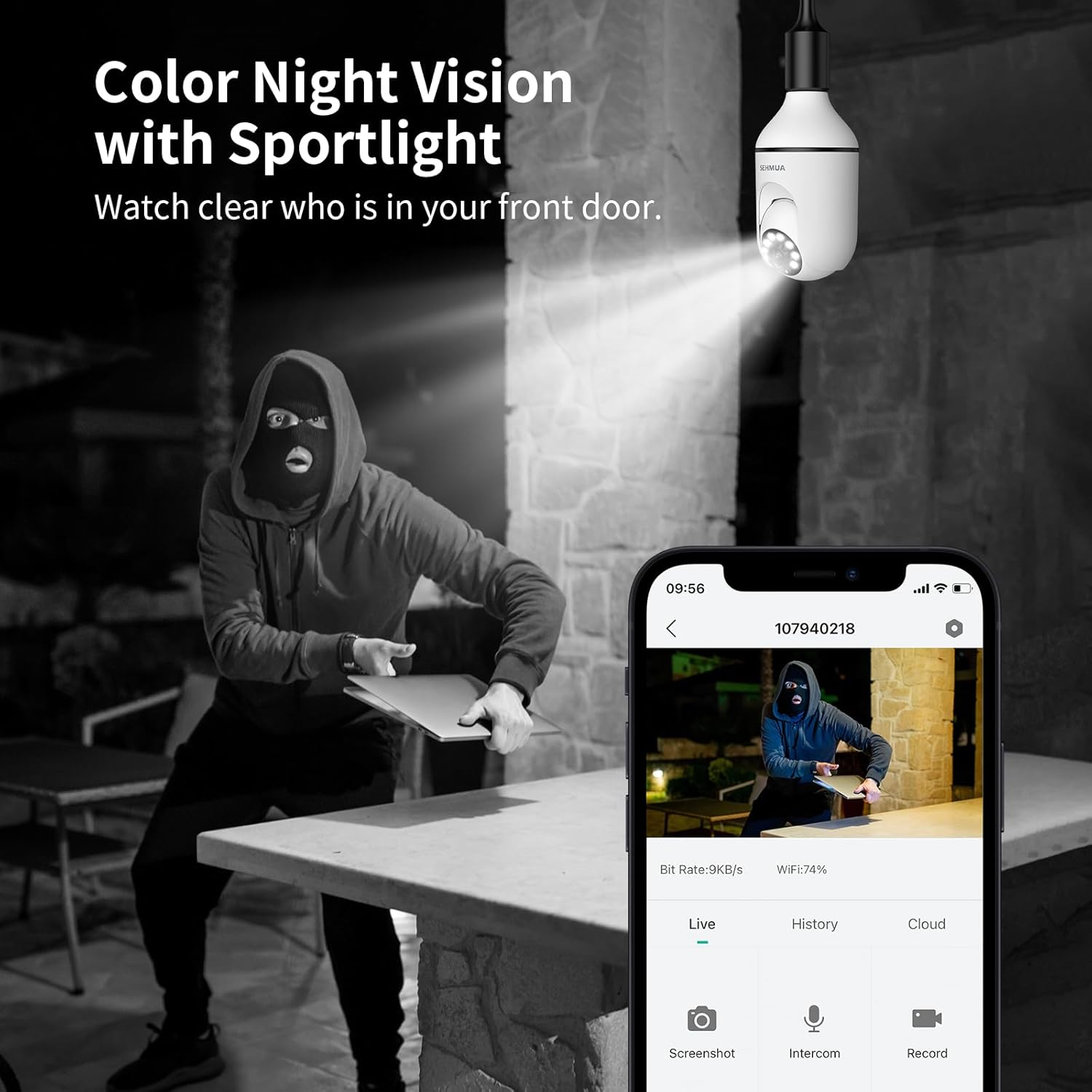
Figure 11: Color Night Vision with spotlight.
4.5 Dvosmjerni audio
Komunicirajte s posjetiteljima ili odvratite uljeze koristeći dvosmjernu audio funkciju kamere.
- Od uživo view in the app, tap the microphone icon to speak through the camera's speaker.
- The camera's built-in microphone will capture audio from the camera's location, which you can hear through your phone.

Figure 12: Two-Way Audio communication.
4.6 Integracija s Amazon Alexom
The SEHMUA camera can be integrated with Amazon Alexa for convenient voice control and viewna kompatibilnim pametnim ekranima.
- Otvorite aplikaciju Alexa na svom pametnom telefonu.
- Traži and enable the "SEHMUA" skill.
- Link your SEHMUA account with your Alexa account.
- Discover devices. You can now use voice commands like "Alexa, show me the [camera name]" on your Echo Show or other compatible devices.
5. Održavanje
- čišćenje: Pažljivo obrišite objektiv i kućište kamere mekom, suhom krpom. Ne koristite jake hemikalije ili abrazivna sredstva za čišćenje.
- Ažuriranja firmvera: Regularly check the SEHMUA app for available firmware updates to ensure optimal performance and security.
- Uslovi okoline: While rated IP65 for outdoor use, avoid exposing the camera to extreme temperatures, direct water submersion, or high-pressure water jets.
6. Otkrivanje problema
| Problem | Mogući uzrok | Rješenje |
|---|---|---|
| Kamera se ne uključuje. | No power to the socket; camera not screwed in properly. | Ensure the light socket has power. Re-screw the camera firmly into the socket. |
| Nije moguće povezati se na Wi-Fi. | Netačna Wi-Fi lozinka; kamera je previše udaljena od rutera; Wi-Fi mreža od 5 GHz. | Verify Wi-Fi password. Move camera closer to the router during setup. Ensure you are connecting to a 2.4GHz Wi-Fi network. |
| Nema upozorenja o detekciji pokreta. | Motion detection disabled; sensitivity too low; activity zones not set correctly. | Enable motion detection in the app. Adjust sensitivity. Check and configure activity zones. |
| Loš kvalitet videa. | Weak Wi-Fi signal; dirty lens. | Improve Wi-Fi signal strength (e.g., use a Wi-Fi extender). Clean the camera lens. |
| Dvosmjerni audio ne radi. | Microphone/speaker muted in app; volume too low. | Check audio settings in the app. Ensure microphone and speaker are not muted and volume is adequate. |
7. Specifikacije
| Feature | Detalj |
|---|---|
| Broj modela | L1 |
| Rezolucija | 2K FullHD |
| Povezivanje | 2.4GHz Wi-Fi |
| Izvor napajanja | Corded Electric (E26/E27 Socket) |
| Kut pomicanja / nagiba | 350° Pan, 90° Tilt (360° Field of View) |
| Night Vision | Color Night Vision with Spotlight |
| Opcije skladištenja | MicroSD Card (up to 128GB, not included), Cloud Storage (optional) |
| Audio | Dvosmjerni audio |
| Alerts | Motion Detection, Siren, Strobe Light |
| Kompatibilnost | Amazon Alexa, Smartphone (iOS/Android) |
| Unutarnja/vanjska upotreba | Vanjski (IP65 zaštita) |
| Težina artikla | 10.5 unce |
| Dimenzije paketa | 6.89 x 3.31 x 3.23 inča |
8. Garancija i podrška
For detailed warranty information and technical support, please refer to the warranty card included with your product or visit the official SEHMUA website. You may also find additional resources and FAQs on the product support page.
For further assistance, please contact SEHMUA customer service through the contact information provided on their official website or within the mobile application.
A PDF version of the Instructions for Use (IFU) is available for download ovdje.


