1. Uvod
Thank you for choosing the Nexxt Indoor Smart Camera. This manual provides essential information for the safe and efficient use of your new device. Please read it thoroughly before installation and operation, and retain it for future reference.
This 1080p HD fixed room camera is designed to provide reliable indoor surveillance with features such as night vision, two-way audio communication, motion detection, and seamless integration with smart home ecosystems like Amazon Alexa and Google Assistant.
2. Sigurnosne informacije
- Ensure the camera is powered by the provided power adapter. Using unauthorized adapters may damage the device and void the warranty.
- Do not expose the camera to water, moisture, or extreme temperatures. It is designed for indoor use only.
- Izbjegavajte postavljanje kamere na direktnu sunčevu svjetlost ili u blizinu izvora toplote.
- Ne pokušavajte sami rastavljati ili popravljati kameru. Sve servisne radove prepustite kvalifikovanom osoblju.
- Keep the camera and its accessories out of reach of children and pets.
- Ensure stable Wi-Fi connectivity for optimal performance.
3. Sadržaj paketa
Provjerite da li su sve stavke prisutne u paketu:
- NEXXT Indoor Smart Camera (NHC-I710)
- Adapter za napajanje
- Stani
- Korisnički priručnik (ovaj dokument)

Image: The retail packaging of the NEXXT Indoor Smart Camera, showing the camera and key features.
4. Proizvod je gotovview
The Nexxt Indoor Smart Camera offers a range of features for comprehensive home monitoring:
- Full HD 1080p rezolucija: Pruža jasan i detaljan video zapistage.
- Automatski noćni vid: Integrated infrared LEDs enable clear monitoring in low-light conditions up to 30 feet.
- Dvosmjerna komunikacija: Built-in microphone and speaker allow for real-time audio interaction.
- Detekcija pokreta: Obavještava vas o detektovanom pokretu unutar vidnog polja kamere view.
- Lokalna i Cloud pohrana: Supports microSD cards (sold separately) and Microsoft Azure cloud storage (subscription sold separately) for recording.
- Integracija pametnog doma: Compatible with Amazon Alexa and Google Assistant for voice control and integration into smart routines.
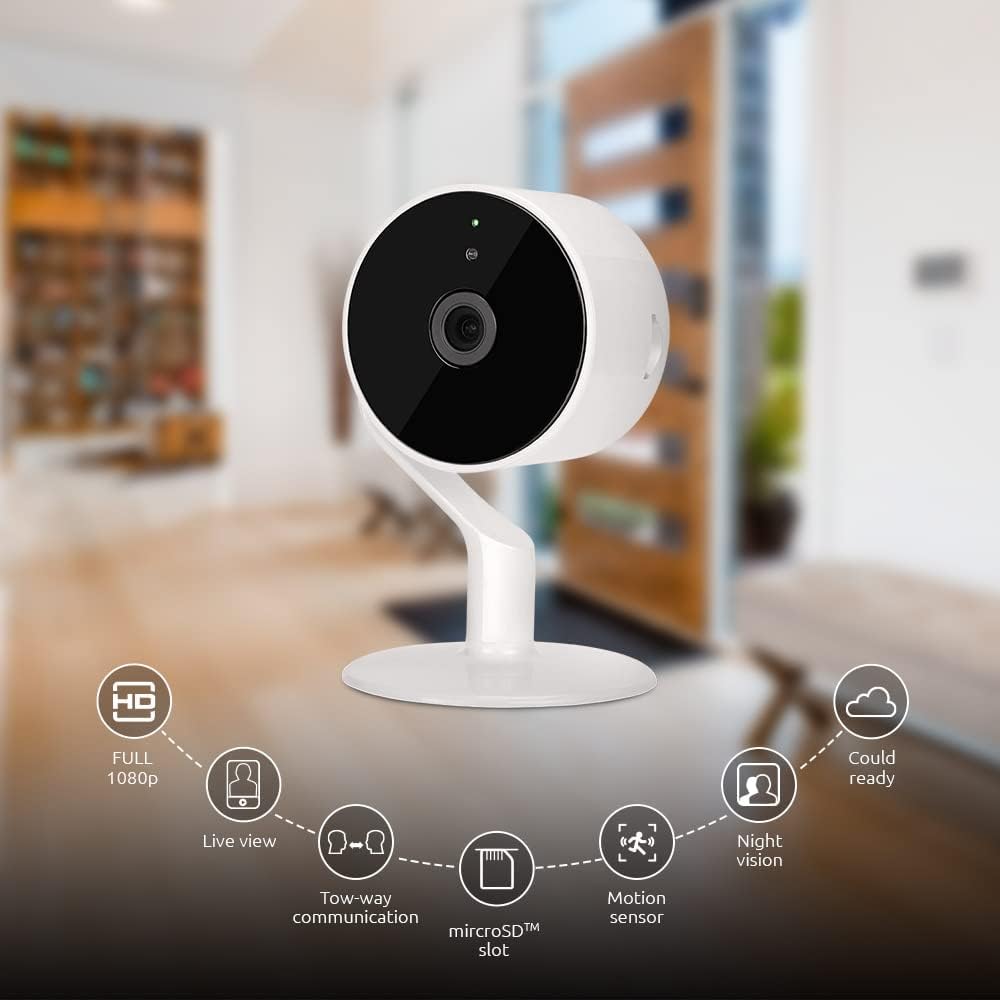
Image: The NEXXT Indoor Smart Camera highlighting its key features: Full HD 1080p, Live View, Two-way communication, microSD slot, Motion sensor, Night vision, and Cloud ready.
5. Podešavanje
5.1 Uključivanje
- Place the camera on a stable, flat surface or mount it using appropriate hardware (not included).
- Spojite adapter za napajanje na ulazni priključak za napajanje kamere.
- Plug the power adapter into a standard electrical outlet. The camera will power on and its indicator light will begin to flash, indicating it's ready for pairing.
5.2 Instalacija i uparivanje aplikacije
To control and monitor your camera, you need to download the Nexxt Home App:
- Preuzmite Next Home App od Google Play prodavnica (za Android uređaje) ili Apple App Store (za iOS uređaje).
- Open the Nexxt Home App and create a new account or log in if you already have one.
- Dodirnite ikonu "+" ili "Dodaj uređaj" da biste započeli proces uparivanja.
- Select "Camera" or the specific camera model from the list of devices.
- Follow the on-screen instructions in the app to connect the camera to your home Wi-Fi network. This typically involves scanning a QR code displayed on your phone with the camera.
- Once connected, the camera's indicator light will turn solid, and you will see the camera added to your app.

Image: Illustration showing the NEXXT Indoor Smart Camera being set up to function as a webcam, connecting to a laptop.
6. Uputstvo za upotrebu
6.1 Uživo View
From the Nexxt Home App, tap on your camera's name to access the live video feed. You can view u realnom vremenu footage of your monitored area.

Image: The NEXXT Indoor Smart Camera on a desk, with text indicating "Full HD resolution" and its ability to provide 1080p high-quality video day or night.
6.2 Dvosmjerni razgovor
Dok je u živo view, tap the microphone icon in the app to enable two-way audio. You can speak through your phone, and your voice will be projected through the camera's speaker. Tap the icon again to end communication.

Image: An illustration depicting communication between a person using a phone and another person near the camera, symbolizing the two-way talk feature.
6.3 Noćni vid
The camera automatically switches to night vision mode in low-light conditions. You can also manually toggle night vision on/off within the app settings for the camera.

Image: A split image showing a room in daylight on one side and the same room in night vision on the other, demonstrating the camera's night vision capability.

Image: A smartphone screen displaying the Nexxt Home app interface with a night vision toggle switch, overlaid on a room scene, indicating active night vision monitoring.
6.4 Detekcija pokreta i upozorenja
Configure motion detection sensitivity and alert preferences in the app. When motion is detected, you will receive notifications on your smartphone.

Image: A person sleeping in bed with a motion detection icon overlaid, indicating advanced motion detection with an effective range of up to 30 feet.

Image: A woman holding a smartphone displaying the Nexxt Home app, with text indicating that advanced human identification technology helps reduce false alarms and unwanted notifications.
6.5 Snimanje i pohranjivanje
The camera supports local storage via a microSD card (up to 128GB, not included) and cloud storage via Microsoft Azure (subscription required, sold separately). Insert the microSD card into the designated slot on the camera. Manage recording settings and view snimljeno footage through the Nexxt Home App.
6.6 Dijeljenje pristupa
You can securely share your camera's security feed with multiple approved devices, allowing family members or trusted individuals to also monitor your home.

Image: Two smartphones displaying the Nexxt Home app, with text stating "Everyone Can Keep Watch" and explaining that the security feed can be securely shared with multiple approved devices.
6.7 Integracija pametnog doma
The Nexxt Indoor Smart Camera is compatible with Amazon Alexa and Google Assistant. Follow the instructions in your Alexa or Google Home app to link your Nexxt Home account and enable voice commands for your camera.
7. Održavanje
- čišćenje: Za čišćenje objektiva i kućišta kamere koristite meku, suhu krpu. Ne koristite tekuća sredstva za čišćenje ili aerosole.
- Skladištenje: Ako skladištite kameru duži period, isključite je iz napajanja i čuvajte je na hladnom i suhom mjestu.
- Ažuriranja firmvera: Regularly check the Nexxt Home App for available firmware updates to ensure optimal performance and security.
8. Otkrivanje problema
- Kamera se ne povezuje na Wi-Fi:
- Provjerite da vaša Wi-Fi mreža koristi frekvenciju od 2.4 GHz. Kamera ne podržava Wi-Fi od 5 GHz.
- Provjerite tačnost lozinke za Wi-Fi.
- Približite kameru svom Wi-Fi ruteru.
- Ponovo pokrenite ruter i kameru.
- Nema uživo view or choppy video:
- Provjerite brzinu vaše internet veze.
- Provjerite da kamera ima jak Wi-Fi signal.
- Close and reopen the Nexxt Home App.
- Obavještenja o kretanju nisu primljena:
- Provjerite je li detekcija pokreta omogućena u postavkama aplikacije.
- Check your phone's notification settings for the Nexxt Home App.
- Podesite osjetljivost detekcije pokreta.
- Dvosmjerni audio ne radi:
- Ensure your phone's microphone is enabled for the Nexxt Home App.
- Provjerite postavke jačine zvuka na telefonu i u aplikaciji.
9. Specifikacije
| Feature | Specifikacija |
|---|---|
| Naziv modela | NHC-I710 |
| Rezolucija video snimanja | 1080p HD |
| Unutrašnja/vanjska upotreba | Indoor |
| Tehnologija povezivanja | bežični (Wi-Fi) |
| Connectivity Protocol | Wi-Fi (2.4GHz) |
| Izvor napajanja | Corded Electric |
| Noćni vid | 30 stopa |
| Tip kontrolera | Amazon Alexa, Google Assistant |
| Vrsta montaže | Tabletop Mount |
| Dimenzije artikla (D x Š x V) | 3 x 7 x 3 inča |
| Težina artikla | 6.7 unci (0.19 kilograma) |
| UPC | 798302056152 |
| Međunarodna ocjena zaštite | IP65 |
10. Garancija i podrška
The Nexxt Indoor Smart Camera comes with a 2 godine garancije od datuma kupovine. Molimo sačuvajte dokaz o kupovini za potrebe reklamacije.
For technical support, troubleshooting assistance, or warranty inquiries, please visit the official Nexxt Solutions website or contact their customer support through the Nexxt Home App.
Next Solutions Webstranica: www.nexxtsolutions.com