1. Uvod
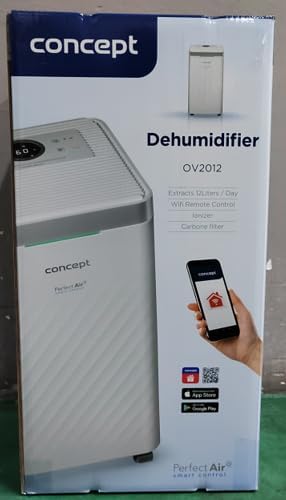
The Concept OV2012 is a versatile appliance designed to improve indoor air quality by combining dehumidification with air purification. This device effectively reduces excess humidity, which can contribute to mold growth and discomfort, while simultaneously filtering airborne pollutants. It features a triple filtration system, intuitive touch controls, and smart app connectivity for convenient operation.

Slika 1: Prednja strana view of the Concept OV2012 Dehumidifier.
2. Sigurnosne informacije
Molimo vas da pažljivo pročitate sva sigurnosna uputstva prije upotrebe uređaja. Nepoštivanje ovih uputstava može dovesti do strujnog udara, požara ili ozbiljnih povreda.
- Osigurajte napajanje voltage odgovara naljepnici s karakteristikama na uređaju.
- Nemojte koristiti uređaj sa oštećenim kablom za napajanje ili utikačem.
- Držite uređaj dalje od vode i drugih tekućina. Ne uranjajte ga.
- Ne blokirajte ulaze ili izlaze za zrak. Osigurajte dovoljno prostora oko uređaja za pravilan protok zraka.
- Isključite uređaj iz struje prije čišćenja, održavanja ili kada ga ne koristite duži period.
- Ovaj uređaj nije namijenjen za upotrebu od strane osoba (uključujući djecu) sa smanjenim fizičkim, senzornim ili mentalnim sposobnostima ili bez iskustva i znanja, osim ako nisu pod nadzorom ili im nisu data uputstva.
- Do not use the appliance in areas where flammable gases or vapors are present.
3. Komponente proizvoda
Familiarize yourself with the main parts of your Concept OV2012 dehumidifier.
- Kontrolna tabla: Touch-sensitive interface for setting modes and functions.
- Izlaz zraka: Where processed air is released.
- Poklopac ulaza zraka/filtera: Located at the rear, provides access to the air filters.
- Spremnik za vodu: Sakuplja kondenzovanu vodu.
- Kontinuirani odvod za odvodnju: Port for attaching a hose for continuous water drainage.
- 360° Rolling Wheels: Za lakše premještanje uređaja.

Slika 2: Pozadi view of the dehumidifier, showing air intake and water tank.
4. Kontrolna tabla i ekran
The OV2012 features an intuitive touch control panel with a digital display and LED indicators.
Slika 3: Detaljno view dodirne kontrolne ploče.
- Dugme za napajanje: Uključuje ili isključuje jedinicu.
- Odabir načina rada: Cycles through operating modes (Automatic, Continuous, Laundry Drying, Fan).
- Humidity Slider/Buttons: Podešava željeni nivo vlažnosti.
- Dugme za tajmer: Sets the delayed on/off time (up to 24 hours).
- Brzina ventilatora: Adjusts fan speed (usually two levels).
- Dugme za ionizator: Activates or deactivates the ionizer function.
- LED Humidity Indicator: Changes color based on current room humidity:
- crveno: High humidity (RH > 70%)
- zeleno: Satisfactory humidity (70% ≥ RH ≥ 50%)
- plava: Low humidity (RH < 50%)
5. Početno podešavanje
- Raspakivanje: Pažljivo izvadite odvlaživač zraka iz ambalaže. Sačuvajte ambalažu za buduće skladištenje ili transport.
- plasman: Place the unit on a firm, level surface. Ensure there is at least 20 cm of clear space around all sides for optimal airflow. The 360° rolling wheels allow for easy positioning.
- Priključak za napajanje: Uključite kabl za napajanje u uzemljenu električnu utičnicu.
- Spremnik za vodu: Provjerite da li je rezervoar za vodu pravilno umetnut u uređaj.
6. Načini rada
The OV2012 offers four distinct operating modes to suit various needs:
- Automatski način rada: The dehumidifier automatically maintains the humidity level you select. The unit will cycle on and off to achieve and sustain the target humidity.
- Kontinuirani rad: Ideal for long-term drying of very wet areas. In this mode, the unit runs continuously regardless of the ambient humidity. It is recommended to use the continuous drainage hose in this mode.
- Način sušenja rublja: Accelerates the drying of laundry and helps prevent moisture buildup in the room, reducing the risk of mold.
- Fan Mode (Air Purification without Dehumidification): In this mode, the compressor is off, and only the fan and filtration system operate to purify the air without removing moisture.
Using the Concept Home Mobile Application
The OV2012 can be controlled remotely via the Concept Home mobile application, available for iOS and Android devices. This app allows you to:
- Uključite ili isključite jedinicu.
- Select desired operating modes.
- Check the current air status in the room.
- Create a precise operating schedule for the dehumidifier.

Figure 4: The Concept Home mobile application for remote control.
7. Odvodnjavanje vode
Odvodnja rezervoara za vodu
When the 2.2-liter water tank is full, the unit will automatically shut off, and an indicator light will illuminate. Carefully remove the water tank, empty it, and reinsert it securely to resume operation.
Kontinuirana drenaža
For continuous operation without needing to empty the water tank, attach the included hose to the continuous drainage outlet. Direct the hose to a suitable drain, ensuring it is sloped downwards for proper water flow. This allows the unit to operate uninterrupted.
8. Održavanje i čišćenje
Redovno održavanje osigurava optimalne performanse i dugotrajnost vašeg odvlaživača zraka.
Sistem filtra
The OV2012 features a triple filter system:
- Filter za prašinu: Captures coarse impurities like dust particles, hair, fur, and pollen. This filter should be cleaned regularly.
- Filter sa aktivnim ugljem: Absorbs toxic, suffocating, and foul-smelling gases and vapors, such as formaldehyde, benzene, and cigarette smoke. This filter requires periodic replacement (Optional accessory: Carbon filter - 42394390).
- jonizator: Refreshes and purifies the air by increasing negatively charged ions, neutralizing odors and absorbing positively charged particles, viruses, and bacteria.
To clean the dust filter, remove the rear filter cover, gently remove the filter, and clean it with a vacuum cleaner or rinse it with water. Ensure it is completely dry before reinserting. Replace the activated carbon filter as recommended by the manufacturer or when you notice a decrease in odor removal effectiveness.

Figure 5: Illustration of the triple filtration system.
Čišćenje rezervoara za vodu
Periodically clean the water tank with mild detergent and warm water to prevent mold and bacterial growth. Rinse thoroughly and dry before reinserting.
Exterior Cleaning
Obrišite spoljašnjost jedinice mekom krpom, damp tkanina. Nemojte koristiti abrazivna sredstva za čišćenje ili rastvarače.
9. Vodič za rješavanje problema
Ako naiđete na probleme s odvlaživačem zraka, pogledajte sljedeće uobičajene probleme i rješenja:
| Problem | Mogući uzrok | Rješenje |
|---|---|---|
| Jedinica se ne uključuje | Nema napajanja; Spremnik za vodu je pun ili nepravilno umetnut. | Check power cord connection; Empty and reinsert water tank correctly. |
| Bez odvlaživanja | Room temperature too low; Air filters clogged; Humidity setting too high. | Ensure room temperature is above 5°C; Clean or replace filters; Lower the desired humidity setting. |
| Jedinica je bučna | Uređaj nije na ravnoj površini; filter za vazduh je začepljen. | Place unit on a flat, stable surface; Clean or replace air filters. |
| Indikator punog rezervoara za vodu ostaje upaljen nakon pražnjenja | Water tank not fully inserted; Sensor malfunction. | Push the water tank firmly into place; If problem persists, contact customer support. |
Ako problem i dalje postoji nakon isprobavanja ovih rješenja, obratite se korisničkoj podršci.
10. Tehničke specifikacije
| Feature | Specifikacija |
|---|---|
| Broj modela | OV2012 |
| Dehumidification Performance (max) | 12 liters/day (at 30°C, 80% RH) |
| Zapremina rezervoara za vodu | 2.2 litara |
| Potrošnja energije | 210 W (Note: Product description also mentions 245W, refer to product label for exact value) |
| Nivo buke | ≤ 45 dB |
| Dimenzije (Š x D x V) | 250 x 250 x 460 mm (25 x 25 x 46 cm) |
| Težina artikla | 10.82 kg |
| Dužina kabla | 1.8 m |
| Radni režimi | 4 (Automatic, Continuous, Laundry Drying, Fan) |
| Sistem filtra | Dust filter, Activated Carbon filter, Ionizer |
| Kontrola | Touch control, Mobile App (Concept Home) |
| Posebne karakteristike | Automatic Shut-off, Timer, 360° wheels, LED Humidity Indicator |

Slika 6: Dimenzije proizvoda.
11. Garancija i korisnička podrška
For warranty information, please refer to the warranty card included with your product or contact your local Concept distributor. For technical support, spare parts, or service inquiries, please contact Concept customer service. Contact details may be found on the product packaging or the official Concept website.
Example contact information from product packaging (may vary by region):
- CZ: Zavolejte nám +420 465 471 400, www.my-concept.cz
- SK: Zavolajte nám +421 326 583 465, www.my-concept.sk
- PL: Zadzwoń do nas +48 71 339 04 44, www.my-concept.pl