1. Uvod
This manual provides detailed instructions for the setup, operation, and maintenance of your Wings Phantom 850 Low Latency Wireless Earbuds. Please read this manual thoroughly before using the product to ensure optimal performance and longevity.

Image: The Wings Phantom 850 Wireless Earbuds shown inside their open charging case, highlighting their design and readiness for use.
2. Sadržaj paketa
Provjerite da li se sve stavke nalaze u pakovanju vašeg proizvoda:
- Wings Phantom 850 Earbuds
- Futrola za bežično punjenje
- USB kabl za punjenje
- Jastučići za uši (različite veličine)
- Korisnički priručnik (ovaj dokument)
3. Podešavanje
3.1. Punjenje slušalica i kutijice
Prije prve upotrebe, potpuno napunite slušalice i kućište za punjenje.
- Stavite slušalice u kutijicu za punjenje. Provjerite da li su pravilno postavljene.
- Spojite USB kabel za punjenje na priključak za punjenje na kućištu i na izvor napajanja (npr. USB adapter za zid, USB priključak računara).
- The LED indicators on the case will show the charging status. A full charge typically takes approximately 1-2 hours.

Image: The Wings Phantom 850 Earbuds in their charging case, illustrating the charging process with illuminated LED lights.
3.2. Bluetooth uparivanje
Da biste povezali slušalice s uređajem:
- Provjerite jesu li slušalice napunjene i unutar kućišta za punjenje.
- Open the charging case. The earbuds will automatically enter pairing mode (indicated by flashing LED lights on the earbuds).
- Na svom uređaju (pametnom telefonu, tabletu, laptopu) omogućite Bluetooth i potražite dostupne uređaje.
- Select "Wings Phantom 850" from the list of devices.
- Once connected, the earbud LEDs will stop flashing, and you will hear a confirmation tone.
Karakteristike slušalica Open and On Tech™ for quick connection upon opening the case.
3.3. Wings Sync App Installation
Enhance your experience by installing the Wings Sync App. The app allows for custom controls, EQ modes, and locating misplaced earbuds.
- Download the "Wings Sync" app from your device's app store (App Store for iOS, Google Play Store for Android).
- Open the app and follow the on-screen instructions to connect your Phantom 850 earbuds.

Image: A visual representation of the Wings Sync App dashboard, showing options for touch controls, game mode, EQ modes, and locating earbuds.
Video: A demonstration of the Wings Sync App features, including custom touch controls, EQ modes, and the earbud locator function. This video illustrates how to personalize your earbud settings and find them if misplaced.
4. Uputstvo za upotrebu
4.1. Dodirnite Kontrole
The Wings Phantom 850 earbuds feature intuitive touch controls. These can be customized via the Wings Sync App.
| Akcija | Funkcija (zadano) |
|---|---|
| Jedan dodir (L/R) | Volume Up/Down (Customizable) |
| Dvostruki dodir (L/R) | Play/Pause (Customizable) |
| Trostruki dodir (L) | Previous Track (Customizable) |
| Trostruki dodir (R) | Next Track (Customizable) |
| Long Press (L) | Voice Assistant (Customizable) |
| Long Press (R) | Game Mode ON/OFF (Customizable) |
| Dolazni poziv (jedan dodir) | Odgovori na poziv |
| Dolazni poziv (dugi pritisak) | Odbiti poziv |
Note: Default functions may vary. Refer to the Wings Sync App for current settings and customization options.
4.2. Način igranja
Activate Gaming Mode for ultra-low latency audio (40ms) during gameplay. This mode is designed to synchronize audio with on-screen action, providing a competitive edge.
- Aktivacija: Long press the right earbud (default setting) or activate via the Wings Sync App.
- Deaktivacija: Ponovite korak aktivacije.

Slika: Prekoview of key features including the dedicated Gaming Mode with 40ms ultra-low latency, Bluetooth 5.3, IPX5 water resistance, and ENC Quad Mic technology.
4.3. Poništavanje buke iz okoline (ENC)
The Quad ENC Mics reduce environmental noise during calls, ensuring clear communication.
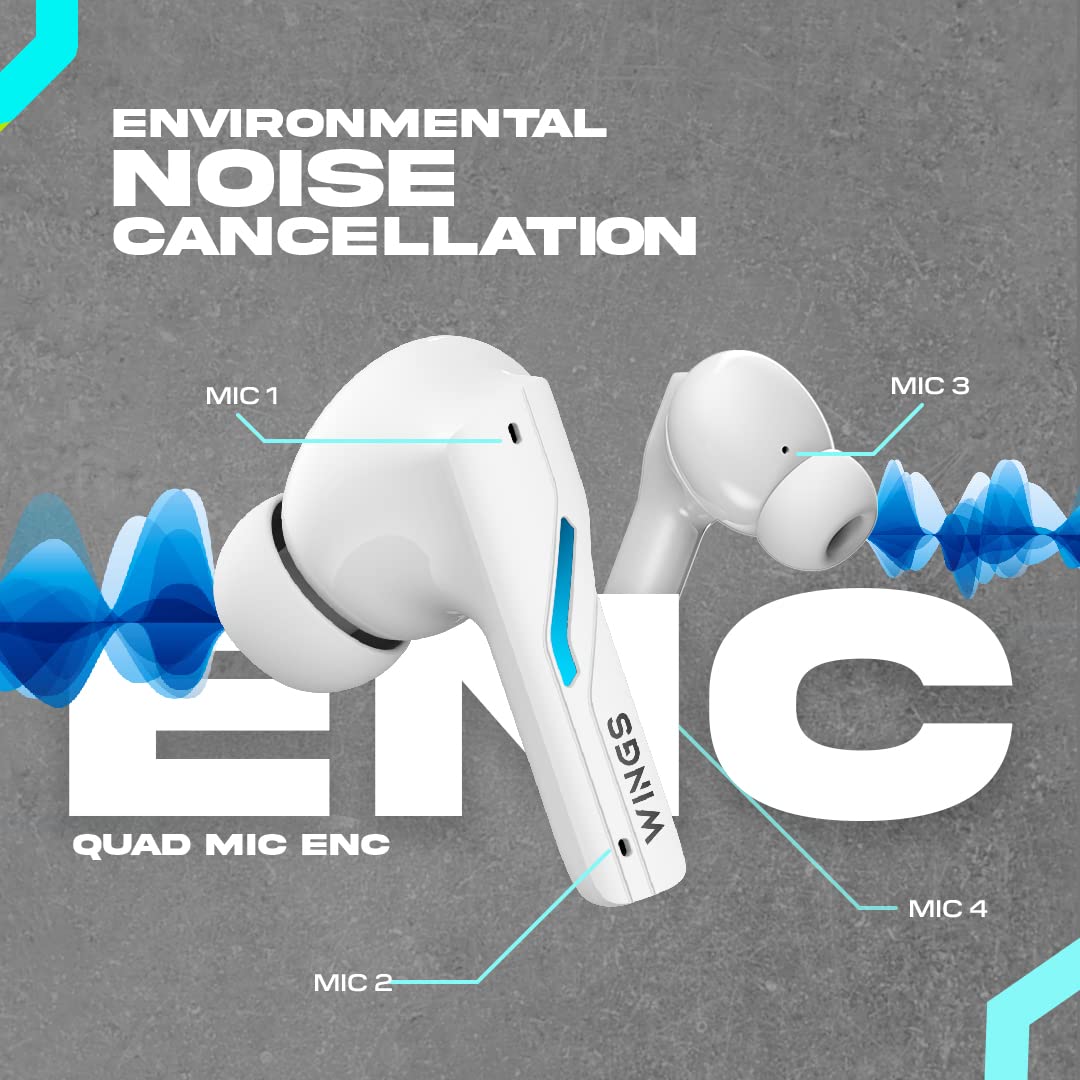
Image: A diagram illustrating the four Environmental Noise Cancellation (ENC) microphones on the Wings Phantom 850 earbuds, designed for clear call quality.
5. Održavanje
5.1. Čišćenje
Redovno čišćenje pomaže u održavanju kvalitete zvuka i higijene:
- Nježno obrišite slušalice i kućište za punjenje mekom, suhom krpom koja ne ostavlja dlačice.
- Uklonite nastavke za uši i operite ih blagim sapunom i vodom, a zatim ih dobro osušite prije ponovnog pričvršćivanja.
- Use a dry cotton swab to clean the charging contacts on both the earbuds and the case.
5.2. Otpornost na vodu
The Wings Phantom 850 earbuds are rated IPX5 water resistant, meaning they can withstand splashes and sweat. They are not designed for submersion in water.
- Ne izlažite slušalice tekućoj vodi niti ih nosite dok plivate ili se tuširate.
- Prije nego što vratite slušalice u kutijicu za punjenje, provjerite jesu li suhe kako biste spriječili oštećenja.
6. Otkrivanje problema
If you encounter issues with your Wings Phantom 850 earbuds, refer to the following common solutions:
- Nema problema sa zvukom/povezivanjem:
- Uvjerite se da su obje slušalice napunjene.
- Provjerite je li Bluetooth omogućen na vašem uređaju i jesu li odabrane slušalice.
- Pokušajte odvojiti i ponovo upariti slušalice sa svojim uređajem.
- Ponovo pokrenite uređaj.
- Jedna slušalica ne radi:
- Place both earbuds back in the charging case, close the lid, wait a few seconds, then open and try again.
- Očistite kontakte za punjenje na slušalicama i u futroli.
- Problemi s punjenjem:
- Uverite se da je kabl za punjenje dobro povezan.
- Pokušajte s drugim USB priključkom ili adapterom za punjenje.
- Očistite kontakte za punjenje.
- Niska jačina zvuka/loš kvalitet zvuka:
- Podesite jačinu zvuka i na uređaju i na slušalicama.
- Provjerite da li su nastavci za uši pravilno zatvoreni u vašem ušnom kanalu. Isprobajte nastavke za uši različitih veličina.
- Očistite mrežicu zvučnika slušalica od svih ostataka.
- Check EQ settings in the Wings Sync App.
Za dodatnu pomoć, molimo kontaktirajte korisničku podršku.
7. Specifikacije
| Feature | Detalj |
|---|---|
| Naziv modela | Phantom 850 |
| Tehnologija povezivanja | Bežično (Bluetooth 5.3) |
| Bluetooth domet | 15 metara |
| Vrsta audio drajvera | Dynamic Driver (13mm Composite Drivers) |
| Trajanje baterije (slušalice) | Do 10 sati |
| Ukupno vrijeme reprodukcije (s kutijom) | Do 50 sati |
| Tehnologija punjenja | Bullet Charge™ (15 mins charge = 100 mins playtime) |
| Posebna karakteristika | ENC Quad Mic, Dedicated Gaming Mode (40ms Low Latency), App Support, Open and On Tech™ |
| Nivo vodootpornosti | IPX5 (Otporan na znoj i vodu) |
| Kontrolni metod | Dodir, glas |
| Kompatibilni uređaji | Mobilni telefoni, desktop računari, igraće konzole, laptopi, tableti |
| Težina artikla | 150 grama |
| Dimenzije proizvoda | 10 x 10 x 4 cm |

Slika: Eksplodirala view diagram illustrating the 13mm composite drivers responsible for high-fidelity audio output in the earbuds.

Image: Information detailing the battery life, showing 50 hours of total playtime with the charging case and 10 hours of playtime on the earbuds alone.
8. Garancija i podrška
Your Wings Phantom 850 Wireless Earbuds come with a 1-godišnja garancija od datuma kupovine.
For warranty claims, technical support, or any other inquiries, please refer to the contact information provided on the official Wings webweb-mjesto ili vašu dokumentaciju o kupovini.


