Uvod
Thank you for choosing the Platinum Karaoke DK-88 Duo Speaker System. This manual provides essential information for the safe and efficient operation of your new device. Please read it thoroughly before use and retain it for future reference.
The DK-88 Duo is an all-in-one karaoke solution, featuring a built-in song library, wireless microphones, and various connectivity options. Its robust design and versatile features make it ideal for home parties, family gatherings, and outdoor events.
Sigurnosne informacije
- Ne izlažite uređaj kiši ili vlazi kako biste spriječili požar ili strujni udar.
- Ne otvarajte casing. Za sve servisne radove obratite se kvalifikovanom osoblju.
- Osigurajte odgovarajuću ventilaciju oko uređaja. Ne blokirajte ventilacijske otvore.
- Use only the provided charging adapter.
- Držite uređaj dalje od direktne sunčeve svjetlosti, izvora toplote i prekomjerne prašine.
- Izbjegavajte postavljanje teških predmeta na uređaj.
- Čuvati van domašaja djece.
Sadržaj paketa
Molimo Vas da provjerite da li se u Vašem paketu nalaze sve dolje navedene stavke:
- Main Unit (DK-88 Duo Speaker)
- Adapter za punjenje
- 2 x bežična mikrofona
- Daljinski upravljač
- Batteries (for remote control and microphones)
- AV kabel
- Uputstvo za upotrebu
- Garantni list

Slika 1: Priloženi pribor i komponente
Product Overview
Front View

Slika 2: Prednja strana View of the DK-88 Duo with LED Lighting
Kontrole na gornjoj ploči

Figure 3: Top Panel Controls and Inputs
Zadnja ploča

Figure 4: Rear Panel with Connectivity Ports
Setup
1. Powering On/Charging
- AC napajanje: Connect the charging adapter to the 'DC IN 20V/4A' port on the top panel and plug it into a wall outlet. The unit can be used while charging.
- Snaga baterije: The unit has a built-in rechargeable battery providing up to 6 hours of playback. Ensure the unit is charged before portable use. The battery indicator on the display will show the current charge level.
2. Podešavanje mikrofona
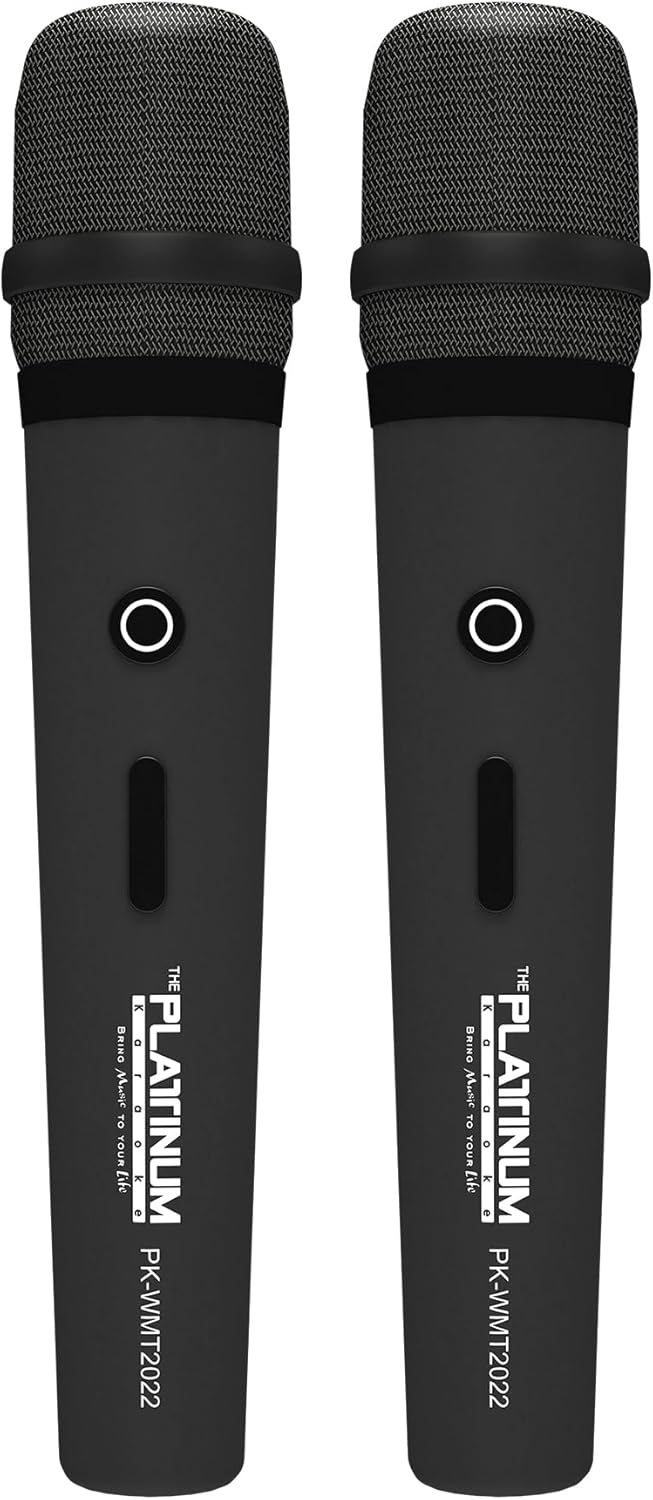
Slika 5: Bežični mikrofoni
- Insert the provided batteries into each wireless microphone.
- Turn on the microphones using their power switches. They will automatically connect to the DK-88 Duo unit.
- Adjust the 'MIC VOLUME' knob on the top panel to control the microphone output level.
3. Povezivanje audio izvora
- Bluetooth: Turn on the unit. The Bluetooth indicator will flash. Enable Bluetooth on your mobile device and select 'DK-88 Duo' from the list of available devices to pair.
- USB disk: Umetnite USB fleš disk koji sadrži MP3 muziku files into the 'USB' port on the top panel. The system will automatically detect and play the files.
- Micro SD kartica: Insert a Micro SD card (up to 32GB, pre-loaded with songs) into the 'MICRO SD' slot on the top panel. The system will automatically detect and play the songs.
- AUX ulaz: Use the provided AV cable to connect external audio devices (e.g., DVD player, TV) to the 'AUX' input on the top panel.
- Ulaz za gitaru: Connect a guitar to the 'GUITAR IN' port on the top panel. Adjust the dedicated 'GUITAR' volume knob.
Uputstvo za upotrebu
1. Osnovni rad
- Uključivanje/isključivanje: Use the 'POWER' switch on the top panel to turn the unit on or off.
- Kontrola jačine zvuka: Rotate the 'VOLUME' knob to adjust the overall sound output.
- Odabir načina rada: Press the 'MODE' button to switch between input sources (Bluetooth, USB, Micro SD, AUX).
2. Karakteristike karaokea
- Izbor pjesme: Use the 'SKIP' buttons (|< / >> |) to navigate through songs.
- Eho efekat: Adjust the 'ECHO' knob to add or reduce echo to your vocals. This helps blend your voice with the music.
- Snimanje pjesme: Press the 'REC' button to start recording your performance. The system will save the music and your vocals to the inserted Micro SD card or USB drive. To share, simply copy the recorded file na kompjuter.
- Vocal Assist (Training Songs): For training songs, the main vocals will automatically fade out when you sing into the microphone and reappear when you stop.
3. Audio podešavanje
- Kontrola visokih tonova: Use the 'TREBLE' knob to adjust the high-frequency sounds of the music.
- Kontrola basa: Use the 'BASS' knob to adjust the low-frequency sounds of the music.
4. Svjetlosni efekti
- Press the 'LIGHT' button on the top panel to cycle through different colorful fire lighting modes. The lights glow and dance with the music, enhancing the party atmosphere.
5. Platinum Link App
- Download the 'Platinum Link' app from your mobile device's app store (available on Android and iOS).
- Connect your mobile phone to the DK-88 Duo via Bluetooth.
- Use the app to control song selection, browse the song library, reserve songs, and display karaoke lyrics directly on your phone screen.
- The app also features a karaoke recording function to measure your vocal performance and improve your singing skills.
Održavanje
- Čistite uređaj mekom, suhom krpom. Ne koristite tekuća sredstva za čišćenje ili aerosole.
- Čuvajte jedinicu na hladnom i suvom mestu kada se ne koristi.
- Remove batteries from the remote control and microphones if storing for extended periods to prevent leakage.
Rješavanje problema
| Problem | Mogući uzrok | Rješenje |
|---|---|---|
| Nema struje | Unit is not charged or not connected to AC power. | Connect the charging adapter and ensure it's plugged into a working outlet. Check battery level. |
| Nema zvuka iz mikrofona | Microphones are off, batteries are low, or volume is too low. | Turn on microphones, replace batteries, increase 'MIC VOLUME' knob. |
| Bluetooth se ne povezuje | Bluetooth is not enabled on the unit or mobile device, or device is too far. | Ensure unit is in Bluetooth mode, enable Bluetooth on your device, move closer to the unit. |
| Cannot play songs from USB/SD | Netačno file format, oštećen files, or card/drive not inserted properly. | Osigurati files are MP3 format. Reinsert the USB drive/SD card. Try a different drive/card. |
| Svjetla ne rade | Light feature is turned off. | Press the 'LIGHT' button to activate the lighting effects. |
Specifikacije
| Feature | Detalj |
|---|---|
| Broj modela | DK-88 |
| Dimenzije (D x Š x V) | 35 x 38 x 78 cm |
| Težina | 13 kg |
| Izvor napajanja | Battery Powered (1 x 12V battery included), AC Powered |
| Battery Playtime | Do 6 sati |
| Tehnologija povezivanja | USB, Bluetooth |
| USB portovi | 1 |
| Broj zvučnika | 2 |
| Posebna karakteristika | Built-in Song Track |
| Boja | Crna |
| Preporučena upotreba | Home parties, family gatherings, karaoke bars, outdoor events, musical performances |
Garancija i podrška
Your Platinum Karaoke DK-88 Duo comes with a warranty. Please refer to the included Warranty Card for detailed terms and conditions, including warranty period and coverage.
For technical support, service, or inquiries not covered in this manual, please contact Platinum Karaoke customer service. Contact information can typically be found on the Warranty Card or the official Platinum Karaoke website.


