1. Uvod
The Audeze Filter Speakerphone is a portable conference device designed for clear voice communication. It features advanced Artificial Intelligence (A.I.) noise filtering and proprietary planar magnetic speaker technology to optimize speech clarity. This manual provides instructions for setting up, operating, maintaining, and troubleshooting your Audeze Filter Speakerphone.
2. Šta se nalazi u kutiji
Upon unboxing your Audeze Filter Speakerphone, verify that all the following items are included:
- Audeze Filter Speakerphone Unit
- Kabel za punjenje od USB-C do USB-C
- USB-C na USB-A adapter
- Quick Start Guide (Multi-language)
- Leatherette Magnetic Closure Carry Case
- Anti-slip Pad with Audeze Logo
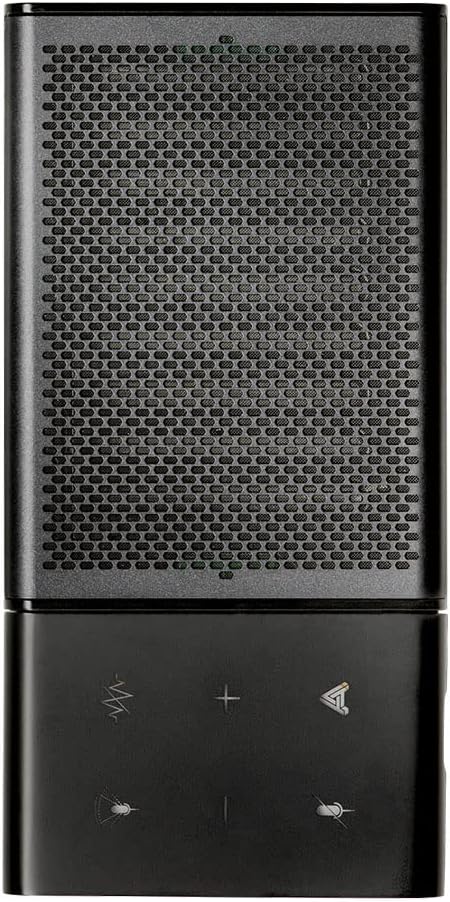
Image: All items included in the Audeze Filter Speakerphone package.
Video: Prekorview of the Audeze Filter Speakerphone, including unboxing and initial setup. This video demonstrates the physical components and accessories.
3. Proizvod je gotovview
The Audeze Filter is designed for portability and ease of use, featuring a sleek aluminum chassis. It is comparable in size to a large cellphone when folded.
3.1 Fizičke karakteristike
- Kontrole: Touch-sensitive buttons for mute, AI filter, volume adjustment, and call management.
- mikrofoni: Intelligent beamforming microphone array.
- govornik: Patented Audeze Planar Magnetic Speaker optimized for speech clarity.
- USB-C priključak: Za punjenje i žičanu vezu.
- Dugme za napajanje: Smješten sa strane radi lakšeg pristupa.
- LED indikator: Pruža povratne informacije o statusu.
- Sklopivi dizajn: Allows the speaker to stand upright for optimal sound direction or fold flat for portability.

Image: Close-up of the speakerphone's control panel and speaker grille.

Image: The Audeze Filter Speakerphone in its upright position, ready for use.

Image: Dimensions of the Audeze Filter Speakerphone.

Image: The Audeze Filter Speakerphone in its compact, folded state.

Image: The Audeze Filter Speakerphone neatly stored in its protective carry case.
4. Podešavanje
4.1 Punjenje uređaja
The Audeze Filter has a built-in rechargeable Lithium Polymer battery, providing up to 15 hours of usage. To charge:
- Connect the provided USB-C cable to the USB-C port located on the inside of the speakerphone when it is unfolded.
- Connect the other end of the USB-C cable to a power source (e.g., computer, wall adapter). If your power source only has a USB-A port, use the included USB-C to USB-A adapter.
- Potpuno punjenje traje otprilike 2.5 sati.
4.2 Uključivanje/isključivanje napajanja
To power on the device, press the singular power button located on the side. The LED indicator will illuminate. To power off, press and hold the power button.
4.3 Bluetooth uparivanje
The Audeze Filter supports Bluetooth connectivity for wireless use with compatible devices.
- Power on the Audeze Filter. It will automatically enter pairing mode, indicated by a blinking LED.
- Na vašem uređaju (pametnom telefonu, tabletu, laptopu) idite na postavke Bluetootha.
- Select "Audeze Filter" from the list of available devices to connect.
- For Android devices, a prompt may appear for quick connection. For other operating systems like Windows or macOS, you may need to manually select it in Bluetooth settings.
4.4 Žičana USB veza
For a direct and stable connection, you can use the USB-C cable:
- Connect one end of the USB-C cable to the Audeze Filter's USB-C port.
- Connect the other end to your computer's USB-C port. Use the provided USB-C to USB-A adapter if necessary.
- The device will be recognized as an audio input/output device.
5. Upravljanje spikerfonom
5.1 Kontrole
The Audeze Filter features intuitive touch controls on its surface:
- Dugme za isključivanje zvuka: Located at the upper left, mutes/unmutes the microphone.
- AI Filter Button: Located to the right of the mute button, cycles through AI Noise Suppression settings (Off, Low, Medium, High).
- Dugmad za jačinu zvuka (+/-): Adjust speaker volume. Long-press to skip tracks (forward/reverse) when listening to media.
- Višenamjensko dugme: Located at the lower right, used for accepting and rejecting phone calls.
5.2 AI Noise Filtering
The Audeze Filter utilizes A.I. to identify and remove background noises, enhancing voice clarity. It is trained to recognize over 1000 different sounds, such as barking dogs, crying babies, fan noises, and car sounds.
- Adjust the level of noise suppression (Low, Medium, High) via the AI Filter button on the device or through the companion app.
5.3 mikrofona za oblikovanje snopa
The intelligent beamforming microphone array allows you to adjust the microphone pickup pattern to suit your environment:
- 30°: Ideal for a single user directly in front of the speakerphone.
- 90°: Suitable for a small group or two people facing the speakerphone.
- 180°: For users on one side of a table.
- 360°: Best for multiple participants around the speakerphone in a conference setting.
5.4 Companion App (Audeze Hub)
The Audeze Hub app, available for iOS and Android, provides advanced control and customization options for your Audeze Filter Speakerphone.
- Indikator trajanja baterije: View procenat preostale baterijetage.
- Speaker Boost: Increase speaker loudness by up to 15dB for larger rooms or louder environments.
- Udaljenost mikrofona: Fine-tune the microphone pickup range from 0.5 meters to 5.5 meters to optimize for different room sizes and participant distances.
- Isključivanje mikrofona: One-tap microphone mute control.
- automatsko gašenje: Configure the device to automatically shut down after 30 minutes, 1 hour, 2 hours, 4 hours, or disable this feature.
- Glasovni upiti: Adjust the volume level of voice prompts from 0% to 100%.
- Ažuriranja firmvera: Keep your device updated with the latest features and improvements by checking for and installing firmware updates directly through the app.
Video: This video provides a comprehensive demonstration of the Audeze Filter Speakerphone, including its unboxing, physical features, and a detailed walkthrough of the Audeze Hub companion app's functionalities, such as AI noise suppression, speaker boost, and microphone distance settings. It also includes a practical test of the AI noise filtering feature.
6. Održavanje
To ensure the longevity and optimal performance of your Audeze Filter Speakerphone, follow these maintenance guidelines:
- čišćenje: Koristite meku, suhu krpu za čišćenje spoljašnjosti uređaja. Izbjegavajte korištenje jakih kemikalija ili abrazivnih materijala.
- Skladištenje: When not in use, store the speakerphone in its provided leatherette carry case to protect it from scratches and dust.
- temperatura: Izbjegavajte izlaganje uređaja ekstremnim temperaturama ili direktnoj sunčevoj svjetlosti tokom dužeg perioda.
7. Otkrivanje problema
If you encounter issues with your Audeze Filter Speakerphone, refer to the following common solutions:
- Difficulty Hearing Others / Low Volume:
- Check the volume level on the device and your connected computer/smartphone.
- Use the Audeze Hub app to activate the Speaker Boost karakteristika.
- Others Cannot Hear You Clearly / Background Noise:
- Uvjerite se da mikrofon nije isključen.
- Podesite AI suzbijanje buke level (Low, Medium, High) via the device button or the Audeze Hub app.
- Podesite Beamforming setting to focus on the speaker(s) and minimize ambient noise.
- In the Audeze Hub app, verify the Udaljenost mikrofona setting is appropriate for your position relative to the speakerphone.
- Problemi s Bluetooth vezom:
- Ensure the speakerphone is powered on and in pairing mode (blinking LED).
- Turn off and on Bluetooth on your connecting device.
- Zaboravite uređaj u svojim Bluetooth postavkama i ponovo ga uparite.
- Try connecting via the USB-C cable as an alternative.
- Problemi s ažuriranjem firmvera:
- Ensure the device has sufficient battery charge before attempting an update.
- Maintain a stable Bluetooth connection between the speakerphone and the device running the Audeze Hub app during the update process.
8. Specifikacije
| Feature | Detalj |
|---|---|
| Materijal | Aluminijum |
| Naziv modela | Filter Speakerphone |
| Vrsta zvučnika | Zvučnik |
| Posebna karakteristika | A.I. Noise filtering |
| Preporučena upotreba | For Computers, For Smartphones or Tablets, For Online Meetings, For Travel |
| Kompatibilni uređaji | Android, Mac, Windows, iPhones |
| Uključene komponente | USB-C kabl |
| Dimenzije proizvoda | 0.3"D x 2.5"Š x 6"H |
| Težina artikla | 280 grama (9.9 unci) |
| Bežična komunikacijska tehnologija | Bluetooth |
| Izvor napajanja | Battery Powered |
| Baterija | Potrebna je 1 litijum-polimerska baterija (uključena) |
| Vrsta audio drajvera | Planarni magnetni drajver |
| Maksimalna izlazna snaga zvučnika | 10 Watts |
| Tehnologija povezivanja | Bluetooth, USB |
| Način audio izlaza | Stereo |
| Vrsta montaže | Tabletop Mount |
| Vrijeme punjenja | 2.5 sata |
9. Garancija i podrška
The Audeze Filter Speakerphone comes with a Puna garancija. For detailed warranty information, product support, or to contact customer service, please visit the official Audeze Store:


