1. Uvod
Thank you for choosing the Cherry KW 9100 Slim Wireless Keyboard. This manual provides essential information for setting up, operating, and maintaining your new keyboard. The KW 9100 Slim is designed for both work and home office environments, offering flexible connectivity options and a comfortable typing experience with its silent SX Scissor Mechanism.

Slika 1.1: Od vrha prema dolje view of the Cherry KW 9100 Slim Wireless Keyboard, showcasing njegov puni raspored i elegantan dizajn.
2. Sadržaj paketa
Molimo Vas da provjerite da li se u Vašem paketu nalaze svi artikli:
- Cherry KW 9100 Slim Wireless Keyboard
- USB kabel (USB-A na USB-C)
- USB Receiver (2.4 GHz RF dongle)
- Uputstvo za upotrebu (ovaj dokument)
- Magnetic Support Bar (pre-attached or separate)
3. Ključne karakteristike
- Dvostruko povezivanje: Seamlessly switch between wireless RF (2.4 GHz) and Bluetooth transmission modes.
- Punjiva baterija: Built-in lithium rechargeable battery with USB-C connection for convenient charging.
- SX Scissor Mechanism: Cherry's proprietary low-profile scissor technology ensures a quiet and precise typing experience.
- Slim and Stable Design: Features a thin profile with a built-in metal plate for maximum stability and rigidity.
- Podesivi ugao kucanja: Includes a removable magnetic support bar for a steeper typing angle preference.
- Statusne LED diode: Integrated LEDs for CAPS LOCK, NUM, and SCROLL keys.
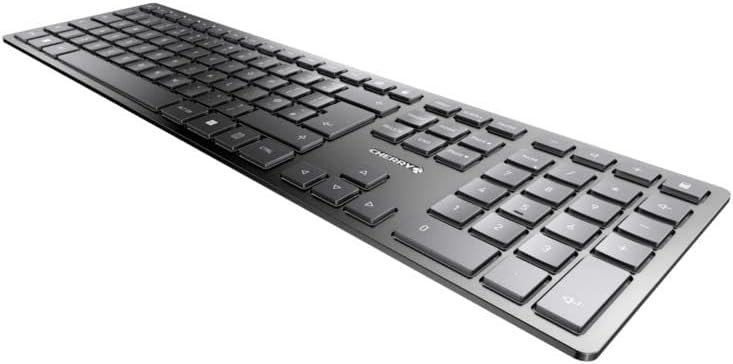
Slika 3.1: Pod uglom view highlighting the slim profile and key layout of the keyboard.

Slika 3.2: Krupni plan view of the keys, illustrating the low-profile design and quiet SX Scissor Mechanism.
4. Podešavanje i povezivanje
4.1 Punjenje tastature
Before first use, it is recommended to fully charge the keyboard.
- Connect the supplied USB-A to USB-C cable to the USB-C port on the keyboard.
- Connect the other end of the cable to a USB-A port on your computer or a compatible USB power adapter.
- The charging indicator LED will illuminate. The keyboard can be used while charging.

Figure 4.1: Location of the USB-C charging port on the Cherry KW 9100 Slim keyboard.
4.2 Connecting via 2.4 GHz RF Wireless
For a stable and fast wireless connection, use the included USB receiver.
- Locate the USB receiver (dongle) in the package.
- Uključite USB prijemnik u dostupan USB-A priključak na računaru.
- On the keyboard, locate the connectivity switch (usually on the back or side) and set it to the "RF" or 2.4 GHz icon position.
- Tastatura bi se trebala automatski povezati s vašim računarom.
4.3 Povezivanje putem Bluetooth-a
The keyboard supports Bluetooth connectivity for devices with Bluetooth capabilities.
- On the keyboard, set the connectivity switch to the "Bluetooth" icon position.
- The Bluetooth indicator LED on the keyboard will start blinking, indicating it's in pairing mode.
- Na računaru ili uređaju otvorite postavke Bluetootha.
- Traži new devices and select "Cherry KW 9100 Slim" from the list.
- Pratite sve upite na ekranu da dovršite proces uparivanja.
4.4 Attaching the Magnetic Support Bar
The keyboard comes with a magnetic support bar that can be attached to adjust the typing angle.
- Locate the magnetic support bar.
- Align the bar with the magnetic strip on the underside of the keyboard.
- The magnets will snap the bar into place, providing an elevated typing angle.
- To remove, simply pull the bar away from the keyboard.

Slika 4.2: Bočna strana view of the keyboard demonstrating the elevated angle with the magnetic support bar attached.

Figure 4.3: Illustration of how the magnetic support bar attaches to the keyboard's underside.
5. Operacija
5.1 Osnovna upotreba
Once connected, the Cherry KW 9100 Slim functions as a standard keyboard. Type as you normally would.

Figure 5.1: A user demonstrating typing on the Cherry KW 9100 Slim keyboard in an office setting.
5.2 Function Keys (F-Keys)
The F-keys (F1-F12) on the top row may have secondary functions accessible by pressing the Fn key simultaneously. Refer to the keycap legends for specific functions such as media control, volume adjustment, or brightness control.
5.3 LED diode statusa
The keyboard features indicator LEDs for:
- CAPS LOCK: Svijetli kada je Caps Lock aktivan.
- NUM: Svijetli kada je Num Lock aktivan.
- SKROLITE: Svijetli kada je Scroll Lock aktivan.
- Battery/Charging: Indicates charging status or low battery.
6. Održavanje
6.1 Čišćenje tastature
Da biste održali izgled i funkcionalnost tastature:
- Prije čišćenja isključite tastaturu iz računara.
- Koristite meku krpu koja ne ostavlja dlačiceampnatopljen vodom ili blagim rastvorom za čišćenje.
- Izbjegavajte prekomjernu vlagu i ne prskajte sredstva za čišćenje direktno na tastaturu.
- Za prašinu i nečistoće između tipki koristite komprimirani zrak.
6.2 Njega baterija
The built-in rechargeable battery is designed for long life.
- Recharge the keyboard when the battery indicator shows low power.
- Izbjegavajte često potpuno pražnjenje baterije kako biste produžili njen vijek trajanja.
- Tastaturu čuvajte na hladnom i suhom mjestu ako se ne koristi duži period.
7. Otkrivanje problema
| Problem | Mogući uzrok | Rješenje |
|---|---|---|
| Keyboard not responding (RF) | USB receiver not plugged in; keyboard not in RF mode; low battery. | Ensure USB receiver is securely plugged in. Set keyboard switch to RF mode. Charge the keyboard. Try a different USB port. |
| Tastatura ne reaguje (Bluetooth) | Keyboard not in Bluetooth mode; not paired; out of range; low battery. | Set keyboard switch to Bluetooth mode. Ensure keyboard is paired with the device. Move keyboard closer to the device. Charge the keyboard. |
| Tipke su ljepljive ili ne reagiraju | Debris under keys; liquid spill. | Clean the keyboard using compressed air. If liquid spill, disconnect immediately and allow to dry completely before use. Do not attempt to disassemble. |
| Baterija se ne puni | Faulty USB cable or port; power source issue. | Try a different USB cable and/or USB port. Ensure the power source is active. |
8. Specifikacije
| Feature | Detalj |
|---|---|
| Broj modela | JK-9100US-2 |
| Povezivanje | Bluetooth, 2.4 GHz RF (with USB receiver), USB-C (for charging) |
| Opis tastature | Wireless, Full-size |
| Ključni mehanizam | SX Scissor Mechanism |
| Broj ključeva | 108 |
| Boja | Crna |
| Materijal | Metal (built-in plate) |
| Težina artikla | 1.49 funti (približno 676 grama) |
| Dimenzije paketa | 18.19 x 6.69 x 1.26 inča |
| Proizvođač | CHERRY |
| Kompatibilni uređaji | PC |
| Preporučena upotreba | Gaming, Office, Work |
9. Garancija i podrška
Za informacije o garanciji i tehničkoj podršci, molimo vas da se obratite službenim Cherryjevim website or contact Cherry customer service. Keep your proof of purchase for warranty claims.
Zvanična trešnja Webstranica: www.cherry.de/en/
Služba za korisnike: Pogledajte odjeljak za kontakt na službenoj stranici webstranicu za detalje o regionalnoj podršci.


