1. Uvod
Hvala na kupoviniasing the Ysametp 5G WiFi Bluetooth Projector. This device is designed to provide a high-quality home theater experience with its native 1080p Full HD resolution, 4K support, and integrated Android system. Please read this manual thoroughly before using the projector to ensure proper operation and to maximize its lifespan.
2. Sigurnosne informacije
Please observe the following safety precautions to prevent damage to the projector and ensure user safety:
- Napajanje: Use only the specified power adapter. Ensure the power outlet voltage matches the projector's requirements.
- ventilacija: Ne blokirajte ventilacijske otvore. Osigurajte dovoljan protok zraka oko projektora kako biste spriječili pregrijavanje.
- plasman: Place the projector on a stable, level surface. Avoid placing it in direct sunlight, near heat sources, or in environments with high humidity or dust.
- čišćenje: Isključite napajanje prije čišćenja. Koristite meku, suhu krpu. Ne koristite tekuća ili aerosolna sredstva za čišćenje.
- Zaštita očiju: Ne gledajte direktno u sočivo projektora kada je lamp je uključen, jer jarko svjetlo može uzrokovati oštećenje oka.
- Popravke: Ne pokušavajte sami popravljati projektor. Sve servisne radove prepustite kvalifikovanom osoblju.
3. Sadržaj paketa
Provjerite da li su sve stavke prisutne u paketu:
- Ysametp 5G WiFi Bluetooth Projector (Model DE-M8-E-An)
- Daljinski upravljač
- Power Cable (AC 220V with Schuko plug)
- HDMI kabl
- Uputstvo za upotrebu
4. Proizvod je gotovview
Familiarize yourself with the projector's components and interfaces.
4.1 Prednji View

Slika: Front view of the Ysametp Projector, highlighting the projection lens and side ventilation grilles.
4.2 Rear and Side Interfaces
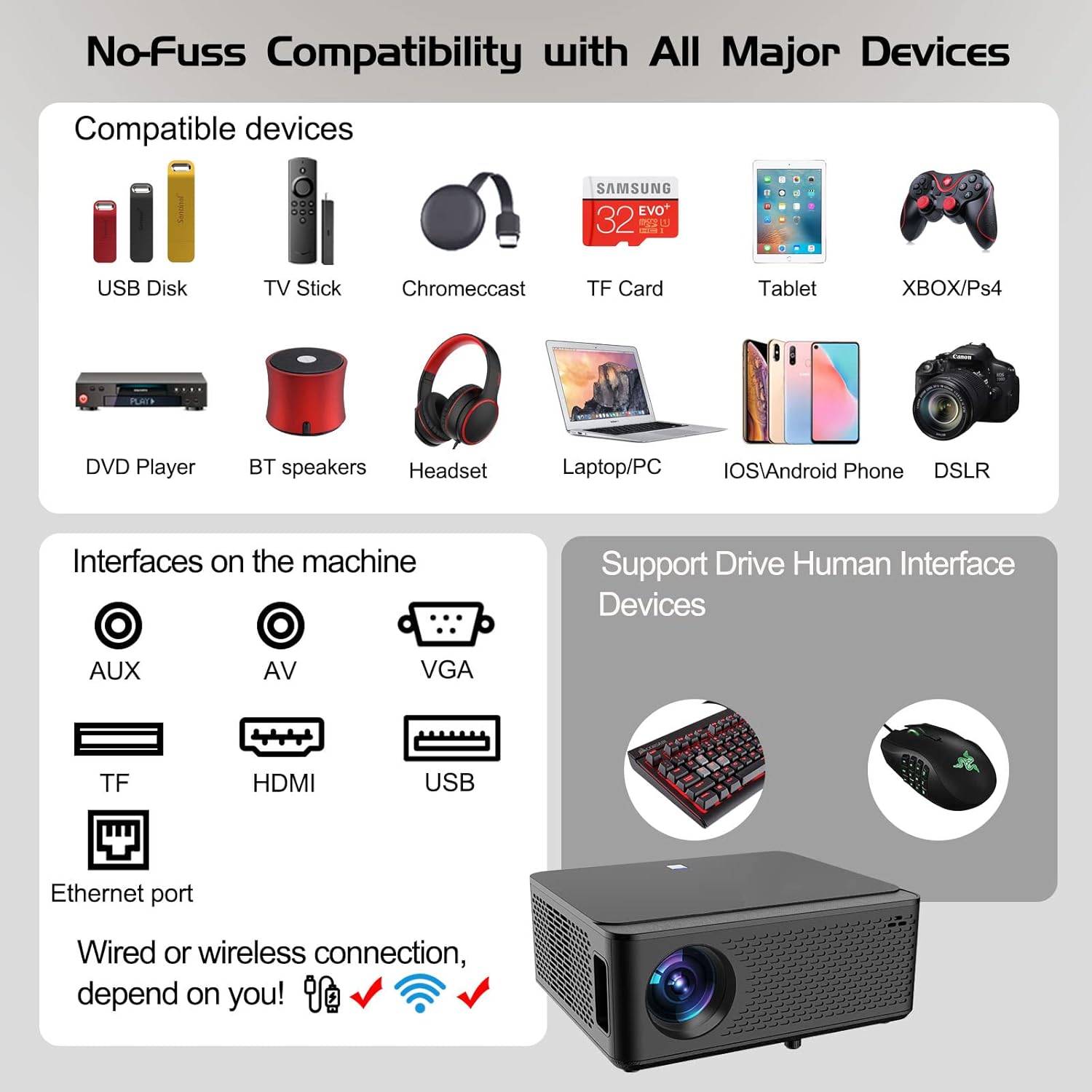
Image: Diagram illustrating the various input and output ports available on the Ysametp Projector, including USB, HDMI, AV, VGA, TF card slot, and Ethernet port.
The projector features a comprehensive set of ports for versatile connectivity:
- Ethernet priključak: Za žičanu internet vezu.
- VGA port: For connecting to older computers.
- USB-A port: For connecting USB flash drives or external devices.
- HDMI priključak: For high-definition audio and video input from various sources.
- AV ulaz: For connecting analog audio/video devices.
- 3.5 mm audio izlaz: Za povezivanje eksternih zvučnika ili slušalica.
- Utor za TF karticu: For reading media from Micro SD cards.
- Ulazna snaga: Za spajanje kabela za napajanje izmjeničnom strujom.
4.3 Gornje kontrole
The top of the projector includes a power button for basic on/off functionality. Further controls are available via the remote control and the on-screen display.
4.4 Podešavanje fokusa
A mechanical focus adjustment screw is located on the side of the lens for manual image clarity control.
5. Podešavanje
5.1 Postavljanje
Position the projector on a stable surface. The projection distance will determine the screen size. For optimal viewing, ensure the projector is perpendicular to the projection surface.
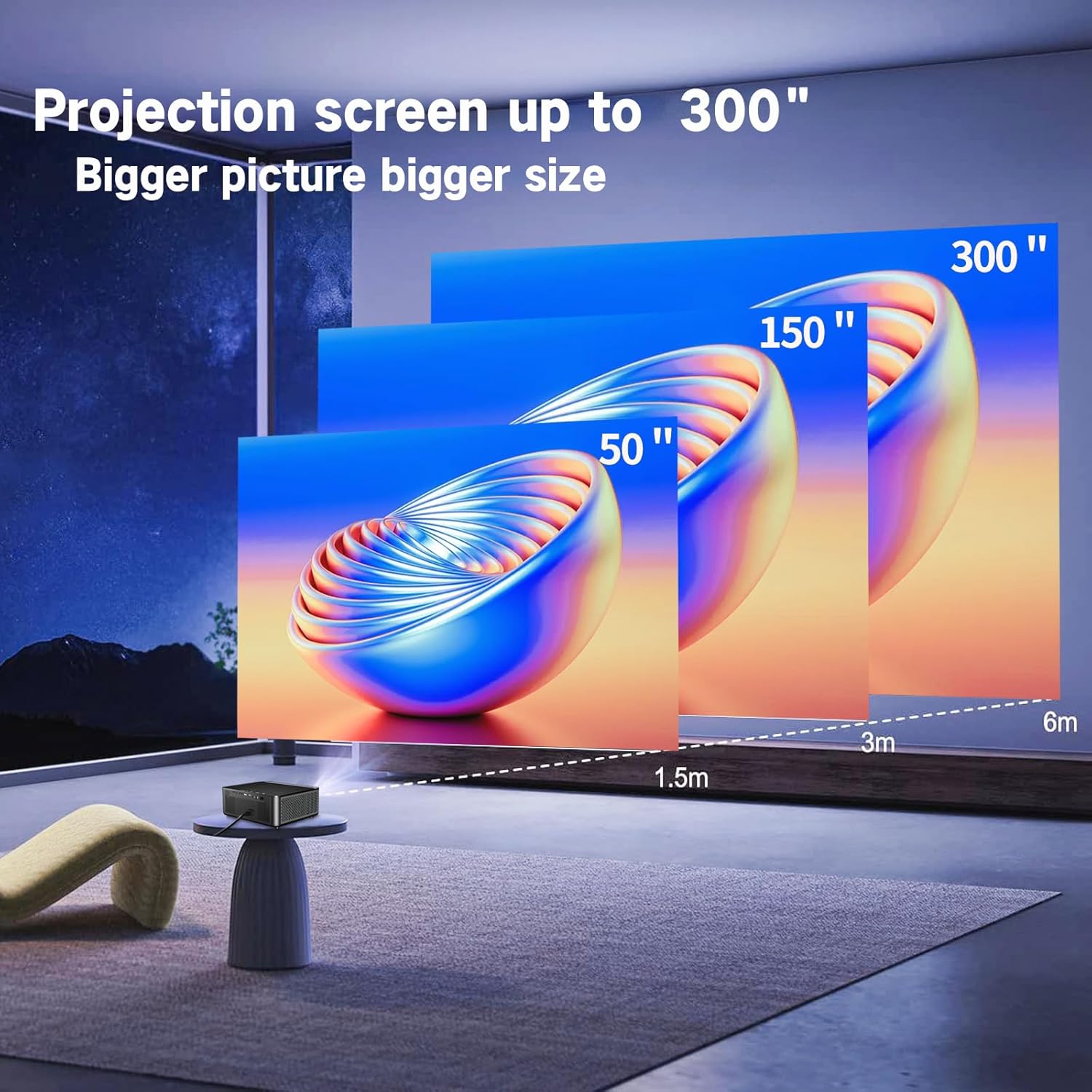
Image: Illustration demonstrating recommended projection distances for achieving screen sizes of 50, 150, and 300 inches.
5.2 Priključak za napajanje
- Connect the power cable to the projector's power input.
- Plug the other end of the power cable into a suitable electrical outlet.
5.3 Početno uključivanje
- Pritisnite dugme za napajanje na projektoru ili daljinski upravljač da uključite uređaj.
- Allow a few moments for the projector to boot up.
5.4 Fokus i korekcija trapezoidnog izobličenja
After powering on, adjust the image for clarity and proper geometry:
- Fokus: Rotate the mechanical focus adjustment screw near the lens until the image appears sharp and clear.
- Keystone korekcija: If the projected image is trapezoidal (wider at the top or bottom), use the 4D keystone correction feature via the on-screen menu to adjust the image corners until it forms a perfect rectangle.

Image: Diagram showing how 4P/4D keystone correction can be used to adjust the corners of a projected image to achieve a rectangular shape.
6. Uputstvo za upotrebu
6.1 Povezivanje vanjskih uređaja
Projektor podržava različite načine povezivanja:
- HDMI: Connect gaming consoles (PS4, Xbox), laptops, or other HDMI-enabled devices using an HDMI cable.
- USB: Insert a USB flash drive into the USB-A port to play media files direktno.
- TF kartica: Insert a Micro SD (TF) card into the TF card slot to access media.
- VGA/AV: Use these ports for older devices requiring analog connections.
- Bluetooth: Pair Bluetooth speakers or headphones for enhanced audio.

Image: The projector shown with various compatible devices, including laptops, smartphones, gaming consoles, USB drives, and external speakers, demonstrating its versatile connectivity.
6.2 Using the Integrated Android System
The projector comes with an integrated Android system, allowing access to a wide range of applications.

Image: The projector displaying its Android interface, featuring icons for popular streaming services and apps such as Netflix, YouTube, Prime Video, Hulu, Spotify, and TikTok.
- Mrežna veza: Connect the projector to your home Wi-Fi network via the settings menu or use an Ethernet cable for a wired connection.
- Pristup aplikaciji: Navigate the Android interface using the remote control. You can download and install applications from the Google Play Store.
- Prijenos: Enjoy content from pre-installed or downloaded streaming services.
6.3 5G WiFi Screen Mirroring
Mirror your smartphone, tablet, or PC screen wirelessly to the projector.

Image: A family enjoying content mirrored from a smartphone onto the large projected screen, illustrating the 5G WiFi Screen Mirroring feature for iOS, Android, and Windows devices.
- Ensure both the projector and your device are connected to the same 5G WiFi network.
- Select the "Screen Mirroring" option on the projector's menu.
- On your smartphone/tablet/PC, activate its screen mirroring function (e.g., "Smart View" for Android, "AirPlay" for iOS, "Cast" for Windows).
- Select the projector from the list of available devices to establish the connection.
7. Održavanje
7.1 Čišćenje objektiva
Pažljivo obrišite sočivo projektora mekom krpom koja ne ostavlja dlačice, posebno dizajniranom za optičke površine. Nemojte koristiti abrazivna sredstva za čišćenje ili prekomjernu silu.
7.2 Čišćenje tijela projektora
Use a soft, dry cloth to clean the exterior of the projector. Avoid using harsh chemicals or solvents.
7.3 Optical Engine Protection
The projector features a full-sealed optical engine designed to prevent dust from entering the internal components, reducing the need for frequent internal cleaning and extending the device's lifespan.

Slika: Interni view diagram of the projector's full-sealed optical engine, highlighting its design to prevent dust from entering and affecting performance.
7.4 Lamp Život
The projector utilizes advanced SmarEco technology to minimize energy consumption and extend the lamp's lifespan up to 60,000 hours, providing long-term reliability.

Slika: Detaljan dijagram prikazujeasing the projector's lamp technology, indicating a lifespan of over 30,000 hours.
8. Otkrivanje problema
Ako naiđete na probleme s projektorom, pogledajte sljedeće uobičajene probleme i rješenja:
| Problem | Mogući uzrok | Rješenje |
|---|---|---|
| Nema slike na ekranu. | Kabl za napajanje labav; pogrešan ulazni izvor; uređaj nije povezan. | Check power connections. Select correct input source (HDMI, AV, etc.). Ensure external device is powered on and connected properly. |
| Slika je mutna. | Focus not adjusted; projector too far/close. | Adjust the focus ring on the lens. Ensure projector is within optimal projection distance. |
| Slika je trapezoidnog oblika. | Projektor nije okomit u odnosu na platno. | Use the 4D keystone correction feature in the settings menu to adjust the image shape. |
| Nema zvuka. | Volume too low; external audio device not connected; incorrect audio output selected. | Increase volume. Check external speaker/headphone connection. Ensure correct audio output is selected in settings. |
| Ne mogu se povezati na WiFi. | Netačna lozinka; van dometa; problem s mrežom. | Verify WiFi password. Move projector closer to router. Restart router and projector. |
9. Specifikacije
Key technical specifications for the Ysametp 5G WiFi Bluetooth Projector (Model DE-M8-E-An):
- Brand: Ysametp
- Broj modela: DE-M8-E-An
- Boja: Crna
- Vrsta proizvoda: Prijenosni projektor
- Tehnologija povezivanja: HDMI, USB, Wi-Fi (5G), Bluetooth
- Posebne karakteristike: Integrated WiFi, Android System, 4D Keystone Correction
- Kompatibilni uređaji: Game Consoles, Speakers, Laptops, Smartphones, Tablets
- Rezolucija ekrana: Native 1920 x 1080 (Full HD)
- Maksimalna rezolucija ekrana: 4096 x 2160 (4K Support)
- Vrsta prikaza: DLP
- Dimenzije proizvoda: 26D x 23W x 11H centimetara
- Form Faktor: Prijenosni
- Vrsta montaže: Table Mount
- Lamp Životni vijek: Do 60,000 sati

Image: A visual comparison highlighting the projector's 20,000 Lumens brightness, Native 1080P resolution, and 4K support, contrasting it with a lower specification projector.
10. Garancija i podrška
The Ysametp Projector comes with a 3-year service warranty. For technical support or warranty claims, please contact Ysametp customer service through your purchase platform or the official Ysametp website.


