1. Uvod
The iPega 9211b is a wireless game controller designed to enhance your mobile gaming experience on Android and iOS devices. Featuring a compact and ergonomic design, it provides precise control and comfort for extended gameplay sessions. This manual provides detailed instructions on setting up, operating, and maintaining your controller.
2. Proizvod je gotovview
Familiarize yourself with the components of your iPega 9211b Wireless Game Controller.

Slika 1: The iPega 9211b Wireless Game Controller disassembled, showing the left control unit with joystick and D-pad, and the right grip unit with the R1 button.
- Left Control Unit: Contains the analog joystick, D-pad, and function buttons.
- Right Grip Unit: Provides ergonomic grip and additional trigger buttons (e.g., R1).
- Držač telefona: Integrated mechanism to securely hold smartphones up to 6.8 inches.
- Port za punjenje: Za spajanje kabla za punjenje.
- Indikatorska svjetla: Display connection status and battery level.
3. Podešavanje
3.1 Punjenje kontrolera
Before initial use, ensure the controller is fully charged.
- Connect the provided charging cable to the controller's charging port.
- Drugi kraj kabla priključite na USB izvor napajanja (npr. računar, USB adapter za zid).
- The indicator light will show charging status. A full charge typically takes approximately 2-3 hours.
- Once fully charged, the indicator light will change or turn off, indicating the 250mAh battery is ready for up to 10 hours of gameplay.
3.2 Pairing with Your Device (Android/iOS)
The iPega 9211b connects wirelessly via Bluetooth.
- Uključeno: Press and hold the power button on the controller until the indicator light flashes, indicating it is in pairing mode.
- Omogući Bluetooth: On your mobile device (Android or iOS), go to your settings and enable Bluetooth.
- Traži uređaji: Your device will scan for available Bluetooth devices. Look for "iPega 9211b" or a similar name in the list.
- Povežite se: Select "iPega 9211b" to pair. The indicator light on the controller will become solid, confirming a successful connection.
- Umetni broj telefona: Gently extend the phone holder and securely place your smartphone (up to 6.8 inches) into the controller.
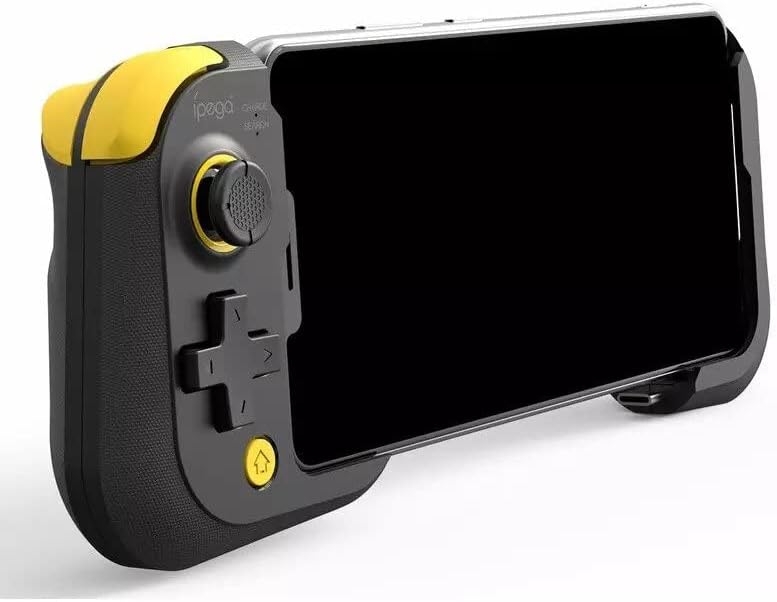
Slika 2: The iPega 9211b Wireless Game Controller with a smartphone securely inserted, ready for gameplay.
4. Uputstvo za upotrebu
4.1 Kompatibilnost s igrama
The iPega 9211b is compatible with most games that support external game controllers on Android and iOS platforms. Some games may require specific controller settings within the game's options menu.
4.2 Funkcije dugmadi
Refer to the game's control scheme for specific button assignments. Common functions include:
- Analogni džojstik: For directional movement and camera control.
- D-Pad: Za precizan smjerni unos.
- Akciona dugmad: (e.g., A, B, X, Y or similar symbols) For in-game actions.
- Trigger/Shoulder Buttons (R1): For specific actions like shooting or jumping.
- Dugme za početnu stranicu: May return to the device's home screen or open a game menu.
4.3 Isključivanje
To conserve battery, power off the controller when not in use. Press and hold the power button until the indicator light turns off.
5. Održavanje
Proper care ensures the longevity of your controller.
- čišćenje: Use a soft, dry cloth to wipe the controller. Avoid harsh chemicals or abrasive materials.
- Skladištenje: Kontroler čuvajte na hladnom i suhom mjestu, dalje od direktne sunčeve svjetlosti i ekstremnih temperatura.
- zaštita: When not in use, consider storing the controller in a protective case to prevent damage.

Slika 3: The iPega 9211b Wireless Game Controller neatly stored within its protective carrying case.
6. Otkrivanje problema
| Problem | Moguće rješenje |
|---|---|
| Kontroler se ne uključuje. | Ensure the controller is fully charged. Connect it to a power source and allow it to charge for at least 30 minutes before attempting to power on again. |
| Kontroler se ne uparuje s uređajem. |
|
| Buttons are unresponsive or laggy. |
|
7. Specifikacije
- Model: 9211b
- Povezivanje: bežični (Bluetooth)
- Kapacitet baterije: 250mAh
- Trajanje baterije: Do 10 sati (otprilike)
- Kompatibilnost: Android, iOS (for phones up to 6.8 inches)
- Dimenzije (paket): 18.4 x 12.6 x 4.4 cm
- Težina (pakovanje): 240 g
8. Garancija i podrška
Za informacije o garanciji ili tehničku podršku, molimo pogledajte dokumentaciju koju ste dobili prilikom kupovine ili se obratite prodavaču. Sačuvajte dokaz o kupovini za potrebe reklamacije.


