1. Uvod
This manual provides detailed instructions for the Nulea Wireless Ergonomic Keyboard, Model RT05. This keyboard is designed to enhance typing comfort and efficiency through its split, splayed, and curved layout, integrated wrist rest, and versatile connectivity options. It features a 7-color adjustable backlight and convenient USB-C charging.

Figure 1.1: Nulea Wireless Ergonomic Keyboard (Model RT05)
This image displays the Nulea Wireless Ergonomic Keyboard from a top-down perspective, highlighting its split design, integrated wrist rest, and full key layout including a numeric keypad. The keyboard is black with yellow accents on the spacebar area.
2. Sadržaj paketa
Provjerite da li su sve stavke prisutne u paketu:
- Ergonomska tastatura x1
- USB kabel x1
- Uputstvo za upotrebu x1
3. Podešavanje
3.1 Početno punjenje
Before first use, fully charge the keyboard using the provided USB-C cable. The keyboard features a 2000mAh internal battery for extended operation.
- Connect the USB-C end of the cable to the keyboard's charging port.
- Connect the USB-A end to a compatible USB power source (e.g., computer USB port, wall adapter).
- The battery indicator light will provide charging status. Recharge when the battery level is below 10% (backlight will turn off to conserve power).

Figure 3.1: USB-C Quick Charging
This image illustrates the Nulea keyboard being charged via a USB-C cable, with a graphic indicating a 2000mAh built-in rechargeable battery. The image emphasizes the convenience of USB-C charging.
3.2 Bežično povezivanje
The Nulea keyboard supports both Bluetooth and 2.4G USB connectivity, allowing connection to up to three devices simultaneously.
2.4G USB veza:
- Pronađite 2.4G USB prijemnik (obično se nalazi u odjeljku na tastaturi).
- Uključite USB prijemnik u slobodan USB port na vašem računaru.
- Uključite tastaturu. Trebala bi se automatski povezati s prijemnikom.
Bluetooth veza:
- Uključite tastaturu.
- Pritisnite Fn key simultaneously with either Q (for 2.4G), W (for Bluetooth 1), or E (for Bluetooth 2) to select the desired connection channel. For Bluetooth pairing, select W or E.
- Hold the selected Fn + W or Fn + E key combination for 3-5 seconds until the indicator light flashes rapidly, indicating pairing mode.
- On your device (computer, smartphone, tablet), go to Bluetooth settings and search for new devices.
- Select "Nulea Keyboard" or a similar name from the list of available devices to complete the pairing process.
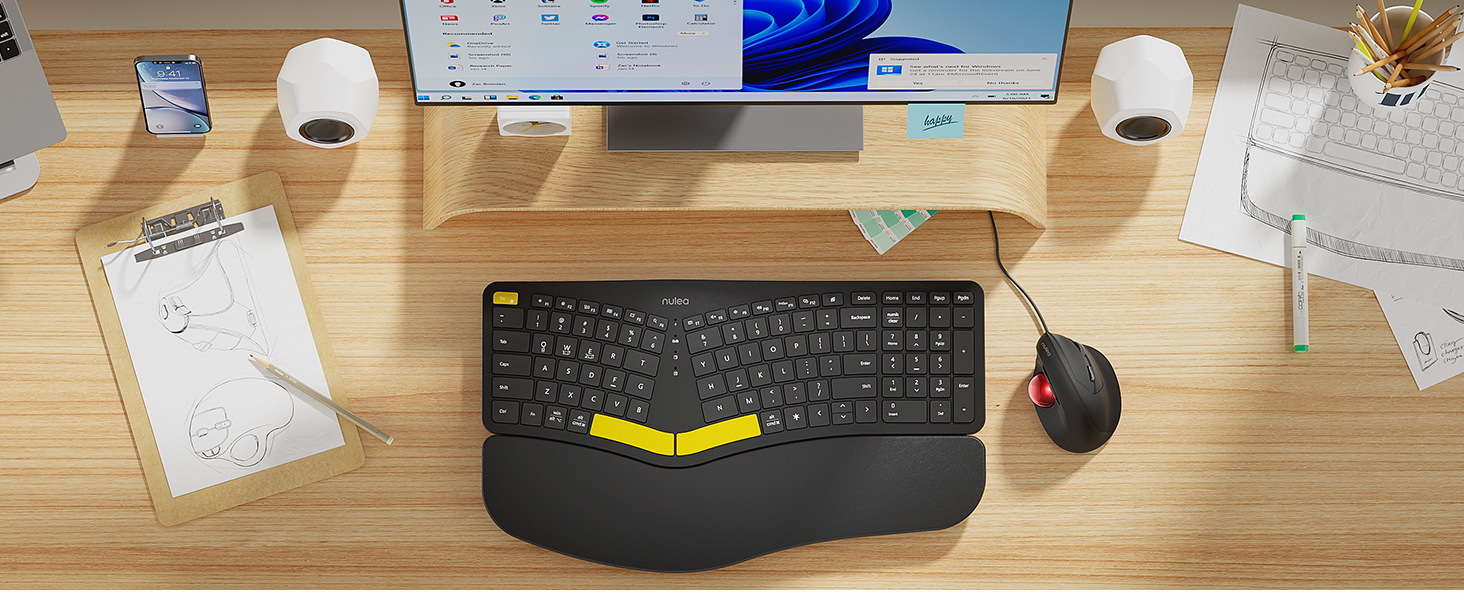
Figure 3.2: Wireless Connectivity Setup
This diagram illustrates the three connectivity options for the Nulea keyboard: 2.4G USB connection via a dongle, and two separate Bluetooth connections. It shows how to switch between devices using Fn + Q/W/E keys.
4. Uputstvo za upotrebu
4.1 Uključivanje/isključivanje napajanja
Locate the power switch on the keyboard (typically on the top edge or underside) and slide it to the 'ON' or 'OFF' position.
4.2 Prebacivanje između povezanih uređaja
Once multiple devices are paired, you can switch between them instantly:
- Pritisnite Fn + Q to switch to the 2.4G USB connected device.
- Pritisnite Fn + W to switch to Bluetooth Device 1.
- Pritisnite Fn + E to switch to Bluetooth Device 2.

Figure 4.1: Easy Device Switching
This image shows the Nulea keyboard connected to a desktop monitor, a laptop, and a smartphone, illustrating its ability to easily switch between up to three paired devices with a single tap.
4.3 Kontrola pozadinskog osvetljenja
The keyboard features a 7-color backlight with 3 brightness levels. You can customize the lighting to your preference:
- To cycle through backlight colors (blue, green, red, cyan, purple, yellow, white), press the backlight control key (refer to keyboard layout for specific key).
- To adjust brightness levels, use the dedicated brightness control keys (refer to keyboard layout).
- Note: When the battery level drops below 10%, the backlight will automatically turn off to preserve basic keyboard functionality.

Figure 4.2: Adjustable 7-Color Backlight
This image displays the Nulea keyboard in a dimly lit environment, showcasing its illuminated keys with a vibrant backlight. The image highlights the 7 available backlight colors and 3 brightness levels.
4.4 Podesive nagibne noge
The keyboard is equipped with 4 adjustable tilt legs, allowing you to set the keyboard at 3 different angles for optimal wrist comfort and posture.
- Gently pull out the tilt legs located on the underside of the keyboard to adjust the angle.
- Experiment with different tilt levels to find the most comfortable position for your typing style.

Figure 4.3: Adjustable Tilt Legs
Ova slika prikazuje stranu view of the Nulea keyboard on a desk, with its adjustable tilt legs extended to demonstrate the ergonomic angle. The image emphasizes how the tilt legs help maintain a comfortable wrist position.
4.5 Iskustvo s tipkanjem
The keyboard features spherical-dished key shapes designed to conform to your fingertips, promoting effortless and comfortable typing.

Figure 4.4: Spherical-Dished Keys
This close-up image focuses on the keys of the Nulea keyboard, highlighting their spherical-dished shape designed for comfortable and precise typing.
5. Održavanje
5.1 Čišćenje
Da biste održali izgled i funkcionalnost tastature:
- Disconnect the keyboard from all devices and power sources before cleaning.
- Koristite meku krpu koja ne ostavlja dlačiceampvodom ili blagim rastvorom za čišćenje da biste obrisali površinu.
- Izbjegavajte upotrebu jakih hemikalija, abrazivnih sredstava za čišćenje ili rastvarača.
- Koristite komprimirani zrak za uklanjanje prašine i ostataka između tipki.
5.2 Njega baterija
Da produžite vijek trajanja baterije:
- Recharge the keyboard when the battery low indicator appears.
- Izbjegavajte često potpuno pražnjenje baterije.
- Ako skladištite tastaturu duži period, napunite je do otprilike 50% prije skladištenja.
6. Otkrivanje problema
6.1 Tastatura ne reaguje
- Uvjerite se da je tastatura uključena.
- Provjerite nivo baterije i napunite ako je potrebno.
- For 2.4G connection, ensure the USB receiver is securely plugged into the device. Try a different USB port.
- For Bluetooth connection, ensure Bluetooth is enabled on your device and the keyboard is paired. Try re-pairing the keyboard.
- Ensure you are on the correct connection channel (Fn + Q/W/E).
6.2 Pozadinsko osvjetljenje ne radi
- Check the battery level. The backlight automatically turns off when the battery is below 10%. Recharge the keyboard.
- Ensure the backlight is turned on and brightness is adjusted using the dedicated keys.
6.3 Connectivity Issues / Lag
- Približite tastaturu uređaju kako biste smanjili smetnje.
- Avoid placing the keyboard near other wireless devices that may cause interference (e.g., Wi-Fi routers, cordless phones).
- Provjerite da li su operativni sistem i upravljački programi za Bluetooth vašeg uređaja ažurirani.
7. Specifikacije
| Feature | Detalj |
|---|---|
| Naziv modela | RT05 |
| Dimenzije proizvoda | 16.5"D x 9.6"Š x 1.3"V (41.9 x 24.4 x 3.3 cm) |
| Težina artikla | 3.5 funte (1.59 kg) |
| Proizvođač | Nulea |
| Baterije | 1 litijum-jonska baterija (uključena) |
| Tehnologija povezivanja | 2.4G USB, Bluetooth |
| Kompatibilni uređaji | Laptop, PC, pametni telefon, tablet |
| Posebne karakteristike | Backlit, Rechargeable, Split Keyset Design, Adjustable Tilt Legs |
| Boja | Crna |
8. Garancija i podrška
For warranty information, technical support, or service inquiries, please refer to the contact information provided on the Nulea official website or contact the seller directly. Keep your purchase receipt for warranty claims.
This user manual is included with your product for future reference.


