1. Uvod
This manual provides essential information for the proper setup, operation, and maintenance of your Sharp 32FG6EA 32-inch HD Android TV. The Sharp 32FG6EA offers a wide range of connection options and features the Android TV operating system, providing a modern and intuitive television experience. It functions as an all-in-one entertainment hub, integrating Google Assistant for a smarter viewing experience. Users can quickly access entertainment, control smart devices, and obtain on-screen information using voice commands.
2. Sigurnosne informacije
Molimo vas da pažljivo pročitate sva sigurnosna uputstva prije upotrebe televizora. Sačuvajte ovaj priručnik za buduću upotrebu.
- Napajanje: Provjerite je li TV priključen na izvor napajanja s ispravnom jačinomtage. Ne preopterećujte utičnice.
- ventilacija: Ne blokirajte ventilacijske otvore. Osigurajte dovoljno prostora oko televizora za pravilan protok zraka kako biste spriječili pregrijavanje.
- Voda i vlaga: Do not expose the TV to rain, moisture, or excessive humidity. Avoid placing objects filled with liquids on or near the TV.
- čišćenje: Isključite televizor iz struje prije čišćenja. Koristite meku, suhu krpu. Ne koristite tekuća sredstva za čišćenje ili aerosolne sprejeve.
- plasman: Postavite TV na stabilnu, ravnu površinu. Ako ga montirate na zid, provjerite je li nosač sigurno postavljen i može li izdržati težinu TV-a.
- servisiranje: Ne pokušavajte sami servisirati TV. Za sve popravke obratite se kvalifikovanom servisnom osoblju.
3. Sadržaj paketa
Provjerite da li su svi artikli prisutni u pakovanju:
- Sharp 32FG6EA 32-inch HD Android TV
- Daljinski upravljač (sa 2 AAA baterije)
- Stand Type Base
- Uputstvo za upotrebu
- Power Cable
4. Podešavanje
4.1 Raspakivanje
Carefully remove the TV and all accessories from the packaging. Retain the packaging materials for future transport or servicing.
4.2 Pričvršćivanje postolja
If you are not wall-mounting the TV, attach the included stand base:
- Postavite televizor ekranom prema dolje na meku, ravnu površinu kako biste spriječili oštećenja.
- Poravnajte bazu postolja s montažnim otvorima na donjoj strani televizora.
- Pričvrstite postolje pomoću priloženih vijaka. Provjerite da li je postolje čvrsto pričvršćeno.
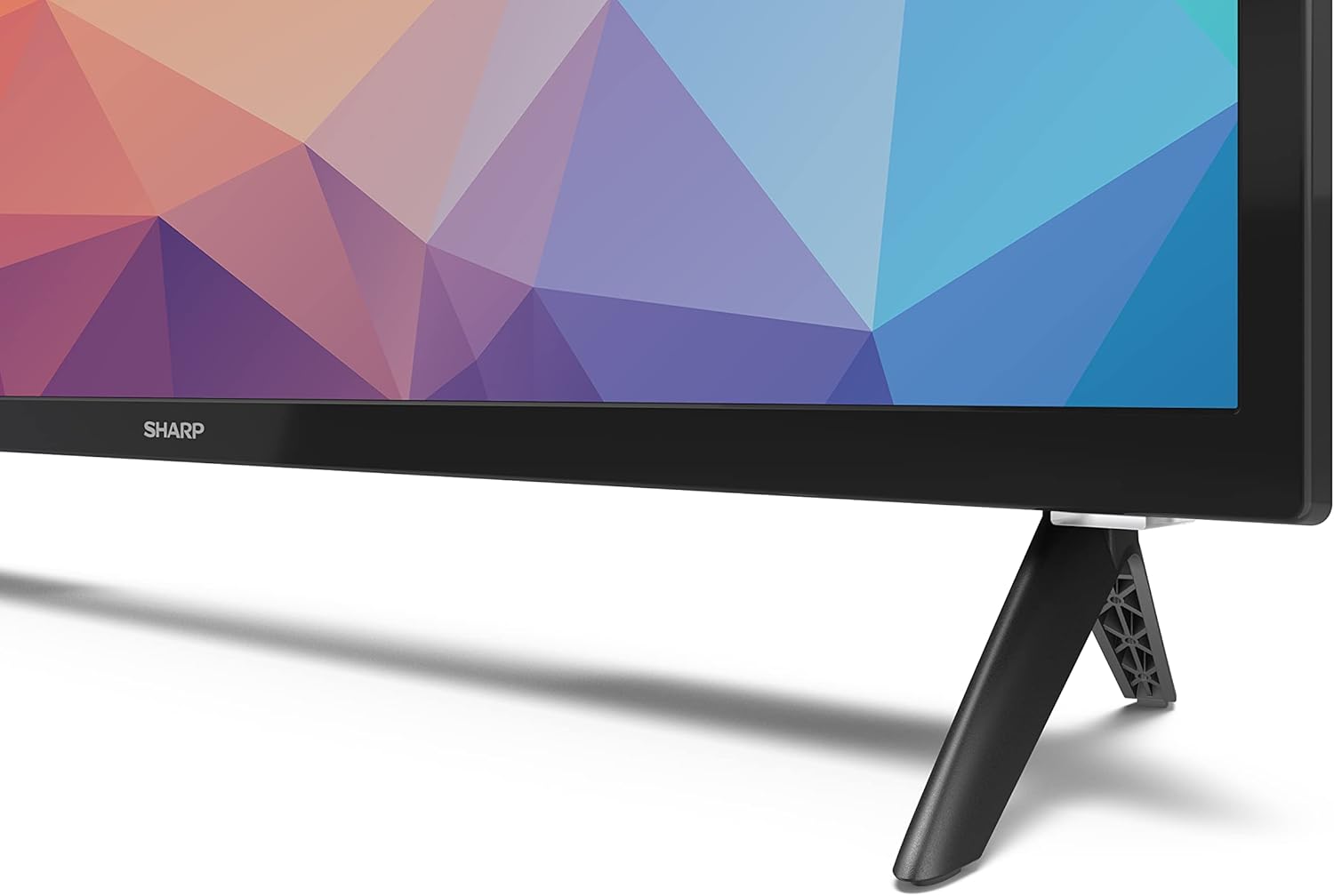
Image: Close-up of the TV stand attachment.
4.3 Montaža na zid
The Sharp 32FG6EA supports VESA wall mounts with dimensions of 75 x 75 mm. Wall mount hardware is not included. Follow the instructions provided with your wall mount kit.
4.4 Povezivanje vanjskih uređaja
Your TV features multiple ports for connecting various devices:
- HDMI: Connect Blu-ray players, game consoles, or set-top boxes to the 2 HDMI ports.
- USB: Connect USB storage devices for media playback to the 2 USB ports.
- Antena/kabel: Connect an antenna or cable TV source for broadcast channels.
- Ethernet: Za žičanu internet vezu.
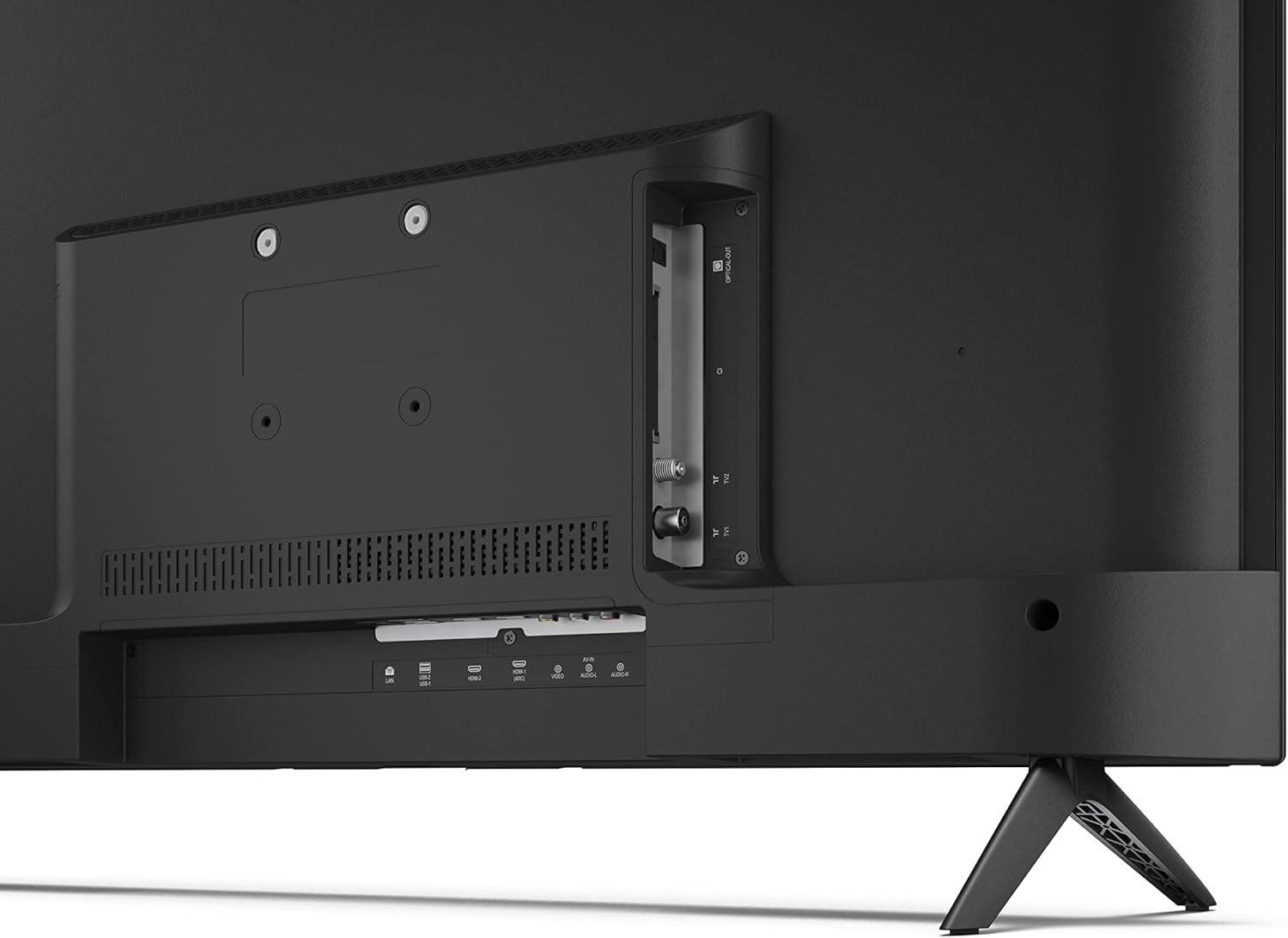
Slika: Stražnja strana view televizora s priključcima za povezivanje.
4.5 Priključak za napajanje
After connecting all necessary devices, plug the power cable into the TV and then into a wall outlet.
4.6 Čarobnjak za početno podešavanje
Prilikom prvog uključivanja, TV će vas voditi kroz početni proces podešavanja. To uključuje:
- Odabir jezika.
- Mrežna veza (Wi-Fi ili Ethernet).
- Prijava na Google račun (potrebno za sve funkcije Android TV-a).
- Skeniranje kanala.
5. Operativni
5.1 Daljinski upravljač prekoview
The included remote control allows you to navigate the TV's features. Insert the 2 AAA batteries into the remote control before use.
- Dugme za napajanje: Uključuje ili isključuje TV.
- Directional Pad (D-Pad) & OK Button: Navigacija kroz menije i potvrđivanje odabira.
- Dugme za povratak: Vraća se na prethodni ekran.
- Dugme za početnu stranicu: Pristupa početnom ekranu Android TV-a.
- Pojačavanje/stišavanje glasnoće: Podešava jačinu zvuka.
- Kanal gore/dolje: Mijenja TV kanale.
- Dugme Google asistenta: Aktivira glasovnu kontrolu.
- Dugmad prečica aplikacije: Dedicated buttons for popular streaming services like Netflix, Prime Video, and YouTube.
5.2 Navigacija kroz Android TV interfejs
The Android TV home screen provides access to your installed apps, recommended content, and settings. Use the directional pad on your remote to navigate through the interface.
5.3 Google Asistent
Pritisnite dugme Google Assistant na daljinskom upravljaču i govorite u mikrofon da biste:
- Traži filmove, emisije ili informacije.
- Kontrolirajte pametne kućne uređaje.
- Otvorene aplikacije.
- Podesite postavke televizora.
5.4 Ugrađen Chromecast
The TV includes Chromecast built-in, allowing you to cast content from compatible apps on your smartphone, tablet, or computer directly to the TV screen.
5.5 Bluetooth povezivost
Connect Bluetooth devices such as headphones or speakers to your TV for a personalized audio experience. Navigate to the TV's settings menu to pair new Bluetooth devices.
5.6 Audio postavke
The TV supports Dolby Audio with 2 x 6 W RMS speakers. You can adjust audio settings, including sound modes and equalizer, through the TV's settings menu.
6. Održavanje
6.1 Čišćenje televizora
To clean the TV screen and cabinet:
- Isključite kabl za napajanje iz zidne utičnice.
- Use a soft, lint-free cloth to gently wipe the screen and surfaces.
- Za tvrdokorne mrlje, lagano dampOperite krpu vodom ili specijaliziranim sredstvom za čišćenje ekrana (nanesite na krpu, a ne direktno na ekran).
- Ne koristite abrazivna sredstva za čišćenje, voskove ili rastvarače.
6.2 Ažuriranja softvera
Your Android TV may receive periodic software updates to improve performance and add new features. Ensure your TV is connected to the internet to receive these updates. You can check for updates manually in the TV's settings menu.
7. Otkrivanje problema
Ako imate problema s televizorom, pogledajte sljedeće uobičajene probleme i rješenja:
- Nema napajanja: Provjerite je li kabel za napajanje sigurno priključen i na TV i na ispravnu zidnu utičnicu. Pokušajte s drugom utičnicom.
- Nema slike/zvuka: Check that the correct input source is selected. Verify all cables (HDMI, antenna) are properly connected.
- Daljinski upravljač ne radi: Check the batteries and ensure they are inserted correctly. Point the remote directly at the TV's IR sensor.
- Loš kvalitet slike: Check antenna/cable connections. Adjust picture settings in the TV menu. For streaming content, ensure a stable internet connection.
- Nema internetske veze: Verify Wi-Fi password or Ethernet cable connection. Restart your router and the TV.
- Apps Not Working: Ensure the TV's software is up to date. Try clearing the app's cache or reinstalling the app.
If problems persist, consult the Sharp support websajtu ili kontaktirajte korisničku podršku.
8. Specifikacije
| Feature | Specifikacija |
|---|---|
| Broj modela | 32FG6EA |
| Brand | Sharp |
| Veličina ekrana | 32 inča (81 cm dijagonalno) |
| Display Technology | LED |
| Rezolucija | 720p (1366 x 768 piksela) |
| Aspect Ratio | 16:9 |
| Refresh Rate | 50 Hz |
| Operativni sistem | Android TV 11 |
| Posebne karakteristike | Android TV, Google Assistant, Chromecast built-in |
| Audio izlaz | 2 x 6 W RMS, Dolby Audio |
| HDMI portovi | 2 |
| USB portovi | 2 |
| Povezivanje | Wi-Fi, Bluetooth, Ethernet |
| VESA zidni nosač | 75 x 75 mm |
| Dimenzije sa postoljem (Š x V x D) | 731 x 486 x 177 mm |
| Dimenzije bez postolja (Š x V x D) | 731 x 433 x 68 mm |
| Dimenzije proizvoda (D x Š x V) | 16 x 73 x 46.4 cm (približno, sa postoljem) |
| Težina | 3.9 kg |
| Klasa energetske efikasnosti | E |

Image: TV dimensions diagram.

Image: Energy Label. For more details, visit EPREL baza podataka.
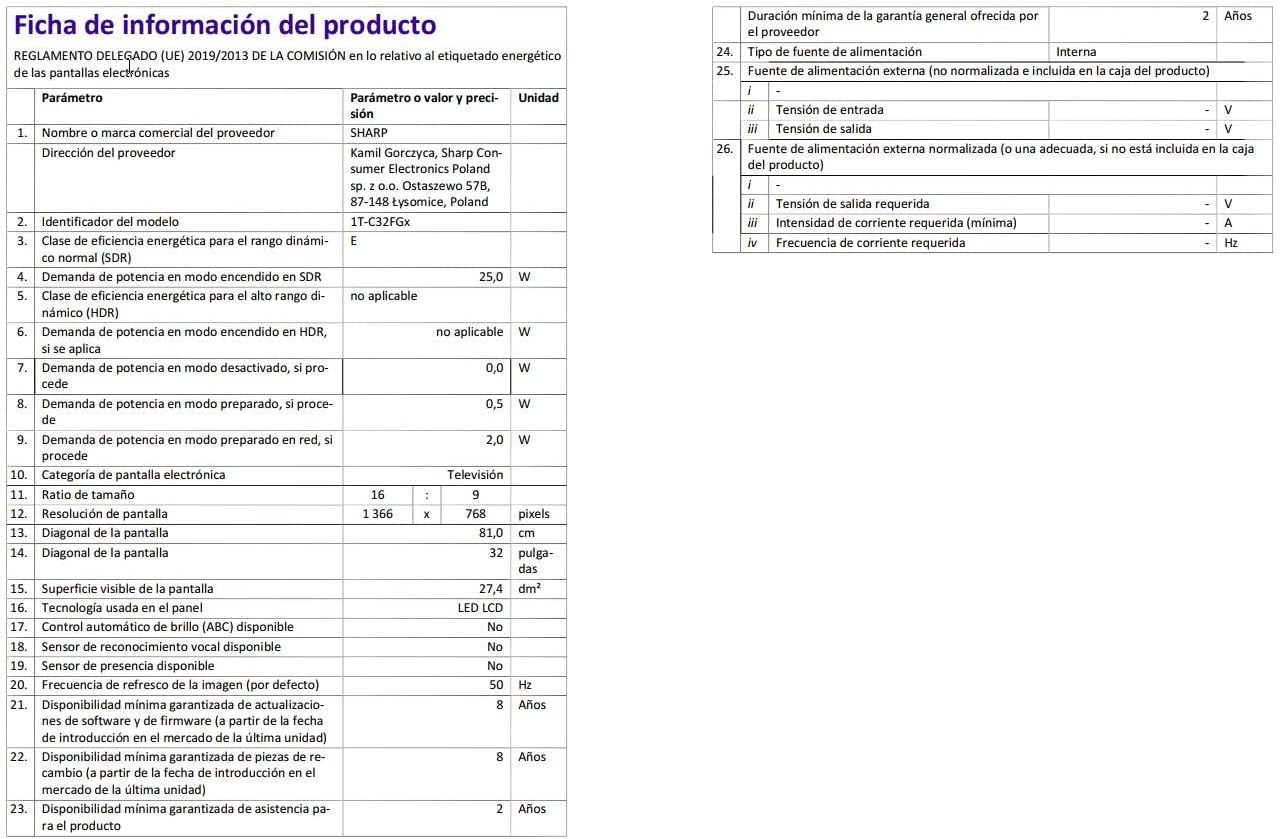
Image: Detailed product information sheet.
9. Garancija i podrška
The Sharp 32FG6EA television comes with a minimum general warranty duration of 2 years from the provider.
For technical support, warranty claims, or further assistance, please refer to the contact information provided with your purchase documentation or visit the official Sharp support websajt za vašu regiju.


