Uvod
Thank you for choosing the Admiral 50-inch Ultra HD LED Smart TV, model ADL50UWOSAC. This manual provides essential information for setting up, operating, maintaining, and troubleshooting your new television. Please read these instructions carefully before using the product to ensure proper operation and to maximize your viewing iskustvo.
This television features a 4K LED display, Dolby Sound System, WebOS, built-in Chromecast, Bluetooth, and Wi-Fi connectivity, offering a wide range of entertainment options.
1. Podešavanje
1.1 Raspakivanje
Carefully remove the TV from its packaging. Ensure all accessories are present, including the remote control, power cable, and stand components. Retain the packaging for future transport or service needs.
1.2 Instalacija postolja
Za postavljanje TV stalka:
- Postavite televizor ekranom prema dolje na meku, ravnu površinu kako biste spriječili oštećenja.
- Poravnajte baze postolja sa odgovarajućim utorima na donjoj strani televizora.
- Pričvrstite postolja pomoću priloženih vijaka. Pazite da su čvrsto zategnuti.
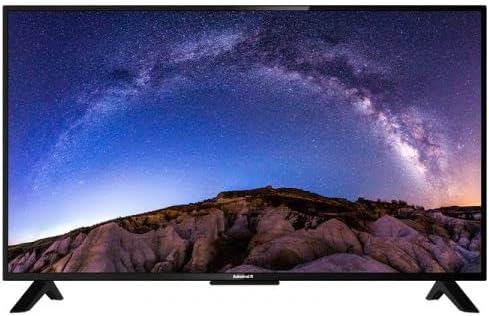
Slika: Front view of the Admiral 50-inch Smart TV with its stand properly installed. This shows the display and the two support feet at the bottom.
1.3 Povezivanje uređaja
Before connecting any devices, ensure the TV is unplugged from the power outlet.
- Kabl za napajanje: Spojite kabel za napajanje na ulaz za napajanje televizora, a zatim na zidnu utičnicu.
- HDMI uređaji: Use HDMI cables to connect external devices such as Blu-ray players, gaming consoles, or set-top boxes to the HDMI ports on the TV.
- USB uređaji: Umetnite USB diskove za reprodukciju medija u USB portove.
- Antena/kabel: Connect an antenna or cable TV source to the RF input.

Slika: Stražnja strana view of the Admiral 50-inch Smart TV, highlighting the location of various input ports including HDMI, USB, and power input.
1.4 Početno uključivanje i čarobnjak za podešavanje
After connecting all necessary cables, plug the TV into a power outlet. Press the power button on the remote control or on the TV itself. The TV will guide you through the initial setup wizard, which includes:
- Odabir jezika.
- Mrežna veza (Wi-Fi ili Ethernet).
- Skeniranje kanala.
- Postavke vremenske zone.
2. Uputstvo za upotrebu
2.1 Funkcije daljinskog upravljača
The provided remote control allows you to navigate the TV's features. Key functions include:
- Dugme za napajanje: Uključuje ili isključuje TV.
- Ulaz/izvor: Selects the input source (HDMI 1, USB, TV, etc.).
- Pojačavanje/stišavanje glasnoće: Podešava nivo zvuka.
- Kanal gore/dolje: Mijenja TV kanale.
- Navigacijski tasteri (tasteri sa strelicama, OK): Navigacija kroz menije i potvrđivanje odabira.
- Dugme za početnu stranicu: Pristupa početnom ekranu Smart TV-a (WebOS).
- Dugmad prečica aplikacije: Direct access to popular streaming services like Netflix, YouTube, and Prime Video.
2.2 Funkcije pametnog TV-a (WebOS)
Your Admiral Smart TV runs on WebOS, providing an intuitive user interface for accessing various applications and content.
- Kućna kontrolna tabla: Press the Home button to access the main dashboard, where you can find installed apps, input sources, and settings.
- App Store: Preuzmite i instalirajte dodatne aplikacije iz integrirane trgovine aplikacija.
- Ugrađen Chromecast: Cast content from compatible mobile devices or computers directly to your TV. Ensure your device and TV are on the same Wi-Fi network.
- Bluetooth povezivanje: Connect Bluetooth-enabled devices such as headphones or soundbars wirelessly to the TV. Access Bluetooth settings in the TV menu.
- Wi-Fi povezivanje: Connect to your home wireless network for internet access and smart features. Manage Wi-Fi settings in the TV's network menu.
2.3 Odabir ulaznog izvora
To switch between connected devices or TV channels, press the "Input" or "Source" button on your remote control. A menu will appear, allowing you to select the desired input (e.g., HDMI 1, HDMI 2, USB, TV).
3. Održavanje
3.1 Čišćenje televizora
- ekran: Nježno obrišite ekran mekom krpom koja ne ostavlja dlačice. Za tvrdokorne mrlje, lagano obrišiteampOperite krpu vodom ili specijaliziranim sredstvom za čišćenje ekrana. Ne prskajte tekućinu direktno na ekran.
- tijelo: Koristite meku, suhu krpu za čišćenje TV-aasing. Izbjegavajte upotrebu abrazivnih sredstava za čišćenje ili rastvarača.
- Uvijek isključite TV iz struje prije čišćenja.
3.2 Ažuriranja softvera
Periodically check for software updates through the TV's settings menu. Updates can improve performance, add new features, and enhance security. Ensure the TV is connected to the internet during the update process.
4. Otkrivanje problema
Ako naiđete na probleme s televizorom, pogledajte sljedeća uobičajena rješenja prije nego što kontaktirate podršku.
| Problem | Moguće rješenje |
|---|---|
| Nema struje |
|
| Nema slike ili zvuka |
|
| Daljinski upravljač ne radi |
|
| Nije moguće povezati se na Wi-Fi |
|
5. Specifikacije
| Feature | Detalj |
|---|---|
| Brand | Admirale |
| Broj modela | ADL50UWOSAC |
| Veličina ekrana | 50 inča |
| Display Technology | LED |
| Rezolucija | 4K Ultra HD |
| Refresh Rate | 60 Hz |
| Operativni sistem | WebOS |
| Posebne karakteristike | Built-In Speaker, Dolby Sound System, Chromecast Built-in |
| Tehnologija povezivanja | HDMI, USB, Wi-Fi, Bluetooth |
| Aspect Ratio | 16:9 |
| Dimenzije proizvoda (D x Š x V) | 14D x 121W x 74H centimetara |
| Težina artikla | 11.16 kg |
| Proizvođač | ADMIRAL TV |
6. Informacije o garanciji
This Admiral 50-inch Smart TV (Model ADL50UWOSAC) comes with a 2 godine garancije from the date of purchase. This warranty covers manufacturing defects and ensures peace of mind. Please retain your proof of purchase for warranty claims. For specific terms and conditions, refer to the warranty card included with your product or contact Admiral customer support.
7. Korisnička podrška
If you require further assistance, have questions not covered in this manual, or need to report a technical issue, please contact Admiral customer support. Refer to the contact information provided on the product packaging or the official Admiral webstranicu za najnovije detalje o podršci.
When contacting support, please have your TV model number (ADL50UWOSAC) and serial number ready.


