1. Uvod
The ICUIXIAN 8x16 HDMI Matrix Switch (Model HD0816) is a professional device designed for high-definition HDMI digital signal switching. It allows for the distribution of up to eight (8) HDMI input signals to sixteen (16) HDMI display terminals of your choice. This matrix switch supports HDMI 1.4a standard, delivering 1080P@60Hz and 1080P 3D@60Hz resolutions. All inputs feature HDCP decoding, ensuring compatibility with Blu-ray and 3D content. This manual provides essential information for the proper installation, configuration, and operation of your device.
2. Ključne karakteristike
- 8x16 HDMI Matrix Switching: Connects 8 HDMI sources to 16 HDMI displays.
- Podrška visoke rezolucije: Supports 1080P@60Hz and 1080P 3D@60Hz (HDMI 1.4a).
- HDCP Decoding: Compatible with HDCP-protected content.
- Custom EDID Management: Allows for EDID settings to optimize display compatibility.
- Upravljanje scenom: Built-in pre-plan management for up to 32 scenes, enabling one-key calling and switching.
- Višestruke metode kontrole: Podržava Web GUI, RS-232 serial port, IR remote control, and front panel buttons.
- LAN Port Control: Enables cross-platform control via web interface without client software installation.
- Dolby Digital & DTS-HD Audio: Supports main audio transmission.
- Rackmount dizajn: Suitable for professional installations.
- Memorija isključenja: Retains settings after power cycles.

Image: Quick overview of the matrix switch's features, including 1080P input/output, high-bandwidth chips, arbitrary switching, HDMI distribution, scenario management, EDID support, liquid crystal display, embedded audio, electrostatic protection, brown-out memory, long-distance transmission, on-patrol function, multiple control methods, remote controls, panel controls, and serial control.
3. Proizvod je gotovview
3.1 Prednja ploča
The front panel features an LCD display, power indicator, IR receiver, and control buttons for input/output selection and menu navigation. The input buttons (1-8) and output buttons (1-16) allow for direct switching.
3.2 Zadnja ploča
The rear panel includes 8 HDMI input ports, 16 HDMI output ports, a DC 5V power input, an RS-232 serial control port (RS232IN and RS232OUT), and an RJ45 LAN port for network control.

Slika: Prednja i zadnja strana view of the ICUIXIAN 8x16 HDMI Matrix Switch, showing the control panel, HDMI input/output ports, and connectivity options, alongside the included IR remote control.
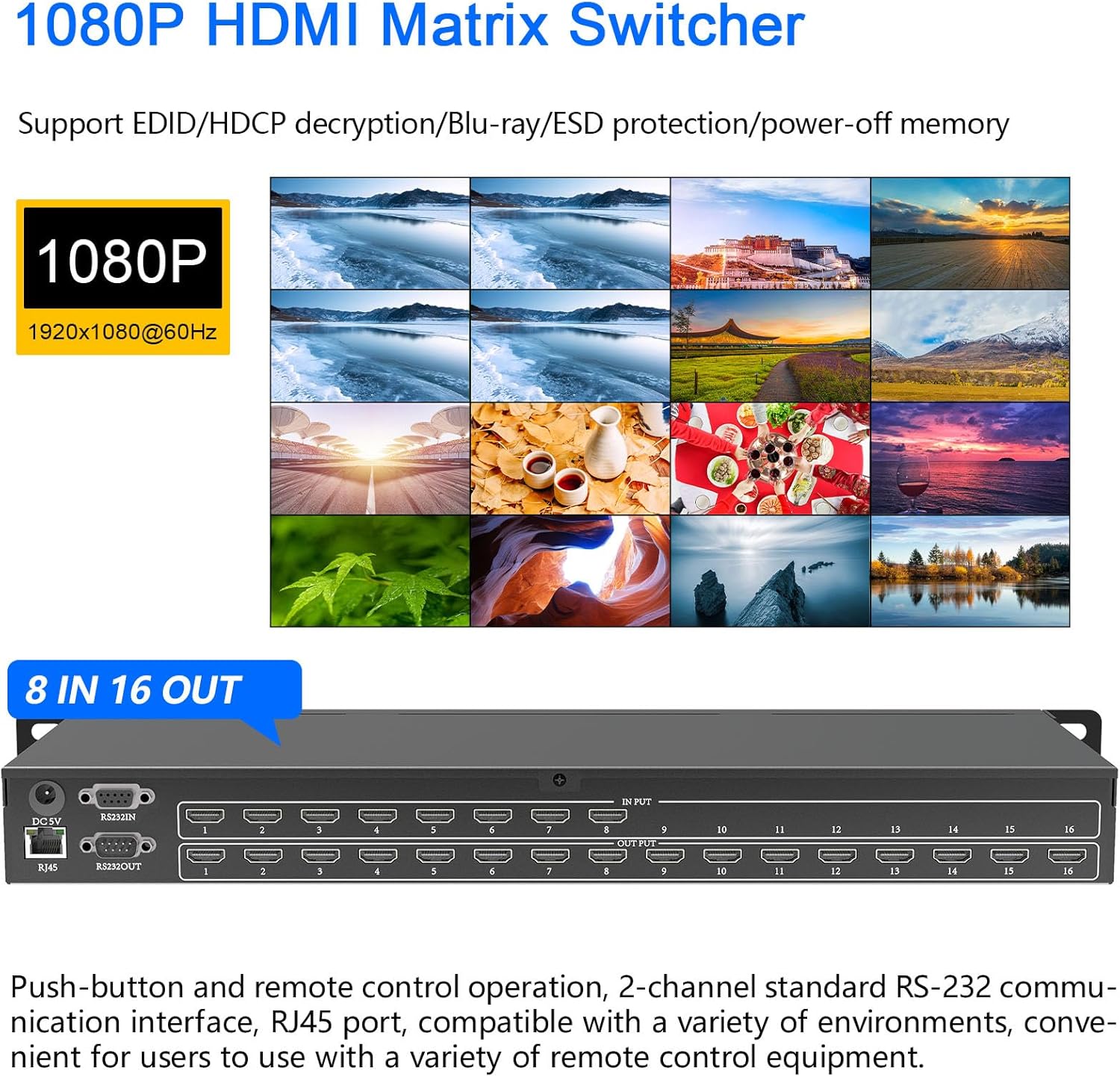
Slika: Detaljna view of the ICUIXIAN 8x16 HDMI Matrix Switch, highlighting its 1080P resolution support and 8 input, 16 output configuration. The image also shows the front panel display and buttons, and the rear panel with HDMI ports, RS-232, and RJ45 connections.
4. Podešavanje i povezivanje
Follow these steps to connect your ICUIXIAN 8x16 HDMI Matrix Switch:
- Iskljuciti: Ensure all devices (source, display, and matrix switch) are powered off before making connections.
- Povežite HDMI izvore: Connect your HDMI source devices (e.g., Blu-ray player, PC, TV box) to the HDMI IN ports (1-8) on the rear panel of the matrix switch using high-quality HDMI cables.
- Povežite HDMI ekrane: Connect your HDMI display devices (e.g., TVs, monitors, projectors) to the HDMI OUT ports (1-16) on the rear panel of the matrix switch using high-quality HDMI cables.
- Connect Control Cables (Optional):
- For RS-232 control, connect a serial cable from your control computer to the RS232IN port.
- For LAN control, connect an Ethernet cable from your network router/switch to the RJ45 port.
- Priključite napajanje: Connect the provided DC 5V power adapter to the matrix switch and then to a power outlet.
- Uključeno: Power on the matrix switch, followed by your display devices, and then your source devices.
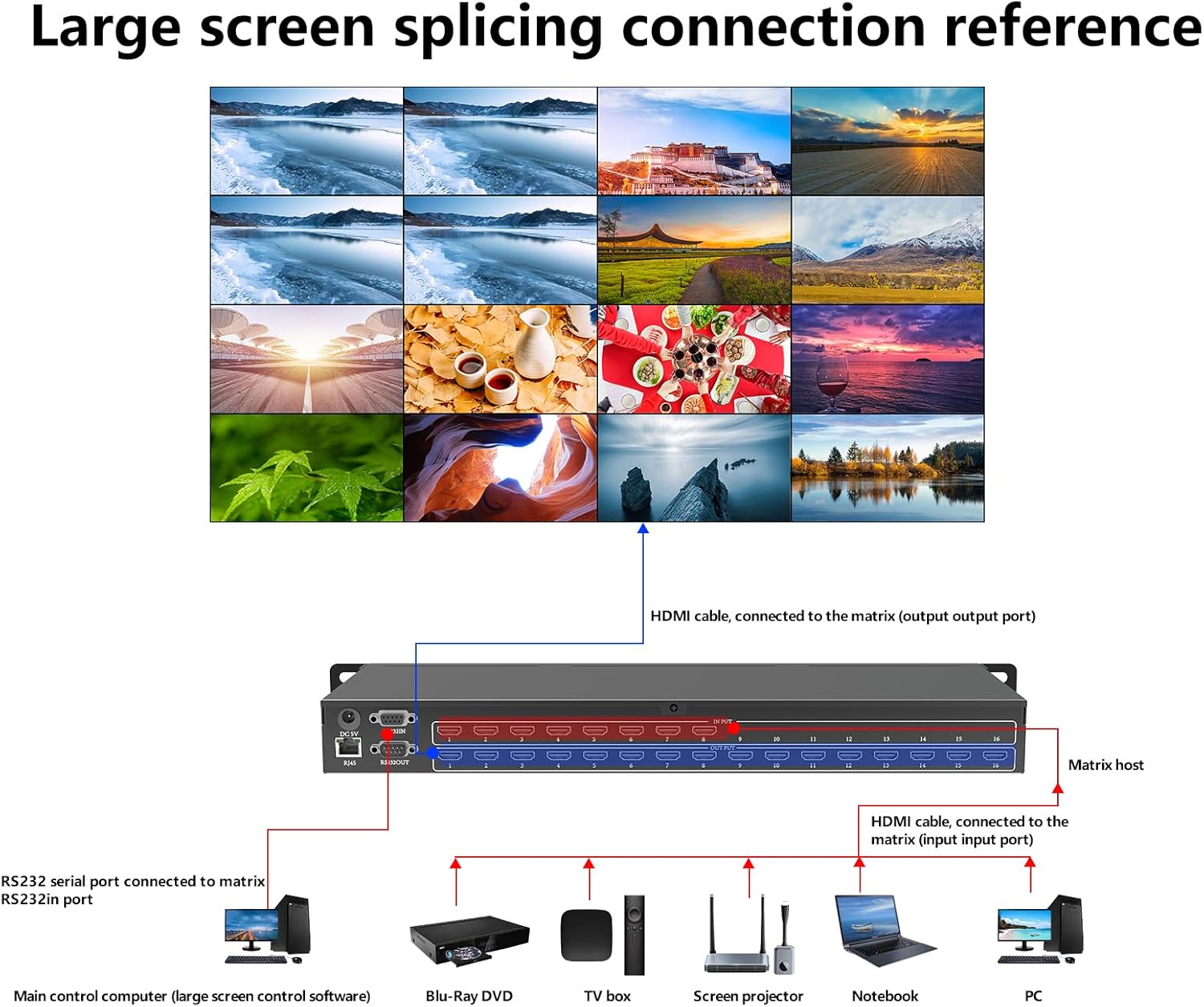
Image: Connection diagram illustrating how to set up the HDMI matrix switch for large screen splicing. It shows HDMI source devices (Blu-ray DVD, TV box, screen projector, notebook, PC) connected to the input ports and a large display connected to the output ports. RS-232 serial port connection to a main control computer is also depicted.

Image: Diagram showing the 8-input, 16-output configuration of the rackmount HDMI matrix. It illustrates connecting up to 8 HDMI source devices (DVD, TV box, portable computers, PC, PS4-POX, advertising box) to the input and assigning any source to any of the 16 HDMI displays independently.
5. Uputstvo za upotrebu
5.1 Metode prebacivanja
The ICUIXIAN 8x16 HDMI Matrix Switch offers several control options:
- Gumbi na prednjoj ploči: Use the 'INPUT' and 'OUTPUT' buttons on the front panel to select the desired input for each output.
- IR daljinski upravljač: Use the included infrared remote control to switch inputs and outputs. Point the remote at the IR receiver on the front panel.
- Serijska kontrola RS-232: Connect a computer via the RS-232 port and use compatible serial control software to manage the matrix switch. Refer to the RS-232 command set for detailed instructions.
- Web GUI kontrola: Connect the matrix switch to your network via the RJ45 port. Access the device's web interfejs preko a web browser on a computer, tablet, or smartphone. This method allows for cross-platform control without installing additional software.
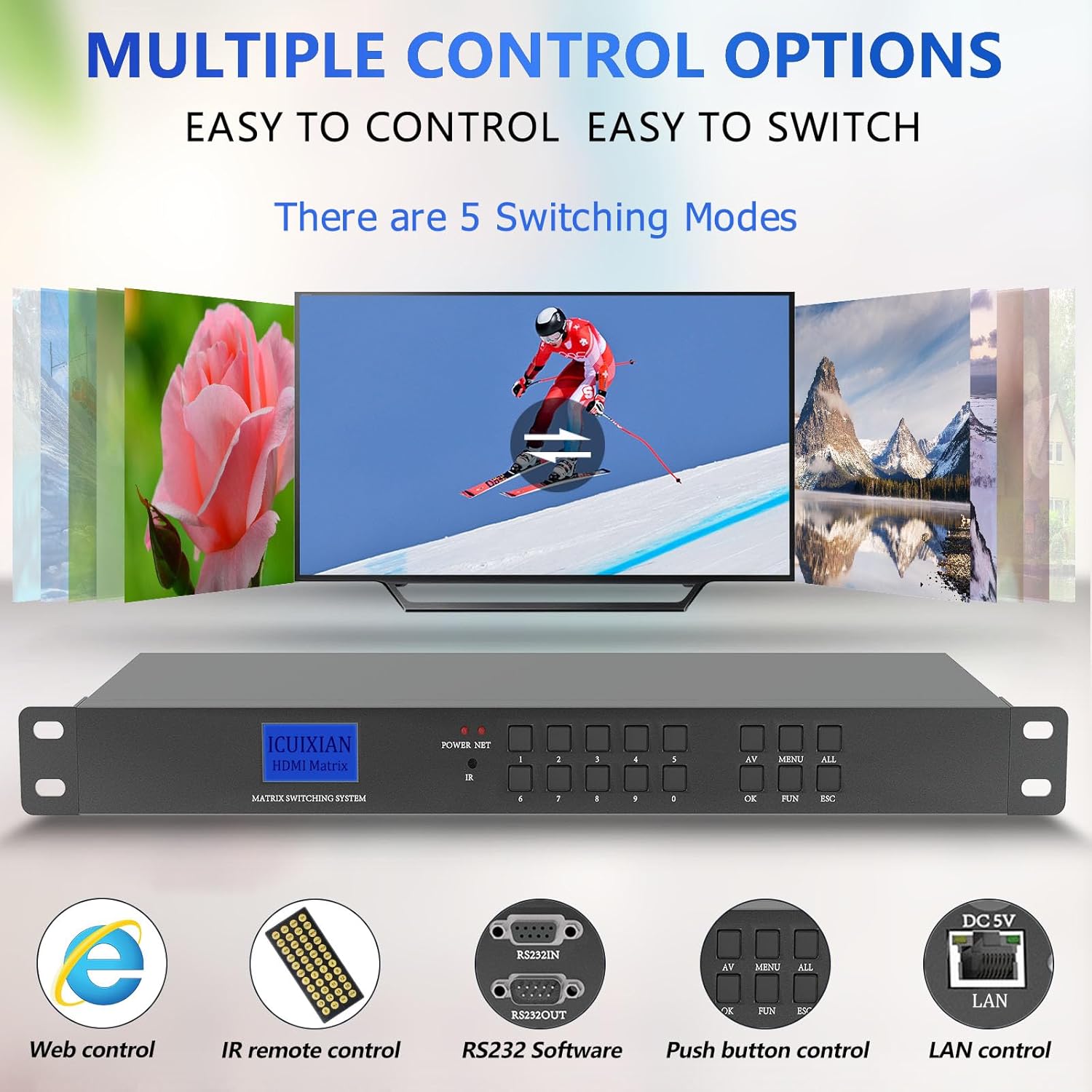
Image: Illustration of the multiple control options available for the HDMI matrix switch, including Web control, IR remote control, RS232 software, push button control, and LAN control.

Image: Visual representation of the four convenient switching methods: Web control, RS232 serial control, IR remote control, and local button control.
5.2 Upravljanje EDID-om
The matrix switch supports custom EDID settings. This feature is crucial for ensuring optimal compatibility between your source devices and displays, especially when encountering resolution or audio format issues. Refer to the detailed EDID configuration guide (usually available via Web GUI or RS-232 software) for specific instructions on how to read, copy, or set EDID modes.
5.3 Upravljanje scenom
The device includes a pre-plan management system that allows you to save and recall up to 32 different input/output configurations (scenes). This enables quick switching between complex setups with a single command or button press.
5.4 Konfiguracije prikaza
The matrix switch supports various display configurations, allowing for flexible content distribution:
- Nezavisno prebacivanje: Each output can display a different input source.
- Shared Input: Multiple outputs can display the same input source.
- Partial Sharing: A combination of independent and shared inputs across different outputs.

Slika: pramples of various screen configurations possible with the HDMI matrix switcher. It shows scenarios where each display has an independent input, all monitors share the same input, and some monitors share the same input.

Image: Visualizing different display configurations: each display selecting a standalone input source, part of displays sharing the same input source, and all displays sharing the same input source.
6. Prijave
The ICUIXIAN 8x16 HDMI Matrix Switch is suitable for a wide range of professional and commercial environments requiring flexible video distribution:
- Broadcast TV Projects
- Nightclubs, Sports Clubs, Gymnastics Clubs
- Multimedia Conference Halls
- Large-screen Display Projects
- TV Education
- Command and Control Centers
- Restaurants, Bars, Casinos, Hotels
- Sistemi kućnog bioskopa
- Video nadzor
- Information Centers
- Computer Room Management
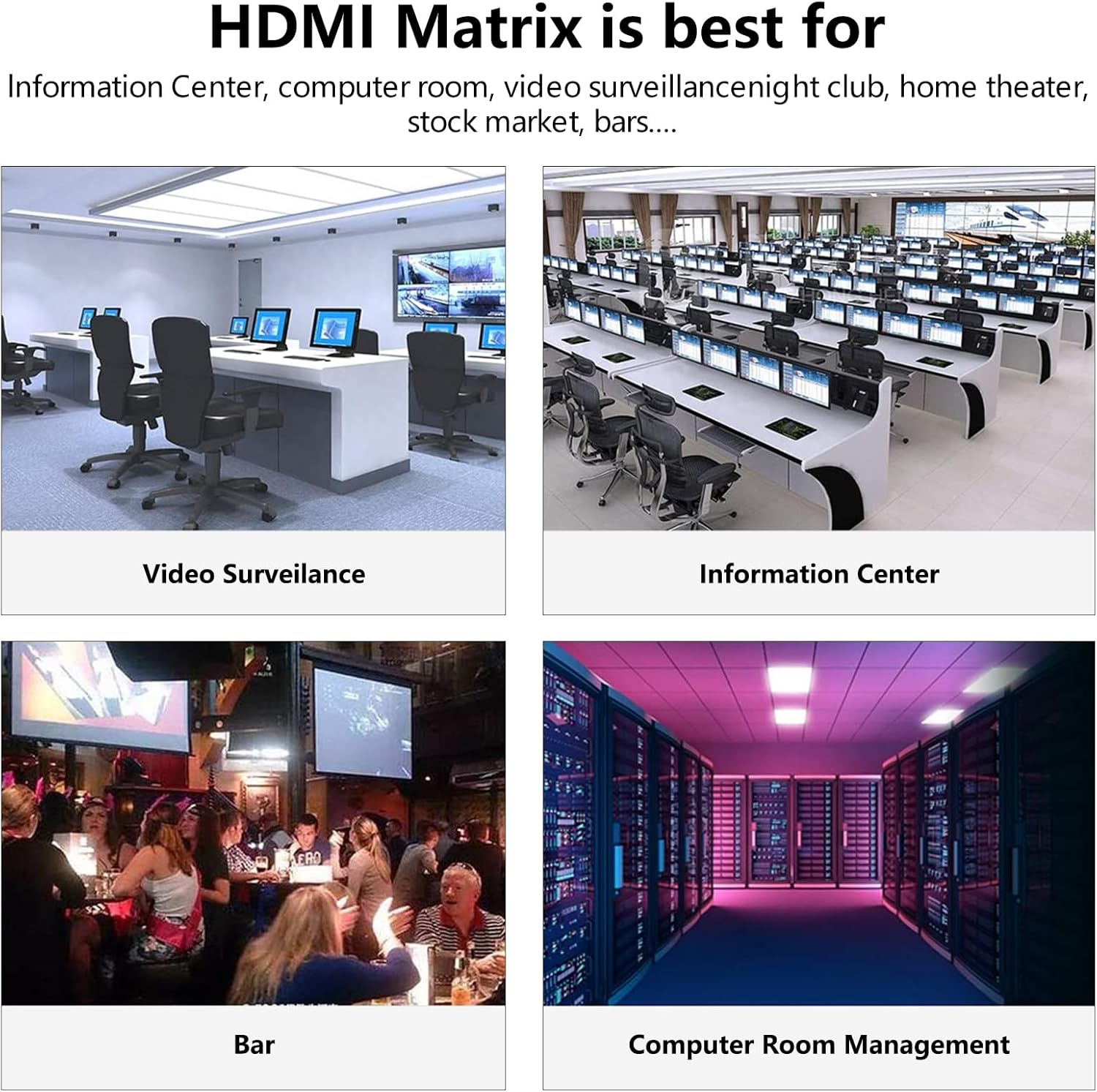
Slika: pramples of environments where the HDMI matrix is beneficial, including video surveillance rooms, information centers, bars, and computer room management.

Image: A collage of diverse application scenarios for the HDMI matrix switch, including conference teaching, shopping mall promotion, outdoor advertising walls, financial operations, traffic monitoring, conference promotion, medical applications, product launches, catering signage, and splicing TV walls.
7. Specifikacije

Image: A table detailing the technical specifications of the ICUIXIAN 8x16 HDMI Matrix Switch, including inputs, outputs, interface width, serial control interface details, resolution support, power supply, operating conditions, enclosure size, chassis weight, and dimensions.
| Feature | Detalj |
|---|---|
| Inputs | 8 HDMI |
| Izlazi | 16 HDMI |
| Interface Width | 13.5 Gbps |
| Resolution Support | 1920x1080P @60Hz (backward compatible) |
| HDMI standard | HDMI 1.4a |
| Podrška za HDCP | HDCP Decoding |
| Audio podrška | Dolby Digital, DTS-HD Main Audio Transmission |
| Kontrolne metode | Web GUI, RS-232, IR Remote, Front Panel Buttons |
| RS-232 interfejs | 9-pin female D-type connector (2-TX, 3-RX, 5-GND) |
| Baud Rate | 9600, data bits: 8, stop bit: 1, no parity bit |
| System Operating Power Supply | 100VAC ~ 240VAC, 50/60Hz (international adaptive) |
| Skladištenje/radna temperatura | 0 ~ +50% (Celsius) |
| Skladištenje/radna vlažnost | 20% ~ 70% |
| Enclosure Size | 1U Rackmount |
| Chassis Weight | 3 kg (6.6 lbs) |
| Product Dimensions (without lugs) | 435 x 182 x 47 mm (17.1 x 7.2 x 1.85 inča) |
| Product Dimensions (with lugs) | 496 x 182 x 47 mm (19.5 x 7.2 x 1.85 inča) |
| Srednje vrijeme između kvarova (MTBF) | 30,000 sati |
8. Otkrivanje problema
If you encounter issues with your ICUIXIAN 8x16 HDMI Matrix Switch, consider the following common troubleshooting steps:
- Nema signala/Crni ekran:
- Verify all HDMI cables are securely connected to both source and display devices, and the matrix switch.
- Ensure the correct input is selected for the desired output on the matrix switch.
- Provjerite je li izvorni uređaj uključen i daje li signal.
- Try bypassing the matrix switch by connecting the source directly to the display to confirm source/display functionality.
- Adjust EDID settings on the matrix switch to match the capabilities of your display. Incompatible EDID can cause signal issues, especially with certain cable boxes or older displays.
- Izobličenje/treperenje slike:
- Use high-quality HDMI cables, especially for longer runs.
- Smanjite dužinu kabla ako je moguće.
- Provjerite elektromagnetske smetnje od drugih elektronskih uređaja.
- Control Issues (Remote/Web GUI/RS-232):
- IR daljinski: Ensure line of sight to the IR receiver and check remote battery.
- Web GUI: Verify network connection, IP address, and browser compatibility. Ensure the matrix switch is assigned a valid IP address on your network.
- RS-232: Confirm correct serial port settings (baud rate, data bits, stop bit, parity) and cable wiring.
- "Content Protection" Error (HDCP):
- This error often indicates an HDCP handshake failure. Ensure all devices in the chain (source, matrix, display) are HDCP compliant.
- Try power cycling all connected devices in sequence: source, then matrix, then display.
- Update firmware if available (check manufacturer's webweb lokacija).
- Problemi sa napajanjem:
- Provjerite je li adapter za napajanje ispravno priključen i je li utičnica funkcionalna.
- If the power cable is damaged, contact support for a replacement.
9. Održavanje
To ensure the longevity and optimal performance of your ICUIXIAN 8x16 HDMI Matrix Switch, follow these maintenance guidelines:
- čišćenje: Use a soft, dry cloth to clean the exterior of the device. Avoid using liquid cleaners, aerosols, or abrasive materials.
- ventilacija: Osigurajte dovoljan protok zraka oko uređaja. Ne blokirajte ventilacijske otvore.
- Okruženje: Operate the device within the specified temperature and humidity ranges. Avoid extreme temperatures, direct sunlight, and high moisture environments.
- Upravljanje kablovima: Uredno organizirajte kablove kako biste spriječili opterećenje portova i slučajno isključivanje.
- Zaštita napajanja: Consider using a surge protector to safeguard the device from power fluctuations.
10. Garancija i podrška
For warranty information and technical support, please refer to the documentation included with your purchase or visit the official ICUIXIAN website. If you encounter issues that cannot be resolved using this manual, contact ICUIXIAN customer service for assistance. Please have your product model (HD0816) and purchase details ready when contacting support.
