1. Proizvod je gotovview
The UNV NVR302-16E2 is a high-performance Network Video Recorder (NVR) designed for advanced surveillance systems. It supports 4K resolution recording and playback, offering robust video management capabilities for up to 32 channels. This NVR is compatible with various camera protocols, including ONVIF, and features Ultra H.265 compression for efficient storage.
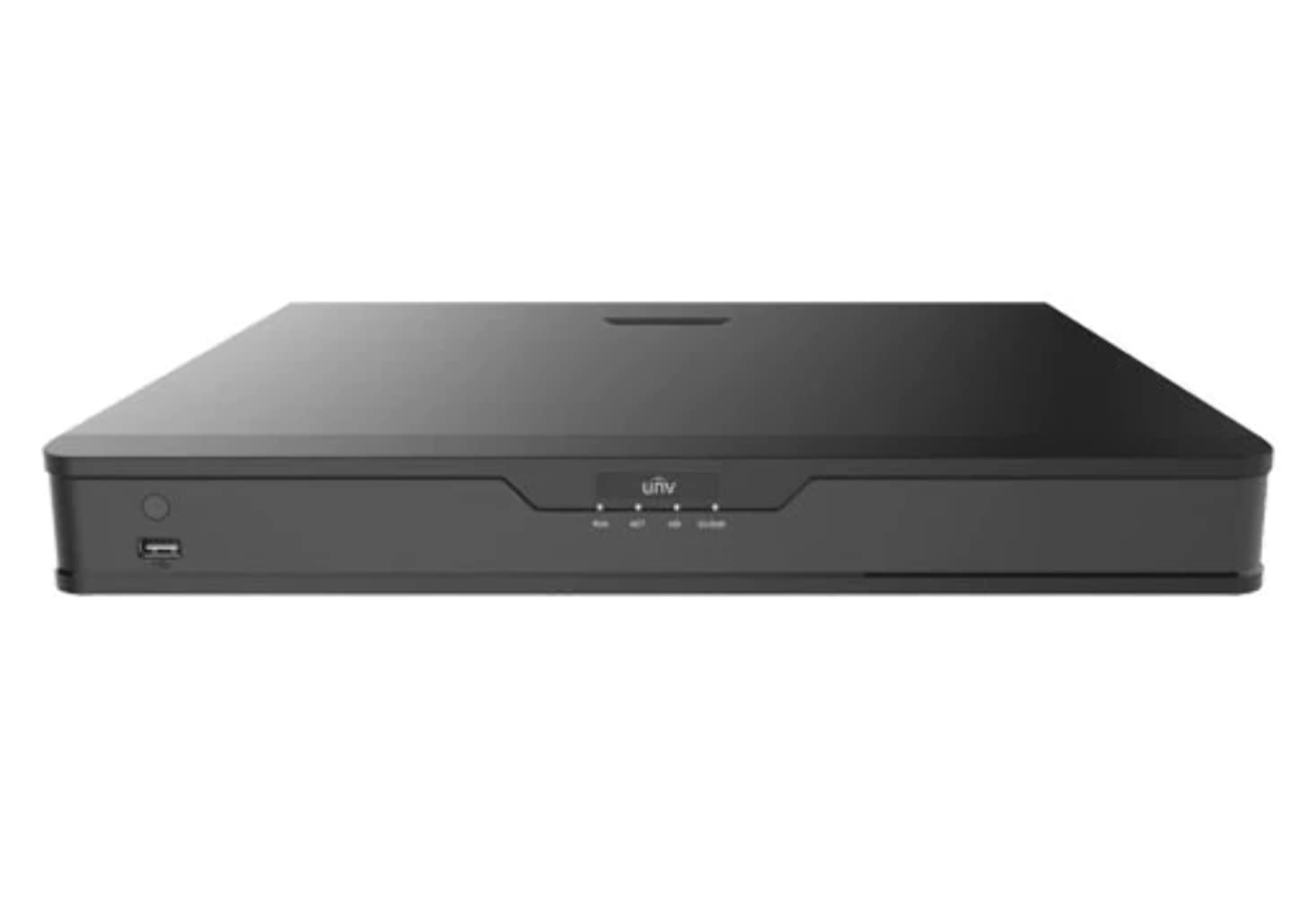
Slika 1: Prednja strana view of the UNV NVR302-16E2 4K NVR. The front panel includes a power button, a USB port, and indicator lights for power, HDD activity, network status, and alarm.
2. Ključne karakteristike
- Supports Ultra H.265/H.265/H.264 video formats for efficient compression.
- 8/16-channel input with Plug & Play functionality via independent PoE network interfaces.
- Compatibility with mainstream cameras supporting ONVIF conformance (Profile S, Profile G, Profile T) and RTSP protocols.
- Equipped with 1-channel HDMI and 1-channel VGA outputs, with HDMI supporting up to 4K (3840x2160) resolution.
- Independent HDMI and VGA outputs for flexible display options.
- Supports recording resolutions up to 12 Megapixels.
- Accommodates 2 SATA HDDs, with support for up to 10TB per HDD.
- Features various fisheye dewarping modes for live view and playback, accessible via both web interface and GUI.
- Incorporates ANR (Automatic Network Replenishment) technology to enhance storage reliability during network disconnections.
- Supports cloud upgrade for convenient firmware updates.
3. Sadržaj paketa
Molimo Vas da provjerite sadržaj paketa nakon raspakivanja. Ako bilo koji artikl nedostaje ili je oštećen, odmah se obratite prodavaču.
- UNV NVR302-16E2 NVR Unit
- Adapter za napajanje
- USB miš
- SATA Data Cables (for HDD installation)
- HDD Mounting Screws
- Vodič za brzi početak
4. Podešavanje
4.1 Fizička instalacija
- HDD instalacija:
Unscrew and remove the NVR cover. Securely mount the SATA hard disk drives (HDDs) into the designated bays using the provided screws. Connect the SATA data and power cables from the NVR motherboard to the HDDs. Replace the NVR cover and secure it with screws.
- Poveži ekran:
Connect a monitor to the NVR's HDMI or VGA output port using a compatible cable.
- Povezivanje miša:
Uključite USB miš u jedan od USB priključaka NVR-a.
- Povežite mrežu:
Spojite Ethernet kabel iz LAN priključka NVR-a na mrežni ruter ili prekidač.
- Povežite kamere:
For PoE cameras, connect them directly to the NVR's independent PoE ports. For non-PoE cameras, ensure they are connected to the same network as the NVR and powered separately.
- Priključite napajanje:
Spojite adapter za napajanje na ulaz za napajanje NVR-a, a zatim ga uključite u utičnicu. NVR će se automatski uključiti.
4.2 Početna konfiguracija
Upon the first boot, the NVR will guide you through an initial setup wizard. Follow the on-screen prompts to configure essential settings.
- Postavite administratorsku lozinku: Create a strong password for the 'admin' user. This is crucial for security.
- Mrežne postavke: Configure the NVR's IP address (DHCP or Static IP). Ensure it is on the same network as your cameras for proper communication.
- Datum i vrijeme: Podesite tačan datum, vrijeme i vremensku zonu.
- Inicijalizacija tvrdog diska: The NVR will prompt you to initialize (format) the newly installed HDDs. This step is necessary before recording can begin.
- Pretraga i dodavanje kamere: The NVR will automatically search for connected cameras. Select and add the cameras you wish to manage.
5. Upravljanje NVR-om
5.1 Uživo View
Nakon podešavanja, NVR će prikazivati sliku uživo view povezanih kamera. Možete prebacivati između pojedinačnih kamera view, mreža s više kamera view, and customize the display layout.
- Odabir kanala: Click on a channel window to select it.
- PTZ kontrola: If using PTZ cameras, use the on-screen controls or joystick (if connected) to pan, tilt, and zoom.
- Trenutna reprodukcija: Right-click on a channel and select "Instant Playback" to view nedavni snimci.
5.2 Upravljanje snimanjem
The NVR supports various recording modes.
- Planirano snimanje: Configure recording schedules based on time, day, and event (e.g., motion detection).
- Snimanje otkrivanja pokreta: Set up motion detection zones and sensitivity for each camera to trigger recording only when movement is detected.
- Ručno snimanje: Start or stop recording manually from the live view interfejs.
5.3 Reprodukcija
Pristup snimljen footage for review.
- Navigate to the "Playback" menu.
- Select the camera(s) and date/time range for playback.
- Koristite vremensku liniju za navigaciju kroz snimke.
- Options include fast forward, rewind, pause, and frame-by-frame playback.
5.4 Rezervna kopija
Export recorded video clips to an external USB drive.
- Insert a USB flash drive into the NVR's USB port.
- Go to the "Backup" menu.
- Select the camera, time range, and desired video format for export.
- Start the backup process.
5.5 Daljinski pristup
Access your NVR remotely via a web browser or mobile application.
- Web Preglednik: Unesite IP adresu NVR-a u web preglednik na računaru povezanom na istu mrežu. Prijavite se sa svojim podacima za prijavu.
- Mobilna aplikacija: Download the official Uniview mobile application (e.g., EZView). Register an account, add your NVR by scanning the QR code or entering its serial number, and view live feeds or playback remotely.
6. Održavanje
6.1 Ažuriranja firmvera
Regularly check for and install firmware updates to ensure optimal performance, security, and access to new features. Updates can typically be performed via the NVR's web interface or local GUI, often with cloud upgrade support.
6.2 HDD Management
Monitor the health and status of your hard drives. The NVR provides tools to check HDD status, format drives, and configure overwrite settings when storage is full.
6.3 Sistemski dnevnici
Review system logs for any errors, warnings, or important events. This can assist in troubleshooting and system monitoring.
7. Otkrivanje problema
| Problem | Mogući uzrok | Rješenje |
|---|---|---|
| Nema video izlaza na monitoru. | Loose cable connection; incorrect display resolution; NVR not powered on. | Check HDMI/VGA cable connections. Ensure NVR is powered. Try a different monitor or cable. Adjust NVR output resolution if possible. |
| Kamere ne prikazuju sliku. | Network issue; incorrect camera IP; camera not powered; camera not added to NVR. | Verify network connectivity. Ensure cameras are powered. Check camera IP addresses and add them to the NVR if not already done. |
| Nije moguće daljinski pristupiti NVR-u. | Network configuration issue (port forwarding, DDNS); NVR offline; incorrect credentials. | Verify NVR's network settings. Ensure necessary ports are forwarded on your router. Check internet connection. Confirm login credentials. |
| Nema snimanja. | HDD not initialized or full; recording schedule not set; camera not recording. | Initialize the HDD. Check recording schedules and ensure they are active. Verify camera status and ensure it's configured to record. |
8. Specifikacije
| Feature | Detalj |
|---|---|
| Broj modela | NVR302-16E2 |
| Podržani video formati | Ultra H.265 / H.265 / H.264 |
| Ulaz kanala | 8/16-channel (with independent PoE interfaces) |
| HDMI izlaz | 1-channel, up to 4K (3840x2160) resolution |
| VGA izlaz | 1-kanalni |
| Maksimalna rezolucija snimanja | Do 12 megapiksela |
| Podrška za tvrdi disk | 2 SATA HDDs, up to 10TB each (20TB total) |
| Tehnologija povezivanja | HDMI, VGA, Ethernet, USB |
| Kompatibilni uređaji | IP Cameras (ONVIF Profile S, G, T; RTSP) |
| Dimenzije proizvoda | 18 x 14 x 4 inča (45.72 x 35.56 x 10.16 cm) |
| Težina artikla | 3.97 funte (1.8 kg) |
| Proizvođač | Uniview |
9. Garancija i podrška
Uniview products typically come with a limited manufacturer's warranty. For specific warranty terms and conditions, please refer to the warranty card included with your product or visit the official Uniview website.
For technical support, troubleshooting assistance, or service inquiries, please contact Uniview customer support through their official channels. You can usually find contact information, FAQs, and support resources on the Uniview webstranica (www.uniview.com).
Povezani dokumenti - NVR302-16E2
 |
Rješavanje problema na Univerzitetuview Problemi sa dvosmjernim zvukom na NVR uređajima | Uniview Podrška Sveobuhvatan vodič za rješavanje problema i rješavanje problema s dvosmjernim zvukom na Uniview NVR uređaji i kamere. Uključuje korake za web interfejs, mobilna aplikacija i grafički korisnički interfejs za NVR. |
 |
Uniview Network Video Recorder Quick Guide A quick guide for Uniview Network Video Recorders (NVRs), covering device indicators, interface ports, disk installation for various HDD configurations (1, 2, 4, 8, 9, 16-bay), startup and shutdown procedures, local operations like adding IP devices and playback, UNV-Link mobile app usage, web login, and essential safety warnings, disclaimers, and regulatory compliance information. |
 |
Kako promijeniti univerzitetview Postavke vremena NVR-a Detaljan vodič o tome kako podesiti vrijeme i datum za Uniview Mrežni video snimači (NVR) koji koriste različite metode, uključujući web interfejs, direktan pristup monitoru, EZTools softver i mobilne aplikacije poput EZView i UNV-Link. |
 |
Uniview XVR301-G3 Series Digital Video Recorder: NDAA Compliant Datasheet Comprehensive datasheet for the Uniview XVR301-G3 Series Digital Video Recorder, including models XVR301-04G3, XVR301-08G3, and XVR301-16G3. Details features, specifications, connectivity, and compliance. |
 |
Uniview Vodič za proizvode za 2021. godinu: Mrežne kamere, NVR-ovi, VMS i sigurnosna rješenja Otkrijte sveobuhvatni Uniview 2021 Product Guide, detailing a wide array of professional video surveillance solutions. This guide covers Network Cameras, NVRs, VMS, Professional Storage, Display & Control systems, and Accessories, featuring advanced technologies like LightHunter and PixelSense. Find detailed specifications and model information for Easy, Prime, and Pro series products, suitable for various applications from residential security to large-scale enterprise deployments. |
 |
NVR-B3601.33.45.221212 Release Notes - Zhejiang Uniview Tehnologije Official release notes for Zhejiang Uniview Technologies' NVR-B3601.33.45.221212 Network Video Recorder software, detailing version information, new features, changes, and upgrade procedures. |